








Nibble is a CLI tool for local network scanning that focuses on speed and ease of use.
Select a network interface, and it scans your local subnet.
Lists hosts, hardware manufacturer, open ports and their services.
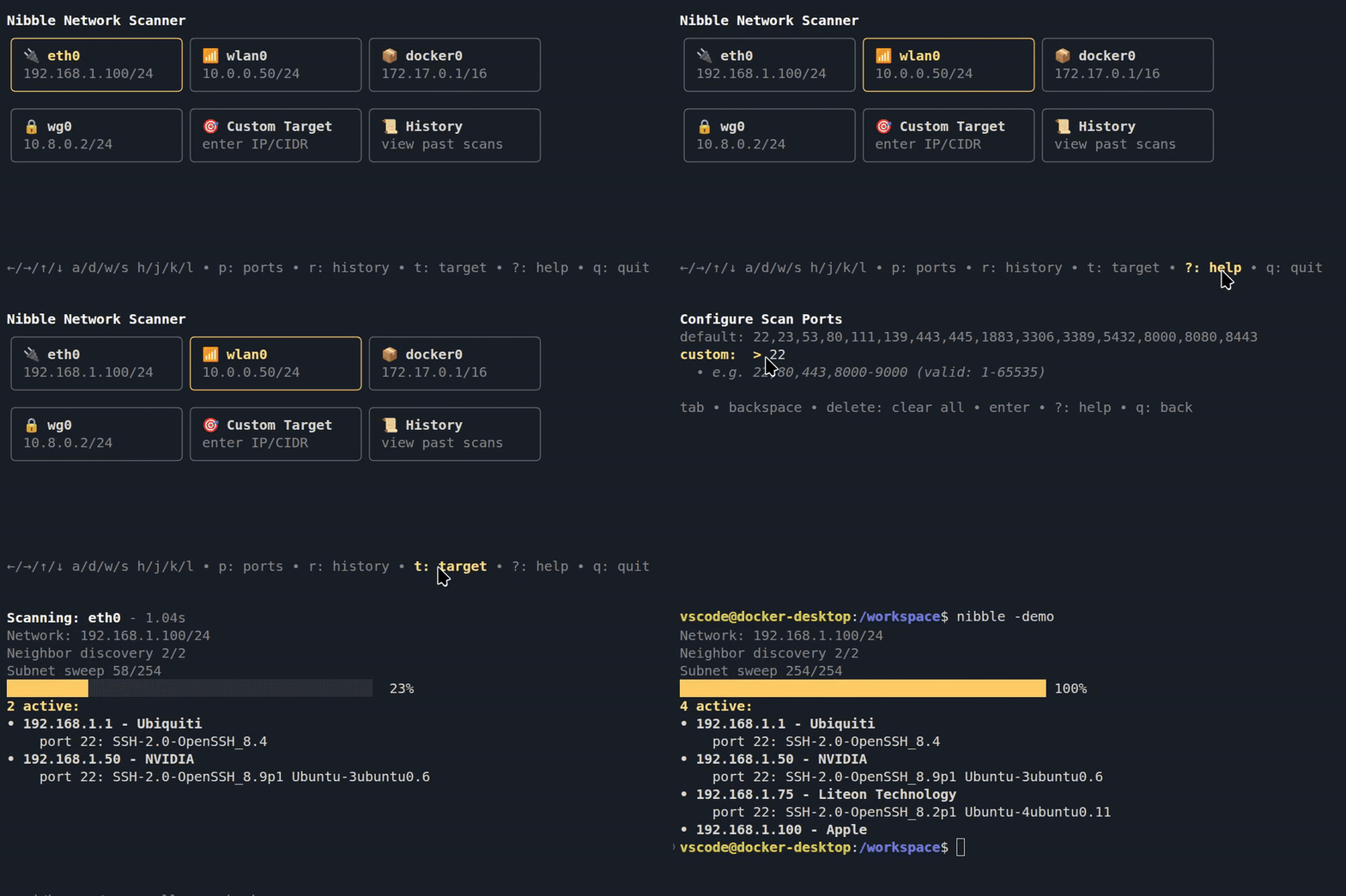
- ⚡ Lightning fast, scans using lightweight threads
- 🔒 Safe, does not need admin access or special privileges
- 🥷 Stealthy, emits no network signals before a scan is started
- Clickable interface, use your mouse to navigate and scan 🖱️
- or navigate with
↑/↓/←/→,w/s/a/dorh/j/k/l - context aware help screens, hotkey:
?
- or navigate with
- Docker networks and WSL support 📦
- instant docker network scans when a docker socket is detected
- can scan windows interfaces from inside wsl
- Shows detected hardware makers: 📙
- Raspberry Pi, Ubiquiti, Apple and 40,000 other vendor ids
- Reads service banners on open ports (for example, ssh or nginx)
- Colors matches your terminal theme automatically 🌈
- Defaults to SSH, Telnet, HTTP, HTTPS, SMB, RDP, and more
- Can be set to a list of custom ports that are stored for future use
- Target mode for targeted network scans
- History mode for past scans lookup 📜
- Headless mode with JSON output for scripting and automation 🤖
History
See past scans, the found hosts and re-scan all hosts ports. hotkey: r
History remembers your position between sessions, so jump right back in to your last viewed scan.

Easy Installation
 Ubuntu
  Fedora
  Arch Linux
 macOS
macOS Any
Any Any
Any Any
AnyPre-built binaries for Linux, macOS and Windows (amd64/arm64) are available on the Releases page.
Usage
Run the CLI with the nibble command, select a network interface.
Interface icons: 🔌Ethernet, 📶Wi-Fi, 📦Container, 🔒VPN.
Headless Mode
Run scans without the TUI. Outputs JSON. Activated by the -i input flag.
Headless scans are not saved in history.
-i scan target(s), comma-separated or a file (example_input)
-p custom ports (e.g. 22,80,8000-8100 or - for all)
-o write output to file instead of stdout (example_output)
nibble -i 192.168.0.0/24
nibble -i 192.168.1.223,10.0.0.12/32 -p - -o results.json
nibble -i targets.txt -p 22,80,443,8000-8100
Exit codes: 0 success, 1 error, 2 invalid usage.
License
This project is MIT licensed. See the LICENSE file for details.
Note: The "nibble" name and branding assets are excluded from this license, see the separate LICENSE for branding terms.
Built with Bubble Tea
1 maintainer

Metadata
1 maintainer
Release files for nibble-cli 1.0.0
For a detailed explanation of source distributions (sdists) and built distributions (wheels), please see the package formats documentation.
Source distribution (sdist)
| File | Size | Uploaded | |
|---|---|---|---|
| nibble_cli-1.0.0.tar.gz | 7.0 kB | Details |
Built distribution (wheel)
| File | Interpreter | ABI | Platform | Reset |
|---|---|---|---|---|
| nibble_cli-1.0.0-py3-none-any.whl | Python 3 | none | any | Details |
Total release size: 15.0 kB
Release files / nibble_cli-1.0.0.tar.gz
| Download URL | nibble_cli-1.0.0.tar.gz |
|---|---|
| Size | 7.0 kB |
| Tags | Source |
|
SHA-256 checksum How to use checksums |
36a77565c87a1cf34b4329d77d5cc40b3b27c0027945776d3c7246789fc381dd
|
|
BLAKE2b-256 checksum How to use checksums |
5cf4e08a6cb8c3528f3838361e25074d56222ff049cad1479ddd60c0c002641c
|
| Upload date | |
|
Uploaded using Trusted Publishing? What is trusted publishing? |
Yes |
| Uploaded via |
twine/6.1.0 CPython/3.13.12
|
Provenance
Provenance describes where a file came from. On PyPI, provenance is shared via attestations, which provide a verifiable record of the build or publishing details. View details, limitations and caveats.


PyPI Publish Attestation
PyPI verified that this artifact, at this checksum, originated from the publisher listed below.
Signed by GitHub Actions, verified by PyPI on May 11, 2026.
Transparency logRelease files / nibble_cli-1.0.0-py3-none-any.whl
| Download URL | nibble_cli-1.0.0-py3-none-any.whl |
|---|---|
| Size | 7.9 kB |
| Tags | Python 3 |
|
SHA-256 checksum How to use checksums |
9cb0a4ea64e50f8f3ae0b81972bc69900a4fac67d6cbe90231347a4e2a37a754
|
|
BLAKE2b-256 checksum How to use checksums |
653a4bf2d923f9d575f510ecc225abdd941b34eb30d9aa021372236bedcaa1ac
|
| Upload date | |
|
Uploaded using Trusted Publishing? What is trusted publishing? |
Yes |
| Uploaded via |
twine/6.1.0 CPython/3.13.12
|
Provenance
Provenance describes where a file came from. On PyPI, provenance is shared via attestations, which provide a verifiable record of the build or publishing details. View details, limitations and caveats.
PyPI Publish Attestation
PyPI verified that this artifact, at this checksum, originated from the publisher listed below.
Signed by GitHub Actions, verified by PyPI on May 11, 2026.
Transparency log













