
Fast local network scanner with hardware identification and a terminal UI
Verified details
These details have been verified by PyPIProject links
GitHub Statistics
Maintainers

Project description


Nibble is a CLI tool for local network scanning that focuses on speed and ease of use.
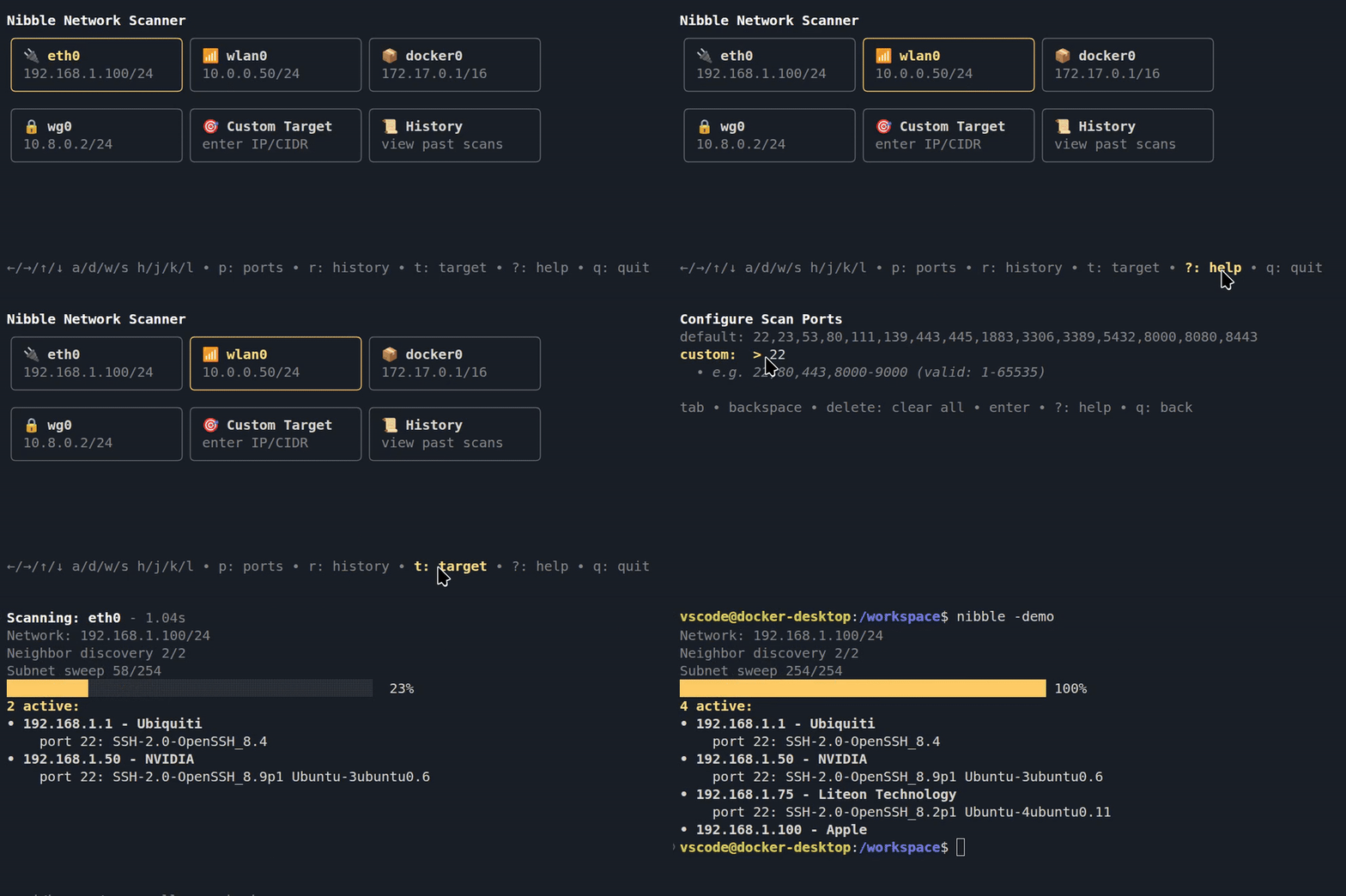
Select a network interface, and Nibble scans your local subnet. Lists hosts, hardware manufacturer, open ports and their services.

- Lightning fast scans using lightweight threads
- Stealthy, emits no network signals before a scan is started
- Colors uses your terminal theme colors
- Skips loopback and irrelevant adapters
- Defaults to SSH, Telnet, HTTP, HTTPS, SMB, RDP, and more
- Can be set to a list of custom ports that are stored for future use
- Target mode for targeted network scans
- Reads service banners on open ports (for example, OpenSSH or nginx versions)
- Looks up hardware vendors:
- Raspberry Pi, Ubiquiti, Apple and 40,000 other vendor ids
History
See past scans, the found hosts and re-scan all hosts ports. hotkey: r
History remembers your position between sessions, so jump right back in to your last viewed scan.

Hotkeys
↑/↓/←/→, w/s/a/d, h/j/k/l: selection
Enter: confirm
p: select ports
r: history
t: target mode
q: cancel
Ctrl+C: quit
?: help
Mouse
Full mouse support. Click to select, click again to confirm. Scroll to navigate lists.
Hold Shift and drag to select text.
Installation
you may have to restart terminal to run nibble after install.
go:
go install github.com/backendsystems/nibble@latest
brew:
brew install backendsystems/tap/nibble
pip:
pipx install nibble-cli
npm:
npm install -g @backendsystems/nibble
or run without install
npx @backendsystems/nibble
Usage
Run the CLI with nibble, select a network interface.
Interface icons: 🔌 = Ethernet, 📶 = Wi-Fi, 📦 = Container, 🔒 = VPN.
Built with Bubble Tea
Project details
Verified details
These details have been verified by PyPIProject links
GitHub Statistics
Maintainers
Release history Release notifications | RSS feed


Download files
Download the file for your platform. If you're not sure which to choose, learn more about installing packages.
Source Distribution
Built Distribution
Filter files by name, interpreter, ABI, and platform.
If you're not sure about the file name format, learn more about wheel file names.
Copy a direct link to the current filters
File details
Details for the file nibble_cli-0.6.0.tar.gz.
File metadata
- Download URL: nibble_cli-0.6.0.tar.gz
- Upload date:
- Size: 5.4 kB
- Tags: Source
- Uploaded using Trusted Publishing? Yes
- Uploaded via: twine/6.1.0 CPython/3.13.7
File hashes
| Algorithm | Hash digest | |
|---|---|---|
| SHA256 |
fcea81a18709d1e235877677a0fb995e5df7f66be5ea543912a23879e16777ee
|
|
| MD5 |
bd69726b32c787de37a118328821a65d
|
|
| BLAKE2b-256 |
9398c0303036efd6cae7b7518c3b59324815ce4f190d667dc32abf0f08e67412
|
Provenance
The following attestation bundles were made for nibble_cli-0.6.0.tar.gz:
Publisher:
pypi-publish.yml on backendsystems/nibble
-
Statement:
-
Statement type:
https://in-toto.io/Statement/v1 -
Predicate type:
https://docs.pypi.org/attestations/publish/v1 -
Subject name:
nibble_cli-0.6.0.tar.gz -
Subject digest:
fcea81a18709d1e235877677a0fb995e5df7f66be5ea543912a23879e16777ee - Sigstore transparency entry: 1122748799
- Sigstore integration time:
-
Permalink:
backendsystems/nibble@6658da1f673cd237fb2dd6696808133ad7d49ec7 -
Branch / Tag:
refs/heads/main - Owner: https://github.com/backendsystems
-
Access:
public
-
Token Issuer:
https://token.actions.githubusercontent.com -
Runner Environment:
github-hosted -
Publication workflow:
pypi-publish.yml@6658da1f673cd237fb2dd6696808133ad7d49ec7 -
Trigger Event:
workflow_dispatch
-
Statement type:
File details
Details for the file nibble_cli-0.6.0-py3-none-any.whl.
File metadata
- Download URL: nibble_cli-0.6.0-py3-none-any.whl
- Upload date:
- Size: 6.7 kB
- Tags: Python 3
- Uploaded using Trusted Publishing? Yes
- Uploaded via: twine/6.1.0 CPython/3.13.7
File hashes
| Algorithm | Hash digest | |
|---|---|---|
| SHA256 |
3f0315e2bd28bf67b468de3154e5de132e61fa3ea3eb45211554491d7ad4a050
|
|
| MD5 |
895d1b53133ce4e0ad832c1de5427328
|
|
| BLAKE2b-256 |
688153ebd0e5bda7f549ee7fcaba7b2e63ac8d4a0a32d36fbf35c6f2bdea0287
|
Provenance
The following attestation bundles were made for nibble_cli-0.6.0-py3-none-any.whl:
Publisher:
pypi-publish.yml on backendsystems/nibble
-
Statement:
-
Statement type:
https://in-toto.io/Statement/v1 -
Predicate type:
https://docs.pypi.org/attestations/publish/v1 -
Subject name:
nibble_cli-0.6.0-py3-none-any.whl -
Subject digest:
3f0315e2bd28bf67b468de3154e5de132e61fa3ea3eb45211554491d7ad4a050 - Sigstore transparency entry: 1122748809
- Sigstore integration time:
-
Permalink:
backendsystems/nibble@6658da1f673cd237fb2dd6696808133ad7d49ec7 -
Branch / Tag:
refs/heads/main - Owner: https://github.com/backendsystems
-
Access:
public
-
Token Issuer:
https://token.actions.githubusercontent.com -
Runner Environment:
github-hosted -
Publication workflow:
pypi-publish.yml@6658da1f673cd237fb2dd6696808133ad7d49ec7 -
Trigger Event:
workflow_dispatch
-
Statement type:






