
nicegui-rdm: Reactive Data Management
What is ng_rdm?
ng_rdm (nicegui-rdm on PyPI) is a Python library for building database-backed CRUD applications with NiceGUI. It ships two things you can use together or separately:
-
A reactive store layer. When one browser tab writes to a store, every other tab watching the same data rebuilds its UI automatically — no manual refresh, no websocket plumbing. Imagine two users with the same dashboard open: user A edits a row, and user B's table updates within ~100 ms. That's the core loop, implemented in
store/andmodels/. -
A set of composite UI widgets. Tables, dialogs, edit cards, detail cards, view stacks, wizards, tabs, and layout primitives — all written in Python, emitting clean HTML with semantic CSS selectors. Any widget can subclass
ObservableRdmComponentto hook into the store layer; the built-in tables do this viaauto_observe=Trueby default.
What it looks like
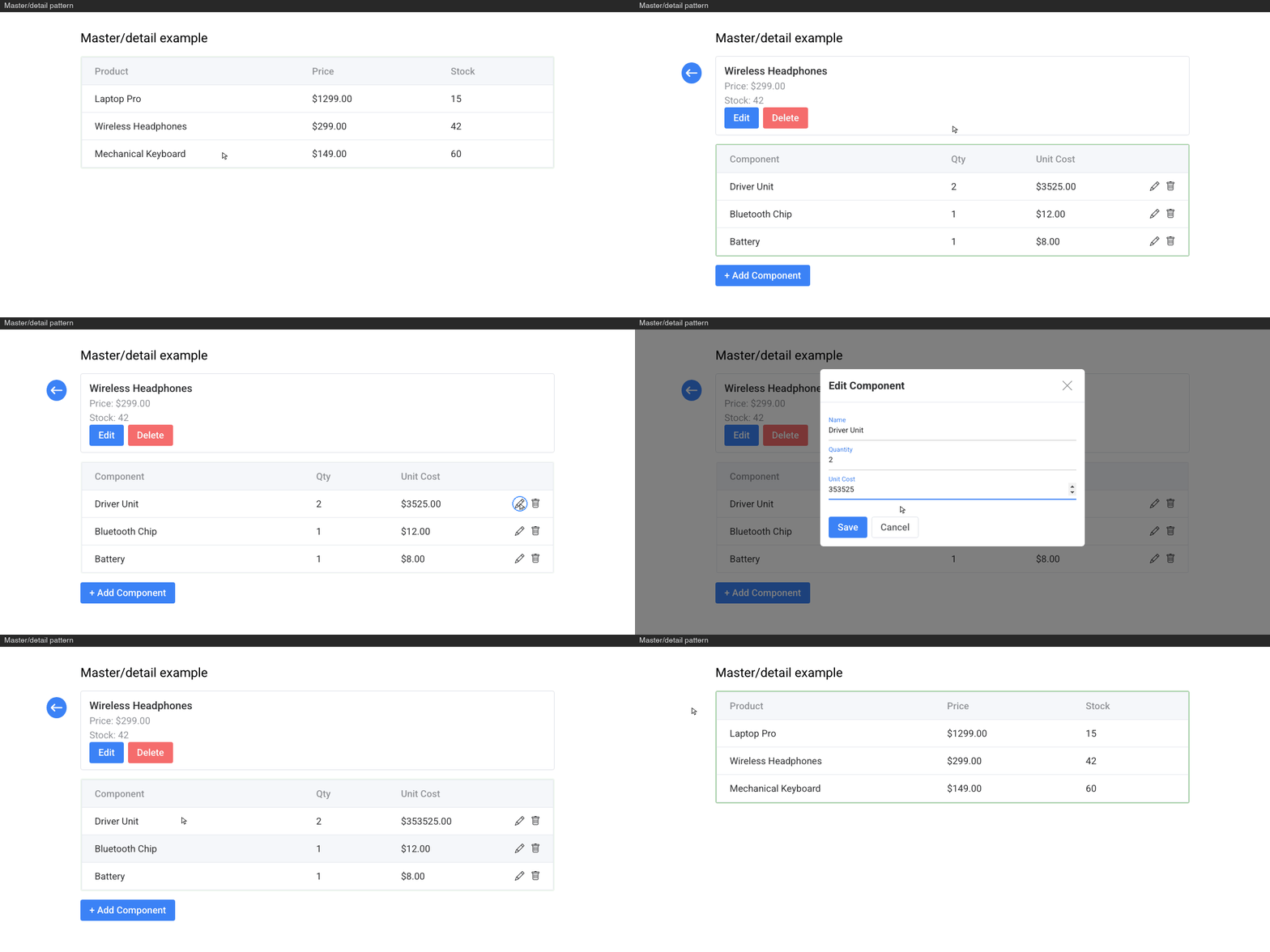
Master/detail using a ListTable, DetailCard, ActionButtonTable and EditDialog - wired together with a ViewStack:
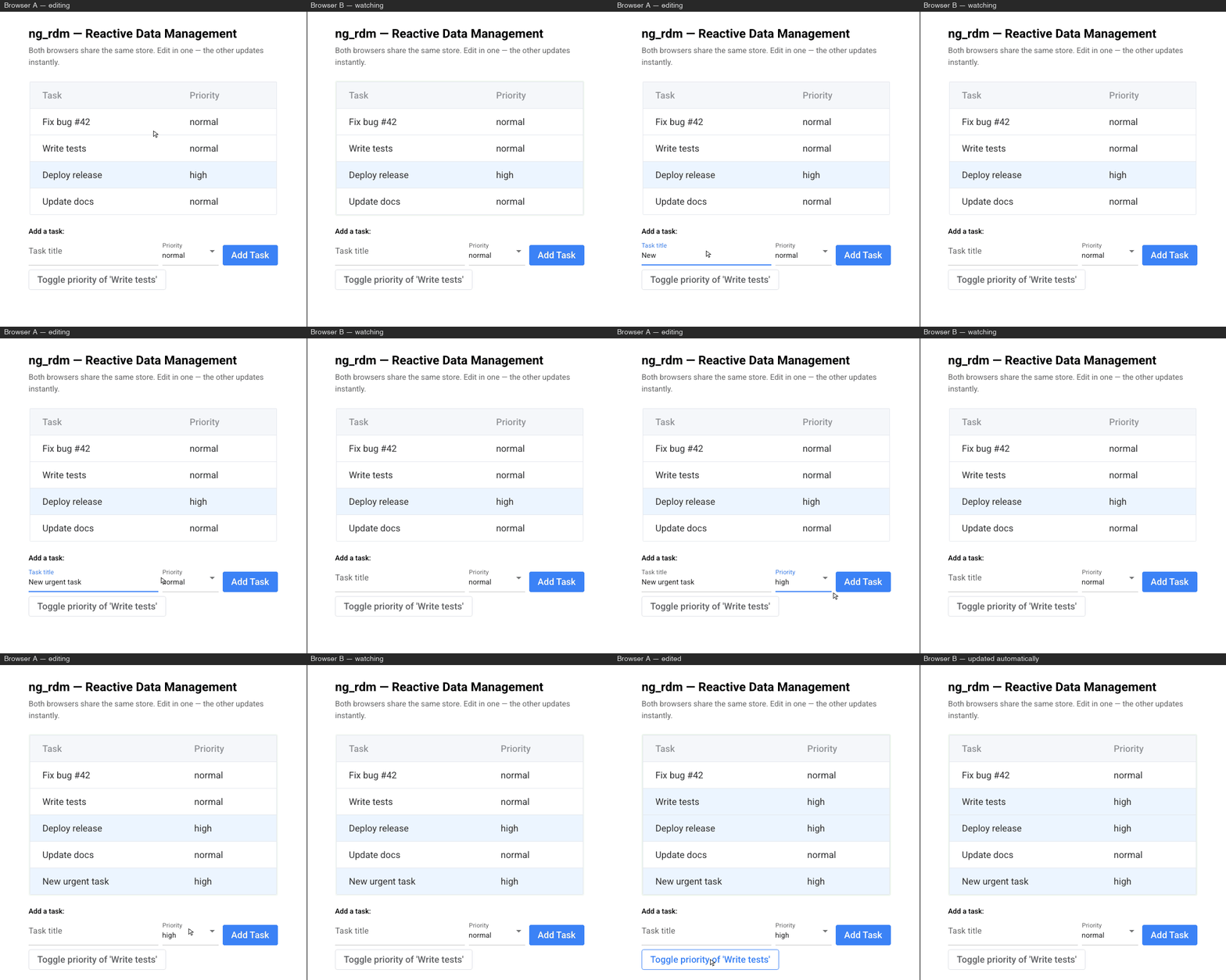
The reactive story in two browser windows — one edits, the other watches:
How it works
┌──────────────────────────────────────────────────────────┐
│  UI Components                                           │
│  ActionButtonTable · ListTable · SelectionTable          │
│  EditDialog · EditCard · DetailCard · ViewStack          │
└──────────────┬─────────────────────────────────┬─────────┘
               │  1. user action                 ▲
               ▼                                 │  6. notify_observers
┌──────────────┴─────────────────────────────────┴─────────┐
│  Store Layer                                             │
│  Store (base) · DictStore · (Multitenant)TortoiseStore   │
│  (Multitenant)StoreRegistry                              │
│  CRUD · validation · observer pattern - EventNotifier    │
└──────────────┬─────────────────────────────────┬─────────┘
               │  2. validate & write            ▲
               ▼                                 │  5. return result
┌──────────────┴─────────────────────────────────┴─────────┐
│  Data Layer                                              │
│  Tortoise ORM · RdmModel / MultitenantRdmModel           │
│  SQLite · PostgreSQL · MySQL                             │
└──────────────────────────────────────────────────────────┘
User actions flow down through the Store layer (which validates and normalizes) to the database. On success, the Store broadcasts a StoreEvent up to all subscribed UI components, which automatically rebuild via @ui.refreshable_method. This is the reactive loop that keeps tables and detail views in sync with the database without manual refresh.
Quick start
Installation
pip install nicegui-rdm
Note: the PyPI package is nicegui-rdm; the import path is ng_rdm.
My first CRUD database app with ng_rdm
from nicegui import app, ui
from tortoise import fields

from ng_rdm import TortoiseStore, init_db, FieldSpec, Validator, store_registry
from ng_rdm.models import RdmModel
from ng_rdm.components import (
    rdm_init, Column, TableConfig, FormConfig,
    ActionButtonTable, EditDialog,
)

# 1. Define a model with validation
class Task(RdmModel):
    id = fields.IntField(pk=True)
    name = fields.CharField(max_length=100)

    field_specs = {
        "name": FieldSpec(validators=[
            Validator("Name is required", lambda v, _: bool(v and v.strip()))
        ])
    }

# 2. Initialize database
init_db(app, "sqlite://tasks.db", modules={"models": [__name__]}, generate_schemas=True)

# 3. Create a store and add it to the registry singleton
store_registry.register_store("task", TortoiseStore(Task))

# 4. Build a page
@ui.page("/")
async def index():

    # 4a. Initialize ng_rdm - required for every page
    rdm_init()

    # 4b. Get the stores you need from the registry
    task_store = store_registry.get_store("task")

    # 4c. Configure the table and form
    columns = [Column("name", "Task name")]
    table_config = TableConfig(columns=columns)
    form_config = FormConfig(columns=columns, title_add="New Task", title_edit="Edit Task")

    # 4d. Create the table & edit components
    dlg = EditDialog(data_source=task_store, config=form_config)

    table = ActionButtonTable(
        # note: the `auto_observe` is default, so the table is refreshed when store data updates
        data_source=task_store, config=table_config,
        on_add=dlg.open_for_new, on_edit=dlg.open_for_edit,
    )
    await table.build()

ui.run()
In practice you will often want to subclass generic stores to enhance/override _read_items or _update_item methods. E.g. class EnrichedTaskStore(TortoiseStore[Task]):...
The example above skips the
state=dict for brevity. In a real app most tables and dialogs take one — it's how selected rows, open tabs, and form field values survive a@ui.refreshable_methodrebuild. See thecatalogexample or docs/facts.md for the production pattern.
Widget overview
Tables — ActionButtonTable (CRUD with per-row action buttons), ListTable (read-only clickable rows), SelectionTable (checkbox multi-select)
Forms — EditDialog (modal create/edit), EditCard (inline form)
Navigation — ViewStack (master/detail/edit flow), Tabs (tabbed content)
Display — DetailCard (read-only detail view), Dialog (modal overlay), StepWizard (multi-step form)
Layout — Button, IconButton, Icon, Row, Col, Separator
They're all included in the catalog example.
Examples
After pip install nicegui-rdm, run any example with python -m ng_rdm.examples.<name>.
| Example | Description |
|---|---|
catalog |
Component catalog — showcases all widgets |
master_detail |
ViewStack master-detail navigation |
multitenant |
MultitenantTortoiseStore — tenant-isolated stores |
chips |
Custom cell rendering via Column.render — colored status chips |
in_row_editing |
Custom ObservableRdmTable subclass with inline per-cell editing |
custom_datasource |
Build your own store backend |
vanilla_store |
Use stores with vanilla NiceGUI components |
topic_filtering |
Topic-based observer filtering |
large_dataset |
Bounded views at scale — query-view, count-view (ReactiveCounts), scoped-live-view |
FAQ
Why not simply use ui.table or ui.aggrid?
NiceGUI wraps them in Python, but components like ui.table and ui.aggrid remain complicated beasts that live primarily in JavaScript-space. Quasar components in particular add a lot of divs and obnoxious styles that get in the way of our sanity. More generally, bridging complex Vue/JavaScript components to Python is riddled with limitations and ambiguities. Vue.js slots, anyone?
Much better (at least for 'composite' components such as tables!) to bring them entirely into Python-space. That is what NiceGUI and websockets are there for, right? RdmComponent subclasses build clean html/css scaffolding for atomic-level controls, and these can be either native html (eg, date picker) or NiceGUI/Quasar controls (ui.label, ui.input, etc).
OK, I get the idea behind the tables. But why a new Row/Col/Dialog/Separator when NiceGUI already has ui.row, ui.dialog, ui.separator?
Like with tables, it's nice to have plain HTML with explicit semantic selectors without the spurious divs added by Quasar – enabling straightforward and predictable styling. But they're a convenience, not a crucial part of the library. And Buttons, Icons and IconButtons are still NiceGUI/Quasar native, though neutered via a subclass (as per this comment).
Project structure
src/ng_rdm/
├── __init__.py              — package root (exports Store layer)
├── store/                   — state management & data layer
│   ├── base.py              — Store (add/remove_observer, set_topic_fields), StoreRegistry, store_registry
│   ├── dict_store.py        — DictStore (in-memory store)
│   ├── orm.py               — TortoiseStore (Tortoise ORM integration)
│   ├── multitenancy.py      — MultitenantTortoiseStore, MultitenantStoreRegistry, mt_store_registry
│   └── notifier.py          — EventNotifier (batching, debouncing, topic filtering), StoreEvent
├── models/                  — data model helpers
│   ├── types.py             — Validator, FieldSpec NamedTuples
│   ├── rdm_model.py         — RdmModel (extended Tortoise ORM Model)
│   └── mt_rdm_model.py      — MultitenantRdmModel (tenant-scoped abstract base)
├── components/              — UI components
│   ├── __init__.py          — exports rdm_init(), all components
│   ├── base.py              — ObservableRdmComponent and config helpers
│   ├── protocol.py          — RdmDataSource protocol (structural typing)
│   ├── fields.py            — build_form_field() for forms; build_cell_field() for table cells
│   ├── i18n.py              — localization (currently Dutch/English, easily expandable)
│   ├── ng_rdm.css           — design system stylesheet
│   └── widgets/             — concrete UI widget components
│       ├── action_button_table.py — ActionButtonTable (table with per-row action buttons)
│       ├── list_table.py    — ListTable (read-only with clickable rows)
│       ├── selection_table.py — SelectionTable (checkbox multi-select)
│       ├── dialog.py        — Dialog (positioned card overlay)
│       ├── detail_card.py   — DetailCard (read-only detail view)
│       ├── edit_card.py     — EditCard (in-place editing form, takes FormConfig)
│       ├── edit_dialog.py   — EditDialog (modal editing dialog, takes FormConfig)
│       ├── tabs.py          — Tabs (div-based tab switcher)
│       ├── view_stack.py    — ViewStack (navigation coordinator with render slots)
│       ├── wizard.py        — StepWizard, WizardStep (multi-step form wizard)
│       ├── button.py        — Button, IconButton, Icon
│       └── layout.py        — RdmLayoutElement, Row, Col, Separator
├── utils/                   — utilities
│   ├── helpers.py           — date/time, validation, formatting
│   └── logging.py           — logger setup & configuration
├── debug/                   — developer tooling
│   ├── event_log.py         — EventLog (rotating buffer), EventLogEntry, event_log singleton
│   └── page.py              — enable_debug_page() registers /rdm-debug route
└── examples/
    ├── catalog.py           — component catalog / showcase
    ├── master_detail.py     — master-detail pattern with ViewStack
    ├── multitenant.py       — MultitenantTortoiseStore with two tenant stores, quadrant layout
    ├── in_row_editing.py    — custom ObservableRdmTable subclass with inline per-cell editing
    ├── chips.py             — custom cell rendering via Column.render (colored status chips)
    ├── custom_datasource.py — custom RdmDataSource implementation
    ├── vanilla_store.py     — using a store with standard NiceGUI components
    └── topic_filtering.py   — topic-based filtering demo (advanced)
Details
Configuring tables and forms
Tables and forms share one configuration unit: a list of Column objects. The same list drives an ActionButtonTable (via TableConfig) and the EditDialog that edits rows in it (via FormConfig) — so "customer has a name, an email, and a priority" is declared once:
columns = [
    Column("name",     "Name",     required=True),
    Column("email",    "Email",    ui_type=ui.input),
    Column("priority", "Priority", ui_type=ui.select, parms={"options": ["low", "high"]}),
]

table_config = TableConfig(columns=columns, custom_actions=[RowAction(icon="send", callback=...)])

form_config  = FormConfig(columns=columns, title_edit="Edit customer")
Configuration covers the common case — labels, widths, ui-types, validation, required fields, custom per-row buttons. When you need to step outside it, every column has rendering hooks that take over for that one concern without losing the rest of the config: Column.formatter for simple display transforms, Column.render(row) for fully custom cell HTML (see the chips example), Column.on_click for per-cell interactions, and RowAction / render_toolbar for buttons around the table. The in_row_editing example goes one step further and subclasses ObservableRdmTable for inline per-cell editing while keeping the Column definitions intact.
Sortable columns — set Column.sortable=True to make a header clickable; each click toggles ascending↔descending (all three tables support it, as shown in the catalog example). Sorting is delegated to the store's read_items(order_by=...), so it runs DB-side for TortoiseStore and stays correct under limit/offset paging — order is applied before the window, with a row-key tie-break for stable pages. The active sort lives on the component instance, so two tables over the same store sort independently (the store's shared set_sort_key is never touched). Mark only columns backed by a real queryable field; use sort_key to sort a display column by a different underlying field.
See docs/api.md for the full API reference.
Multitenancy
The store and model layers have built-in support for a multi-tenant pattern. Subclass MultitenantRdmModel (inherits a tenant varchar field) for your database models and use MultitenantTortoiseStore + mt_store_registry to create a registry indexed by (tenant, store_name).
In your app, call set_valid_tenants(["A", "B"]) at startup, then register one store per tenant per type. See the multitenant.py example for the full pattern, and docs/facts.md for the technical details.
Batching store notifications
Store mutations are throttled by 100 ms by default (TortoiseStore(Model, throttle_ms=100)). The throttle is leading + trailing: the first event flushes immediately, then at most one flush per interval while events keep arriving, with a guaranteed trailing flush after the last one. Unlike a pure debounce, a sustained sub-interval stream (e.g. a live bulk send) never starves — it refreshes on a steady cadence. Bump throttle_ms (e.g. 1000) for busy live views. For explicit multi-step batches use the batch context manager:
async with store.batch():
    await store.create_item(item1)
    await store.create_item(item2)
# single batch notification fires here
Again, technical details in docs/facts.md.
Topic filtering
Observers can subscribe to a specific field value so they are skipped for unrelated events:
store.set_topic_fields(["country"])
store.add_observer(callback, topics={"country": "UK"})
See the topic_filtering.py example, and docs/facts.md for the full batching/topic-filter mechanics (including how batch events interact with topic matching).
Helpers
The library includes a few helpers:
-
utils/logging.py: callconfigure_logging(log_file="app.log", console=True)once inmain.pybefore any other startup code, and all ng_rdm, Tortoise ORM, and uvicorn output goes to that file and/or the console. Without calling it, the library stays silent by default and lets the host app's own logging config take over. Importfrom ng_rdm import loggerto write to the same logger in your own app code. -
components/i18n.py: self-contained translations for the generic CRUD labels used in components (buttons, confirmations, validation messages). Ships with English (default) and Dutch. Passcustom_translationstordm_init()to add a language or override strings; callset_language('nl_nl')to switch. Intentionally separate from any app-level i18n to keep the package portable.
Styling & theming
The design system lives in a single stylesheet,
src/ng_rdm/components/ng_rdm.css,
driven by --rdm-* CSS custom properties. To retheme an app, override the
variables you care about in your own stylesheet after rdm_init() loads the
base:
:root {
    --rdm-primary: #7c3aed;
    --rdm-primary-hover: #8b5cf6;
    --rdm-bg-page: #0f172a;   /* dark page background */
    --rdm-text: #e2e8f0;
    --rdm-border: #334155;
}
The exhaustive list of tokens (semantic colors, spacing, typography, table
row states) is at the top of ng_rdm.css. Every widget uses semantic class
names (rdm-table, rdm-selected, rdm-table-card, etc.) rather than
utility classes, so targeted overrides work reliably.
Show refresh via CSS
If you want to see which tables/components are being refreshed, you can pass show_refresh_transitions = True to the rdm_init call. This adds an animated green border whenever a component is rebuilt – as in the examples.
Other restrictions
The way we use Tortoise ORM assumes every table has an integer primary key called id. It's possible that things will work if you do it differently, but it's quite likely something will break.
Architecture
ng_rdm focuses on back-end reactivity: shared, persistent data/state that multiple users see at once. This is distinct from NiceGUI's front-end reactivity (bindings, Vue/Quasar mechanisms), which handles per-user, transient state. The two are complementary — use both.
When the store notifies a component, @ui.refreshable_method rebuilds the UI with fresh data. Components accept a state dict (owned by the page, persisted in app.storage.user) that survives rebuilds — so selected rows stay selected, open tabs stay open.
For the full architecture, observer pattern, component hierarchy, and data flow, see docs/facts.md.
Caution: scalability
This library is absolutely not intended or suitable for applications with thousands of concurrent users, at least not for fully reactive UI's: a single update of a database table will lead to multiple reads per connected client (refresh -> reread). The typical use case is for dashboard-type apps that have a handful of users; without actually testing it, I'd estimate a practical upper limit to be around ~50-100 concurrent users?
Note that by default, all table classes register as observers to the stores they depend on, for all events. The first step to improve scalability is to set auto_observe=False when instantiating the component – and then to either register your observer with topic filtering or even better, don't register it at all if you don't need reactivity.
Bounded views: working with large or fast-changing entities
The store is a CRUD-by-id gateway (it re-reads from the DB on every call and is not a cache). The "whole set" assumption lives only on the read/view side. When an entity is too big to render whole, or updates arrive several times per second, don't make a view over the entire set — make an explicitly bounded one. Reactivity then means re-reading a small view on a throttled cadence, so its cost stays low. Three archetypes:
- Query-view — a searched/filtered table with a hard
limitand DB-sideorder_by,auto_observe=False. Show "N of M" withread_counts(). Asortablecolumn header sets thisorder_byinteractively (and resetsoffsetto the first page), so the sort always spans the whole set, not just the visible window.ListTable(data_source=users, config=cfg, order_by=["name"], limit=50, auto_observe=False) total = await users.read_counts(filter_by={"team": "Sales"})
- Count-view — for progress/summary headers, read counts (not rows) with
read_counts(group_by=...), throttled, and bind them to the UI without rebuilding any table.ReactiveCountsdoes this; counts bypass@ui.refreshableentirely:counts = ReactiveCounts(messages, group_by="status", keys=["delivered", "pending"]) await counts.start() ui.label().bind_text_from(counts.values, "delivered", backward=lambda v: str(v or 0))
- Scoped-live-view —
filter_bydown to a handful of rows (e.g. one user's messages); a full re-read on throttle is cheap, so keepauto_observe=True.
read_items() accepts limit / offset / order_by; a fully-unbounded read that returns more than unbounded_warn_threshold (default 1000) rows logs a warning. See the large_dataset example for all three archetypes driven by a live update stream.
Requirements
- Python >= 3.12
- NiceGUI >= 3.0, < 4.0
- Tortoise ORM >= 1.0.0, < 2.0.0
- pytz
For testing:
- pytest>=8.0
- pytest-asyncio>=0.23
- pytest-cov>=5.0
- httpx
- pyright
Changelog
See CHANGELOG.md.
License
MIT
1 maintainer

Metadata
1 maintainer
Release files for nicegui-rdm 0.2.2
For a detailed explanation of source distributions (sdists) and built distributions (wheels), please see the package formats documentation.
Source distribution (sdist)
| File | Size | Uploaded | |
|---|---|---|---|
| nicegui_rdm-0.2.2.tar.gz | 1.2 MB | Details |
Built distribution (wheel)
| File | Interpreter | ABI | Platform | Reset |
|---|---|---|---|---|
| nicegui_rdm-0.2.2-py3-none-any.whl | Python 3 | none | any | Details |
Total release size: 1.3 MB
Release files / nicegui_rdm-0.2.2.tar.gz
| Download URL | nicegui_rdm-0.2.2.tar.gz |
|---|---|
| Size | 1.2 MB |
| Tags | Source |
|
SHA-256 checksum How to use checksums |
dda2e792923bb6749b724b4ad592adb2e0413d2501e27ffbf1a60c3a29520ea4
|
|
BLAKE2b-256 checksum How to use checksums |
ae304da4044c1624c913e445c45a8cb5f82e0dc7a999b0edc7347ab64fa5d1cf
|
| Upload date | |
|
Uploaded using Trusted Publishing? What is trusted publishing? |
Yes |
| Uploaded via |
twine/7.0.0 CPython/3.13.14
|
Provenance
Provenance describes where a file came from. On PyPI, provenance is shared via attestations, which provide a verifiable record of the build or publishing details. View details, limitations and caveats.


PyPI Publish Attestation
PyPI verified that this artifact, at this checksum, originated from the publisher listed below.
Signed by GitHub Actions, verified by PyPI on Aug 2, 2026.
Transparency logRelease files / nicegui_rdm-0.2.2-py3-none-any.whl
| Download URL | nicegui_rdm-0.2.2-py3-none-any.whl |
|---|---|
| Size | 122.8 kB |
| Tags | Python 3 |
|
SHA-256 checksum How to use checksums |
a15152c8b0bc09747c772106dd0580e591e1fca5e16840dd2f60a06a7bcecd5f
|
|
BLAKE2b-256 checksum How to use checksums |
3a336df902179b50b722da56bd5ec4bab5009c1af803750c0cf70280443798df
|
| Upload date | |
|
Uploaded using Trusted Publishing? What is trusted publishing? |
Yes |
| Uploaded via |
twine/7.0.0 CPython/3.13.14
|
Provenance
Provenance describes where a file came from. On PyPI, provenance is shared via attestations, which provide a verifiable record of the build or publishing details. View details, limitations and caveats.
PyPI Publish Attestation
PyPI verified that this artifact, at this checksum, originated from the publisher listed below.
Signed by GitHub Actions, verified by PyPI on Aug 2, 2026.
Transparency log













