
nnlens
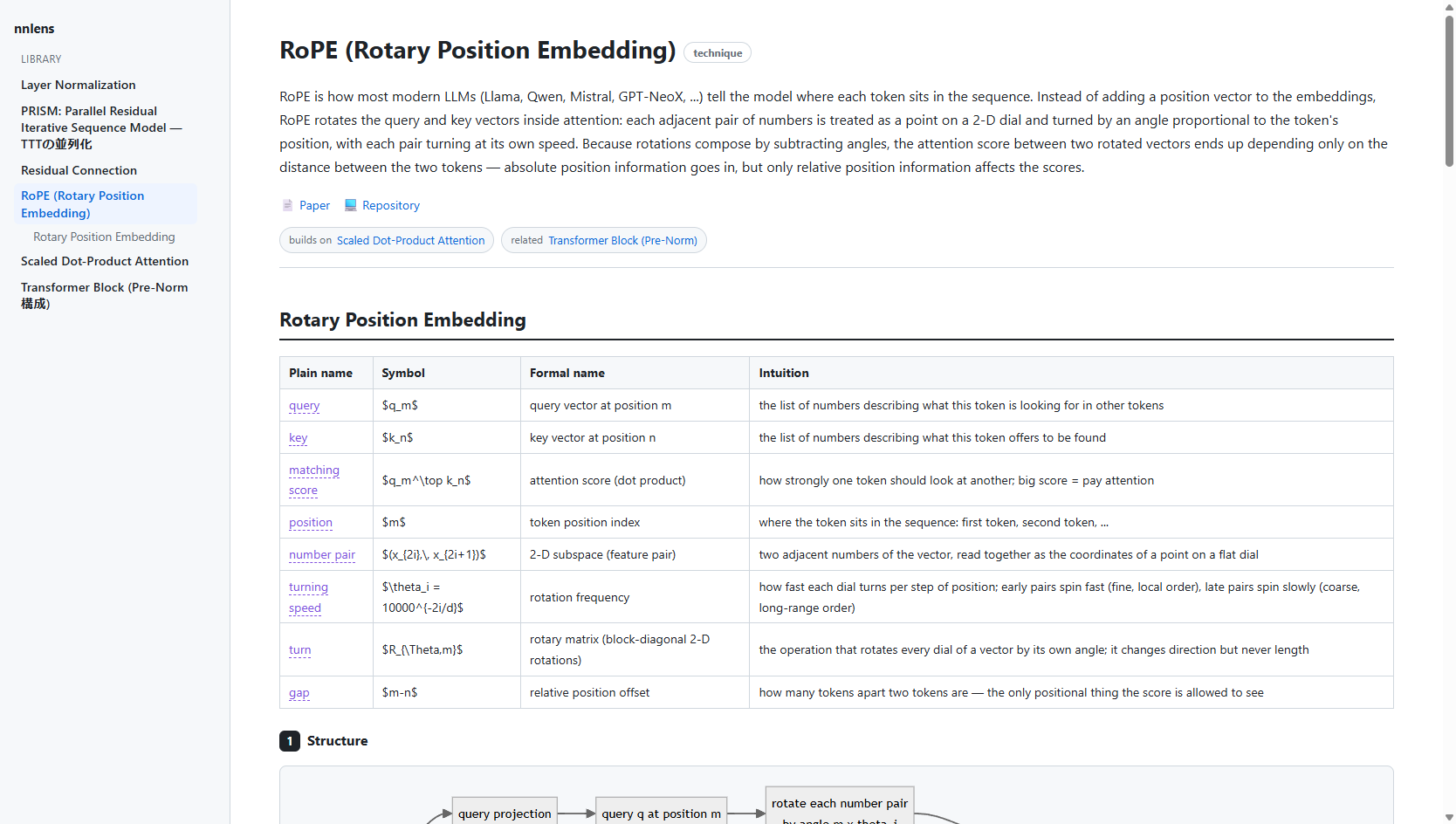
Throw in a paper, a GitHub repo, or just the name of a technique — get back a layer-by-layer explanation of a neural network, in five linked views.
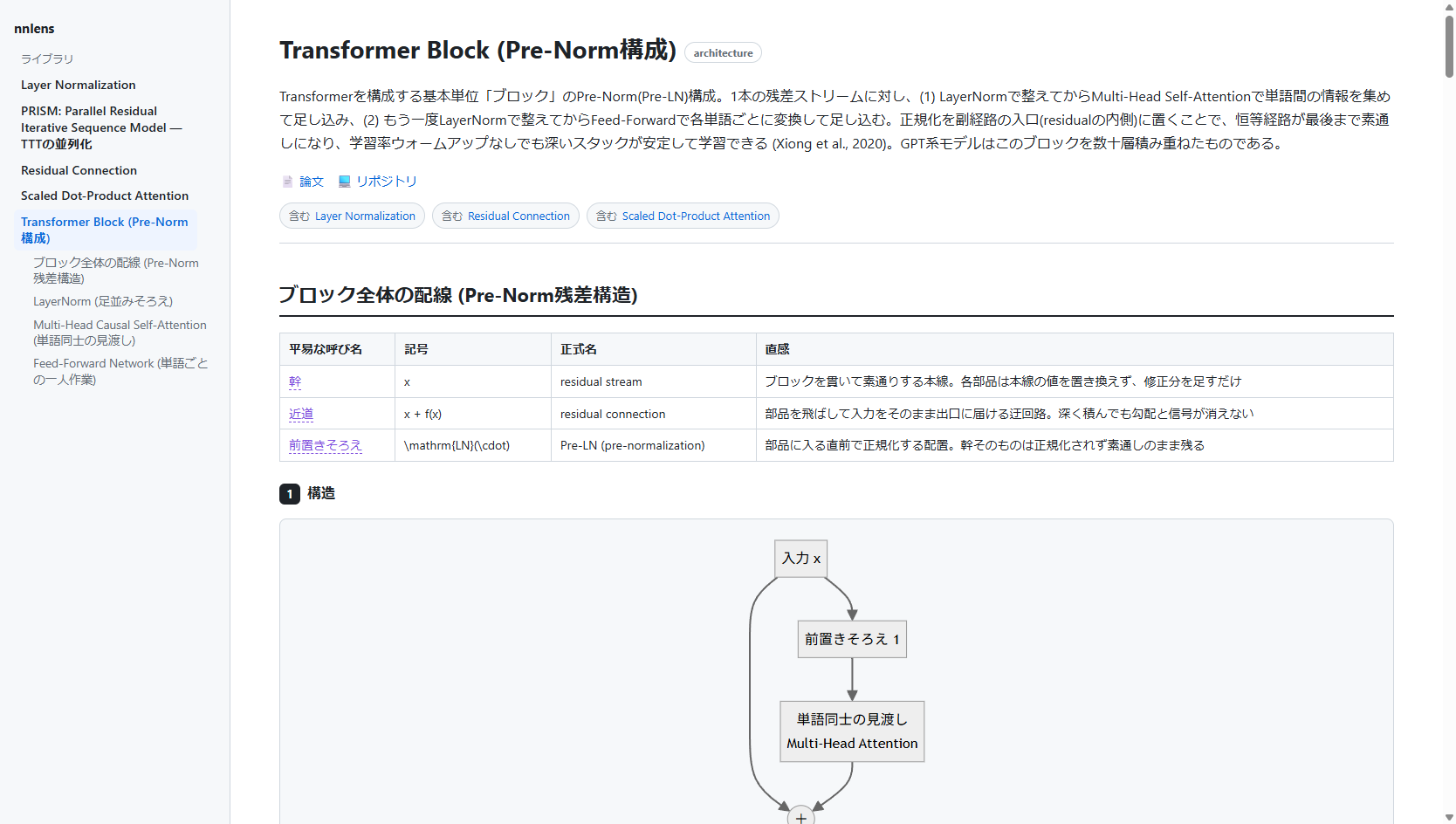
…and it speaks your language — the same viewer rendering a Japanese Transformer-block explanation
nnlens is an MCP server + local renderer. You connect it to an MCP host you already use (Claude Desktop, Claude Code, Cursor, …). The host's model — driven by your own subscription — does the explaining; nnlens gives it the methodology, fetches the real sources, runs the code, and renders the result to a local web page.
nnlens never calls an LLM itself and never handles an API key. The reasoning happens in your MCP host, on your existing plan. That is the whole point: no metered API, no shared credentials, no hosted service borrowing your subscription.
The five views
Every component (a layer, block, or technique) is explained five ways, and the views are linked by a shared concept ledger so the same idea keeps the same everyday word, symbol, and formal name across all of them:
- Structure — a Mermaid diagram of the data flow, plus a short note.
- In plain words — plain language only. No symbols, no jargon.
- The math — the real notation, carrying over the everyday words from view 2 and attaching each to its symbol (hover any highlighted word to see the mapping).
- Naive implementation — a from-scratch implementation that is literally the math (pure Python / numpy, no torch), actually executed so the output is real.
- Optimized implementation — the fast version, excerpted from the official repository (with a source link) or written from scratch when none exists — numerically cross-checked against the naive view when it's locally runnable.
Beyond a single page:
- Any language — explanations are written in whatever language you ask in,
and the page chrome follows: ja/en labels are built in, and the host supplies
ui_labelstranslations for anything else. Nothing about your language is hardcoded. - Library — every explanation you generate is saved locally
(
~/.nnlens/store) and listed in the sidebar; delete with the hover ✕. - Cross-links — explanations reference each other (
relatedchips and[[slug]]wikilinks in the prose). Links to explanations you haven't generated yet show up greyed out — a built-in "what to explain next" list. - Contract lint —
renderreturns warnings when the views drift apart (a ledger term never marked, symbols leaking into the plain-words view, an uncited optimized view, an unverified naive run), so the host fixes them. - Self-healing pages — pages are stamped with a template hash and rebuilt automatically when nnlens updates its renderer.
Install
pip install nnlens # or: pipx install nnlens
Or from source:
git clone https://github.com/tsuzakiii/nnlens
cd nnlens
pip install -e .
Connect it to your MCP host
Claude Desktop — add to claude_desktop_config.json:
{
  "mcpServers": {
    "nnlens": { "command": "nnlens" }
  }
}
Claude Code:
claude mcp add nnlens -- nnlens
(If the nnlens script isn't on your PATH, use
"command": "python", "args": ["-m", "nnlens"] instead.)
Use it
In your host, invoke the explain prompt (e.g. type /nnlens / /explain) or
just ask:
use nnlens to explain Scaled Dot-Product Attention
Ask in any language — 「nnlens で RoPE を説明して」 gets you the same five views with Japanese prose and a Japanese UI.
The host will fetch the paper/repo, write the five views, run the naive code to
verify it, and hand you a URL like http://127.0.0.1:8787/e/… — open it for the
rendered page with diagrams, math, and hover-linked terms.
Try the renderer without a host
python scripts/build_example.py     # (re)build the bundled example, runs its code
python scripts/demo_render.py --open
How it fits together
MCP host (your subscription) ── drives ──► nnlens tools
        │                                    ├─ fetch_paper / find_official_repo / fetch_repo_code
        │  writes the 5 views                ├─ run_python   (proves view 4 runs)
        └───────────────────────────────────► render        (→ local web page URL)
- Tools = the deterministic work (retrieval, code execution, rendering).
explainprompt = the methodology the host follows to assemble the views.
Limitations (read before trusting it)
- Correctness is not guaranteed. The prose and math are written by the host model. Diagrams are model-generated and are the weakest link — treat view 1 as a sketch. View 4 is executed, so its output is real; the rest is best-effort.
run_pythonruns in a best-effort sandbox, not a hardened one. Snippets get an isolated interpreter (python -I), a scrubbed environment (your API keys and tokens simply aren't in it), no network (bothsocketand_socketdisabled), no process creation (subprocess/os.system/exec*/spawn*refused, so a child interpreter can't slip past the shims), memory / CPU-time / file-size caps, and a process-tree kill on timeout. These are in-process defenses: a payload determined to reach C-level APIs (e.g. viactypes) can still undo them — keep your host's permission prompt on this tool, and run the whole server in a container if you need a real boundary.- View 5 excerpts are fetched from public repos at view time and shown with attribution; nothing is redistributed. Respect each source repo's license.
- The renderer loads Markdown/Mermaid/KaTeX from a CDN, so viewing needs internet.
License
MIT. See LICENSE.
1 maintainer

Release files for nnlens 0.2.0
For a detailed explanation of source distributions (sdists) and built distributions (wheels), please see the package formats documentation.
Source distribution (sdist)
| File | Size | Uploaded | |
|---|---|---|---|
| nnlens-0.2.0.tar.gz | 287.6 kB | Details |
Built distribution (wheel)
| File | Interpreter | ABI | Platform | Reset |
|---|---|---|---|---|
| nnlens-0.2.0-py3-none-any.whl | Python 3 | none | any | Details |
Total release size: 329.6 kB
Release files / nnlens-0.2.0.tar.gz
| Download URL | nnlens-0.2.0.tar.gz |
|---|---|
| Size | 287.6 kB |
| Tags | Source |
|
SHA-256 checksum How to use checksums |
61c6ddc2d5d3ca699cdcb3b7446f122d872971e0903505d76e4fdc169057a44e
|
|
BLAKE2b-256 checksum How to use checksums |
b7307af3954b6fae1558f81f4c8a3e302509328a25f243e9db643cdd553183ec
|
| Upload date | |
|
Uploaded using Trusted Publishing? What is trusted publishing? |
Yes |
| Uploaded via |
twine/6.1.0 CPython/3.13.12
|
Provenance
Provenance describes where a file came from. On PyPI, provenance is shared via attestations, which provide a verifiable record of the build or publishing details. View details, limitations and caveats.


PyPI Publish Attestation
PyPI verified that this artifact, at this checksum, originated from the publisher listed below.
Signed by GitHub Actions, verified by PyPI on Jul 3, 2026.
Transparency logRelease files / nnlens-0.2.0-py3-none-any.whl
| Download URL | nnlens-0.2.0-py3-none-any.whl |
|---|---|
| Size | 42.0 kB |
| Tags | Python 3 |
|
SHA-256 checksum How to use checksums |
a4907b142437b20a49a219223fbc6e81c68506fd212a266f2aed9a3d3b67e222
|
|
BLAKE2b-256 checksum How to use checksums |
f77ac2a702c549730e9615e584a7683bbc23a3f4787efe96a874760b0c89adee
|
| Upload date | |
|
Uploaded using Trusted Publishing? What is trusted publishing? |
Yes |
| Uploaded via |
twine/6.1.0 CPython/3.13.12
|
Provenance
Provenance describes where a file came from. On PyPI, provenance is shared via attestations, which provide a verifiable record of the build or publishing details. View details, limitations and caveats.
PyPI Publish Attestation
PyPI verified that this artifact, at this checksum, originated from the publisher listed below.
Signed by GitHub Actions, verified by PyPI on Jul 3, 2026.
Transparency log













