
Explain neural-network architectures layer by layer in five linked views (structure, plain words, math, naive code, optimized code). An MCP server + local renderer driven by your own LLM subscription.
Verified details
These details have been verified by PyPIProject links
GitHub Statistics
Maintainers

Project description
nnlens
Throw in a paper, a GitHub repo, or just the name of a technique — get back a layer-by-layer explanation of a neural network, in five linked views.
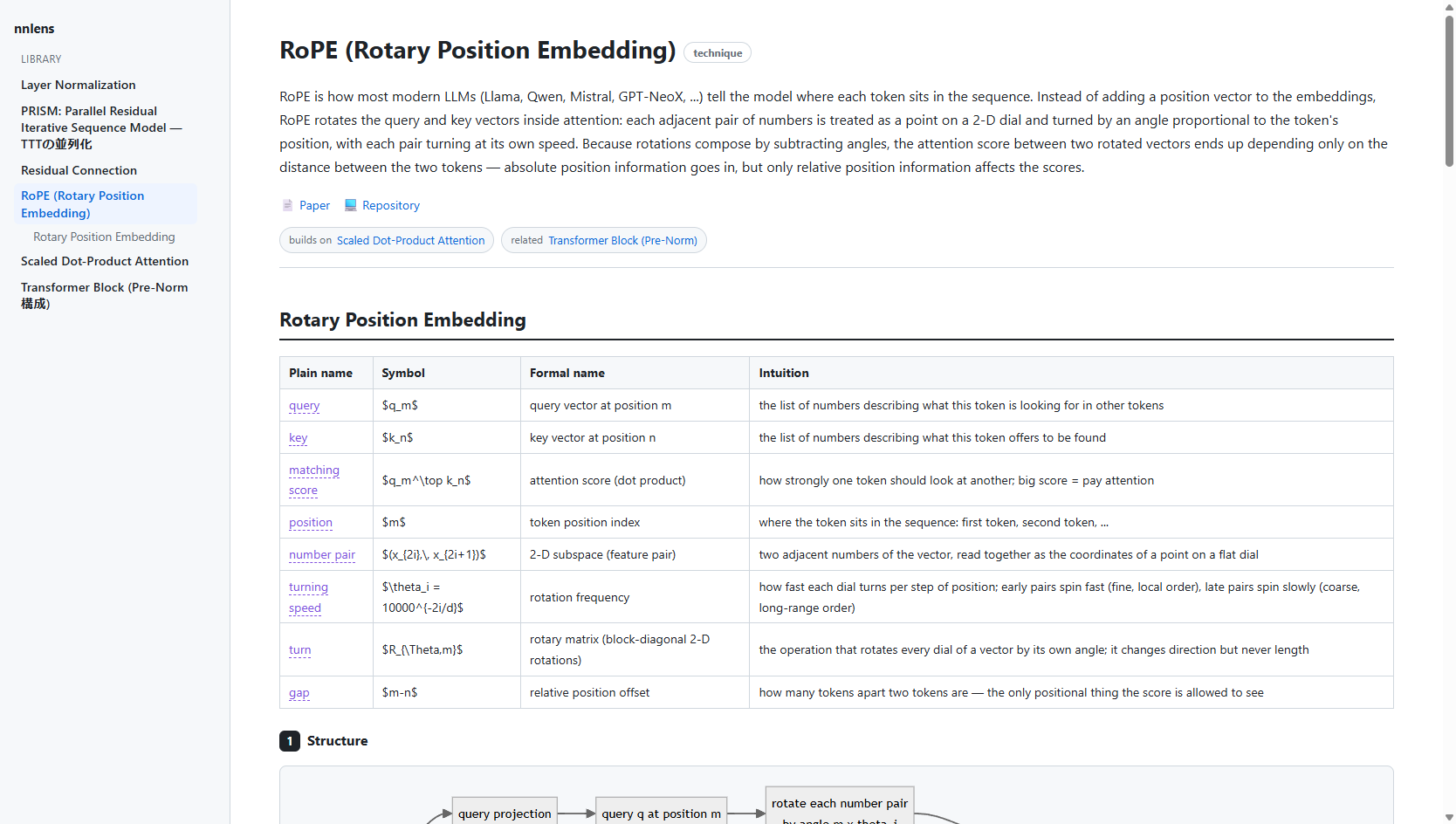
…and it speaks your language — the same viewer rendering a Japanese Transformer-block explanation
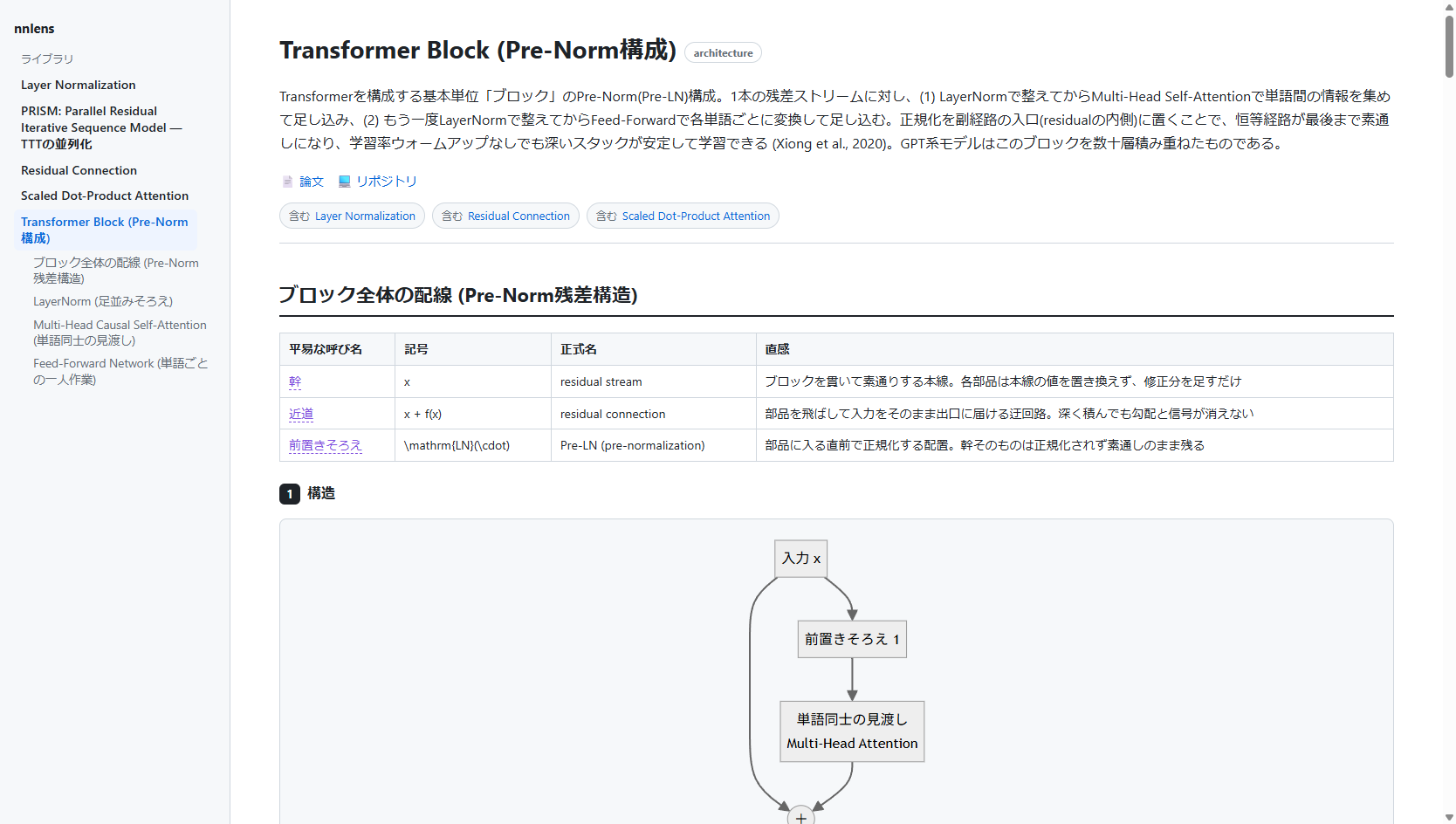
nnlens is an MCP server + local renderer. You connect it to an MCP host you already use (Claude Desktop, Claude Code, Cursor, …). The host's model — driven by your own subscription — does the explaining; nnlens gives it the methodology, fetches the real sources, runs the code, and renders the result to a local web page.
nnlens never calls an LLM itself and never handles an API key. The reasoning happens in your MCP host, on your existing plan. That is the whole point: no metered API, no shared credentials, no hosted service borrowing your subscription.
The five views
Every component (a layer, block, or technique) is explained five ways, and the views are linked by a shared concept ledger so the same idea keeps the same everyday word, symbol, and formal name across all of them:
- Structure — a Mermaid diagram of the data flow, plus a short note.
- In plain words — plain language only. No symbols, no jargon.
- The math — the real notation, carrying over the everyday words from view 2 and attaching each to its symbol (hover any highlighted word to see the mapping).
- Naive implementation — a from-scratch implementation that is literally the math (pure Python / numpy, no torch), actually executed so the output is real.
- Optimized implementation — the fast version, excerpted from the official repository (with a source link) or written from scratch when none exists — numerically cross-checked against the naive view when it's locally runnable.
Beyond a single page:
- Any language — explanations are written in whatever language you ask in,
and the page chrome follows: ja/en labels are built in, and the host supplies
ui_labelstranslations for anything else. Nothing about your language is hardcoded. - Library — every explanation you generate is saved locally
(
~/.nnlens/store) and listed in the sidebar; delete with the hover ✕. - Cross-links — explanations reference each other (
relatedchips and[[slug]]wikilinks in the prose). Links to explanations you haven't generated yet show up greyed out — a built-in "what to explain next" list. - Contract lint —
renderreturns warnings when the views drift apart (a ledger term never marked, symbols leaking into the plain-words view, an uncited optimized view, an unverified naive run), so the host fixes them. - Self-healing pages — pages are stamped with a template hash and rebuilt automatically when nnlens updates its renderer.
Install
pip install nnlens # or: pipx install nnlens
Or from source:
git clone https://github.com/tsuzakiii/nnlens
cd nnlens
pip install -e .
Connect it to your MCP host
Claude Desktop — add to claude_desktop_config.json:
{
  "mcpServers": {
    "nnlens": { "command": "nnlens" }
  }
}
Claude Code:
claude mcp add nnlens -- nnlens
(If the nnlens script isn't on your PATH, use
"command": "python", "args": ["-m", "nnlens"] instead.)
Use it
In your host, invoke the explain prompt (e.g. type /nnlens / /explain) or
just ask:
use nnlens to explain Scaled Dot-Product Attention
Ask in any language — 「nnlens で RoPE を説明して」 gets you the same five views with Japanese prose and a Japanese UI.
The host will fetch the paper/repo, write the five views, run the naive code to
verify it, and hand you a URL like http://127.0.0.1:8787/e/… — open it for the
rendered page with diagrams, math, and hover-linked terms.
Try the renderer without a host
python scripts/build_example.py     # (re)build the bundled example, runs its code
python scripts/demo_render.py --open
How it fits together
MCP host (your subscription) ── drives ──► nnlens tools
        │                                    ├─ fetch_paper / find_official_repo / fetch_repo_code
        │  writes the 5 views                ├─ run_python   (proves view 4 runs)
        └───────────────────────────────────► render        (→ local web page URL)
- Tools = the deterministic work (retrieval, code execution, rendering).
explainprompt = the methodology the host follows to assemble the views.
Limitations (read before trusting it)
- Correctness is not guaranteed. The prose and math are written by the host model. Diagrams are model-generated and are the weakest link — treat view 1 as a sketch. View 4 is executed, so its output is real; the rest is best-effort.
run_pythonis not a hardened sandbox. It runs code your host produced, on your machine, with a timeout — not untrusted third-party code. Don't point it at untrusted input.- View 5 excerpts are fetched from public repos at view time and shown with attribution; nothing is redistributed. Respect each source repo's license.
- The renderer loads Markdown/Mermaid/KaTeX from a CDN, so viewing needs internet.
License
MIT. See LICENSE.
Project details
Verified details
These details have been verified by PyPIProject links
GitHub Statistics
Maintainers


Download files
Download the file for your platform. If you're not sure which to choose, learn more about installing packages.
Source Distribution
Built Distribution
Filter files by name, interpreter, ABI, and platform.
If you're not sure about the file name format, learn more about wheel file names.
Copy a direct link to the current filters
File details
Details for the file nnlens-0.1.2.tar.gz.
File metadata
- Download URL: nnlens-0.1.2.tar.gz
- Upload date:
- Size: 283.9 kB
- Tags: Source
- Uploaded using Trusted Publishing? Yes
- Uploaded via: twine/6.1.0 CPython/3.13.12
File hashes
| Algorithm | Hash digest | |
|---|---|---|
| SHA256 |
b919ff66b77bbae1c6658eee716ad364b0999daa8448711da3a2b9c5d2ef0117
|
|
| MD5 |
8d4d79343de10b7c3ae748fc7c691326
|
|
| BLAKE2b-256 |
66831550e3352956ab725cb3200c28fbcbe10506fe86816da8f96fea6f53f286
|
Provenance
The following attestation bundles were made for nnlens-0.1.2.tar.gz:
Publisher:
release.yml on tsuzakiii/nnlens
-
Statement:
-
Statement type:
https://in-toto.io/Statement/v1 -
Predicate type:
https://docs.pypi.org/attestations/publish/v1 -
Subject name:
nnlens-0.1.2.tar.gz -
Subject digest:
b919ff66b77bbae1c6658eee716ad364b0999daa8448711da3a2b9c5d2ef0117 - Sigstore transparency entry: 2059075755
- Sigstore integration time:
-
Permalink:
tsuzakiii/nnlens@62bff36e1e2cd43f414d124c792abee7bdffe186 -
Branch / Tag:
refs/tags/v0.1.2 - Owner: https://github.com/tsuzakiii
-
Access:
public
-
Token Issuer:
https://token.actions.githubusercontent.com -
Runner Environment:
github-hosted -
Publication workflow:
release.yml@62bff36e1e2cd43f414d124c792abee7bdffe186 -
Trigger Event:
push
-
Statement type:
File details
Details for the file nnlens-0.1.2-py3-none-any.whl.
File metadata
- Download URL: nnlens-0.1.2-py3-none-any.whl
- Upload date:
- Size: 39.0 kB
- Tags: Python 3
- Uploaded using Trusted Publishing? Yes
- Uploaded via: twine/6.1.0 CPython/3.13.12
File hashes
| Algorithm | Hash digest | |
|---|---|---|
| SHA256 |
6aaa22345175a14553dabf015f10654ce0e185e418532fb89dafe643838f789d
|
|
| MD5 |
eef6e8e67ae2a2abaf6cfc5d94a8667c
|
|
| BLAKE2b-256 |
02a5706bb37af5f1fc0506601eaf3ee1fce9dabf07a6ff08ab871a3ed04ed334
|
Provenance
The following attestation bundles were made for nnlens-0.1.2-py3-none-any.whl:
Publisher:
release.yml on tsuzakiii/nnlens
-
Statement:
-
Statement type:
https://in-toto.io/Statement/v1 -
Predicate type:
https://docs.pypi.org/attestations/publish/v1 -
Subject name:
nnlens-0.1.2-py3-none-any.whl -
Subject digest:
6aaa22345175a14553dabf015f10654ce0e185e418532fb89dafe643838f789d - Sigstore transparency entry: 2059076436
- Sigstore integration time:
-
Permalink:
tsuzakiii/nnlens@62bff36e1e2cd43f414d124c792abee7bdffe186 -
Branch / Tag:
refs/tags/v0.1.2 - Owner: https://github.com/tsuzakiii
-
Access:
public
-
Token Issuer:
https://token.actions.githubusercontent.com -
Runner Environment:
github-hosted -
Publication workflow:
release.yml@62bff36e1e2cd43f414d124c792abee7bdffe186 -
Trigger Event:
push
-
Statement type:






