





简体中文|English
📖 介绍
Minecraft服务器状态查询,支持IPv6
💿 安装
以下提到的方法任选 其一 即可
[推荐]使用 nb-cli 安装
在 Bot 的根目录下打开命令行, 输入以下指令即可安装nb plugin install nonebot-plugin-mccheck
使用包管理器安装
在 nonebot2 项目的插件目录下, 输入安装命令pip install nonebot-plugin-mccheck
打开 nonebot2 项目根目录下的 pyproject.toml 文件, 在 [tool.nonebot] 部分追加写入
plugin["nonebot_plugin_mccheck"]
📈 已实现的功能
- IPv6支持
- 支持全平台适配器
- 支持Unicode全字体与字形
- Motd样式渲染
- 支持互通服务器双次查询
- 多语言
- SRV支持
📑 未来的功能
- 敬请期待
🖼️ 效果图
v0.1.45
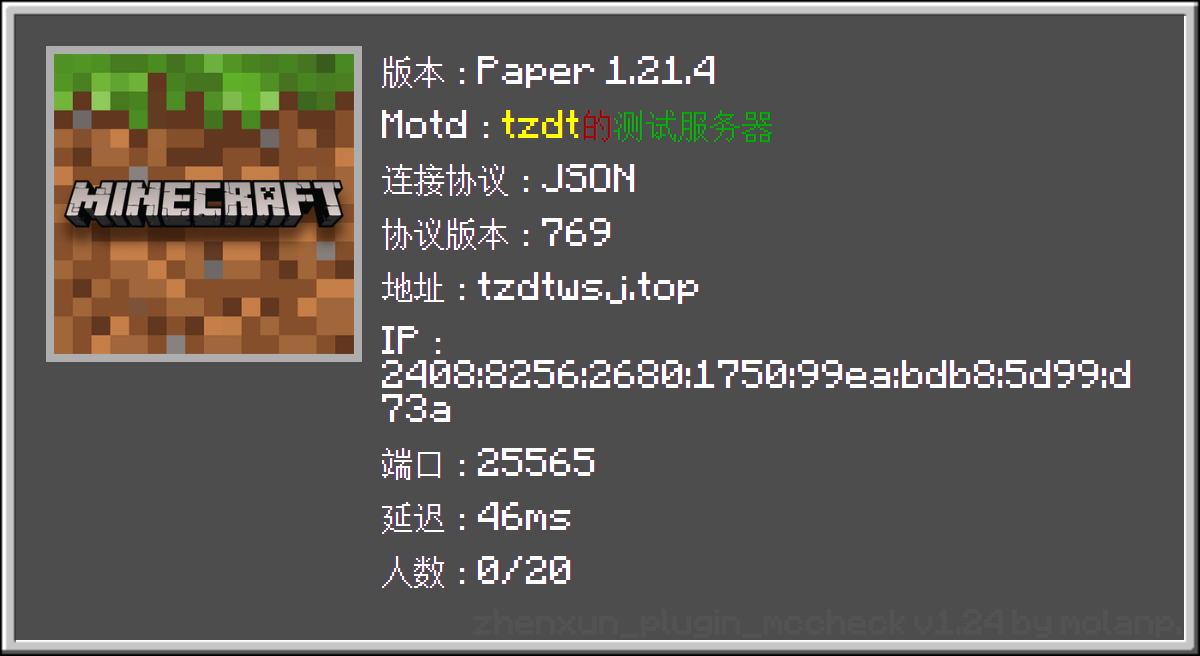
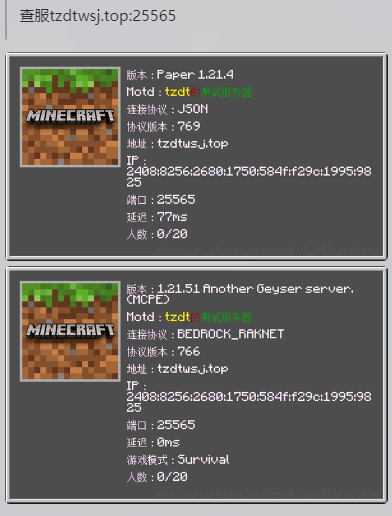
🎈 特别说明
查询IPv6服务器
查服 [2001:db8:85a3::8a2e:370:7334]:25565 <-IPv6服务器地址及端口,端口和冒号可以不带
或
查服 [2001:db8:85a3::8a2e:370:7334] <-IPv6服务器地址
⚙️ 配置
在 nonebot2 项目的.env文件中添加下表中的必填配置
| 配置项 | 必填 | 默认值 | 说明 |
|---|---|---|---|
MCC__LANGUAGE |
否 | zh-cn |
插件渲染图片所使用的语言 可用语言:[ zh-cn,zh-tw,en] |
MCC__TYPE |
否 | 0 |
插件发送的消息类型(0为Pillow绘制图片, 1为文本) |
🎲 消息类型对比
| 类型 | 特殊样式 | Favicon | 完全彩色下划线/删除线 | 全Unicode字体支持 |
|---|---|---|---|---|
| 文本 | ❌ | ⭕ | ❌ | ⭕ |
| Pillow | ⭕ | ⭕ | ⭕ | ⭕ |
🎉 使用
| 命令 | 参数 | 范围 | 说明 |
|---|---|---|---|
查服/mcheck |
ip:端口 或 ip |
私聊/群聊 | 查询服务器状态 |
设置语言/set_lang |
语言名称 | 私聊/群聊 | 设置插件渲染图片所使用的语言 |
当前语言/lang_now |
无 | 私聊/群聊 | 查看当前插件渲染图片所使用的语言 |
语言列表/lang_list |
无 | 私聊/群聊 | 查看插件支持的语言列表 |
1 maintainer

Metadata
1 maintainer
Release files for nonebot-plugin-mccheck 0.4.1
For a detailed explanation of source distributions (sdists) and built distributions (wheels), please see the package formats documentation.
Source distribution (sdist)
| File | Size | Uploaded | Provenance | |
|---|---|---|---|---|
| nonebot_plugin_mccheck-0.4.1.tar.gz | 1.4 MB | Without provenance | Details |
Built distribution (wheel)
| File | Interpreter | ABI | Platform | Reset |
|---|---|---|---|---|
| nonebot_plugin_mccheck-0.4.1-py2.py3-none-any.whl | Python 3, Python 2 | none | any | Details |
Total release size: 2.9 MB
Release files / nonebot_plugin_mccheck-0.4.1.tar.gz
| Download URL | nonebot_plugin_mccheck-0.4.1.tar.gz |
|---|---|
| Size | 1.4 MB |
| Tags | Source |
|
SHA-256 checksum How to use checksums |
aaae25b2caa98ff2f3b64684a4e0bd07faf5be33600c1f612934db9bfc221c1a
|
|
BLAKE2b-256 checksum How to use checksums |
080cb605a656e359c8d0c2315e8aa6eadb0ea296acf0ddd18e1c50965910b519
|
| Upload date | |
|
Uploaded using Trusted Publishing? What is trusted publishing? |
No |
| Uploaded via |
twine/6.2.0 CPython/3.9.25
|
Release files / nonebot_plugin_mccheck-0.4.1-py2.py3-none-any.whl
| Download URL | nonebot_plugin_mccheck-0.4.1-py2.py3-none-any.whl |
|---|---|
| Size | 1.4 MB |
| Tags | Python 2 Python 3 |
|
SHA-256 checksum How to use checksums |
ec7fdacea9b814cb714ddddb2cdeb795eee9f075ee8c858649a582ad0ba38e19
|
|
BLAKE2b-256 checksum How to use checksums |
3e53ec363458b6c913491e9f7f4174d66f5afa08aef040c17a93d33ff293c95c
|
| Upload date | |
|
Uploaded using Trusted Publishing? What is trusted publishing? |
No |
| Uploaded via |
twine/6.2.0 CPython/3.9.25
|
Security for nonebot-plugin-mccheck 0.4.1
Provenance
Provenance describes where a file came from. On PyPI, provenance is shared via attestations, which provide a verifiable record of the build or publishing details. View details, limitations and caveats.
No provenance found
None of the files in this release were uploaded with provenance metadata.
A note on package security
PyPI is a repository for distributing packages, not a service for auditing them. While third-party security researchers and our staff do their best to detect and remove malicious packages, PyPI cannot guarantee the quality, security or suitability of any given package.














