
NoneBot2 链接分享解析 Alconna 版, 通用媒体卡片渲染(PIL 实现), 支持 B站/抖音/快手/微博/小红书/youtube/tiktok/twitter/acfun/nga

Project description









[!IMPORTANT] 收藏项目,你将从 GitHub 上无延迟地接收所有发布通知~⭐️

📖 介绍
| 平台 | 触发的消息形态 | 视频 | 图集 | 音频 |
|---|---|---|---|---|
| B站 | av号/BV号/链接/短链/卡片/小程序 | ✅ | ✅ | ✅ |
| 抖音 | 链接(分享链接,兼容电脑端链接) | ✅ | ✅ | ❌️ |
| 微博 | 链接(博文,视频,show, 文章) | ✅ | ✅ | ❌️ |
| 小红书 | 链接(含短链)/卡片 | ✅ | ✅ | ❌️ |
| 快手 | 链接(包含标准链接和短链) | ✅ | ✅ | ❌️ |
| acfun | 链接 | ✅ | ❌️ | ❌️ |
| youtube | 链接(含短链) | ✅ | ❌️ | ✅ |
| tiktok | 链接 | ✅ | ❌️ | ❌️ |
| 链接 | ✅ | ✅ | ❌️ |
支持的链接,可参考 测试链接
🎨 效果图
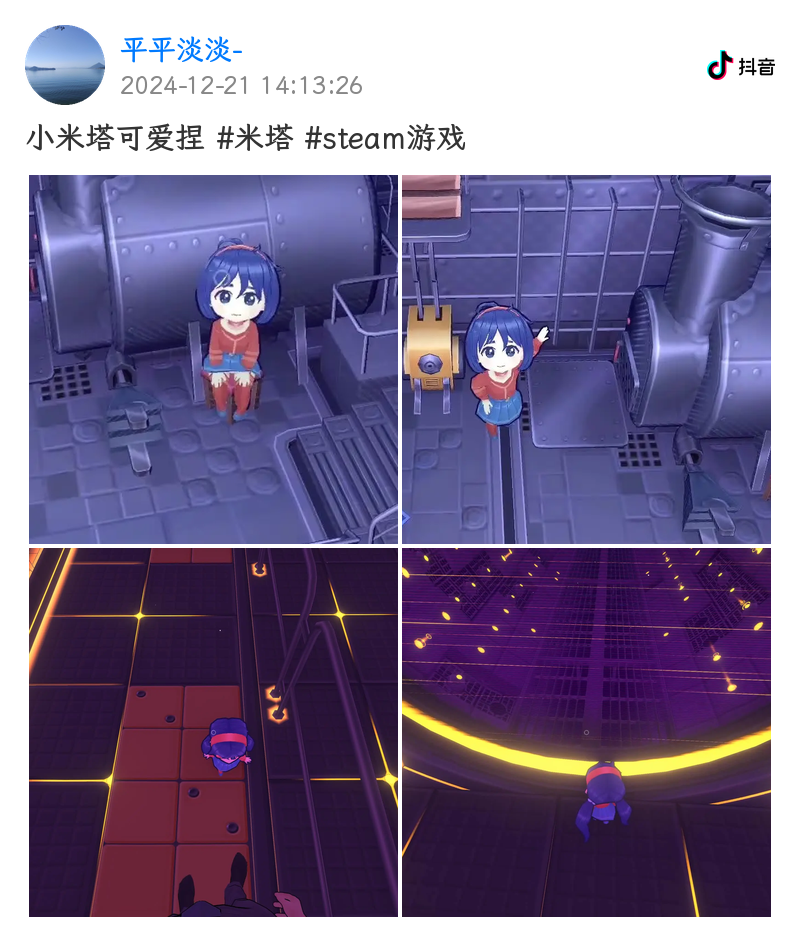
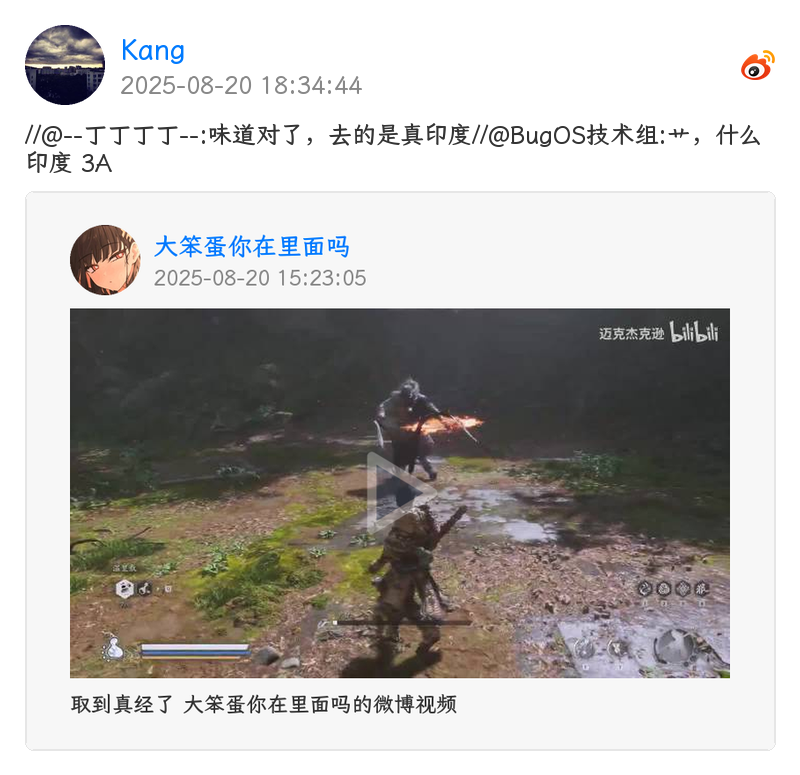
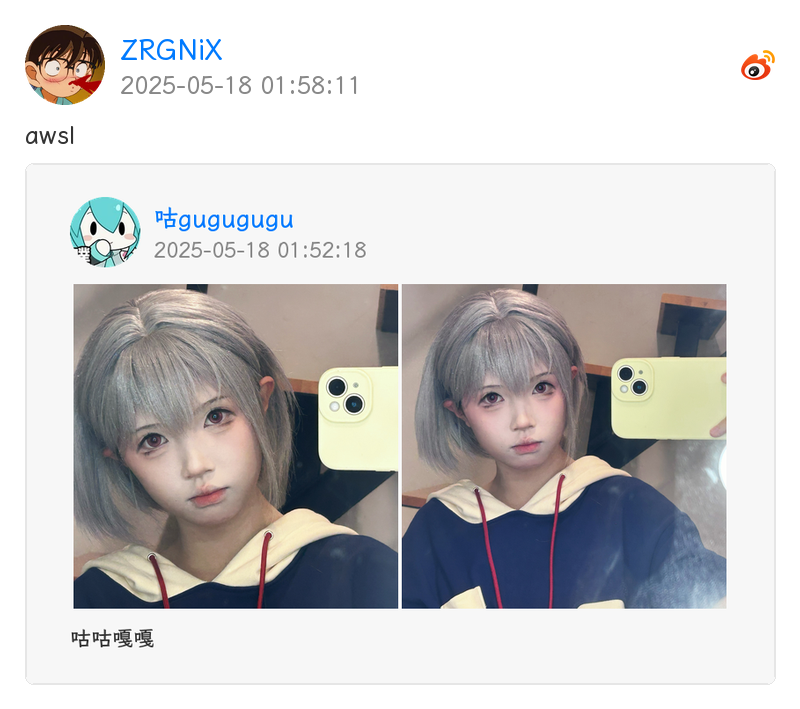
插件默认启用 PIL 实现的通用媒体卡片渲染,效果图如下


💿 安装
[!Warning] 如果你已经在使用 nonebot-plugin-resolver[2],请在安装此插件前卸载
[!Important] 插件可选依赖
htmlkit,ytdlp,all,分别用于 htmlkit 渲染和 youtube / tiktok 解析,如果需要使用,请在安装时指定,如nb plugin install nonebot-plugin-parser[ytdlp]
使用 nb-cli 安装/更新
在 nonebot2 项目的根目录下打开命令行, 输入以下指令即可安装nb plugin install nonebot-plugin-parser --upgrade
使用 pypi 源更新
nb plugin install nonebot-plugin-parser --upgrade -i https://pypi.org/simple
安装仓库 dev 分支
uv pip install git+https://github.com/fllesser/nonebot-plugin-parser.git@dev
使用包管理器安装
在 nonebot2 项目的插件目录下, 打开命令行, 根据你使用的包管理器, 输入相应的安装命令uv
使用 uv 安装uv add nonebot-plugin-parser
安装仓库 dev 分支
uv add git+https://github.com/fllesser/nonebot-plugin-parser.git@master
pip
pip install --upgrade nonebot-plugin-parser
pdm
pdm add nonebot-plugin-parser
poetry
poetry add nonebot-plugin-parser
打开 nonebot2 项目根目录下的 pyproject.toml 文件, 在 [tool.nonebot] 部分追加写入
plugins = ["nonebot_plugin_parser"]
使用 nbr 安装(使用 uv 管理依赖可用)
nbr 是一个基于 uv 的 nb-cli,可以方便地管理 nonebot2
nbr plugin install nonebot-plugin-parser
使用 pypi 源安装
nbr plugin install nonebot-plugin-parser -i "https://pypi.org/simple"
使用清华源安装
nbr plugin install nonebot-plugin-parser -i "https://pypi.tuna.tsinghua.edu.cn/simple"
安装必要组件
部分解析依赖 ffmpeg
ubuntu/debian
sudo apt-get install ffmpeg
其他 Linux 参考(原项目推荐): https://gitee.com/baihu433/ffmpeg
Windows 参考(原项目推荐): https://www.jianshu.com/p/5015a477de3c
yt-dlp 自 2025.11.12 起要求用户安装外部 JavaScript Runtime,参考 https://github.com/yt-dlp/yt-dlp/releases/tag/2025.11.12, 推荐安装 Deno
macOS / Linux
curl -fsSL https://deno.land/install.sh | sh
windows
irm https://deno.land/install.ps1 | iex
⚙️ 配置
配置项
# [可选] nonebot2 内置配置,若服务器上传带宽太低,建议调高,防止超时
API_TIMEOUT=30.0

# [可选] B 站 cookie, 必须含有 SESSDATA 项,可附加 B 站 AI 总结功能
# 如果需要长期使用此凭据则不应该在浏览器登录账户导致 cookie 被刷新,建议注册个小号获取
# 各项获取方式 https://nemo2011.github.io/bilibili-api/#/get-credential
# ac_time_value 相对特殊,仅用于刷新 Cookies
# B站网页打开开发者工具,进入控制台,输入 window.localStorage.ac_time_value 即可获取其值。
parser_bili_ck="SESSDATA=xxxxxxxxxx;ac_time_value=131231241231241"

# [可选] 允许的 B 站视频编码,越靠前的编码优先级越高
# 可选 "avc"(H.264,体积较大), "hev"(HEVC), "av01"(AV1)
# 后两项在不同设备可能有兼容性问题,如需完全避免,可只填一项,如 '["avc"]'
parser_bili_video_codes='["avc", "av01", "hev"]'

# [可选] B 站视频清晰度
# 360p(16), 480p(32), 720p(64), 1080p(80), 1080p+(112), 1080p_60(116), 4k(120)
parser_bili_video_quality=80

# [可选] Youtube Cookie, Youtube 视频因人机检测下载失败,需填
parser_ytb_ck=""

# [可选] 代理, 仅作用于 youtube, tiktok 解析
# 推特解析会自动读取环境变量中的 http_proxy / https_proxy(代理软件通常会自动设置)
parser_proxy=None

# [可选] 音频解析,是否需要上传群文件
parser_need_upload=False

# [可选] 视频,图片,音频是否使用 base64 发送
# 注意:编解码和传输 base64 会占用更多的内存,性能和带宽, 甚至可能会使 websocket 连接崩溃
# 因此该配置项仅推荐 nonebot 和 协议端不在同一机器的用户配置
parser_use_base64=False

# [可选] 视频最大解析时长,单位:秒
parser_duration_maximum=480

# [可选] 音视频下载最大文件大小,单位 MB,超过该配置将阻断下载
parser_max_size=90

# [可选] 全局禁止的解析
# 示例 parser_disabled_platforms=["bilibili", "douyin"] 表示禁止了哔哩哔哩和抖音
# 可选值: ["bilibili", "douyin", "kuaishou", "twitter", "youtube", "acfun", "tiktok", "weibo", "xiaohongshu"]
parser_disabled_platforms='["twitter"]'

# [可选] 渲染器类型
# 可选 "default"(无图片渲染), "common"(PIL 通用图片渲染), "htmlkit"(htmlkit, 暂不可用)
parser_render_type="common"

# [可选] 是否在解析结果中附加原始URL
parser_append_url=False

# [可选] 自定义渲染字体
# 配置字体文件名,并将字体文件放置于 localstore 生成的插件 data 目录下
# 例如: ./data/nonebot_plugin_parser/
parser_custom_font="LXGWZhenKaiGB-Regular.ttf"

# [可选] 是否需要转发媒体内容(超过 4 项时始终使用合并转发)
parser_need_forward_contents=True

# [可选] emoji 渲染样式 "apple", "google", "twitter", "facebook"(默认)
parser_emoji_style="facebook"
🎉 使用
| 指令 | 权限 | 需要@ | 范围 | 说明 |
|---|---|---|---|---|
| 开启解析 | SUPERUSER/OWNER/ADMIN | 是 | 群聊 | 开启解析 |
| 关闭解析 | SUPERUSER/OWNER/ADMIN | 是 | 群聊 | 关闭解析 |
| bm | - | 否 | 群聊 | 下载 B 站音频 |
| ym | - | 否 | 群聊 | 下载 youtube 音频 |
🧩 扩展
[!IMPORTANT] 插件自
v2.2.0版本开始支持自定义解析器,通过继承BaseParser类并实现platform,handle即可
完整示例
from re import Match
from typing import ClassVar

from httpx import AsyncClient
from nonebot import require

require("nonebot_plugin_parser")
from nonebot_plugin_parser.parsers import BaseParser, Platform, handle

class ExampleParser(BaseParser):
    """示例视频网站解析器"""

    platform: ClassVar[Platform] = Platform(name="example", display_name="示例网站")

    @handle("ex.short", r"ex\.short/\w+)")
    async def _parse_short_link(self, searched: Match[str]):
        """解析短链"""
        url = f"https://{searched.group(0)}"
        # 重定向再解析,请确保重定向链接的 handle 存在
        # 比如 url 重定向到 example.com/... 就会调用 _parse 解析
        return await self.parse_with_redirect(url)

    @handle("example.com", r"example\.com/video/(?P<video_id>\w+)")
    @handle("exam.ple", r"exam\.ple/(?P<video_id>\w+)")
    async def _parse(self, searched: Match[str]):
        # 1. 提取视频 ID
        video_id = searched.group("video_id")

        # 2. 请求 API 获取视频信息
        async with AsyncClient(headers=self.headers, timeout=self.timeout) as client:
            resp = await client.get(f"https://api.example.com/video/{video_id}")
            resp.raise_for_status()
            data = resp.json()

        # 3. 提取数据
        title = data["title"]
        author_name = data["author"]["name"]
        avatar_url = data["author"]["avatar"]
        video_url = data["video_url"]
        cover_url = data["cover_url"]
        duration = data["duration"]
        timestamp = data["publish_time"]
        description = data.get("description", "")

        # 4. 视频内容
        author = self.create_author(author_name, avatar_url)
        video = self.create_video_content(video_url, cover_url, duration)

        # 5. 图集内容
        image_urls = data.get("images")
        images = self.create_image_contents(image_urls)

        # 6. 返回解析结果
        return self.result(
            title=title,
            text=description,
            author=author,
            contents=[video, *images],
            timestamp=timestamp,
            url=f"https://example.com/video/{video_id}",
        )
辅助函数
构建作者信息
author = self.create_author(
    name="作者名",
    avatar_url="https://example.com/avatar.jpg",   # 可选,会自动下载
    description="个性签名"                          # 可选
)
构建视频内容
# 方式1:传入 URL,自动下载
video = self.create_video_content(
    url_or_task="https://example.com/video.mp4",
    cover_url="https://example.com/cover.jpg",  # 可选
    duration=120.5                               # 可选,单位:秒
)

# 方式2:传入已创建的下载任务
from nonebot_plugin_parser.download import DOWNLOADER
video_task = DOWNLOADER.download_video(url, ext_headers=self.headers)
video = self.create_video_content(
    url_or_task=video_task,
    cover_url=cover_url,
    duration=duration
)
构建图集内容
# 并发下载图集内容
images = self.create_image_contents([
    "https://example.com/img1.jpg",
    "https://example.com/img2.jpg",
])
构建图文内容(适用于类似 Bilibili 动态图文混排)
graphics = self.create_graphics_content(
    image_url="https://example.com/image.jpg",
    text="图片前的文字说明",  # 可选
    alt="图片描述"            # 可选,居中显示
)
创建动图内容(GIF),平台一般只提供视频(后续插件会做自动转为 gif 的处理)
dynamics = self.create_dynamic_contents([
    "https://example.com/dynamic1.mp4",
    "https://example.com/dynamic2.mp4",
])
重定向 url
real_url = await self.get_redirect_url(
    url="https://short.url/abc",
    headers=self.headers  # 可选
)
🎉 致谢
Release history Release notifications | RSS feed


Download files
Download the file for your platform. If you're not sure which to choose, learn more about installing packages.
Source Distribution
Built Distribution
Filter files by name, interpreter, ABI, and platform.
If you're not sure about the file name format, learn more about wheel file names.
Copy a direct link to the current filters
File details
Details for the file nonebot_plugin_parser-2.2.3.tar.gz.
File metadata
- Download URL: nonebot_plugin_parser-2.2.3.tar.gz
- Upload date:
- Size: 2.3 MB
- Tags: Source
- Uploaded using Trusted Publishing? No
- Uploaded via: twine/6.1.0 CPython/3.13.7
File hashes
| Algorithm | Hash digest | |
|---|---|---|
| SHA256 |
92fe0dbaa9b363ee5ee2d8270bd2ab7360f19b8ce0396d32604ca7b88935641d
|
|
| MD5 |
9df09aeb09efb5534545371e91d5bfd4
|
|
| BLAKE2b-256 |
f0f3bf364998f0b49596afd87bffd878de65e3642eae29e9347b0c23e6a09608
|
File details
Details for the file nonebot_plugin_parser-2.2.3-py3-none-any.whl.
File metadata
- Download URL: nonebot_plugin_parser-2.2.3-py3-none-any.whl
- Upload date:
- Size: 2.4 MB
- Tags: Python 3
- Uploaded using Trusted Publishing? No
- Uploaded via: twine/6.1.0 CPython/3.13.7
File hashes
| Algorithm | Hash digest | |
|---|---|---|
| SHA256 |
de9deb1d0a297a3489d114eb0cf93404228d18c3cf550e7bafc58d974f9384f8
|
|
| MD5 |
ee00100023606b25fff3f4d9357276ed
|
|
| BLAKE2b-256 |
2871cb7fd84dd499b25b236095db097a922d6292e5b39ca08917248ff610653c
|






