
normalize-tabular-data
A terminal UI (Textual) for interactively normalizing tabular data, backed by polars for speed and gnosis-date-parser for fuzzy date parsing at Rust speed.
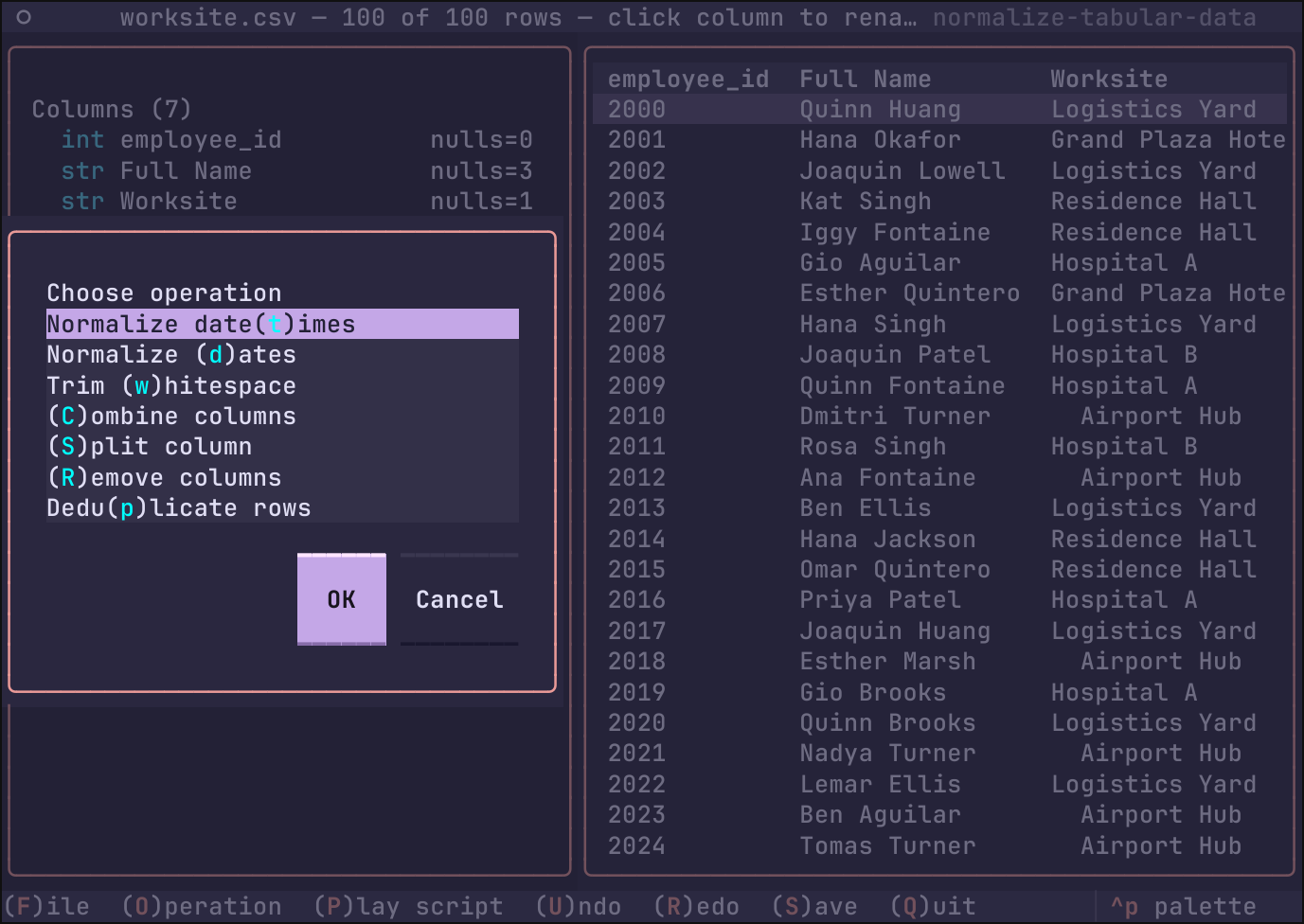
Load a file, see a preview, build up a pipeline of normalization operations (normalize messy dates, trim whitespace, rename a column, deduplicate, combine/split columns, drop columns), then save the cleaned result.
Running
Persistent install
uv tool install normalize-tabular-data
# upgrade later with:
uv tool upgrade normalize-tabular-data
Ephemeral run (no install)
uvx fetches into a throwaway environment each time:
uvx normalize-tabular-data
# pin a specific version:
uvx normalize-tabular-data==0.1.1
From a git checkout
Within the directory of the cloned repository:
uv run normalize-tabular-data
Command line
An optional FILE argument names a table to open at startup, as if you
had picked it from the in-app dialog.
normalize-tabular-data data/members.csv      # or with uvx/uv run
uvx normalize-tabular-data data/members.tsv
If the file is missing or its format cannot be read, the TUI still starts — it shows an alert toast and you can open something else.
Open with a script
With --script/-s, an .ntd script is played on FILE as soon as it
loads (same flow as the p key, same stop-and-rollback on a step that
does not fit the file):
uvx normalize-tabular-data data/members.csv -s data/members.ntd
Headless run (-x, --run)
--run/-x skips the TUI: it opens FILE, plays SCRIPT step by step,
saves the result and exits. Each operation prints to stdout as it is
applied; anything else — including a failing step, named and rolled
back exactly as the interactive player would — goes to stderr with a
nonzero exit code.
# saves data/members-normalized.csv next to the original
uvx normalize-tabular-data members.csv -s members.ntd -x

# choose the destination (format taken from its extension):
uvx normalize-tabular-data members.csv -s members.ntd -x -o out/members.parquet

# write the CSV to a pipe instead:
uvx normalize-tabular-data members.csv -s members.ntd -x -o - | gzip > clean.csv.gz
With -o - (attached -o- works too), the transformed table is written
to stdout itself and the step lines are suppressed, so stdout carries
only the data. After a successful run the confirmation line goes to
stderr.
Usage
Launch with normalize-tabular-data. Keys:
| Key | Action |
|---|---|
f |
(F)ile — open a file |
o |
(O)peration — choose an op |
p |
(P)lay script — apply .ntd |
u |
(U)ndo last applied step |
r |
(R)edo |
s |
(S)ave the data in a format |
q |
(Q)uit |
Operations
- Normalize dates — parse a messy date column of any input format into
canonical UTC
year-month-dayThh:mm:ssvalues (second resolution; fractional parts are truncated); unparseable values become null. - Trim whitespace — strip edges and collapse internal whitespace runs, per selected columns.
- Rename a column — click its header in the preview and type the new name.
- Deduplicate rows — on all or selected columns, keeping first or last.
- Combine columns — concatenate two or more columns with a separator.
- Split column — break one column into
{col}_1..{col}_k; a blank delimiter splits on runs of whitespace. - Remove columns — drop selected columns entirely.
Formats
Reads: CSV, TSV, JSON lines, Parquet, Excel (.xlsx/.xls — first sheet).
Writes: CSV, TSV, JSON lines, Parquet, Excel (.xlsx).
Large files are previewed with a random sample of 250 rows; every operation still runs on the full data.
Operation scripts (.ntd)
Every open file keeps an internal log of the operations performed on it. When
saving, the dialog offers a Save sequence of operations? checkbox
(unticked by default); with it ticked, a second dialog asks where to write
the script — suggested <table>.ntd, any other extension you type is kept.
The script is plain ASCII text, one operation per line, e.g.:
# normalize-tabular-data script
# source: worksite.csv
# table: /data/worksite-normalized.csv
# saved: 2026-10-05T12:30:11
date_normalize(column="Signed Up")
trim_collapse(columns=["Full Name", "Worksite", "Job Class"])
split_column(column="Full Name", delimiter="")
rename_single(column="Full Name_1", new_name="First Name")
rename_single(column="Full Name_2", new_name="Last Name")
Playing a script back
Press p (available while a file is loaded) to pick a script file: the
dialog previews the highlighted .ntd file (syntax-highlighted, first 40
lines) before you confirm. Its operations are applied, in order, to the table
you have open. If any step cannot be performed against the currently loaded
file — a column it renames, trims or splits is missing, the operation is
unknown — playing stops with an alert naming the failing step, and every step
the script had already applied is rolled back, so the table is left exactly as
it was.
Publishing
PyPI credentials live in $HOME/.pypirc (sections [pypi] and
[testpypi]); uploads go through twine, which honors that file —
uv publish does not read .pypirc, so it is not used here.
make dist       # build sdist+wheel into dist/ and run `twine check`
make testpypi   # upload to the TestPyPI sandbox (login section [testpypi])
make pypi       # upload to PyPI (login section [pypi])
twine upload    # equivalent of `make pypi`, minus a fresh build
The targets fail fast if the package metadata does not pass twine check,
and twine runs with --non-interactive so a missing or wrong
credential aborts the upload instead of prompting mid-run.
License
BSD 2-Clause. Copyright (c) 2026, Service Employees International Union (SEIU).
See LICENSE.
1 maintainer

Metadata
1 maintainer
Release files for normalize-tabular-data 0.1.2
For a detailed explanation of source distributions (sdists) and built distributions (wheels), please see the package formats documentation.
Source distribution (sdist)
| File | Size | Uploaded | |
|---|---|---|---|
| normalize_tabular_data-0.1.2.tar.gz | 25.1 kB | Details |
Built distribution (wheel)
| File | Interpreter | ABI | Platform | Reset |
|---|---|---|---|---|
| normalize_tabular_data-0.1.2-py3-none-any.whl | Python 3 | none | any | Details |
Total release size: 54.7 kB
Release files / normalize_tabular_data-0.1.2.tar.gz
| Download URL | normalize_tabular_data-0.1.2.tar.gz |
|---|---|
| Size | 25.1 kB |
| Tags | Source |
|
SHA-256 checksum How to use checksums |
56d37ec0569cbb84da87030985bd770c0b483ff35e66b3f8de3c5b92d90ac7f2
|
|
BLAKE2b-256 checksum How to use checksums |
1796d9b19f1ea7e7494b1855b81d832d1ad27a07f5a92494809d3f77805fdb0d
|
| Upload date | |
|
Uploaded using Trusted Publishing? What is trusted publishing? |
No |
| Uploaded via |
twine/7.0.0 CPython/3.14.0
|
Release files / normalize_tabular_data-0.1.2-py3-none-any.whl
| Download URL | normalize_tabular_data-0.1.2-py3-none-any.whl |
|---|---|
| Size | 29.6 kB |
| Tags | Python 3 |
|
SHA-256 checksum How to use checksums |
9d130978cb5350490670cc2a218ddf2b32505f8836896a15394062c106b26a4a
|
|
BLAKE2b-256 checksum How to use checksums |
cb5644adb7e9c0290ccb3c3b328b8c423fb1985fab19d866ff576dc843d79824
|
| Upload date | |
|
Uploaded using Trusted Publishing? What is trusted publishing? |
No |
| Uploaded via |
twine/7.0.0 CPython/3.14.0
|














