
OCR-powered screen-capture tool to capture information instead of images

Project description
normcap
OCR powered screen-capture tool to capture information instead of images.




Links: Releases | Changelog | Roadmap | Repo
Content: Introduction |
Installation |
Usage |
Contribute |
Credits
Introduction
Basic usage:
- Launch
normcap - Select a region on the screen
- Retrieve recognized text in clipboard

Installation
On Linux
1. Install dependencies (some of them are probably default):
## on Ubuntu/Debian:
sudo apt-get install tesseract-ocr xclip python3-tk python3-pil.imagetk libleptonica-dev libtesseract-dev

# on Arch:
sudo pacman -S tesseract tesseract-data-eng leptonica xclip tk python-pillow

# on Fedora
sudo dnf install tesseract tesseract-devel leptonica-devel xclip python3-tkinter libappindicator-gtk3 gcc gobject-introspection-devel cairo-devel pkg-config python3-devel gtk3
2. Install normcap:
## on Ubuntu/Debian:
pip3 install normcap

# on Arch:
pip install normcap
(OR download and extract binary package from the latest release)
3. Execute normcap
On Windows (recommended method)
1. Download and extract the binary package from the latest release (no installation required)
2. Execute normcap-v{version}.exe
On Windows (alternative method)
1. Install "Tesseract", e.g. by using the installer provided by UB Mannheim
2. Set the environment variable TESSDATA_PREFIX to Tesseract's data folder, e.g.:
setx TESSDATA_PREFIX "C:\Program Files\Tesseract-OCR\tessdata"
3. Install tesserocr, e.g. by using the Windows specific wheel:
pip install https://github.com/simonflueckiger/tesserocr-windows_build/releases/download/tesserocr-v2.4.0-tesseract-4.0.0/tesserocr-2.4.0-cp37-cp37m-win_amd64.whl
4. Run
pip install normcap
5. Execute normcap
On Mac
Attention! On Mac, not everything works. Help needed!
1. Install dependencies:
brew install tesseract tesseract-lang
2. Install normcap:
pip install normcap
(OR download and extract binary package from the latest release)
3. Execute normcap-v{version}.app
Usage
General
-
After launching
normcappress<esc>to abort and quit. -
Before letting the mouse button go, press the
<space>-key to switch mode, as indicated by a symbol:- ☰ (raw): Copy detected text line by line, without further modification
- ☶ (parse): Try to auto-detect the type of text using magics and format the text accordingly, then copy
-
To download additional languages for Mac and Linux, check the official repository of your distribution for
tesseract-languages. Packages' names might vary. -
The Windows release of normcap supports English and German out of the box. If you need additional languages, download the appropriate files from the tesseract repo and place them into the
/normcap/tessdata/folder. -
normcap is intended to be executed on demand via a keybinding or desktop shortcut. Therefore it doesn't occupy resources by running in the background, but its startup is a bit slower.
-
By default normcap is "stateless": it copies recognized text to the system's clipboard but doesn't save images or text on the disk. However, you can use the
--pathswitch to store the images in any folder.
Command line options
normcap has no settings, just a set of command line arguments:
(normcap)dynobo@cioran:~$ normcap --help
usage: normcap [-h] [-v] [-m MODE] [-l LANG] [-c COLOR] [-p PATH]

OCR-powered screen-capture tool to capture information instead of images.

optional arguments:
  -h, --help               show this help message and exit
  -v, --verbose            print debug information to console (default: False)
  -m MODE, --mode MODE     startup mode [raw,parse] (default: parse)
  -l LANG, --lang LANG     languages for ocr, e.g. eng+deu (default: eng)
  -c COLOR, --color COLOR  set primary color for UI (default: #FF0000)
  -p PATH, --path PATH     set a path for storing images (default: None)
Magics
"Magics" are like add-ons providing automated functionality to intelligently detect and format the captured input.
First, every "magic" calculates a "score" to determine the likelihood of being responsible for this type of text. Second, the "magic" which achieved the highest "score" takes the necessary actions to "transform" the input text according to its type.
Currently implemented Magics:
| Magic | Score | Transform |
|---|---|---|
| Single line | Only single line is detected | Trim unnecessary whitespace |
| Multi line | Multi lines, but single Paragraph | Separated by line breaks and trim each lined |
| Paragraph | Multiple blocks of lines or multiple paragraphs | Join every paragraph into a single line, separate different paragraphs by empty line |
| Number of chars in email addresses vs. overall chars | Transform to a comma-separated list of email addresses | |
| URL | Number of chars in URLs vs. overall chars | Transform to line-break separated URLs |
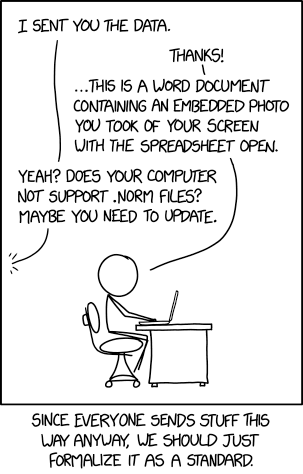
Why "normcap"?
See XKCD:
Contribute
Setup Environment
Prerequisites are Python, Tesseract (incl. language data) and on Linux also XClip.
# Clone repository
git clone https://github.com/dynobo/normcap.git

# Change into project directory
cd normcap

# Create and activate virtual env
python -m venv .venv
source .venv/bin/activate

# Install project development incl. dependencies
pip install -r requirements.txt
# or depending on your OS:
#    pip install -r requirements-macos.txt
#    pip install -r requirements-win.txt

# Register pre-commit hook
pre-commit install -t pre-commit

# Run normcap in pipenv environment
python -m normcap
Design Principles
- Multi-Platform
Should work on Linux, Mac & Windows. - Don't run as service
As normcap is (hopefully) not used too often, it shouldn't consume resources in the background, even if it leads to slower start-up time. - No network connection
Everything should run locally without any network communication. - Avoid text in UI
This just avoids translations ;-) And I think it is feasible in such a simple application. - Avoid configuration file or settings UI
Focus on simplicity and core functionality. - Dependencies
The fewer dependencies, the better. Of course, I have to compromise, but I'm always open to suggestions on how to further reduce dependencies. - Chain of Responsibility as main design pattern
See description on refactoring.guru - Multi-Monitors
Supports setups with two or more displays
Credits
This project uses the following non-standard libraries:
- mss - taking screenshots
- pillow - manipulating images
- tesserocr - wrapper for tesseract's API
- pyperclip - accessing clipboard
- pyinstaller - packaging for platforms
- notify-py - system notifications
And it depends on external software
- tesseract - OCR engine
Thanks to the maintainers of those nice libraries!
Certification

Release history Release notifications | RSS feed


Download files
Download the file for your platform. If you're not sure which to choose, learn more about installing packages.
Source Distribution
Built Distribution
Filter files by name, interpreter, ABI, and platform.
If you're not sure about the file name format, learn more about wheel file names.
Copy a direct link to the current filters
File details
Details for the file normcap-0.1.7.tar.gz.
File metadata
- Download URL: normcap-0.1.7.tar.gz
- Upload date:
- Size: 8.1 MB
- Tags: Source
- Uploaded using Trusted Publishing? No
- Uploaded via: twine/3.2.0 pkginfo/1.6.1 requests/2.24.0 setuptools/41.2.0 requests-toolbelt/0.9.1 tqdm/4.51.0 CPython/3.8.2
File hashes
| Algorithm | Hash digest | |
|---|---|---|
| SHA256 |
70fb40513fcbb3b5f6cc06a441d71ad799bd2889ba4fc7b28c142211856032d2
|
|
| MD5 |
4515cd5862a508751ac4ae884cca0096
|
|
| BLAKE2b-256 |
fb8cd63ba7ebf5d680d88a6b253843c80134dd5552241c46289d9cf24fedf446
|
File details
Details for the file normcap-0.1.7-py3-none-any.whl.
File metadata
- Download URL: normcap-0.1.7-py3-none-any.whl
- Upload date:
- Size: 8.1 MB
- Tags: Python 3
- Uploaded using Trusted Publishing? No
- Uploaded via: twine/3.2.0 pkginfo/1.6.1 requests/2.24.0 setuptools/41.2.0 requests-toolbelt/0.9.1 tqdm/4.51.0 CPython/3.8.2
File hashes
| Algorithm | Hash digest | |
|---|---|---|
| SHA256 |
9efcfbec20d5923ddc76582107a6f587974a3e27cb600d29f36efafe9987b70c
|
|
| MD5 |
fa1a3d75b180405b9fd5a87caf7657fb
|
|
| BLAKE2b-256 |
8273054424b4d143ab66a12ef503c75d59efd80bcd2e7886a7e5bc515e66d280
|






