
OCR-powered screen-capture tool to capture information instead of images.

Project description
NormCap
OCR powered screen-capture tool to capture information instead of images. For Linux, macOS and Windows.







Links: Source Code | Documentation | FAQs | Releases | Changelog
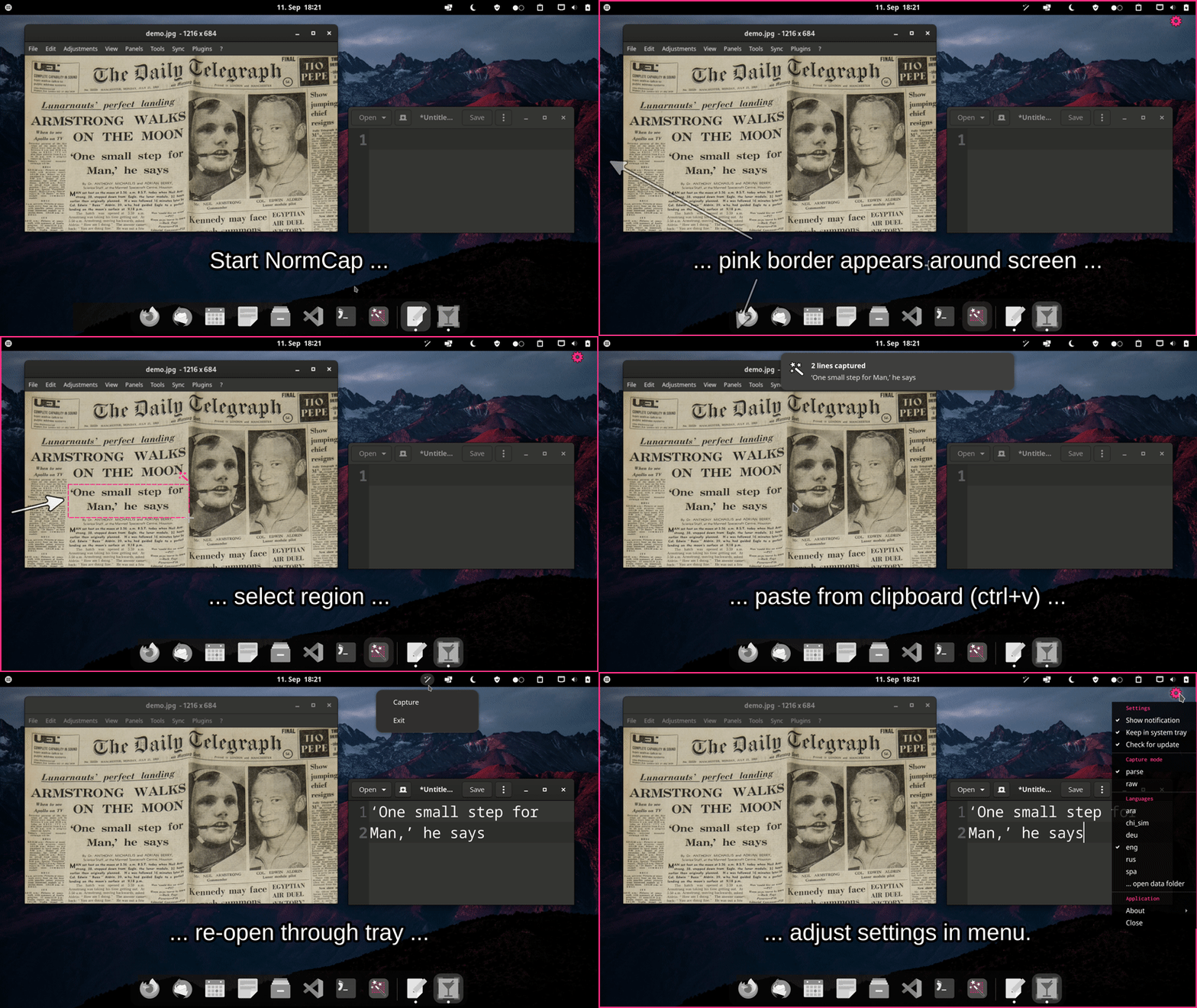
Quickstart
Install a prebuilt release:
- Windows: NormCap-0.4.0-x86_64-Windows.msi
- Linux: NormCap-0.4.0-x86_64.AppImage
- macOS (x86) ¹: NormCap-0.4.0-x86_64-macOS.dmg
- macOS (M1) ¹·²:
NormCap-0.4.0-arm64-macOS.dmg
1: On macOS, allow the unsigned application on first start: "System Preferences" → "Security & Privacy" → "General" → "Open anyway". You might also need to allow NormCap to take screenshots. #135
2: Might be available a bit delayed, as it is currently build manually. (Thx, @Takrin!)
Install from repositories:
- Arch / Manjaro: Install the
normcappackage from AUR. - FlatPak (Linux): Install com.github.dynobo.normcap from FlatHub.
If you experience issues please look at the FAQs or open an issue.
Python package
As an alternative to a prebuilt package you can install the NormCap Python package for Python >=3.9:
On Linux
# Install dependencies (Ubuntu/Debian)
sudo apt install build-essential tesseract-ocr tesseract-ocr-eng libtesseract-dev libleptonica-dev wl-clipboard

## Install dependencies (Arch)
sudo pacman -S tesseract tesseract-data-eng wl-clipboard

## Install dependencies (Fedora)
sudo dnf install tesseract wl-clipboard

## Install dependencies (openSUSE)
sudo zypper install python3-devel tesseract-ocr tesseract-ocr-devel wl-clipboard

# Install normcap
pip install normcap

# Run
./normcap
On macOS
# Install dependencies
brew install tesseract tesseract-lang

# Install normcap
pip install normcap

# Run
./normcap
On Windows
1. Install Tesseract 5 by using the
installer provided by UB Mannheim.
2. Adjust environment variables:
-
Create an environment variable
TESSDATA_PREFIXand set it to Tesseract's data folder, e.g.:setx TESSDATA_PREFIX "C:\Program Files\Tesseract-OCR\tessdata"
-
Append Tesseract's location to the environment variable
Path, e.g.:setx Path "%Path%;C:\Program Files\Tesseract-OCR"
-
Make sure to close and reopen your current terminal window to apply the new variables. Test it by running:
tesseract --list-langs
3. Install and run NormCap:
# Install normcap
pip install normcap

# Run
normcap
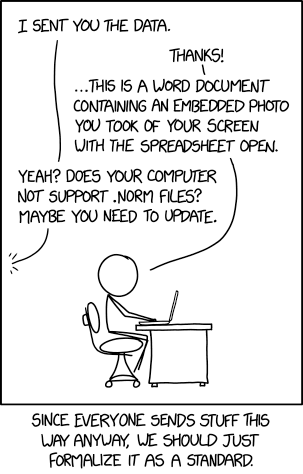
Why "NormCap"?
See XKCD:
Development
Prerequisites for setting up a development environment are: Python >=3.9, Poetry>=1.3.2 and Tesseract (incl. language data).
# Clone repository
git clone https://github.com/dynobo/normcap.git

# Change into project directory
cd normcap

# Create virtual env and install dependencies
poetry install

# Register pre-commit hook
poetry run pre-commit install

# Run NormCap in virtual env
poetry run python -m normcap
Credits
This project uses the following non-standard libraries:
- pyside6 - bindings for Qt UI Framework
- pytesseract - wrapper for tesseract's API
- jeepney - DBUS client
And it depends on external software:
- tesseract - OCR engine
- wl-clipboard - Wayland clipboard utilities
Packaging is done with:
- briefcase - converting Python projects into standalone apps
Thanks to the maintainers of those nice tools!
Similar open source tools
If NormCap doesn't fit your needs, try those alternatives (no particular order):
- TextSnatcher (Linux)
- GreenShot (Linux, macOS)
- TextShot (Windows)
- gImageReader (Linux, Windows)
- Capture2Text (Windows)
- Frog (Linux)
- Textinator (macOS)
Certification

Release history Release notifications | RSS feed


Download files
Download the file for your platform. If you're not sure which to choose, learn more about installing packages.
Source Distribution
Built Distribution
Filter files by name, interpreter, ABI, and platform.
If you're not sure about the file name format, learn more about wheel file names.
Copy a direct link to the current filters
File details
Details for the file normcap-0.4.0.tar.gz.
File metadata
- Download URL: normcap-0.4.0.tar.gz
- Upload date:
- Size: 237.0 kB
- Tags: Source
- Uploaded using Trusted Publishing? No
- Uploaded via: poetry/1.2.2 CPython/3.10.9 Linux/5.15.0-1031-azure
File hashes
| Algorithm | Hash digest | |
|---|---|---|
| SHA256 |
532ff7c256626ee524b1a6561c3b2620d32185f6b32bb21bd90a76d48dcd0f35
|
|
| MD5 |
8c8e61128f8d3a69ef574f5b782d8f51
|
|
| BLAKE2b-256 |
9e52a0437ea55cbdda602cef1881b8ab94a98bea88aebba8aa4cfa11d1ae74ea
|
File details
Details for the file normcap-0.4.0-py3-none-any.whl.
File metadata
- Download URL: normcap-0.4.0-py3-none-any.whl
- Upload date:
- Size: 265.9 kB
- Tags: Python 3
- Uploaded using Trusted Publishing? No
- Uploaded via: poetry/1.2.2 CPython/3.10.9 Linux/5.15.0-1031-azure
File hashes
| Algorithm | Hash digest | |
|---|---|---|
| SHA256 |
cd0f2aa075b093597d9c7af4e444f75b4651e3d5287564badb7f9b49271fdf9a
|
|
| MD5 |
d65c25324768f8a07e9b2424f7f1bbb3
|
|
| BLAKE2b-256 |
c693fb491e9ebfaa71b851033204de758b41a599f78ba1a999ac5ed4e827dd34
|






