



Nornir Validate
A Nornir plugin for validating network state (actual state) against YAML-based specifications (desired state). This project extends napalm-validate to perform command-based validation rather than relying solely on getters, providing greater flexibility in validating arbitrary command outputs. It leverages Nornir with nornir-netmiko to collect and format device data, then compares actual state against desired state to generate a compliance report.
For a complete list of supported validations, see the validation reference.
How It Works
- Validation File: The expected desired state specified in YAML format (can be automatically generated) is provided at runtime
- Desired State: The validation file is rendered by Jinja adding validation commands to the desired state and storing this as a Nornir host variable
- Data Collection: Nornir (netmiko plugin) executes commands against target devices parsing the outputs through
ntc-templatesto construct the actual state - Compliance Report: The desired state and actual state are fed into napalm_validate generating a compliance report of the differences
Installation
pip install nornir-validate
or
uv add nornir-validate
Usage
Below is just the bare minimum to get started, see the documentation for more detailed information.
Generating a Compliance Report
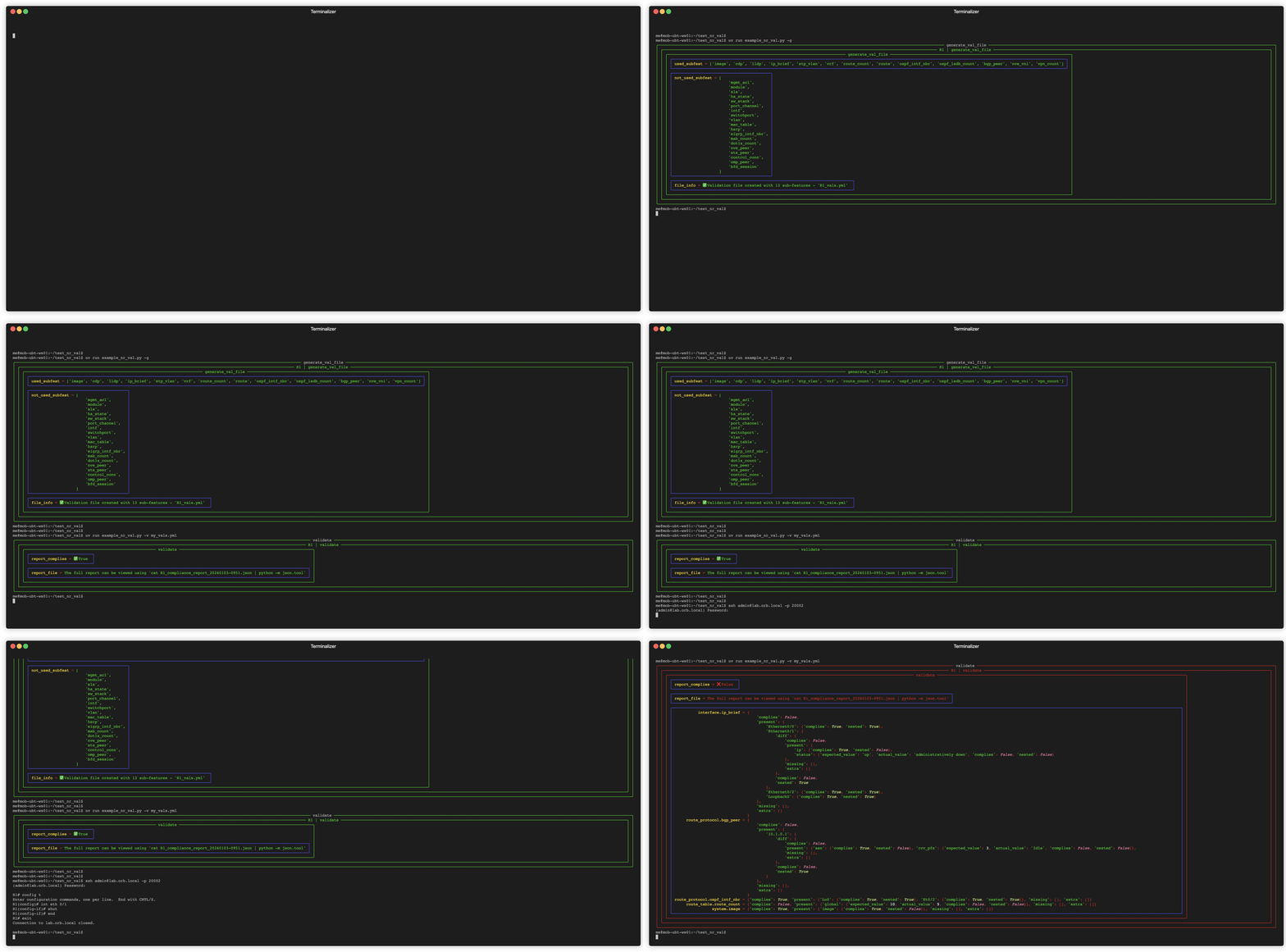
The compliance report is generated based on a YAML formatted validation file describing the desired state of the network. Comprehensive validation file examples for all supported operating systems and features can be found in the example_validation_files directory.
import yaml
from nornir import InitNornir
from nornir_validate import validate, print_result_val

nr = InitNornir(config_file="config.yml")

with open("input_val_data.yml") as tmp_data:
    input_data = yaml.load(tmp_data, Loader=yaml.Loader)

result = nr.run(task=validate, input_data=input_data)
print_result_val(result)
By default the full compliance report will be printed to the screen if the validation fails, add the save_report="" argument to also save it to file.
If a validation is requested for a device whose OS type has no command to gather it, it is reported under a skipped key and fails the task rather than being silently dropped from the report. This normally means a feature under the all dictionary is only valid for some of the OS types being validated, move it to the relevant groups or hosts dictionary.
Auto-generation of Validation Files
Rather than defining validation files manually from scratch they can be automatically generated from a devices actual state based of an index of sub-features. If no index file is specified (omit the input_data= argument), validations will be generated for all enabled sub-features on the device.
from nornir import InitNornir
from nornir_validate import generate_val_file, print_result_gvf

nr = InitNornir(config_file="config.yml")

with open("CORE_index.yml") as tmp_data:
    input_idx = yaml.load(tmp_data, Loader=yaml.Loader)

result = nr.run(task=generate_val_file, input_data=input_idx)
print_result_gvf(result, nr)
Validations that have environment-specific elements (such as VRF route table) must be manually defined in the index file, if not it will only generate validations for the global elements (the global routing table).
Example projects
Below are few projects that use nornir-validate:
- nr-val: A basic no-frills script to generate validation files and create compliance reports
- nornir-ppcheck: Tool for running pre and post change check as well as validation of network state
- update-mgmt-acl: Tool to update management and SNMP ACLs on Cisco IOS-XE, NXOS and ASA
Contributing
If you want to help add any validations to the project the Contribution Guidelines walk through the steps.
AI Disclaimer
Everything up to 2026-08-13 was written without AI assistance. Since then, some changes are made with AI assistance (mainly Claude Code).
1 maintainer

Metadata
1 maintainer
Release files for nornir-validate 1.0.0
For a detailed explanation of source distributions (sdists) and built distributions (wheels), please see the package formats documentation.
Source distribution (sdist)
| File | Size | Uploaded | Provenance | Actions |
|---|---|---|---|---|
| nornir_validate-1.0.0.tar.gz | 35.9 kB | With provenance | Details for nornir_validate-1.0.0.tar.gz |
Built distribution (wheel)
| File | Interpreter | ABI | Platform | Actions Reset |
|---|---|---|---|---|
| nornir_validate-1.0.0-py3-none-any.whl | Python 3 | none | any | Details for nornir_validate-1.0.0-py3-none-any.whl |
Total release size: 108.5 kB
Release files / nornir_validate-1.0.0.tar.gz
| Download URL | nornir_validate-1.0.0.tar.gz |
|---|---|
| Size | 35.9 kB |
| Tags | Source |
|
SHA-256 checksum How to use checksums |
46e69882ebdbc865463619a995d98221da2c87124ea01dd1207747aac75b94da
|
|
BLAKE2b-256 checksum How to use checksums |
6a0d2de45ba87aa9466ed8f8afd3c42fc5e594edbc415cc6095ee89a62da5166
|
| Upload date | |
|
Uploaded using Trusted Publishing? What is trusted publishing? |
Yes |
| Uploaded via |
twine/7.0.0 CPython/3.13.14
|
Provenance
Provenance describes where a file came from. On PyPI, provenance is shared via attestations, which provide a verifiable record of the build or publishing details. View details, limitations and caveats.


PyPI Publish Attestation
PyPI verified that this artifact, at this checksum, originated from the publisher listed below.
Signed by GitHub Actions, verified by PyPI on Sep 9, 2026.
Transparency logRelease files / nornir_validate-1.0.0-py3-none-any.whl
| Download URL | nornir_validate-1.0.0-py3-none-any.whl |
|---|---|
| Size | 72.6 kB |
| Tags | Python 3 |
|
SHA-256 checksum How to use checksums |
f5573caeda2b9615f87d68017a63022fdf750da8bbefa81f480709b15829739c
|
|
BLAKE2b-256 checksum How to use checksums |
e6a4513dccd513bfddd7306057a58106854d823013ed2f861ec7e0178a8d5c9d
|
| Upload date | |
|
Uploaded using Trusted Publishing? What is trusted publishing? |
Yes |
| Uploaded via |
twine/7.0.0 CPython/3.13.14
|
Provenance
Provenance describes where a file came from. On PyPI, provenance is shared via attestations, which provide a verifiable record of the build or publishing details. View details, limitations and caveats.
PyPI Publish Attestation
PyPI verified that this artifact, at this checksum, originated from the publisher listed below.
Signed by GitHub Actions, verified by PyPI on Sep 9, 2026.
Transparency logSecurity for nornir-validate 1.0.0
Provenance
Provenance describes where a file came from. On PyPI, provenance is shared via attestations, which provide a verifiable record of the build or publishing details. View details, limitations and caveats.
Full provenance
All 2 files in this release have been uploaded with provenance metadata.
Attestation for nornir_validate-1.0.0.tar.gz
PyPI Publish Attestation
PyPI verified that this artifact, at this checksum, originated from the publisher listed below.
Signed by GitHub Actions, verified by PyPI on Sep 9, 2026.
Transparency logA note on package security
PyPI is a repository for distributing packages, not a service for auditing them. While third-party security researchers and our staff do their best to detect and remove malicious packages, PyPI cannot guarantee the quality, security or suitability of any given package.
To learn more about protecting yourself from malicious actors, visit our package security documentation.














