
Noust 4.2 puts the console in order: one frame on every screen, with Network and Security as areas of their own, a Home of widgets each person arranges, background work in sight from any page, the server's software on one page, and pages that say what each thing is before they explain it. Signing in is redrawn, with room for your own logo, and a problem is reported from the console in three steps. Nothing that runs is rewritten, and the store moves to schema 17: read docs/UPGRADING-4.2.md before updating, and see docs/CHANGELOG-4.2.md.
Every earlier release has its own changelog in docs/ (
CHANGELOG-<version>.md).







Your server, Vercel-grade. No Docker required.
In Orkney and Shetland, a noust is the hollow on the shore where a boat is drawn up and sheltered between voyages. Your server is the noust, and your applications are the boats.
Noust deploys web applications onto a Linux server you own and keeps them running. Point it at a repository and a domain: it builds the application, runs it as a systemd unit behind nginx or Apache, obtains its certificate, and from then on every deploy is a new release that only goes live if it answers, and can be undone in seconds. The same engine is driven from the CLI, a browser console and a JSON API.
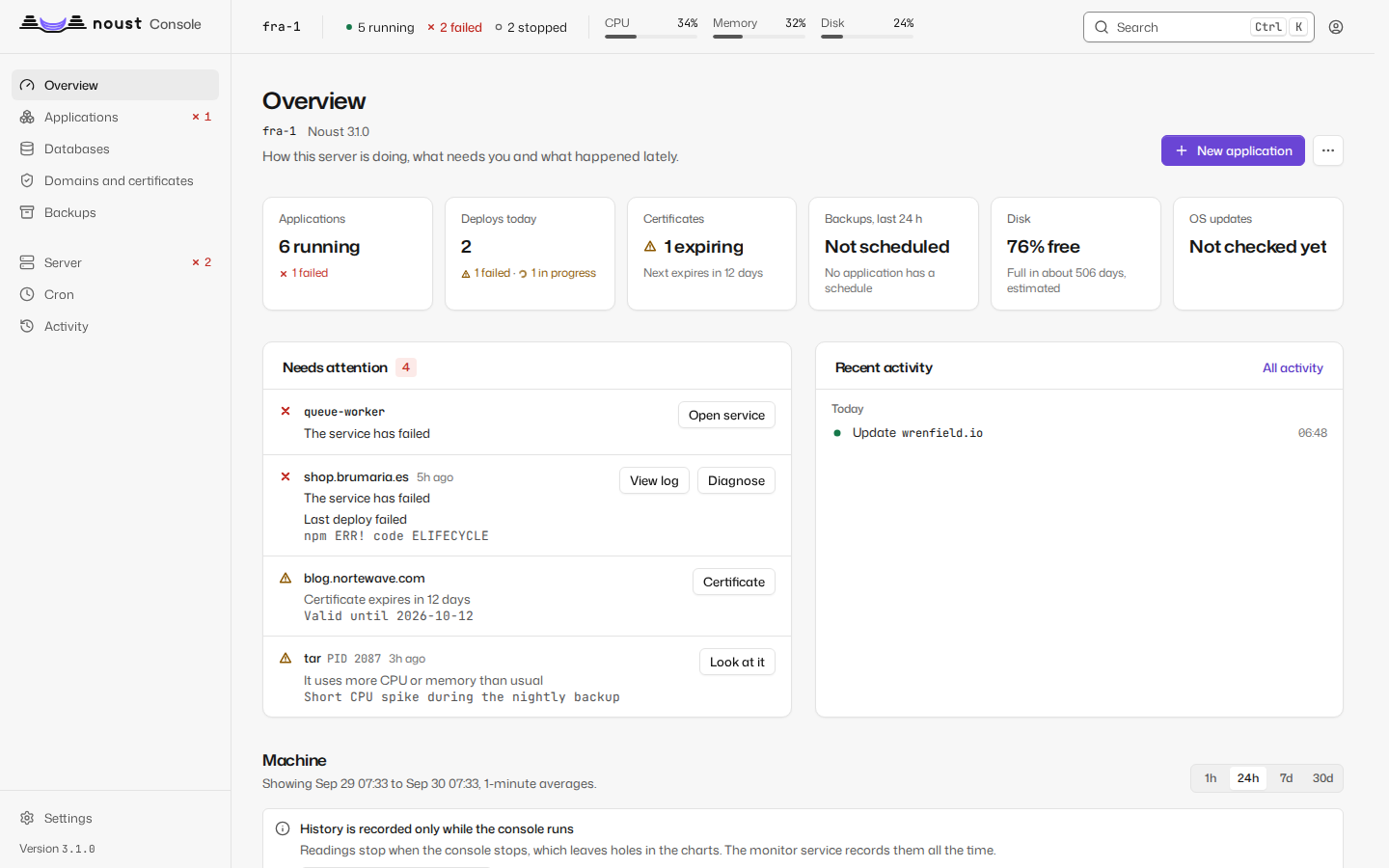
What Noust is, and is not
It is
- Your server. A VPS or a bare-metal machine running Ubuntu, Debian, Fedora or openSUSE.
- systemd-native. Every application is a unit you can inspect with
systemctlandjournalctl; every site is a file in/etc/nginxor/etc/apache2. Nothing sits between you and your processes, and there is no daemon with a privileged socket. - A distribution package. Installed with
apt,dnforzypper, or from PyPI. - Atomic deploys with instant rollback. Each deploy builds in its own directory, is
activated behind a health check, rolls back by itself when it does not answer, and any
release still on disk can be reactivated in seconds. From 4.0 a new application that runs a
process behind nginx starts as two instances (blue and green): the next release starts
beside the old one and nginx switches only once it answers; static and PHP sites already
switch with one atomic rename, and a Docker Compose stack gets the same through a relay,
which stays opt-in. A repository's
noust.yamlruns its migrations before anything serves the new version, and stops the deploy when they fail. - A deploy queue. A push that arrives while an application builds waits its turn instead
of failing, and several pushes are one update. Builds of different applications overlap up
to a limit you set,
noust deploy queueshows the line, andnoust deploy cancelstops a build that has not started to activate, removing the half-built release and touching nothing that serves. - Per-application resource limits with cgroups: memory, CPU and tasks.
- Builds without root. Dependencies install and build as an unprivileged account in a systemd sandbox that cannot read the rest of the machine, and every application created from 3.2 runs as a system account of its own.
- A console and an API over exactly what the CLI does, with accounts and roles, passkeys and two-factor authentication, sudo mode, four-eyes approvals and a tamper-evident audit log.
- The server too: operating-system updates, SSH, the firewall, fail2ban, disks and swap, checked and changed safely from the same console.
- A terminal in the browser, on the record. A shell as an application, in its sandbox and with its environment, and commands run once; for administrators, a root shell on the server, off until it is turned on. Each session asks you to confirm it is you, and is recorded (docs/terminal.md).
It is not
- A cluster or an orchestrator. Each server runs its own applications and manages itself. A central manages several Noust servers from one console and acts on many at once (see The fleet); it does not schedule work across them.
- A container platform. Applications run as ordinary processes. Docker is only needed if you deploy a Docker Compose project, which Noust then runs as a unit.
- A container boundary between running applications. Each application created from 3.2
runs as an account of its own, so one cannot read another's tree, but they share the kernel
and the machine; those from before keep the shared service account until
noust app identity migrate. Deploy only code you trust, as you would on any server you administer.
Install
On a fresh server, as root. The installer is published with every release beside its checksum (and the checksum's signature), so check it before you run it:
curl -fsSLO https://github.com/Perkybeet/noust/releases/latest/download/install.sh
curl -fsSLO https://github.com/Perkybeet/noust/releases/latest/download/SHA256SUMS
sha256sum -c --ignore-missing SHA256SUMS && sh install.sh
It reads the distribution and the architecture and refuses what is not on the
platform list; adds the Noust repository after checking that the key it
serves has the fingerprint pinned in the script; installs the noust package with apt, dnf
or zypper (the RHEL family has no package, so it gets a virtual environment with pip); runs
noust setup init -y and noust web enable; and prints how to reach the console. It downloads
no other script. sh install.sh --dry-run prints what it would do and changes nothing.
docs/install.md has the whole path to a signed-in console, and the other ways: by hand on Ubuntu, Debian, Fedora and openSUSE, from PyPI, from source, and the container image that runs a central.
First deploy
noust setup init                                                   # web server, certbot, git, Node.js, directories
noust create -d shop.example.com -s https://github.com/you/shop.git   # detect, build, run, serve, certificate
noust status shop.example.com                                      # how it is configured, whether it runs
noust update shop.example.com                                      # after a push: a new release behind the health check
noust releases rollback shop.example.com                           # back to the previous release, in seconds
noust create detects the application type, installs and builds it in a new release under
/var/www/apps/shop-example-com/, writes a systemd unit and an nginx site pointing at
current, obtains a Let's Encrypt certificate, and keeps the release only if the
application answers. When the repository has an .env.example, a .env is generated from
it, with random values for secrets. Useful options: --type, --port, --branch, --www,
--webserver apache, --no-ssl, --persist storage, --env-file (its variables are
written into the application's .env, 0600 and loaded by the unit with
EnvironmentFile=; only PORT and NODE_ENV stay inline in the unit, which local users can
read). To change the port later, redeploy with --port rather than editing the .env - the
unit's own PORT would otherwise win over one written there. For a private repository,
create a deploy key with noust setup ssh --generate --show and use the SSH URL, or connect
the GitHub App.
Run noust with a command and --help for its options, or noust -i for an interactive
menu. --dry-run before any command rehearses it without changing anything, and --json
gives machine-readable output where supported.
The console
noust web enable # a systemd service on 127.0.0.1:8080; prints an access token
The console listens on loopback unless you give it TLS, so opening the server's address in a browser will not reach it. Reach it through an SSH tunnel from your own machine; the banner prints the exact line:
ssh -L 8080:127.0.0.1:8080 root@server.example.com # then open http://localhost:8080
noust web enable keeps it running: it writes noust-web.service, which starts at boot and
restarts on failure, and noust web disable removes it. To try it first, noust web start
runs it in the foreground until Ctrl+C, and noust web start -d in the background until
noust web stop or the next reboot. All three take the same options and print the access
token the same way.
To open it from a browser without a tunnel, publish it on a name of your own, over TLS, with Noust's own nginx and Let's Encrypt:
noust console expose --domain console.example.com --allow-ip 203.0.113.0/24
noust console unexpose                  # removes exactly what the line above made
It refuses while any account can sign in without a second factor, when the name belongs to an
application or to a site Noust did not write, when the name does not point at this server, and
under the ENS profile unless forced (--force-ens, which asks, needs --allow-ip and is
audited). There is no plain-HTTP option: until the certificate exists the site answers 404. See
docs/console.md.
To expose it by hand, serve TLS (--host 0.0.0.0 --tls-cert ... --tls-key ..., or --self-signed),
or put it behind a reverse proxy that terminates TLS and declare it with --trusted-proxy.
Binding beyond loopback without TLS is refused unless you pass --insecure-http. A running
console reads the token from disk on every request, so noust web token --new retires the
old one at once, with no restart needed.
The first time, sign in with the access token: the console asks you to create the first account, an administrator (and, recommended, a security officer for someone else). From then on people sign in with their account, a password and an authenticator code, or a passkey, and the access token is emergency access. Destructive actions ask you to confirm it is you (sudo mode) and stay confirmed for 10 minutes.
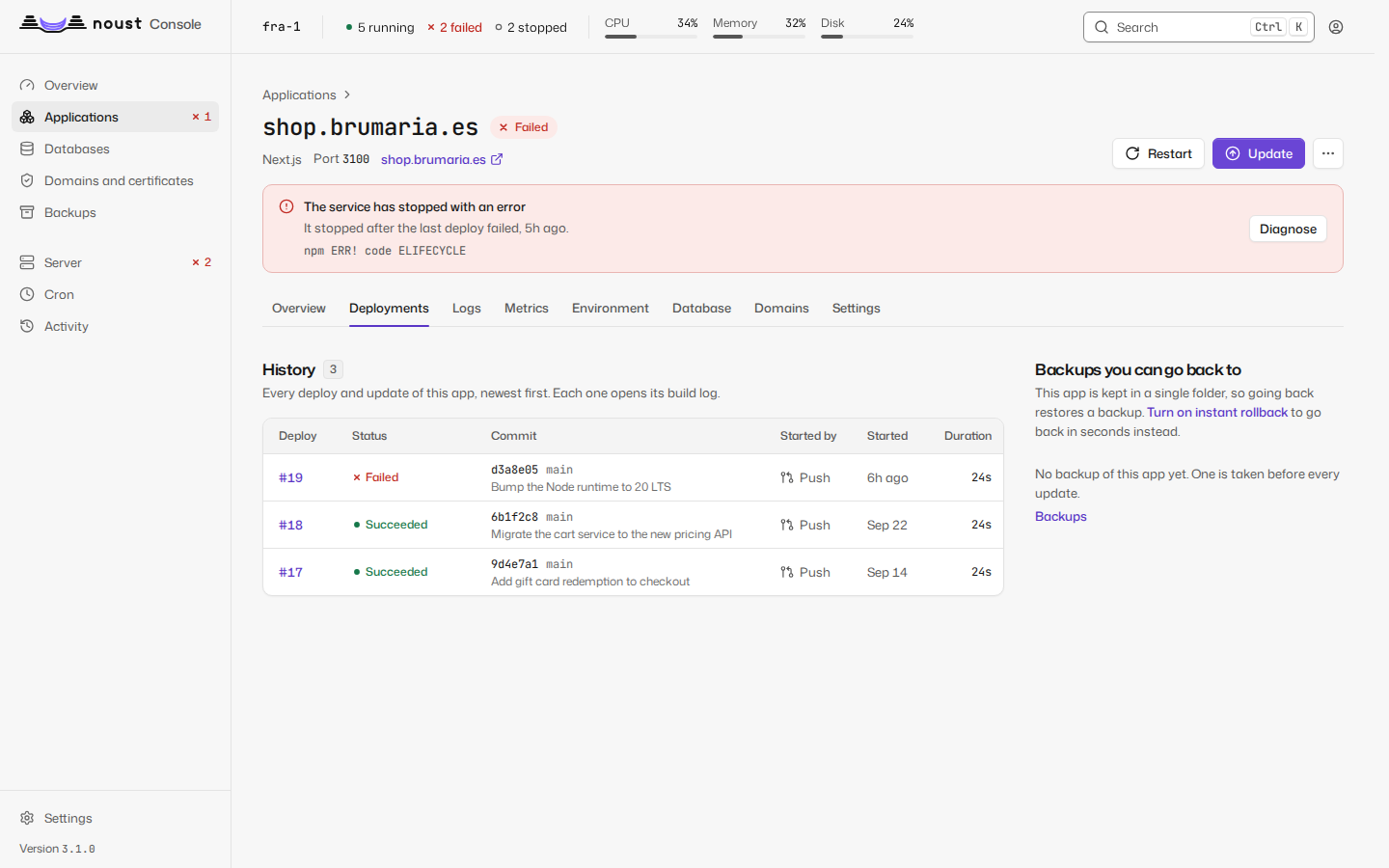
It covers everything the CLI does: an overview of what needs attention; applications with
their deployments, releases, live logs, metrics, environment, database, domains, diagnosis and
settings; databases with a data browser and a SQL console; backups, schedules and remote
destinations; certificates and sites, each site as text, as a structure you can edit visually
and as an animated diagram of what reaches what, with a "try a URL" that shows which location
answers; the server (updates, security, storage, services, system); cron; one page of logs for
the applications and the system's journal; an activity timeline, and a panel that answers "what happened here" for any stretch you select on a chart;
and settings, accounts, approvals, the audit log and compliance. On a central, fleet-wide views
and bulk actions.
The new-application wizard deploys from a repository, a recipe or an exported application.
It speaks English, Spanish, French, German, Brazilian Portuguese and Simplified Chinese, following
the browser, switched from the session menu; what nginx, systemd or certbot print is shown verbatim,
as they wrote it. Every page is built from
one design system, docs/DESIGN.md. Keyboard: Ctrl K for
the command palette, g a for applications, / to search, ? for every shortcut. Light,
dark and system themes. Built to WCAG 2.2 AA and tested with axe on every page.
See docs/console.md.
Releases and instant rollback
/var/www/apps/shop-example-com/
  releases/20260925-143012-a1b2c3d/    one build per deploy
  releases/20260924-101500-9f8e7d6/
  current -> releases/20260925-143012-a1b2c3d
  shared/.env                           outside every release
  shared/storage/                       persistent paths, linked into each release
  repo/                                 git cache
- Isolated builds. A deploy fetches and builds in a new directory; the running application sees nothing until activation. Dependencies are copied from the active release instead of reinstalled when the lockfiles have not changed.
- Health-gated activation.
currentis swapped atomically and the unit restarted; the release stays only if the application answers its health check (by default, any status below 500 on its port) within about 30 seconds. The path, accepted statuses and timeout are set per application withnoust app health. - Automatic rollback. If it does not answer, the previous release is put back and the deploy fails with the probe results and the unit's journal, verbatim.
- Instant rollback.
noust releases rollback DOMAIN [RELEASE], the console, orPOST /api/apps/{domain}/releases/{id}/activate: re-point, restart, same health gate.noust update DOMAIN --commit SHArebuilds an exact commit. - Retention. The newest five releases, plus the active one, are kept by default;
noust releases keep DOMAIN Nchanges it. - The branch it deploys.
noust app branch DOMAIN mainpins it: every update builds it and the webhook ignores pushes to other branches.noust update --branch XpinsXwhen it succeeds.noust app follow-tags DOMAIN 'v*'deploys the newest matching tag instead, from a GitHub release or a tag push, and never an older one. - Hooks and migrations.
hooks.pre_deployin a repository'snoust.yamlruns before the new version serves, in the application's identity, and a failure stops the deploy with what served before still serving;post_deployruns after the health gate and a failure leaves the deployment deployed with warnings. A deployment whose hook changed the database schema makes going back past it ask first (--schema-changed-ok): Noust puts code back, never a database.
Applications deployed in place (by 1.x, or with --layout inplace) stay in place until
you run noust app migrate DOMAIN (rehearse it first with noust --dry-run app migrate DOMAIN): the live tree becomes the first release, the .env and what the application wrote
for itself move to shared/, and if it does not come up everything is put back. A monorepo moves
the same way, every workspace's unit at once; Docker Compose projects keep deploying in place. See
docs/releases.md.
Builds without root
noust app sandbox test shop.example.com      # build the live commit in the sandbox, activate nothing
noust app sandbox enable shop.example.com    # sandboxed from the next deploy on
Installing dependencies and building run in a transient systemd unit as the unprivileged
noust-build account: it can write its release and its own cache, and cannot read Noust's
configuration, the store, root's home or any other application's .env. A self-test proves the
sandbox holds before the first build; where it does not (a container or WSL without mount
namespaces) the build stops rather than running as root. Applications and previews created from
3.1 on build this way. An application from before builds this exact commit in the sandbox on its
next update: when that passes it builds there from then on, and when it fails it builds as root
as before and says so (noust health, a notification). --network strict also builds without a
network.
Blue/green
noust app zero-downtime shop.example.com on
On by default for applications created from 4.0 (deploy.zero_downtime); opt-in for the
ones from before, with the command above. The application runs as two instances of one systemd
template unit, each on its own port and release, behind an nginx upstream. An activation starts the idle
instance on the new release, passes the health gate on its port, moves the upstream with
nginx -t and a reload, and stops the old instance after a drain (10 seconds by default). A
failed gate stops the new instance; the old one never stopped. Only for applications on
releases, with a process, behind nginx; the application must tolerate two copies running
for a few seconds. A Docker Compose stack uses the same command and gets
a relay instead.
Build, start and runtime
noust app build set shop.example.com --base-directory apps/web --build 'pnpm --filter web build'
noust app build set shop.example.com --start 'node dist/server.js --port ${PORT}' --runtime node@22
noust app build show shop.example.com        # which block applies, and where it comes from
noust create -d api.example.com -s https://github.com/you/shop.git --build-file api.yaml   # one repository, several apps
noust runtime install python@3.12            # Node and Python are installed under /opt/noust/runtimes
A build: block in the repository's noust.yaml (or the operator's, which replaces it whole)
changes how an application is installed, built and started: base_directory for a project in a
subdirectory of a monorepo, install, build and start commands (an argument vector, never a
shell), publish_directory for static output, and runtime to pin node@22, python@3.12 or
php@8.3. The project's .nvmrc, engines.node, .python-version, runtime.txt and
composer.json are read too. Pinned Node comes from nodejs.org verified against its published
SHA-256, Python from uv, PHP from the distribution's packages; builds run in the sandbox with the
runtime first on PATH, and the unit names its interpreter by absolute path. An update that
changes the block rewrites the unit's command, directory and PATH, and puts the previous unit
back when the release does not answer.
Nuxt, SvelteKit, Astro, Remix and React Router, and Angular are detected and deployed as a
server or as static files depending on how they are configured. Python binds 127.0.0.1, takes
its workers from WEB_CONCURRENCY, and starts with whatever server you name.
See docs/build.md.
Docker Compose
A project with a docker-compose.prod.yml (or any compose file) deploys as a stack under a
systemd unit, with nginx in front of its published ports, the health gate, and a way back to the
images that served when an update does not pass. 3.2 adds what a project with a database needs:
noust create -d shop.example.com -s https://github.com/you/shop.git        # detects the compose file
noust app zero-downtime shop.example.com on          # updates without a cut: a relay per web service
noust app adopt shop.example.com --path /opt/shop    # register a stack that already runs, untouched
noust app backup-before-update shop.example.com on   # on by default: databases dumped before an update
noust backup restore BACKUP_ID --databases-only      # put the stack's databases back
- Hooks. A
noust.yamlat the root of the repository declareshooks.pre_deploy(your migrations, run in a one-off container of the image just built, before anything is recreated; a failure stops the update) andhooks.post_deploy. The project's own steps live in its repository, hung from the hooks Noust gives it, and Noust stays generic. - No cut. The relay starts a twin of each web service from the new image, passes the health
gate against it, points nginx at it, recreates the real container, and moves nginx back. A
site you wrote yourself includes one line (
include /etc/nginx/noust-upstreams/<app>/<service>.servers;) that the command prints; it is never rewritten for you. - A way back from a migration. Every update dumps the stack's Postgres, MySQL, MariaDB or MongoDB through the engine's own client, and stops if it cannot; going back past a deployment that changed the schema asks before it goes.
- Your own site, respected. A site without Noust's marker is never rewritten or deleted.
noust app adoptrecords the file serving the domain, whatever it is called. - Workers. A stack that publishes no port is judged by its containers, not by a probe of a port nothing listens on.
See docs/compose.md.
Pull request previews
noust preview enable shop.example.com --domain previews.example.com
noust preview list shop.example.com
Every pull request gets pr-<n>-<app>.previews.example.com, deployed on releases with 256 MB
and half a CPU, rebuilt on each push, and removed when the request closes or after seven
days without a push, up to a quota per application. Events come from the application's own
webhook (GitHub, GitLab, Gitea, Bitbucket Cloud) or from the GitHub App. Pull requests from forks are refused,
and on GitHub so are those of authors who are not the repository's owners, members or
collaborators. A preview runs with the application's environment variables, except those
listed with --exclude-env; its build runs in the sandbox as noust-build and never sees
production secrets.
A private repository, with a key of its own
noust app deploy-key generate shop.example.com   # an ed25519 key for this repository alone
noust app deploy-key rotate shop.example.com     # a new one waits; the old keeps working until the host answers with it
noust app git-credential set shop.example.com -u x-token-auth --secret-file -   # an https token, kept as a secret
Each repository can have an SSH deploy key of its own, generated here (no passphrase, a 0600
secret file that never travels in a command line) or imported, instead of the one key of the
server. git is given only that key, host keys are pinned the first time a host is reached and a
changed key is refused, and a rotation never leaves the repository without a key that works.
noust setup ssh stays the fallback for a repository with none. A Bitbucket Cloud repository
deploys on push and builds previews like the other hosts (webhook with a secret), and clones with
a deploy key or an access token.
GitHub
A GitHub App per server, created from the console (Settings > Integrations) with GitHub's
manifest flow: it lives in your account, its private key stays on the server (0600), and
you choose the repositories when you install it. Private repositories clone with one-hour
installation tokens passed through git's environment only, never in a URL, .git/config, a
command line or a log; github:owner/repo works as a source everywhere. Pushes and pull
requests arrive at /hooks/github, and each deployment shows on GitHub as in progress,
success or failure. noust web expose-hooks DOMAIN publishes only /hooks/ of the console
on a domain of its own, so GitHub can reach a console that listens on loopback.
noust github status shows what is connected.
Recipes
noust recipe list -q "password manager"             # search; --category, --tag, --kind filter
noust recipe show vaultwarden                       # what it runs, what it opens, what to give it
noust recipe install vaultwarden -d vault.example.com
noust recipe outdated                               # installed recipes the catalogue has a newer version of
noust recipe update vault.example.com               # through the one update: backup, health gate, way back
430 applications, every one started for real before it was accepted: WordPress (PHP-FPM and MariaDB),
Uptime Kuma, Umami (PostgreSQL) and a one-page demo (Hello) run natively from a source pinned to a tag or
checked against a published checksum; the other 426 run in Docker, as a Compose stack behind nginx whose images are pinned by tag and by
digest. Some are one container (Vaultwarden, Memos, Syncthing, Grafana, Jellyfin, ntfy, Actual
Budget, CyberChef...); the rest bring the database they need as a service of their stack, which
Noust dumps before every update (Gitea, Forgejo, Nextcloud, Ghost, Plausible, Matomo, Mattermost,
Paperless-ngx, Keycloak, authentik, Immich, Odoo, Metabase, NocoDB, Directus, Twenty,
Rocket.Chat, Langflow, LiteLLM, Penpot, Plane, GlitchTip, Typebot, Home Assistant...). An
application that answers on more than one name (Typebot's builder and viewer, Logto's sign-in and
admin console) gets each name from the recipe. Ten more are listed with the reason they are not
installable, and where it was read. The 27 that are not free software say so, with their licence. Each recipe has generated secrets, its variables (kept across
updates and editable afterwards), a health check and the next steps. Also
"From a recipe" in the console's new-application wizard. Noust installs nothing on its own:
noust recipe show lists what a recipe needs. The format, the pinning policy and how to contribute
one are in docs/recipes.md.
Moving applications
noust app export shop.example.com -o shop.json        # secrets only with --with-secrets
noust app import shop.json --domain shop.example.org
noust import --from vercel ./shop                     # also: railway, render, heroku
An export is everything that defines an application, as versioned JSON; an import deploys it
through the normal path and applies the rest (domains, health check, retention, secret marks,
cron jobs, backup schedule, previews, blue/green), listing what it could not. noust import --from reads another platform's configuration in a repository and proposes Noust's, with a
warning for each thing that has no equivalent.
Domains, aliases and redirects
noust domain add shop.example.com shop.example.org                    # alias: serves the app too
noust domain add shop.example.com old-shop.example.com --kind redirect # 301 to the primary
noust domain list shop.example.com
noust domain remove shop.example.com shop.example.org
Every name is rendered into the site, tested by the web server before it is reloaded, and,
when the application serves TLS, added to its certificate. noust create --www records
www.<domain> as a redirect. The console checks where each name resolves before you add it.
It works for Docker Compose and monorepo applications too. A site you wrote yourself is never
rewritten or deleted, and the console edits any site as text, as a structure or as a diagram.
See docs/domains.md.
Resource limits
noust app limits shop.example.com --memory 512M --cpu 50% --tasks 256 --restart
noust app limits shop.example.com --memory none         # remove one limit
noust app limits shop.example.com                       # show them
The limits become MemoryMax=, CPUQuota= and TasksMax= in the unit (200% is two CPUs).
With --restart, the application must pass the health gate under its new limits or the old
ones are put back. Docker Compose projects set their limits in the compose file.
Diagnose
noust diagnose shop.example.com
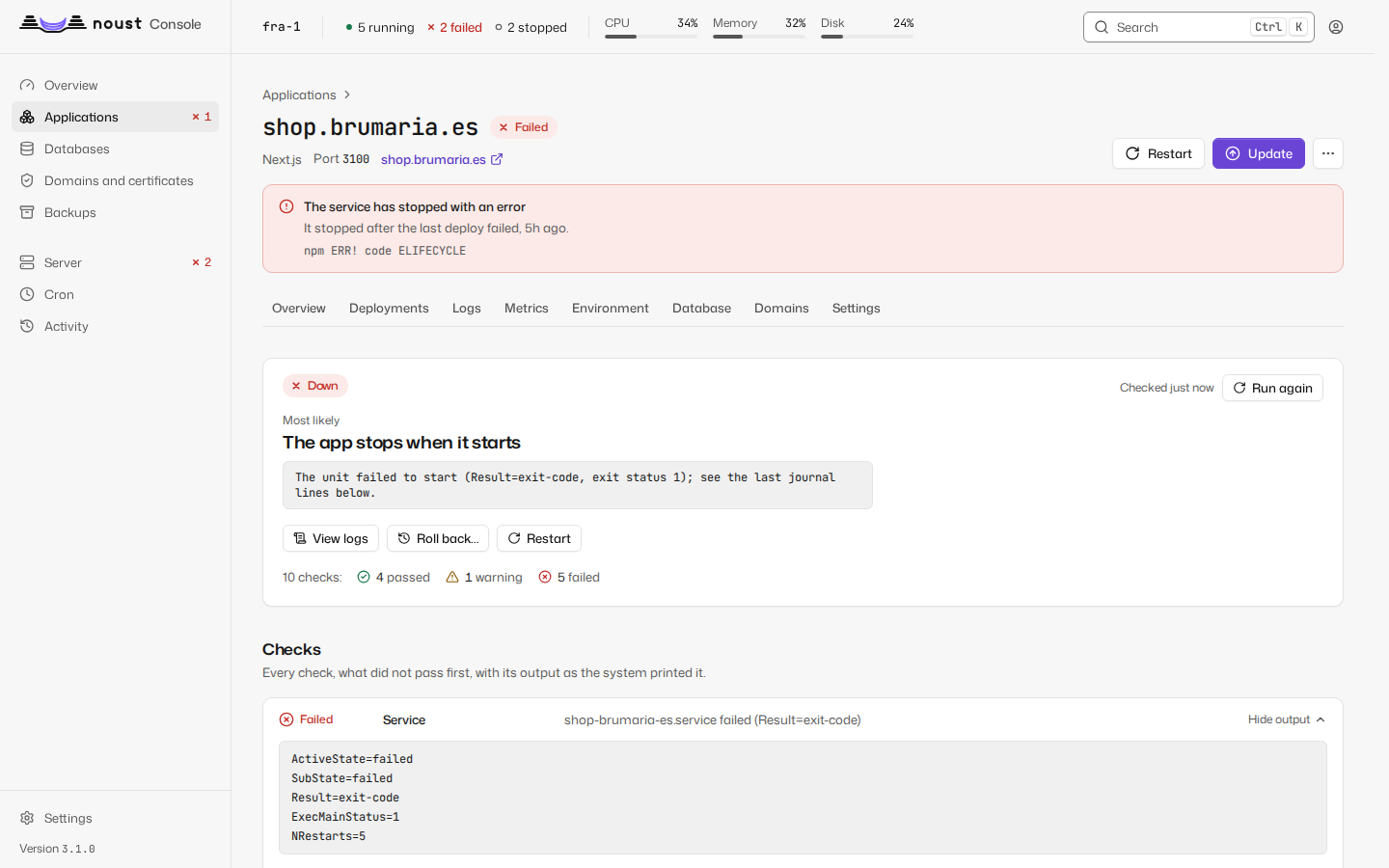
Explains why an application is down. It checks the unit's state and exit status, whether the
recorded port is listening (and which port the process listens on instead), an HTTP probe
straight to the application and one through nginx, the last journal lines, nginx's error log
for the domain, the certificate, the last deployment, OOM kills in the last week and disk
space, and puts the most likely cause first: "Listening on 3001, Noust routes to 3000",
"Killed by the kernel for running out of memory". Every probe only reads. --json for
scripts; the exit code is 1 when the application is down.
noust health checks the whole server: free disk, the web server, every application,
certificates close to expiry, memory pressure, the hardening checks, the audit trail and the
applications still building as root.
Backups
noust backup create shop.example.com -m "Before the migration" --include-databases
noust backup list shop.example.com
noust backup verify BACKUP_ID
noust backup restore BACKUP_ID
noust backup schedule create shop.example.com --schedule daily --retention-count 7
noust rollback shop.example.com            # restore the latest backup, after a safety backup
A backup is one .tar.gz under /var/backups/noust/<app>/, mode 0600, with a SHA-256
checksum: the application (for one on releases, the active release and shared/), its .env
unless --no-env, and on request its database dumps (--include-databases) and Docker
volumes, so it restores on a server that knows nothing about this one. For a Docker Compose
stack, --include-databases dumps the databases its containers run, and noust backup restore --databases-only puts them back. Schedules are systemd
timers named noust-backup-<app>, and their retention applies only to the backups they
made: manual and safety backups are never removed by a schedule.
Off the server. Remote destinations go through rclone: SFTP, SMB, WebDAV, S3 and compatibles, B2, Google Drive, OneDrive, Dropbox, pCloud and mounted paths, with optional encryption per destination.
noust backup destination add offsite ...        # --help lists the kinds and their options
noust backup destination test offsite
noust backup push BACKUP_ID offsite
noust backup remote-list offsite
noust backup restore --from offsite BACKUP_ID
Each scheduled backup is copied to the schedule's destinations, verified and pruned per destination; each server keeps its own folder, so servers sharing a bucket never remove each other's backups. Keep the key an encrypted destination shows: it is the only way to read its backups on a replacement server.
Databases
noust db install postgresql                             # also: mysql (MariaDB), redis (or Valkey), mongodb
noust db provision shop.example.com -e postgresql       # a database and an account, linked to the app
noust db tables shop -e postgresql                      # browse, read-only
noust db query shop "SELECT count(*) FROM orders" -e postgresql
noust db backup-schedule set shop -e postgresql --schedule daily --keep 7 --to offsite
noust db restore shop dump.pgc -e postgresql --as-new shop_check
noust db connect-info shop -e postgresql                # the SSH tunnel to reach it from your computer
A database belongs to an application: noust db provision creates it with its own account and
writes the connection string into the application's environment, and rotating a password
updates every application that uses it behind the health gate. Each database has a page in the
console with its data, a SQL console with history and saved statements, backups, users and
metrics. Reads are read-only because the database server enforces it: a dedicated role or
account with SELECT and nothing else, in a read-only transaction, so pg_read_file or
LOAD_FILE() are out of reach. Writing SQL or editing a row needs sudo mode. Backups are
policies with a schedule, retention, verification and remote destinations (timers
noust-backup-db-*), and a restore never loses data: --as-new restores beside the database,
and restoring over it takes a safety copy first. Passwords never appear in a command line, and
database ports open beyond the machine are reported (noust db exposure).
The engine and its version are a choice, not an accident (noust db provision shop -e postgresql --version 17 --install; noust db choices lists what the server can be given). The host's engine
stays the primary one; for another version beside it, or an engine the host does not have, Noust
runs it itself from the engine's official image pinned by digest, on 127.0.0.1 only and held to a
memory limit (noust db instance create pg16 --engine postgresql --version 16 --memory 512m), and
it is then postgresql@pg16 wherever an engine is named. And when a
desktop client has to connect from your computer, noust db public open shop -e postgresql --from 203.0.113.7 makes that one database reachable on a port you choose, on purpose and with every
consequence shown first: a proxy forwards the port (the engine is not reconfigured), an account of
its own is made for it, TLS is required where the engine can, and the firewall is told.
noust db public close shop -e postgresql undoes all of it.
Cron
noust cron create nightly-report "/usr/bin/node scripts/report.js" --schedule daily \
  --app shop.example.com --working-directory /var/www/apps/shop-example-com/current
noust cron list
noust cron run nightly-report
noust cron runs nightly-report
Jobs are systemd timers (noust-cron-<name>). A schedule is hourly, daily, weekly,
monthly or any OnCalendar= expression. The command runs without a shell: write
/bin/sh -c "..." when you need pipes or &&. --app associates the job with an
application and makes its directory the default working directory; for an application on
releases, the code is under current/, so name that directory. --timeout SECONDS stops a
run that takes longer and counts it as failed, and --service NAME runs the command in a
service of the application's Compose stack. Runs and their output are read back from the
journal.
Processes beside the web process, copies of it, the sandbox of its unit, mounted files, a file manager, log shipping and the list of changes not applied yet are in docs/runtime.md.
Notifications and webhooks
Notifications go to a webhook (JSON, optionally signed), Slack, Discord, Telegram or email,
each written for its channel, on deploys (deploy_started off by default, deploy_success,
deploy_failed, deploy_rolled_back), restores, backups (backup_failed, and
backup_success if you want a heartbeat), cert_expiring, unit_failed, disk_threshold,
app_unreachable and app_recovered (an application whose unit runs but no longer answers, and
its first answer after), deploy_hook_failed, reboots, approvals and, on a central, a server
unreachable, recovered or with a changed host key. They come from every deployment: the CLI's, the console's, webhooks' and previews'. A
failure carries the health gate's evidence, and every message names its server
(server.name). Configure
them in the console (Settings > Channels) or with
noust config set notifications.<key> <value>, and test a channel with
noust notify test slack. They are written in English or Spanish
(notifications.language). Private and loopback destinations are refused unless listed in
notifications.allow_private_hosts.
Deploy on push: in the console (application > Settings > Deploy on push) or with
POST /api/apps/{domain}/webhook-secret, create a secret, and point a GitHub, Gitea,
GitLab or Bitbucket Cloud webhook at https://<console>/hooks/deploy/<domain>, which the forge must be able to
reach. Signatures are verified; only pushes to the branch the application deploys update it
(pin one with noust app branch), or, for an application that follows tags, a published
release or a tag push.
noust app webhook show|rotate|disable|deliveries DOMAIN does the same from the terminal: how
far the setup is (public URL, secret, branch, GitHub App), the secret, and every delivery the
forge sent, including the ones that were ignored or had a wrong signature.
API
noust token create ci --scope deploy
curl -H "Authorization: Bearer $TOKEN" https://panel.example.com/api/apps
curl -H "Authorization: Bearer $TOKEN" https://panel.example.com/api/openapi.json
A JSON API under /api. Tokens belong to an account and hold at most its permissions, narrowed
by scope (read, deploy, admin), by a list of permissions or by network. Every route
declares its permission (x-noust-permission in the schema), what needs sudo mode and what
needs a second person's approval. Long operations are jobs
you follow over REST, Server-Sent Events (/events) or WebSockets. Every error has the same
shape: {error, detail, hint, fields, output}, where output is the system tool's own
output. The contract is served as OpenAPI at /api/openapi.json. See
docs/api.md.
Accounts, roles and audit
noust user create alice --role admin --person-ref alice@example.com   # password at a hidden prompt
noust user invite bob --role operator                                   # a one-use code; Bob sets his own
noust audit verify                                                      # the chain is intact
noust ens check                                                         # against Spain's ENS, category MEDIUM
People sign in with their own account, each with one role: viewer (sees, changes nothing),
operator (also restarts, deploys, rolls back, renews, backs up), admin (also creates,
configures, deletes and reads secrets, and holds accounts, security settings and the audit log
unless the roles are split, as they are under ENS medium), security (accounts, security
settings and the audit log; deploys nothing) and auditor (reads everything, including the
audit log). A second factor, an authenticator app or a passkey, is asked of every account where
a compliance framework requires it and wherever the console is published; elsewhere an account
sets it up when it likes. Where the separation of duties is on, one person cannot hold roles that
go against each other without a documented exception. Until the first account exists, the access
token works exactly as before; afterwards it is emergency access.
Every change, from the console, the API or the CLI (--reason says why), is recorded in an audit
log whose lines are chained with an HMAC (noust audit verify) and shipped to journald or a
syslog server as they are written. With approval.enabled, root-equivalent changes (raw units,
cron commands, backup hooks, raw site configuration), SQL that writes, adding servers and role
grants wait for a second person (noust approval). security.profile: ens-medium sets every
value Spain's Esquema Nacional de Seguridad expects for category MEDIUM, and noust ens report
writes the evidence for an auditor. See docs/security.md and
docs/ENS.md.
The server
noust server status                         # updates pending, reboot due, disks, clock, swap
noust server updates apply --security-only  # in its own systemd unit; never reboots by itself
noust server security checks                # hardening checks, each with its fix or exact steps
noust server security ssh harden disable-passwords   # reverts after 5 min unless confirmed from a new login
noust server security firewall status       # the rules against the ports that really answer
noust server reboot --at 04:00
The Server page and noust server look after the machine itself: operating-system updates
(security first, the distribution's automatic updates, services left on replaced libraries,
whether a reboot is due and why), reboots and shutdowns now or scheduled, SSH (the effective
configuration, keys, and fixes that undo themselves unless you confirm from a new login), the
firewall compared with the ports that answer (with a guard that never closes SSH, and a warning
when Docker publishes past it), fail2ban, disks and clean-ups, swap, time, host name, processes
and the journal of any unit. Every change runs as a job with the system's own output, needs sudo
mode and is audited. A finding you decide to keep is accepted with a reason and an end date,
never marked as passed.
The fleet
One Noust, the central, shows and drives several Noust servers from a single console and CLI.
The central can be one more VPS, or a container on a machine at home such as a NAS, reaching
each server over an SSH tunnel it opens outward, so no port has to be opened anywhere. A central
that only manages the fleet (central.role = hub) deploys nothing itself.
noust node key vps1                                                    # on the central
noust fleet authorize --central-key 'ssh-ed25519 AAAA...' --name nas   # on vps1, as root
noust node add vps1 --ssh vps1.example.com --join-code -               # on the central
noust fleet status                                                     # every server it manages
noust fleet certs --expiring 21                                        # certificates of every server
noust node label vps1 env=prod
noust fleet run apps_update --label env=prod --serial 1 --canary vps1  # plan first, then run
Enrollment is inverted by default: you authorize the central on the server, where you are
already root. When you only have an address and a way in, noust fleet enroll vps1 --host 203.0.113.9 (or the same two API calls, POST /api/fleet/enroll/host-key and POST /api/fleet/enroll) does the three steps from the central:
it connects once, to a host key you confirm, installs Noust there if it is missing, authorizes
itself and joins the server, and keeps neither the password nor the key. The result is the same
as the manual way, which is what happens underneath: noust fleet authorize installs
the central's key for noust-tunnel, an account with no home, no shell and no password that
sshd itself restricts to forwarding that server's console port - no terminal, no command, no
other forward - and prints a join code, which you paste into the central (noust node add).
The central pins the server's SSH host key from that code; a change closes the tunnel rather
than being accepted. A server enrolled by 3.0 has the key in root's authorized_keys; move it
with noust node migrate-tunnel.
Each server decides how far any central may go there, and enforces it itself: read, deploy
or admin, plus host access (off by default) for SSH, the firewall, system accounts and
root-equivalent changes (noust fleet access). The central forwards the operator's name and
role, so the server applies its own table for that role within the ceiling and its audit log
names the person, not the central. Anything a server marks as needing confirmation or approval
is asked on the central, and the server refuses the call anyway if the central did not vouch
for it.
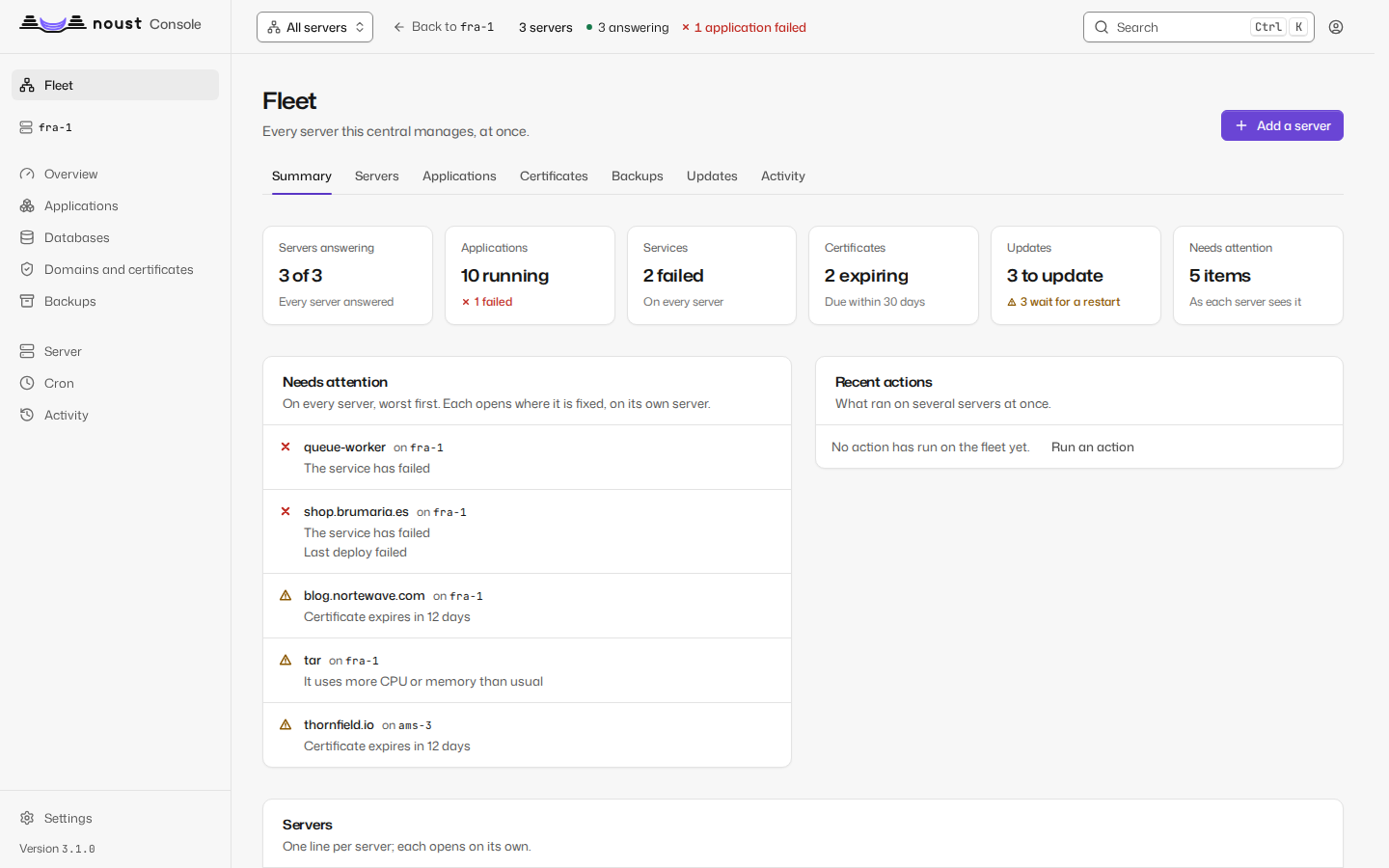
The console has a scope selector at the head of its sidebar (every page also exists at
/n/<server>/...): one server, All servers or This central. All servers is the fleet,
with fleet-wide views - overview, servers, applications, certificates, backups, updates and
activity, each row linking to its server - and bulk actions: renew certificates, back up and
verify, update or restart applications, update Noust or the operating system, on servers chosen
by name or label, with a plan first, batches, a canary and a retry of what failed. A server that
is down or too old is one row with its reason, never an error for the page. A central with its
secrets sealed shows a lock screen until you unlock it, and noust central backup keeps an
encrypted copy of everything it holds.
See docs/CENTRAL.md for running a central on a NAS or a VPS, the access ceiling, sealing its secrets, backups and troubleshooting.
Security model
- Root, on purpose. Noust administers the machine, so it runs as root. An
adminaccount, the access token and any token holdingroot_equivalentcan make changes that run as root; treat them that way, and turn on approvals if one person should not make them alone. - Roles and permissions at one chokepoint. Every API route declares its permission and one layer enforces it; a route without one is refused.
- Builds without root. Dependencies install and build as
noust-buildin a sandbox, and a build never falls back to root silently. - Processes are started with an argument list, never a shell, always with a timeout, and
secrets travel through the environment or standard input, never the command line. Only one
module may start a process, and the test suite enforces it.
--dry-runruns only commands declared as read-only probes. - The console listens on loopback, and refuses to serve beyond it without TLS.
- Strict Content Security Policy with Trusted Types; no inline scripts or styles; nothing loaded from another origin.
- Sessions are server-side,
HttpOnly,SameSite=Strict, with CSRF tokens; they end after 30 minutes idle and 12 hours in total. Every account has a second factor or a passkey. Five failures lock an account, and an address, for 15 minutes. - Sudo mode: deleting, restoring, revealing secrets, editing units and sites, writing SQL or configuration, server changes and account management need a confirmation from the last 10 minutes.
- Audit log: one closed catalogue of events, chained with an HMAC, retained 365 days and shipped off the machine to journald or syslog.
- Secrets at rest are
0600: configuration,.envfiles, the store, the credentials Noust keeps for itself, backups; TOTP secrets are encrypted.
See docs/security.md, which also says how to report a vulnerability, and docs/SECURITY-MODEL.md for what Noust guarantees, the failure each guarantee answers, the test that fails if it stops holding, what it does not guarantee, and how to verify a release's signatures.
Privacy. Noust has no telemetry and sends no error reports to anyone. The only request it makes
without being told where is the update check (noust config set updates.check false turns it off);
everything else goes to addresses you configured. docs/PRIVACY.md lists them, and
tests/test_privacy.py fails if a change adds a way out that is not declared.
Command reference
| Command | Does |
|---|---|
| Applications | |
noust create |
Deploy an application and put it online (also deploy, new; --recipe) |
noust list |
List deployed applications (--json) |
noust status |
Show how an application is configured and whether it runs (--json) |
noust start, stop, restart |
Control an application |
noust update |
Pull, rebuild and redeploy an application (--commit, --tag) |
noust delete |
Delete an application and everything deployed with it |
noust logs |
Show or follow an application's log (-f, --json) |
noust env |
Show, configure, mark or export an application's environment |
noust releases |
List releases, set their retention and roll back to one instantly |
noust app |
Migrate to releases; limits, health check, blue/green and the Compose relay, branch and tags, hooks, build commands and runtime (app build), adopt a running stack, workers, database copy, build sandbox, account, deploy webhook; export and import |
noust runtime |
List, install and remove the Node and Python versions applications are pinned to; the PHP versions the server has |
noust domain |
Add, list and remove aliases and redirects |
noust preview |
Pull request previews |
noust recipe |
Browse the catalogue of ready-made applications, install one, see which are outdated and update them |
noust import |
Read another platform's configuration and propose Noust's |
noust diagnose |
Explain why an application is down |
noust rollback |
Restore an application's latest backup |
| Web server and certificates | |
noust site |
Create, enable, disable, show and delete nginx or Apache sites |
noust cert |
Obtain, list, inspect, renew, revoke and delete certificates |
| Services and schedules | |
noust service |
Create and control the systemd services Noust owns |
noust cron |
Run commands on a schedule, as systemd timers |
| Data | |
noust backup |
Create, verify, restore, schedule and send backups off the server |
noust db |
Install engines; databases per application, data, queries, users, backups and their policies |
| The machine | |
noust setup |
Prepare the server (init), check it (doctor), SSH keys, completions |
noust server |
Updates, reboots, storage, swap, time, host name, processes, logs; server security for checks, SSH, firewall, fail2ban and accepted risks |
noust health |
Check the server and report what needs attention |
noust monitor |
Watch processes, resources, units and certificates, record the metrics history, and report |
noust config |
Read, set, upgrade and clean Noust's configuration |
noust store |
Inspect, export and maintain Noust's database |
| Fleet | |
noust fleet authorize |
Run on a server: let a central manage it, and print the join code |
noust fleet deauthorize |
Run on a server: stop trusting a central, revoke its key and tokens |
noust fleet access |
Run on a server: the most any central may do there |
noust fleet status |
Run on a central: every node it manages, reachability, version, apps |
noust fleet apps, certs, backups, updates, activity |
Run on a central: one view across every node |
noust fleet run, jobs, retry |
Run on a central: an action on several nodes, with a plan, batches and a canary |
noust node |
Run on a central: register, list, show, test, label, rekey, migrate to the tunnel account and remove nodes |
noust central |
Run and look after a central: serve it (run), back it up, seal, unseal, unlock, status |
| Console and access | |
noust web |
Start, stop and inspect the console, or run it as a service; issue its access token |
noust github |
The GitHub App: status, installations, repositories |
noust user |
Accounts and roles: create, invite, set a role, disable, unlock, reset MFA, exceptions |
noust passkey |
List and remove passkeys; reset them when all are lost |
noust token |
Create, list and revoke API tokens |
noust sessions |
List and revoke console sessions |
noust 2fa |
Enrol, confirm, disable or recover the access token's two-factor authentication |
noust approval |
Four-eyes requests: list, show, approve, reject |
noust audit |
Read, verify, export, ship and review the audit log |
noust ens |
Check the server against the ENS profile; evidence report, access reviews, inventory |
noust incident |
Freeze the evidence of an incident and lock the console down |
noust notify |
Send a test notification through a channel |
Global options go before the command: -v (verbose), --dry-run, --json, --no-color,
--reason (why, for the audit log), -i (interactive menu), --changelog, -V (version). Tab completion: noust setup completions.
Supported application types
| Type | Detected by | Built and run with | Releases |
|---|---|---|---|
nextjs |
next.config.{js,mjs,ts}, or next in package.json |
Install, build, then start or the standalone server |
Yes |
nuxt |
nuxt in package.json, or a nuxt.config |
Install, build; Nitro's server (.output/server/index.mjs), or the generated files |
Yes |
sveltekit |
@sveltejs/kit in package.json |
Install, build; node build with adapter-node, the files with adapter-static |
Yes |
astro |
astro in package.json, or an astro.config |
Install, build; the files, or dist/server/entry.mjs with @astrojs/node |
Yes |
remix |
@remix-run/* or @react-router/*, or a react-router.config |
Install, build; the start script or remix-serve; the client bundle in SPA mode |
Yes |
angular |
angular.json with @angular/core |
Install, build; the client bundle, or the SSR server |
Yes |
vite |
vite.config.{js,ts,mjs}, or vite in package.json |
Install, build, served as static files; preview when it uses SSR |
Yes |
nodejs |
package.json with Express, Fastify or Koa, a main or a start script |
Install, build if present, then start:prod, start:production or start |
Yes |
python |
requirements.txt, pyproject.toml, setup.py, Pipfile |
A virtual environment (Poetry or Pipenv when locked); Gunicorn (Hypercorn when the project depends on it) on 127.0.0.1, with Uvicorn workers for FastAPI and Starlette; Django's collectstatic when it has a STATIC_ROOT |
Yes |
php-fpm |
composer.json with a front controller, or a root index.php |
A PHP-FPM pool per application on its own socket, composer when there is a composer.json, a fastcgi site (nginx or Apache); public/ detected |
Yes |
go |
go.mod with a package main, and no Dockerfile |
go mod download, then go build in the build sandbox; the binary runs as the unit |
Yes |
rust |
Cargo.toml with a program, and no Dockerfile |
cargo fetch, then cargo build --release --offline; the binary runs as the unit |
Yes |
ruby |
Gemfile next to config.ru or Rails's config/application.rb, and no Dockerfile |
Bundler in the release, assets precompiled, Puma on 127.0.0.1 |
Yes |
static |
index.html, and no project manifest |
Served by the web server from public, dist, build, www, html or the root |
Yes |
monorepo |
turbo.json, pnpm workspaces and at least two apps under apps/ |
pnpm; one unit and one subdomain per workspace. For new work prefer one application per workspace: docs/workspaces.md | In place; releases after noust app migrate (docs/releases.md) |
docker-compose |
A compose file (docker-compose.prod.yml first) |
docker compose v2 under a systemd unit, nginx in front of published ports; hooks, relay, database copy |
In place |
container |
A Dockerfile or Containerfile with no compose file; --image for a registry; --builder railpack for any other language |
A compose file Noust writes, one container on 127.0.0.1 under a systemd unit, nginx in front; one image per release | Images |
Detection tries the most specific type first: monorepo, Docker Compose, Angular, Astro, Nuxt,
Remix, SvelteKit, Next.js, PHP, Vite, Python, Go, Ruby, Rust, Node.js, static. When nothing matches, Noust falls
back to Node.js and says so; pass --type to choose. Node package managers (npm, pnpm, Yarn,
Bun) are detected from the lockfile (pnpm-lock.yaml, bun.lockb or bun.lock, yarn.lock,
package-lock.json, then packageManager), the nearest one above the project in a monorepo;
--pm npm|pnpm|bun forces one. Any of them can be built and started with commands of your
own: docs/build.md.
Configuration
/etc/noust/config.yaml, mode 0600. Read and change it with the CLI rather than by hand:
noust config show                              # everything in effect, secrets in clear
noust config get deploy.layout                 # one key; secrets print as ***
noust config set ssl.email ops@example.com
noust config upgrade                           # add the options a newer Noust expects
noust config clean                             # remove the settings no version reads any more
Common keys: apps_directory (/var/www/apps), webserver (nginx), service_user
(www-data), ssl.email, deploy.layout (releases for new applications, or inplace),
backup.directory (/var/backups/noust), server.name, security.profile (standard or
ens-medium), auth.*, audit.*, approval.*, notifications.*, monitor.*. Every setting
is documented in docs/CONFIG.md. NOUST_APPS_DIR,
NOUST_WEBSERVER, NOUST_SERVICE_USER and NOUST_SSL_EMAIL override the matching keys. The
reference configuration is
/usr/share/noust/config.example.yaml.
Files
/var/www/apps/<app>/          applications (see Releases above)
/etc/noust/config.yaml        configuration, 0600 in a 0700 directory
/etc/noust/web-*              console state: signing key, token hash, sessions, 2FA, audit log
/var/lib/noust/noust.db       the store: applications, deployments, jobs, releases, domains
/var/lib/noust/               also build logs, and secrets/ for the credentials Noust keeps
/var/backups/noust/           backup archives
/var/cache/noust/build/<app>/ build caches, owned by the noust-build account
/var/log/noust/               Noust's own log files
/etc/nginx/noust-upstreams/   servers files a Compose relay switches (<app>/<service>.servers)
/etc/systemd/system/          units: <app>.service, noust-web, noust-monitor, noust-cron-*,
                              noust-backup-*, noust-previews
When /var/lib/noust is not writable the store lives in ~/.local/share/noust/; noust store path prints where it
is.
A server that came through 3.x may still carry links under the product's old names beside these
paths; noust setup retire-links removes the ones nothing uses.
Requirements
- Operating system and processor: Debian 12 and 13, Ubuntu 22.04, 24.04 and 26.04, Fedora, openSUSE Leap and Tumbleweed, and the RHEL family through pip; amd64 and arm64, Raspberry Pi 64-bit included (docs/PLATFORMS.md says what each is, and what was tested where)
- Python: 3.10 to 3.14
- Privileges: root
- Installed by
noust setup initwhen missing: nginx or Apache, certbot, git, Node.js - Per application type:
python3-venvfor Python, PHP-FPM and its extensions for PHP, Docker with the Compose plugin for Compose projects, the engine for databases (noust db install), rclone for remote backup destinations
Documentation
The documentation is in docs/, arranged by the question you have.
Start: what Noust is, how to install it, and a first application from start to finish.
- What Noust is, and when it is not for you and how it works
- Install Noust, on the platforms it supports
- Your first application: deploy it, put it on your domain, give it a database, back it up, roll it back, add a service from the catalog and make it safe to leave alone
- Add a server to your fleet, or move from Coolify or Dokploy
- Next steps, by what you want to do
Something is wrong: Troubleshooting, one page per symptom, with the messages word for word.
Guides: stacks, build, sources, Docker Compose, containers, recipes, releases and rollback, domains, certificates, databases, backups, CI, the monitor, notifications, the console's security, teams, single sign-on, a central and its fleet, and from Coolify, Dokploy, CapRover or Dokku.
Concepts: the guarantees Noust makes and what leaves a server.
Reference: every command, every API operation
and the API guide, every setting and
what each one does, the console page by page, man noust and
noust <command> --help.
Releases: the release policy, upgrading to 4.0, going back, what changed in 4.0 and in the API (API changes). Every earlier release has its own changelog and upgrade guide in docs/; those of the line that carried the product's previous name are 2.3, 2.2, 2.1, 2.0 and upgrading to 2.0.
ENS: Esquema Nacional de Seguridad, categoría MEDIA (in Spanish).
Development
git clone https://github.com/Perkybeet/noust.git
cd noust
python -m venv .venv && source .venv/bin/activate
pip install -e ".[all,dev]"

pytest                          # tests
ruff check src/noust tests      # lint
ruff format src/noust tests     # format
mypy                            # types
The console's source is in panel/ (React, TypeScript, Vite; Node 22). Its build is
committed to src/noust/web/static/, so packaging never runs Node. See
CONTRIBUTING.md for the project's rules and the console workflow.
License
From 2.1.0, Noust (then under its previous name) is free software under the GNU Affero General Public License, version 3 or later (LICENSE). You may use it for anything, commercially included, study it, change it and share it. If you change Noust and let others use your changed version over a network (a hosted service, say), you must offer them its source under the same licence.
Releases up to 2.0.x were published under a non-commercial source-available licence, and stay
under it: the text is the LICENSE of each of those tags.
Copyright (c) 2024-2026 Yago López Prado. For a licence on other terms (for example to embed Noust in a closed product), write to yago.lopez.adeje@gmail.com.
Acknowledgments
- Certbot - SSL certificate automation
- The open-source community
Support
- Questions and ideas: GitHub Discussions
- Bugs and requests: GitHub Issues; from the console, Report a problem opens the form filled in (how)
- A vulnerability: privately, see SECURITY.md
- Email: yago.lopez.adeje@gmail.com
Developed by Bitbeet
1 maintainer

Metadata
1 maintainer
Release files for noust 4.2.0
For a detailed explanation of source distributions (sdists) and built distributions (wheels), please see the package formats documentation.
Source distribution (sdist)
| File | Size | Uploaded | Provenance | Actions |
|---|---|---|---|---|
| noust-4.2.0.tar.gz | 14.5 MB | With provenance | Details for noust-4.2.0.tar.gz |
Built distribution (wheel)
| File | Interpreter | ABI | Platform | Actions Reset |
|---|---|---|---|---|
| noust-4.2.0-py3-none-any.whl | Python 3 | none | any | Details for noust-4.2.0-py3-none-any.whl |
Total release size: 28.5 MB
Release files / noust-4.2.0.tar.gz
| Download URL | noust-4.2.0.tar.gz |
|---|---|
| Size | 14.5 MB |
| Tags | Source |
|
SHA-256 checksum How to use checksums |
268fa6b4989707746e6b9aa46cc49363c198a3a0011e222b5e1f2629759f0c7c
|
|
BLAKE2b-256 checksum How to use checksums |
1fa60e2a7daf0a2c8cf939923d4ca3681c77acd17e78d4367d57351064f81235
|
| Upload date | |
|
Uploaded using Trusted Publishing? What is trusted publishing? |
Yes |
| Uploaded via |
twine/7.0.0 CPython/3.13.16
|
Provenance
Provenance describes where a file came from. On PyPI, provenance is shared via attestations, which provide a verifiable record of the build or publishing details. View details, limitations and caveats.


PyPI Publish Attestation
PyPI verified that this artifact, at this checksum, originated from the publisher listed below.
Signed by GitHub Actions, verified by PyPI on Nov 6, 2026.
Transparency logRelease files / noust-4.2.0-py3-none-any.whl
| Download URL | noust-4.2.0-py3-none-any.whl |
|---|---|
| Size | 13.9 MB |
| Tags | Python 3 |
|
SHA-256 checksum How to use checksums |
aa7536a2878637589be26669b40406c135c78bce1d891fcb6160233e35b89f15
|
|
BLAKE2b-256 checksum How to use checksums |
3a18de78d4f276744c3b9b94add54c71f214b2f976e40f97fb26692a47188f74
|
| Upload date | |
|
Uploaded using Trusted Publishing? What is trusted publishing? |
Yes |
| Uploaded via |
twine/7.0.0 CPython/3.13.16
|
Provenance
Provenance describes where a file came from. On PyPI, provenance is shared via attestations, which provide a verifiable record of the build or publishing details. View details, limitations and caveats.
PyPI Publish Attestation
PyPI verified that this artifact, at this checksum, originated from the publisher listed below.
Signed by GitHub Actions, verified by PyPI on Nov 6, 2026.
Transparency logSecurity for noust 4.2.0
Provenance
Provenance describes where a file came from. On PyPI, provenance is shared via attestations, which provide a verifiable record of the build or publishing details. View details, limitations and caveats.
Full provenance
Both files in this release have been uploaded with provenance metadata.
Attestation for noust-4.2.0.tar.gz
PyPI Publish Attestation
PyPI verified that this artifact, at this checksum, originated from the publisher listed below.
Signed by GitHub Actions, verified by PyPI on Nov 6, 2026.
Transparency logA note on package security
PyPI is a repository for distributing packages, not a service for auditing them. While third-party security researchers and our staff do their best to detect and remove malicious packages, PyPI cannot guarantee the quality, security or suitability of any given package.
To learn more about protecting yourself from malicious actors, visit our package security documentation.














