
npmctl
Owner-scoped GitOps for Nginx Proxy Manager
Validate desired-state YAML, plan safe owner-scoped changes, apply clean reconciles, and adopt existing NPM resources only when you ask for it.








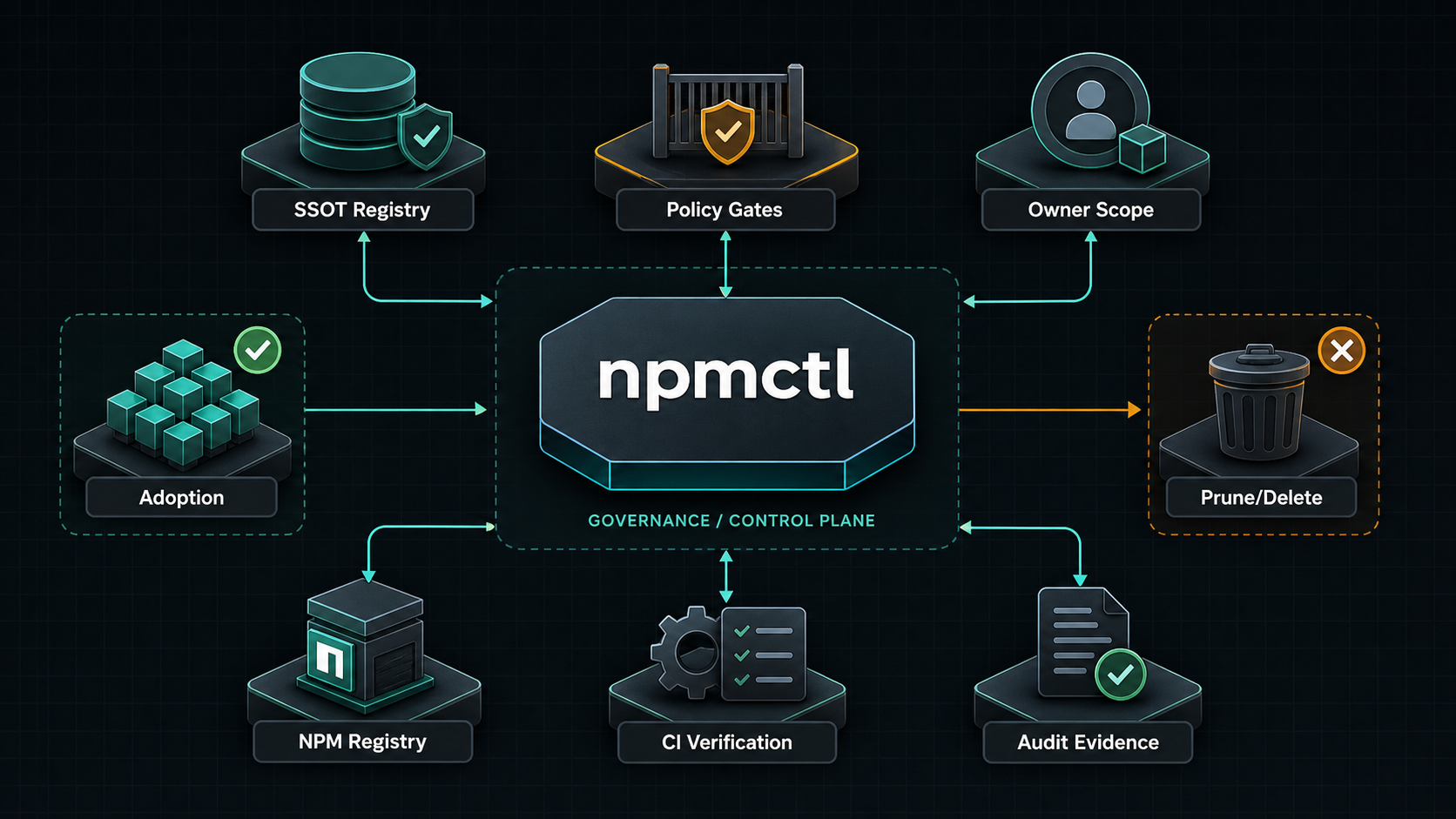
npmctl is the Python package and console script for declarative, owner-scoped Nginx Proxy Manager automation. It manages proxy hosts, certificates, access lists, redirection hosts, dead hosts, streams, users, settings, and provider-backed DNS records without silently mutating foreign-owned resources.
Supported Python Versions
npmctl supports Python 3.10, 3.11, 3.12, 3.13, and 3.14.
Why npmctl
- Owner-scoped reconciliation instead of global mutable state
- Explicit
plan,apply, andadoptflows instead of ad hoc API scripting - Safe reference handling for certificates and access lists
- Fail-closed behavior when the target NPM schema does not support a required operation
- CLI-first workflows that fit GitOps, CI, and controlled repair operations
- Independently versioned contracts, reproducibility lockfiles, and immutable reviewed plan artifacts
- Transactional adjacent migrations with backups, chained ledgers, leases, and explicit recovery classification
FAQ
What is npmctl?
Answer: npmctl is a GitOps-style controller for Nginx Proxy Manager that reads desired-state YAML, compares it to the live NPM API, and produces safe owner-scoped plans before any mutation happens.
What problem does npmctl solve?
Answer: npmctl replaces manual NPM clicking and one-off API scripts with repeatable desired state, explicit adoption, conflict detection, and controlled reconciliation for reverse-proxy resources.
Does npmctl modify resources it does not own?
Answer: No. npmctl treats NPM resources as owner-scoped, refuses to mutate foreign-owned resources, and only attaches metadata to unmanaged resources when you run npmctl adopt.
How does npmctl handle certificate issuance and rotation?
Answer: npmctl treats certificates as declarative resources in the same desired state as proxy hosts. Issuance happens when a desired certificate must be created, and rotation happens through explicit reconcile policy rather than hidden mutation of unrelated resources.
Can npmctl adopt existing manually created NPM resources?
Answer: Yes. npmctl adopt can attach npmctl ownership metadata to compatible unmanaged resources so future plans and applies can manage them under explicit owner scope.
Install
Use pipx for an isolated CLI install:
pipx install npmctl
npmctl --version
Use uv if you manage tools with uv:
uv tool install npmctl
npmctl --help
Use pip inside an existing virtual environment:
python -m venv .venv
. .venv/bin/activate
python -m pip install npmctl
npmctl --help
PowerShell activation:
python -m venv .venv
.\.venv\Scripts\Activate.ps1
python -m pip install npmctl
npmctl --help
Configure NPM
Set Nginx Proxy Manager API credentials as environment variables:
export NPM_BASE_URL=http://127.0.0.1:81/api
export NPM_IDENTITY=admin@example.com
export NPM_SECRET=changeme
Or pass them directly:
npmctl --base-url http://127.0.0.1:81/api --identity admin@example.com --secret changeme health
Quick Start
Validate desired state without touching the API:
npmctl validate ./desired-state
npmctl --output json validate ./desired-state
Plan owner-scoped changes:
npmctl plan ./desired-state --owner workload-a
Apply a clean plan:
npmctl apply ./desired-state --owner workload-a
Adopt unmanaged matching resources:
npmctl adopt ./desired-state --owner workload-a
npmctl adopt ./desired-state --owner workload-a --allow-field-drift
Desired State
Every managed resource needs npmctl ownership metadata:
apiVersion: npmctl.com/v1
schemaVersion: 2
proxy_hosts:
  - domain_names: [app.example.com]
    forward_scheme: http
    forward_host: app
    forward_port: 3000
    meta:
      managed_by: npmctl
      owner: workload-a
      resource_id: proxy.app
References use resource_id values:
apiVersion: npmctl.com/v1
schemaVersion: 2
certificates:
  - name: wildcard-example
    domain_names: ["*.example.com", example.com]
    certificate_type: letsencrypt
    api_payload:
      provider: letsencrypt
    meta:
      managed_by: npmctl
      owner: workload-a
      resource_id: cert.wildcard-example
access_lists:
  - name: private-admins
    api_payload:
      satisfy_any: 0
      items: []
      clients: []
    meta:
      managed_by: npmctl
      owner: workload-a
      resource_id: acl.private-admins
proxy_hosts:
  - domain_names: [app.example.com]
    forward_host: app
    forward_port: 3000
    certificate_ref: cert.wildcard-example
    access_list_ref: acl.private-admins
    ssl_forced: 1
    allow_websocket_upgrade: 1
    caching_enabled: 1
    block_exploits: 1
    meta:
      managed_by: npmctl
      owner: workload-a
      resource_id: proxy.app
More Documentation
- Related PyPI package: https://pypi.org/project/npmctl-namecheap/
- Repository: https://github.com/groupsum/npmctl
- Examples: https://github.com/groupsum/npmctl/tree/master/examples/desired-state
- Docs: https://github.com/groupsum/npmctl/tree/master/docs
1 maintainer

Metadata
1 maintainer
Release files for npmctl 0.4.1
For a detailed explanation of source distributions (sdists) and built distributions (wheels), please see the package formats documentation.
Source distribution (sdist)
| File | Size | Uploaded | Provenance | |
|---|---|---|---|---|
| npmctl-0.4.1.tar.gz | 8.9 kB | Without provenance | Details |
Built distribution (wheel)
| File | Interpreter | ABI | Platform | Reset |
|---|---|---|---|---|
| npmctl-0.4.1-py3-none-any.whl | Python 3 | none | any | Details |
Total release size: 18.8 kB
Release files / npmctl-0.4.1.tar.gz
| Download URL | npmctl-0.4.1.tar.gz |
|---|---|
| Size | 8.9 kB |
| Tags | Source |
|
SHA-256 checksum How to use checksums |
d5a1f1f6fedbbc9db359a2d3dfa7526d21e90ad16e4a94d3f518941f1ae3a429
|
|
BLAKE2b-256 checksum How to use checksums |
9845fa90625bc6335310f54d1b0ea94198ea7f6dece2480f783d65e5963a5c3f
|
| Upload date | |
|
Uploaded using Trusted Publishing? What is trusted publishing? |
Yes |
| Uploaded via |
uv/0.12.1 {"installer":{"name":"uv","version":"0.12.1","subcommand":["publish"]},"python":null,"implementation":{"name":null,"version":null},"distro":{"name":"Ubuntu","version":"24.04","id":"noble","libc":null},"system":{"name":null,"release":null},"cpu":null,"openssl_version":null,"setuptools_version":null,"rustc_version":null,"ci":true}
|
Release files / npmctl-0.4.1-py3-none-any.whl
| Download URL | npmctl-0.4.1-py3-none-any.whl |
|---|---|
| Size | 10.0 kB |
| Tags | Python 3 |
|
SHA-256 checksum How to use checksums |
64cf34507a055744c6b68a348b71dd6b7a90f309ca5be26403e8da43c5b19e77
|
|
BLAKE2b-256 checksum How to use checksums |
5f31bc692a28d9d59dd317bf9a5e604b7fe313b17d5c1c97bcee4f24568c4647
|
| Upload date | |
|
Uploaded using Trusted Publishing? What is trusted publishing? |
Yes |
| Uploaded via |
uv/0.12.1 {"installer":{"name":"uv","version":"0.12.1","subcommand":["publish"]},"python":null,"implementation":{"name":null,"version":null},"distro":{"name":"Ubuntu","version":"24.04","id":"noble","libc":null},"system":{"name":null,"release":null},"cpu":null,"openssl_version":null,"setuptools_version":null,"rustc_version":null,"ci":true}
|
Security for npmctl 0.4.1
Provenance
Provenance describes where a file came from. On PyPI, provenance is shared via attestations, which provide a verifiable record of the build or publishing details. View details, limitations and caveats.
No provenance found
None of the files in this release were uploaded with provenance metadata.
A note on package security
PyPI is a repository for distributing packages, not a service for auditing them. While third-party security researchers and our staff do their best to detect and remove malicious packages, PyPI cannot guarantee the quality, security or suitability of any given package.
To learn more about protecting yourself from malicious actors, visit our package security documentation.














