
A utility for sending push notifications

Project description


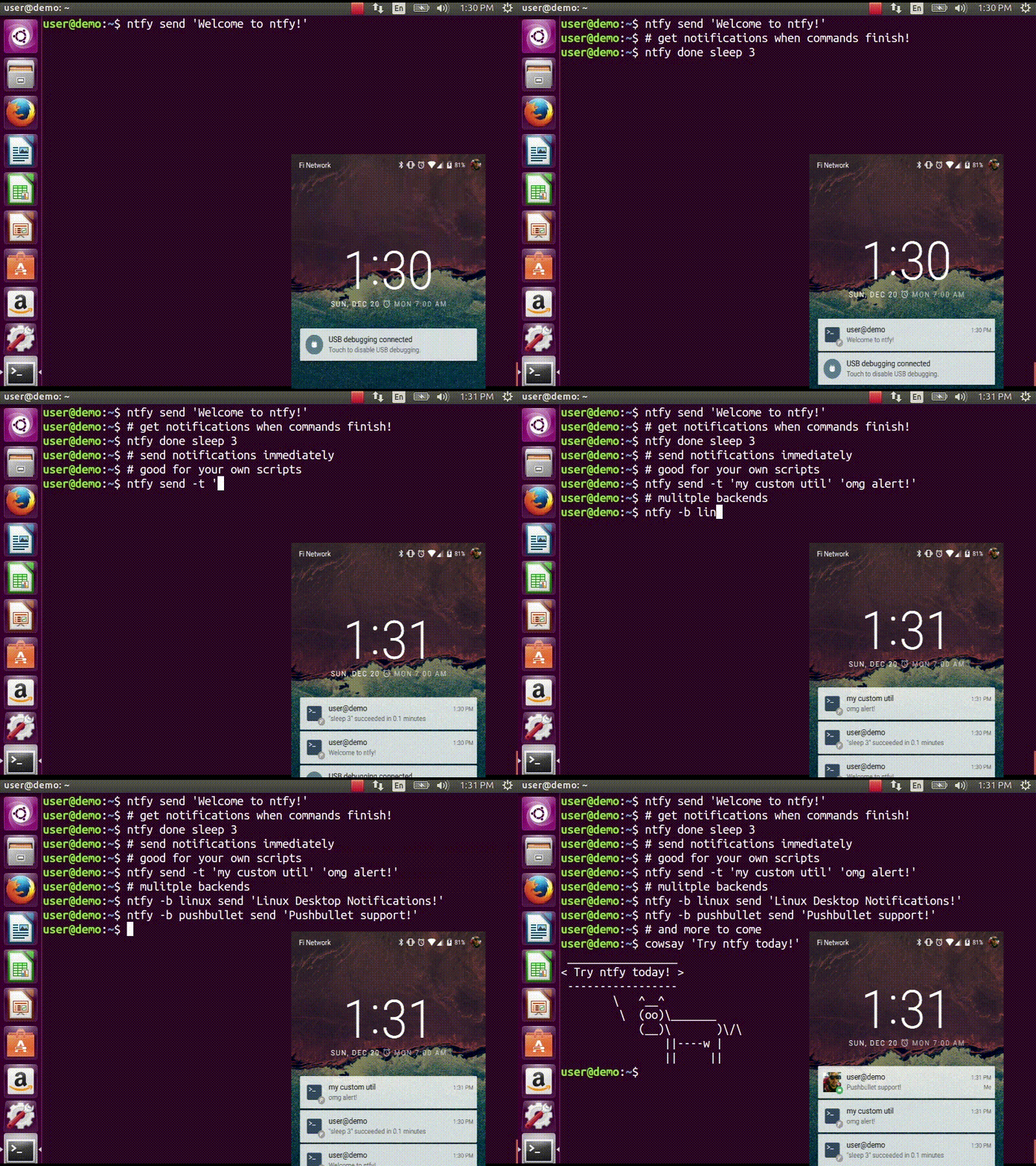
ntfy brings notification to your shell. It can automatically provide desktop notifications when long running commands finish or it can send push notifications to your phone when a specific command finishes. Confused? This video demonstrates some of this functionality:
Quickstart
$ sudo pip install ntfy
$ ntfy send test
# send a notification when the command `sleep 10` finishes
# this sends the message '"sleep 10" succeeded in 0:10 minutes'
$ ntfy done sleep 10
$ ntfy -b pushover -o user_key t0k3n send 'Pushover test!'
$ ntfy -t 'ntfy' send "Here's a custom notification title!"
$ echo -e 'backends: ["pushover"]\npushover: {"user_key": "t0k3n"}' > ~/.config/ntfy/ntfy.yml
$ ntfy send "Pushover via config file!"
$ ntfy done --pid 6379  # PID extra
$ ntfy send ":tada: ntfy supports emoji! :100:"  # emoji extra
# Enable shell integration
$ echo 'eval "$(ntfy shell-integration)"' >> ~/.bashrc
Install
The install technique in the quickstart is the suggested method of installation. It can be installed in a virtualenv, but with some caveats: Linux notifications require --system-site-packages for the virtualenv and OS X notifications don’t work at all.
Shell integration
ntfy has support for automatically sending notifications when long running commands finish in bash and zsh. In bash it emulates zsh’s preexec and precmd functionality with rcaloras/bash-preexec. To enable it add the following to your .bashrc or .zshrc:
eval "$(ntfy shell-integration)"By default it will only send notifications for commands lasting longer than 10 seconds and if the terminal is focused. Terminal focus works on X11(Linux) and with Terminal.app and iTerm2 on MacOS. Both options can be configured via the --longer-than and --foreground-too options.
To avoid unnecessary notifications when running interactive programs, programs listed in AUTO_NTFY_DONE_IGNORE don’t generate notifications. For example:
export AUTO_NTFY_DONE_IGNORE="vim screen meld"Extras
- ntfy can also a has a few features that require extra dependencies.
nfty done -p $PID requires installing as ntfy[pid]
XMPP requires installing as ntfy[XMPP]
Telegram requires installing as ntfy[telegram]
emojis, Telegram and xmpp are extras.
Configuring ntfy
ntfy is configured with a YAML file stored at ~/.config/ntfy/ntfy.yml
Backends
The backends key specifies what backends to use by default. Each backend has its own configuration, stored in a key of its own name. For example:
---
backends:
    - pushover
    - linux
    - xmpp
pushover:
    user_key: hunter2
pushbullet:
    access_key: hunter2
xmpp:
     jid: "user@gmail.com"
     password: "xxxx"
     mtype: "chat"
     recipient: "me@jit.si"
If you want mulitple configs for the same backend type, you can specify any name and then specify the backend with a backend key. For example:
---
pushover:
    user_key: hunter2
cellphone:
    backend: pushover
    user_key: hunter2
See the backends bellow for available backends and options.
Pushover - pushover
- Required parameters:
user_key
- Optional parameters:
sound
priority
expire
retry
callback
access_token - use your own application token
device - target a device, if omitted, notification is sent to all devices
url
url_title
html
Pushbullet - pushbullet
- Required parameter:
access_token - Your Pushbullet access token, created at https://www.pushbullet.com/#settings/account
- Optional parameters:
device_iden - a device identifier, if omited, notification is sent to all devices
email - send notification to pushbullte user with the specified email or send an email if they aren’t a pushullet user
XMPP - xmpp
- Requires parameters:
jid
password
recipient
- Optional parameters
hostname (if not from jid)
port
path_to_certs
mtype (‘chat’ required for Google Hangouts)
Require extras, install like this: pip install ntfy[xmpp].
To verify the SSL certificates offered by a server: path_to_certs = “path/to/ca/cert”
Without dnspython library installed, you will need to specify the server hostname if it doesn’t match the jid.
For example, to use Google Talk you would need to use: hostname = ‘talk.google.com’
Specify port if other than 5222. NOTE: Ignored without specified hostname
Telegram - telegram
Require extras, install like this: pip install ntfy[telegram].
Requires ntfy to be installed as ntfy[telegram]. This backend is configured the first time you will try to use it: ntfy -b telegram send "Telegram configured for ntfy".
Pushjet - pushjet
- Required parameter:
secret - The Pushjet service secret token, created with http://docs.pushjet.io/docs/creating-a-new-service
- Optional parameters:
- endpoint - custom Pushjet API endpoint
(defaults to https://api.pushjet.io)
level - The importance level from 1(low) to 5(high)
link
Linux Desktop Notifications - linux
Works via dbus, works with most DEs like Gnome, KDE, XFCE and with libnotify.
You will need to install some font that supports emojis (in Debian fonts-symbola or Gentoo media-fonts/symbola).
Windows Desktop Notifications - win32
Uses pywin32.
Mac OS X Notification Center - darwin
Requires ntfy to be installed globally (not in a virtualenv).
Other options
Title is configurable with the title key in the config. Example:
---
title: Customized Title
Backends ToDo
Testing
python setup.py testContributors
dschep - Maintainer & Lead Developer
danryder - XMPP Backend & emoji support
oz123 - Linux desktop notification improvements
schwert - PushJet support
rahiel - Telegram support
jungle-boogie - Documentation updates
tjbenator - Advanced Pushover options
mobiusklein - Win32 Bugfix
rcaloras - Creator of bash-prexec, without which there woudn’t be bash shell integration for ntfy
Release history Release notifications | RSS feed


Download files
Download the file for your platform. If you're not sure which to choose, learn more about installing packages.
Source Distributions
Built Distribution
Filter files by name, interpreter, ABI, and platform.
If you're not sure about the file name format, learn more about wheel file names.
Copy a direct link to the current filters
File details
Details for the file ntfy-2.1.1-py2.py3-none-any.whl.
File metadata
- Download URL: ntfy-2.1.1-py2.py3-none-any.whl
- Upload date:
- Size: 34.7 kB
- Tags: Python 2, Python 3
- Uploaded using Trusted Publishing? No
File hashes
| Algorithm | Hash digest | |
|---|---|---|
| SHA256 |
f1e4e9e85db2e48760193187bc13965a6b50b1a70fbef730ca3affdbea4013f3
|
|
| MD5 |
8daa944f69857effd6b957d8a711caf4
|
|
| BLAKE2b-256 |
c42c6f68b960733d4790608e1b4cd999c1f5468dbccf9dda86e432004304b3b5
|






