
Library to make reading, writing and modifying both binary and ascii STL files easy.
Verified details
These details have been verified by PyPIProject links
GitHub Statistics
Maintainers


Project description







A fast library for reading, writing, and modifying STL files, powered by NumPy. Every mesh operation uses vectorized array math for speed.
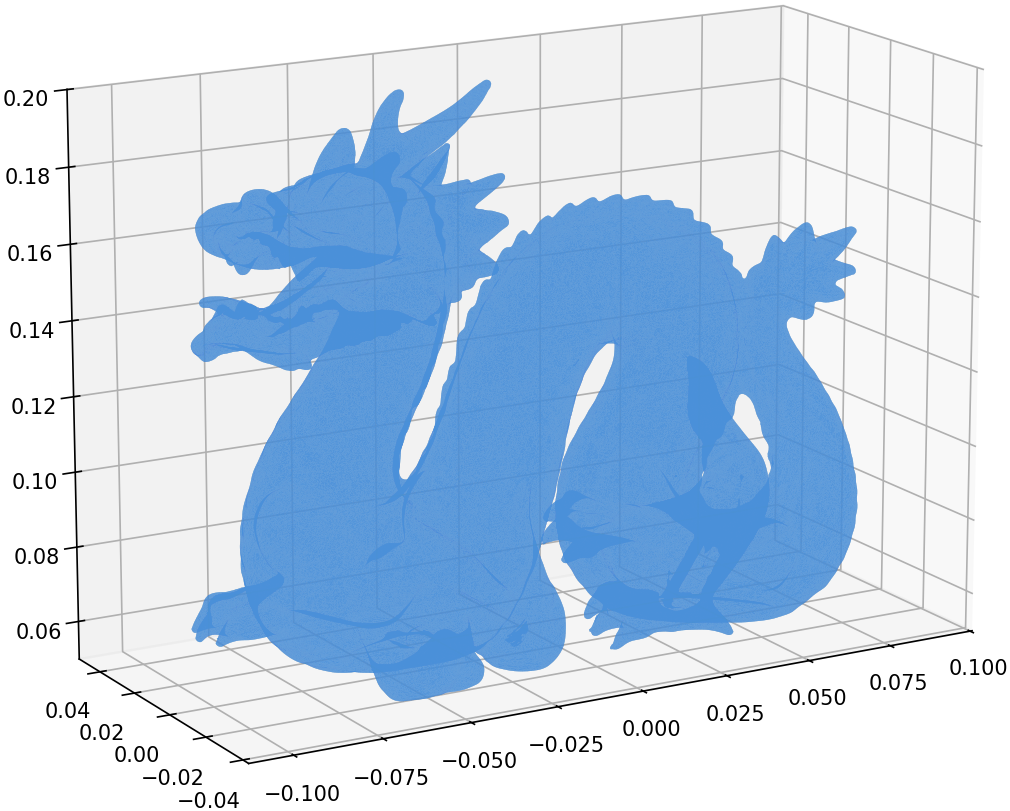
Stanford Dragon — 871,414 triangles loaded in 0.63s, rendered with matplotlib
Quick Start
pip install numpy-stl
from stl import mesh

# Load an STL file (auto-detects binary/ASCII)
your_mesh = mesh.Mesh.from_file('model.stl')

# Inspect
print(f'{len(your_mesh)} triangles')
print(f'Bounding box: {your_mesh.min_} to {your_mesh.max_}')

# Save
your_mesh.save('output.stl')
Features
- Read and write binary and ASCII STL files
- Read PLY and 3MF files (3MF is experimental, read-only)
- Mesh operations: rotate, translate, transform (4x4 matrix)
- Properties: surface area, volume, center of gravity, inertia tensor, convexity
- Combine multiple meshes by concatenating data arrays
- CLI tools:
stl,stl2ascii,stl2binfor format conversion - Fast: all operations backed by NumPy vectorized math
Supported Formats
| Format | Read | Write | Notes |
|---|---|---|---|
| STL (binary) | ✅ | ✅ | Auto-detected on load |
| STL (ASCII) | ✅ | ✅ | ~5x faster with optional speedups |
| PLY | ✅ | ✅ | Binary and ASCII; from_ply_file / save_ply |
| 3MF | ✅ | — | Experimental; from_3mf_file |
Requirements & Compatibility
- Python: 3.10+
- NumPy: 1.24+ (installed automatically)
- Platforms: Linux, macOS, Windows
- Optional:
numpy-stl[fast]for the Cython ASCII speedups (see below)
Performance / Optional Speedups
numpy-stl is fast out of the box. For even faster ASCII STL I/O, install the optional Cython speedups:
pip install numpy-stl[fast]
This installs the speedups
package, a compiled C extension for ASCII parsing. The library works
identically without it -- pure Python is the default.
Benchmark
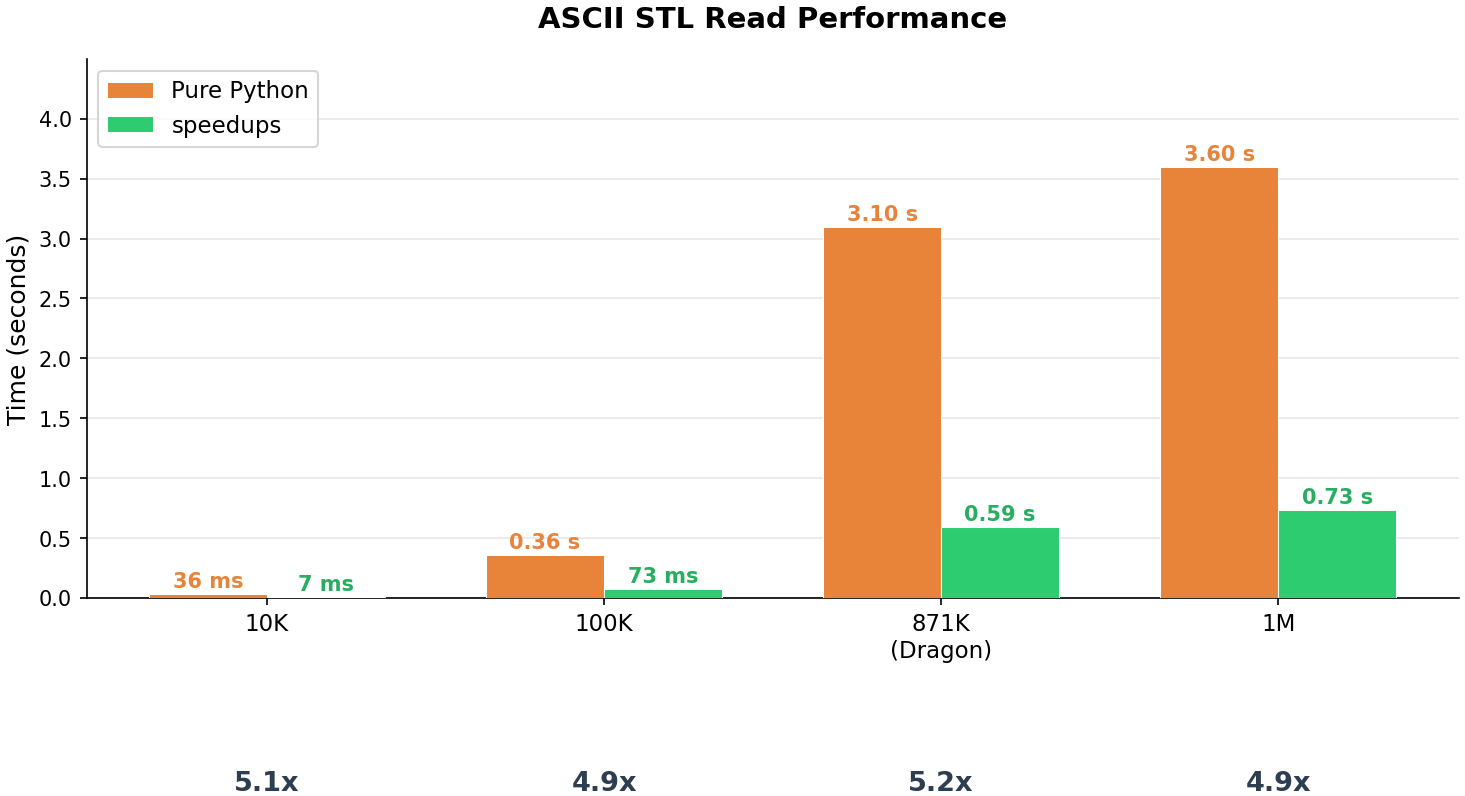
ASCII STL read performance — ~5x faster with the speedups C extension, consistent across data sizes (median of 5 runs):
| Facets | Pure Python | Speedups | Factor |
|---|---|---|---|
| 10,000 | 36 ms | 7 ms | 5.1x |
| 100,000 | 0.36 s | 73 ms | 4.9x |
| 871,414 | 3.10 s | 0.59 s | 5.2x |
| 1,000,000 | 3.60 s | 0.73 s | 4.9x |
Note: Results will vary by hardware. Run the benchmark yourself:
python benchmarks/benchmark_ascii_read.py
Usage Examples
Creating a Mesh from Scratch
import numpy as np
from stl import mesh

# Define vertices and faces of a cube
vertices = np.array([
    [-1, -1, -1], [+1, -1, -1], [+1, +1, -1], [-1, +1, -1],
    [-1, -1, +1], [+1, -1, +1], [+1, +1, +1], [-1, +1, +1],
])
faces = np.array([
    [0, 3, 1], [1, 3, 2], [0, 4, 7], [0, 7, 3],
    [4, 5, 6], [4, 6, 7], [5, 1, 2], [5, 2, 6],
    [2, 3, 6], [3, 7, 6], [0, 1, 5], [0, 5, 4],
])

cube = mesh.Mesh(np.zeros(faces.shape[0], dtype=mesh.Mesh.dtype))
for i, f in enumerate(faces):
    for j in range(3):
        cube.vectors[i][j] = vertices[f[j], :]

cube.save('cube.stl')
Rotating and Translating
import math
from stl import mesh

m = mesh.Mesh.from_file('model.stl')
m.rotate([0, 0, 1], math.radians(90))
m.translate([10, 0, 0])
m.save('transformed.stl')
Mass Properties
from stl import mesh

m = mesh.Mesh.from_file('closed_model.stl')
volume, cog, inertia = m.get_mass_properties()
print(f'Volume: {volume:.4f}')
print(f'Center of gravity: {cog}')
Combining Meshes
import numpy as np
from stl import mesh

m1 = mesh.Mesh.from_file('part1.stl')
m2 = mesh.Mesh.from_file('part2.stl')
combined = mesh.Mesh(np.concatenate([m1.data, m2.data]))
combined.save('combined.stl')
Plotting with Matplotlib
import math
from stl import mesh
from mpl_toolkits import mplot3d
from matplotlib import pyplot

figure = pyplot.figure(figsize=(8, 6))
axes = figure.add_subplot(projection='3d')

dragon = mesh.Mesh.from_ply_file('dragon_vrip.ply')
dragon.rotate([1, 0, 0], math.radians(-90))

axes.add_collection3d(
    mplot3d.art3d.Poly3DCollection(dragon.vectors)
)

scale = dragon.points.flatten()
axes.auto_scale_xyz(scale, scale, scale)
pyplot.show()
API Cheatsheet
Assumes import math, import numpy as np, from stl import mesh, and
from stl import Mode (for the ASCII save).
| Task | Call |
|---|---|
| Load (auto-detect) | mesh.Mesh.from_file('m.stl') |
| Load PLY | mesh.Mesh.from_ply_file('m.ply') |
| Load 3MF (experimental) | list(mesh.Mesh.from_3mf_file('m.3mf')) |
| Save (auto/format) | m.save('out.stl') |
| Save as ASCII | m.save('out.stl', mode=Mode.ASCII) |
| Save PLY | m.save_ply('out.ply') |
| Rotate (axis, radians) | m.rotate([0, 0, 1], math.radians(90)) |
| Translate | m.translate([x, y, z]) |
| Transform (4x4 matrix) | m.transform(matrix) |
| Bounding box | m.min_, m.max_ |
| Mass properties | volume, cog, inertia = m.get_mass_properties() |
| With density | vol, mass, cog, inertia = m.get_mass_properties_with_density(d) |
| Combine meshes | mesh.Mesh(np.concatenate([a.data, b.data])) |
CLI Tools
# Convert ASCII to binary
stl2bin input.stl output.stl

# Convert binary to ASCII
stl2ascii input.stl output.stl

# Auto-detect and convert
stl input.stl output.stl
Documentation
Full documentation is available at numpy-stl.readthedocs.io.
Contributing
Contributions are welcome! See CONTRIBUTING.md for the development setup guide.
Links
License
BSD-3-Clause
Project details
Verified details
These details have been verified by PyPIProject links
GitHub Statistics
Maintainers
Release history Release notifications | RSS feed


Download files
Download the file for your platform. If you're not sure which to choose, learn more about installing packages.
Source Distribution
Built Distribution
Filter files by name, interpreter, ABI, and platform.
If you're not sure about the file name format, learn more about wheel file names.
Copy a direct link to the current filters
File details
Details for the file numpy_stl-4.0.0.tar.gz.
File metadata
- Download URL: numpy_stl-4.0.0.tar.gz
- Upload date:
- Size: 29.4 kB
- Tags: Source
- Uploaded using Trusted Publishing? Yes
- Uploaded via: twine/6.1.0 CPython/3.13.12
File hashes
| Algorithm | Hash digest | |
|---|---|---|
| SHA256 |
086579c101fb2df9fb2594db7074728345710c931265cfdae4a50ed8d59d2f7e
|
|
| MD5 |
62c2afa89109a53a46827e22910155ec
|
|
| BLAKE2b-256 |
3cd401be5c1170ad58dd5cb028ea3329e756cc1c8e9a3fc44784953bccb81771
|
Provenance
The following attestation bundles were made for numpy_stl-4.0.0.tar.gz:
Publisher:
publish.yml on wolph/numpy-stl
-
Statement:
-
Statement type:
https://in-toto.io/Statement/v1 -
Predicate type:
https://docs.pypi.org/attestations/publish/v1 -
Subject name:
numpy_stl-4.0.0.tar.gz -
Subject digest:
086579c101fb2df9fb2594db7074728345710c931265cfdae4a50ed8d59d2f7e - Sigstore transparency entry: 1850752010
- Sigstore integration time:
-
Permalink:
wolph/numpy-stl@649a4ac53723581ab6119233bf60d321be6df1b8 -
Branch / Tag:
refs/tags/v4.0.0 - Owner: https://github.com/wolph
-
Access:
public
-
Token Issuer:
https://token.actions.githubusercontent.com -
Runner Environment:
github-hosted -
Publication workflow:
publish.yml@649a4ac53723581ab6119233bf60d321be6df1b8 -
Trigger Event:
push
-
Statement type:
File details
Details for the file numpy_stl-4.0.0-py3-none-any.whl.
File metadata
- Download URL: numpy_stl-4.0.0-py3-none-any.whl
- Upload date:
- Size: 32.3 kB
- Tags: Python 3
- Uploaded using Trusted Publishing? Yes
- Uploaded via: twine/6.1.0 CPython/3.13.12
File hashes
| Algorithm | Hash digest | |
|---|---|---|
| SHA256 |
8ee1413d12699c8a97821dc5d5f105d047c1aeecc3869dfcf1d92b50272da59c
|
|
| MD5 |
7a52c178bc0a8703573df950de016887
|
|
| BLAKE2b-256 |
791fb76289a9a82df2062274001a3500ca56774c1ee0ddb7e31ee688a48dd9f7
|
Provenance
The following attestation bundles were made for numpy_stl-4.0.0-py3-none-any.whl:
Publisher:
publish.yml on wolph/numpy-stl
-
Statement:
-
Statement type:
https://in-toto.io/Statement/v1 -
Predicate type:
https://docs.pypi.org/attestations/publish/v1 -
Subject name:
numpy_stl-4.0.0-py3-none-any.whl -
Subject digest:
8ee1413d12699c8a97821dc5d5f105d047c1aeecc3869dfcf1d92b50272da59c - Sigstore transparency entry: 1850752263
- Sigstore integration time:
-
Permalink:
wolph/numpy-stl@649a4ac53723581ab6119233bf60d321be6df1b8 -
Branch / Tag:
refs/tags/v4.0.0 - Owner: https://github.com/wolph
-
Access:
public
-
Token Issuer:
https://token.actions.githubusercontent.com -
Runner Environment:
github-hosted -
Publication workflow:
publish.yml@649a4ac53723581ab6119233bf60d321be6df1b8 -
Trigger Event:
push
-
Statement type:






