
nuse
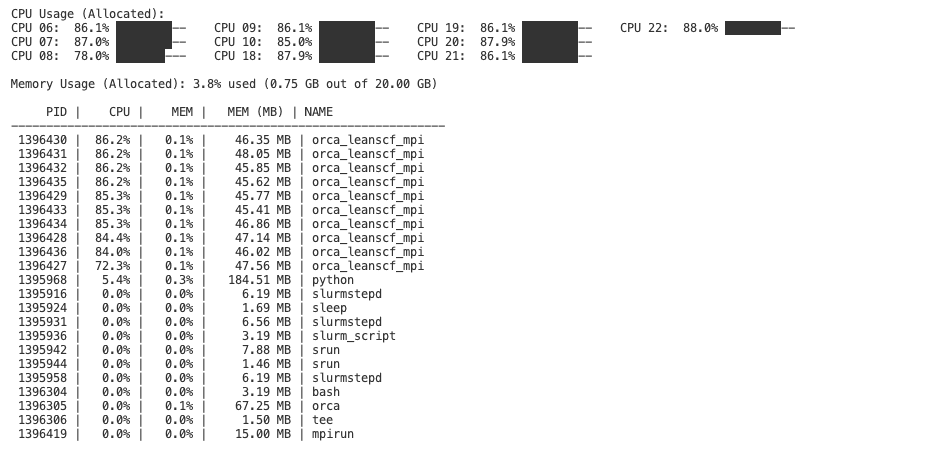
nuse is a simple resource monitoring tool for SLURM jobs. It allows users to view the CPU and memory usage logs for individual jobs and the entire node. With nuse, when running a SLURM-based workflow, you can easily monitor resource consumption through command-line tools.
Features
- Job-Specific Monitoring: Capture and view resource usage for each job (e.g., using cgroup filtering).
- Node-Wide Monitoring: Automatically collect a separate log for overall node usage.
- Command-Line Interface: Installed via pip, the
nusecommand lets you quickly view logs with a simple one-liner. - Custom Log Directory: Easily configure where logs are stored by setting the
MONITOR_LOG_DIRenvironment variable.
Installation
Install nuse directly from PyPI:
pip install nuse
Usage
In your script include.
from nuse import start_monitoring

start_monitoring(filter_cgroup=True)

# your code
INFO: You can set filter_cgroup to False to watch the entire node and not just your own job.
NOTE: You should include start_monitoring() in the script you submit to SLRUM. Don't put it in a submitit script.
Job-Specific Log: To display the resource usage log for a specific job on a node, run in your CLI:
nuse node305 49847516
Here, node305 is the node's short name and 49847516 is the SLURM job ID.
Configuration
Log Directory:
- By default, nuse stores logs in the directory ~/.monitoring. To change the log directory, set the environment variable before running your jobs:
export MONITOR_LOG_DIR="/path/to/your/log_directory"
How it Works
When included in your SLURM job pipeline (via start_monitoring(filter_cgroup=True) from the nuse package), nuse will:
- Create a job-specific log file with a naming convention like cpu_memory_usage_.cluster_<SLURM_JOB_ID>.log.
Then, the nuse CLI tool uses these logs to provide an easy-to-read, real-time view of resource usage.
Happy monitoring!
Planned improvements
nuse clearto remove the monitoring directory. Until then just delete the ~/.monitoring folder.
1 maintainer

Metadata
1 maintainer
Release files for nuse 0.1.8
For a detailed explanation of source distributions (sdists) and built distributions (wheels), please see the package formats documentation.
Source distribution (sdist)
| File | Size | Uploaded | |
|---|---|---|---|
| nuse-0.1.8.tar.gz | 78.2 kB | Details |
Built distribution (wheel)
| File | Interpreter | ABI | Platform | Reset |
|---|---|---|---|---|
| nuse-0.1.8-py3-none-any.whl | Python 3 | none | any | Details |
Total release size: 84.0 kB
Release files / nuse-0.1.8.tar.gz
| Download URL | nuse-0.1.8.tar.gz |
|---|---|
| Size | 78.2 kB |
| Tags | Source |
|
SHA-256 checksum How to use checksums |
dc5e755976906a76ffdf0644ed941221ca9efbc1d4567982992b98349c669fdd
|
|
BLAKE2b-256 checksum How to use checksums |
5e3032854b23b872a39c0c82842b9f441c5c413ee7041ef9bbdb342ec326bd06
|
| Upload date | |
|
Uploaded using Trusted Publishing? What is trusted publishing? |
No |
| Uploaded via |
twine/6.1.0 CPython/3.10.13
|
Release files / nuse-0.1.8-py3-none-any.whl
| Download URL | nuse-0.1.8-py3-none-any.whl |
|---|---|
| Size | 5.8 kB |
| Tags | Python 3 |
|
SHA-256 checksum How to use checksums |
a47e0371a881ff36c8fb027da91cb6c3303cdceadb4ef6b7bc919a6baebbf52a
|
|
BLAKE2b-256 checksum How to use checksums |
36a7aafd2c63b1c1875b713b116b458eb138d7f86eda78cbbc67cd47773c80c1
|
| Upload date | |
|
Uploaded using Trusted Publishing? What is trusted publishing? |
No |
| Uploaded via |
twine/6.1.0 CPython/3.10.13
|














