
No project description provided

Project description
nuse
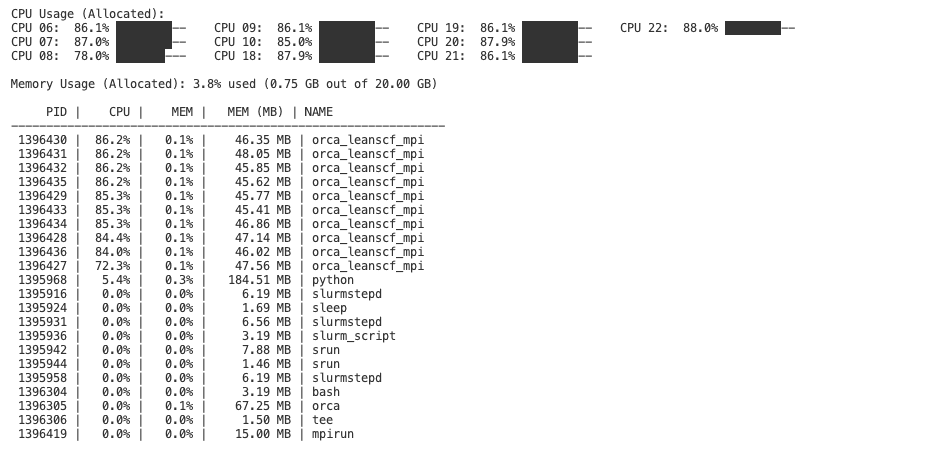
nuse is a simple resource monitoring tool for SLURM jobs. It allows users to view the CPU and memory usage logs for individual jobs and the entire node. With nuse, when running a SLURM-based workflow, you can easily monitor resource consumption through command-line tools.
Features
- Job-Specific Monitoring: Capture and view resource usage for each job (e.g., using cgroup filtering).
- Node-Wide Monitoring: Automatically collect a separate log for overall node usage.
- Command-Line Interface: Installed via pip, the
nusecommand lets you quickly view logs with a simple one-liner. - Custom Log Directory: Easily configure where logs are stored by setting the
MONITOR_LOG_DIRenvironment variable.
Installation
Install nuse directly from PyPI:
pip install nuse
Usage
In your script include
from nuse import start_monitoring

start_monitoring(filter_cgroup=True)

# your code
INFO: You can set filter_cgroup to False to watch the entire node and not just your own job.
Job-Specific Log: To display the resource usage log for a specific job on a node, run in your CLI:
nuse node305 49847516
Here, node305 is the node's short name and 49847516 is the SLURM job ID.
Configuration
Log Directory:
- By default, nuse stores logs in the directory ~/.monitoring. To change the log directory, set the environment variable before running your jobs:
export MONITOR_LOG_DIR="/path/to/your/log_directory"
How it Works
When included in your SLURM job pipeline (via start_monitoring(filter_cgroup=True) from the nuse package), nuse will:
- Create a job-specific log file with a naming convention like cpu_memory_usage_.cluster_<SLURM_JOB_ID>.log.
- Also create a node-wide log file named cpu_memory_usage__node.log for monitoring overall resources.
Then, the nuse CLI tool uses these logs to provide an easy-to-read, real-time view of resource usage.
Happy monitoring!
Release history Release notifications | RSS feed


Download files
Download the file for your platform. If you're not sure which to choose, learn more about installing packages.
Source Distribution
Built Distribution
Filter files by name, interpreter, ABI, and platform.
If you're not sure about the file name format, learn more about wheel file names.
Copy a direct link to the current filters
File details
Details for the file nuse-0.1.4.tar.gz.
File metadata
- Download URL: nuse-0.1.4.tar.gz
- Upload date:
- Size: 77.8 kB
- Tags: Source
- Uploaded using Trusted Publishing? No
- Uploaded via: twine/6.1.0 CPython/3.10.13
File hashes
| Algorithm | Hash digest | |
|---|---|---|
| SHA256 |
1edb09f8bf3da630356a515505fa0fa2d472a05daa3166c1c51968dec61b250a
|
|
| MD5 |
1b8a23de25dc76886b865369495185e3
|
|
| BLAKE2b-256 |
c940b29d875e2f4a6dbb923057e4c4cfe1c356f7a5db5378ce4cbe71355a8fac
|
File details
Details for the file nuse-0.1.4-py3-none-any.whl.
File metadata
- Download URL: nuse-0.1.4-py3-none-any.whl
- Upload date:
- Size: 5.6 kB
- Tags: Python 3
- Uploaded using Trusted Publishing? No
- Uploaded via: twine/6.1.0 CPython/3.10.13
File hashes
| Algorithm | Hash digest | |
|---|---|---|
| SHA256 |
865c50a701a6f066abed43164c10cebf2d7ea6e6542f28514088f259ee788a20
|
|
| MD5 |
6a0ebff73f398de60c392e4aaf4d80fd
|
|
| BLAKE2b-256 |
d821a5a8cffb75e027396dffc54323de35ff058de3ade884f70dd6bae5bcc857
|






