
nvmon
A fancy NVIDIA GPU monitor for the terminal. One Python file, no dependencies.
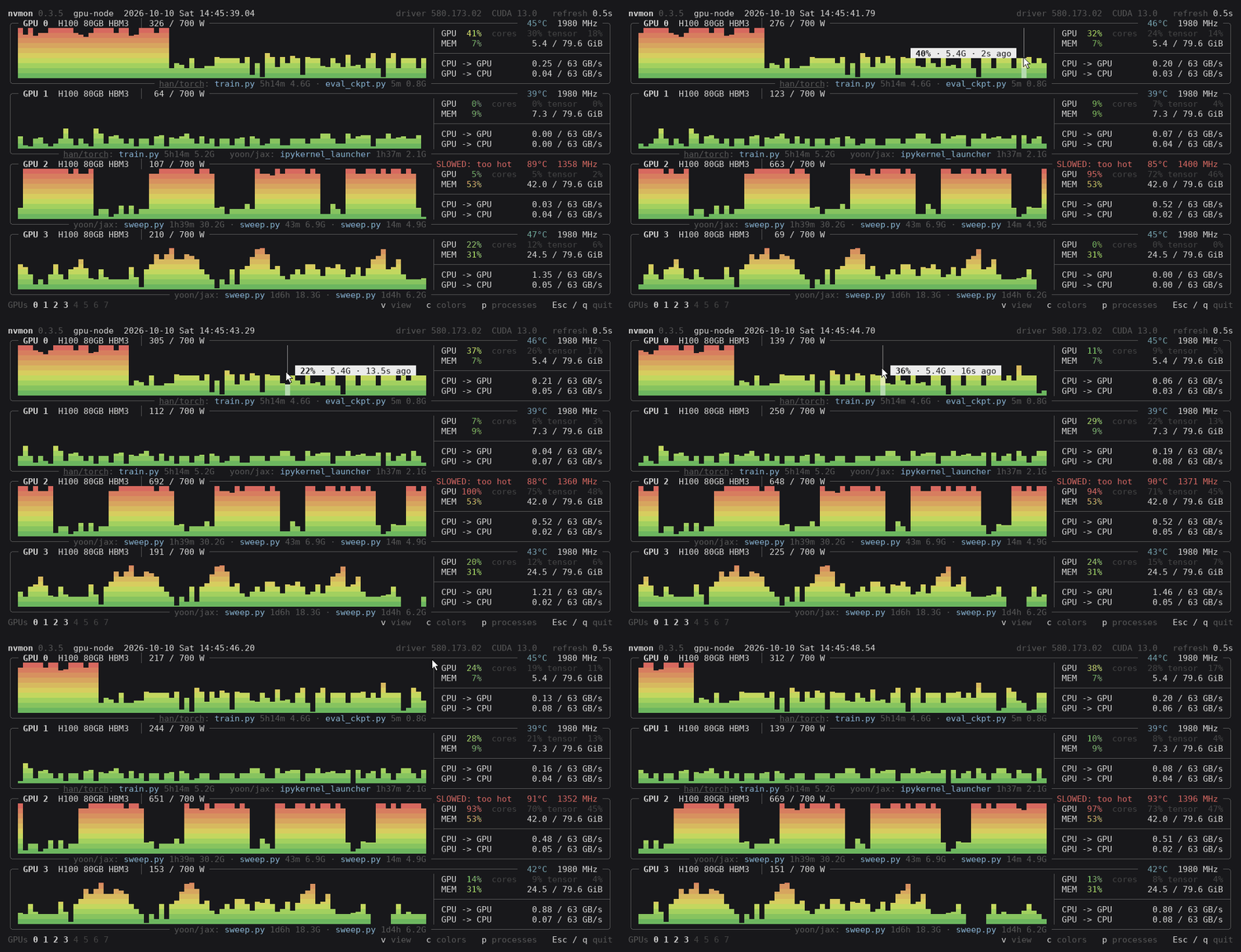
Install
uv tool install nvmon # or: pipx install nvmon
No uv? Install it, or use pip install nvmon
inside whichever environment you use.
Server without internet: copy nvmon.py over and run it with Python 3.6+.
Start
nvmon              # Esc, q or Ctrl+C to quit
nvmon -i 1         # refresh every second (default: 0.5)
nvmon -g 0,2,4-7   # only these GPUs
ssh -t HOST nvmon  # over ssh: -t gives it a terminal
Reading a box
- Top edge: number and name, power against its limit, temperature, fan (if any), clock. Warnings
only when something is off:
SLOWED: power cap | too hot | hw brake,PCIe DEGRADED: x16 -> x8. - Graph: utilization over time, newest on the right. Point at it for the utilization and memory at that moment.
- GPU: how much of the time a kernel ran. cores / tensor (H100 and newer): how busy that kept the chip, and how much was Tensor Core math. One small kernel running nonstop reads GPU 100 % with cores at 30 %.
- MEM: memory in use. CPU -> GPU, GPU -> CPU: PCIe traffic against the link's top speed.
- Bottom edge: the processes, with run time and memory, by account and conda environment (yours
underlined);
+3for those that did not fit.
The bottom line has the GPU numbers (click one, or press its key, to hide or show it), the keys, and a newer release when there is one.
Views: v
v goes through four views, V back. What does not fit scrolls (wheel, PgUp/PgDn).
Graphs: one under the other; two columns only when they would not fit, as here with eight GPUs in 31 lines.
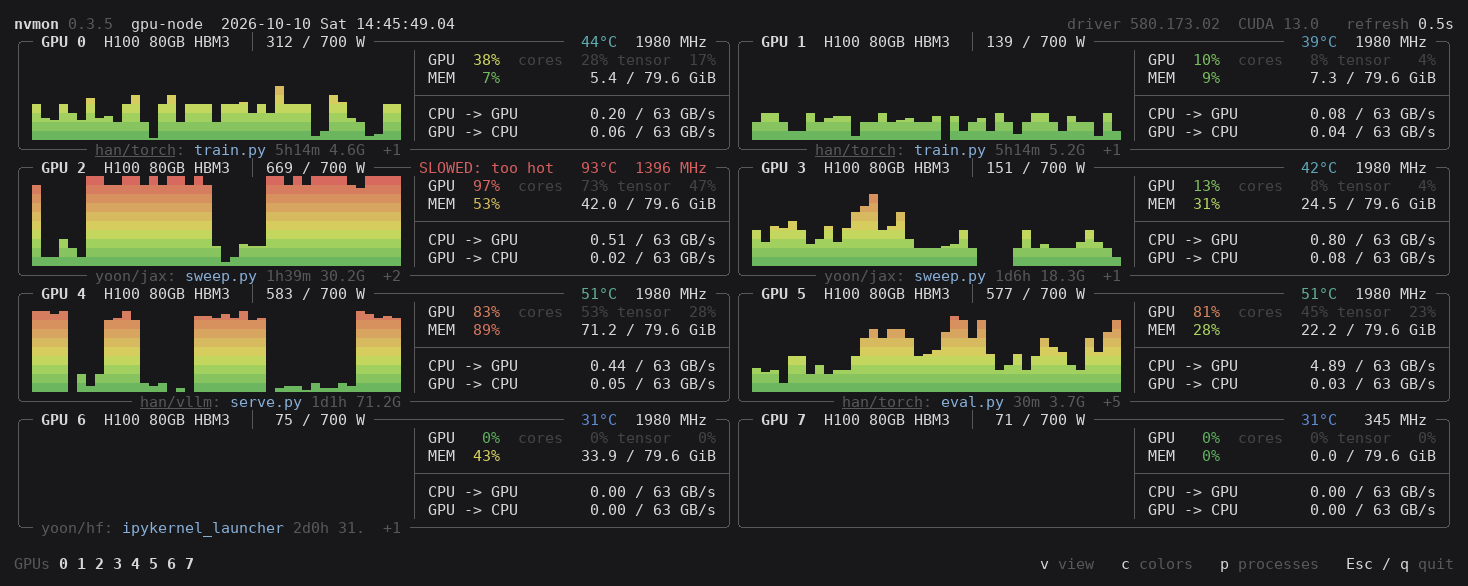
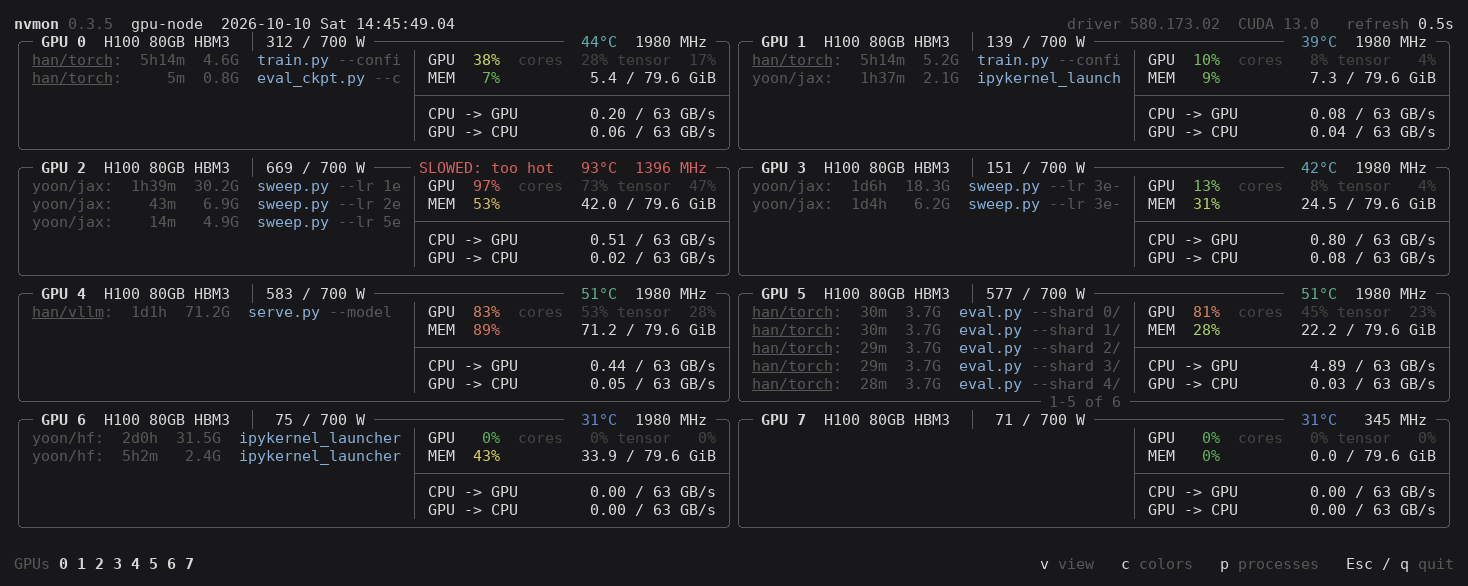
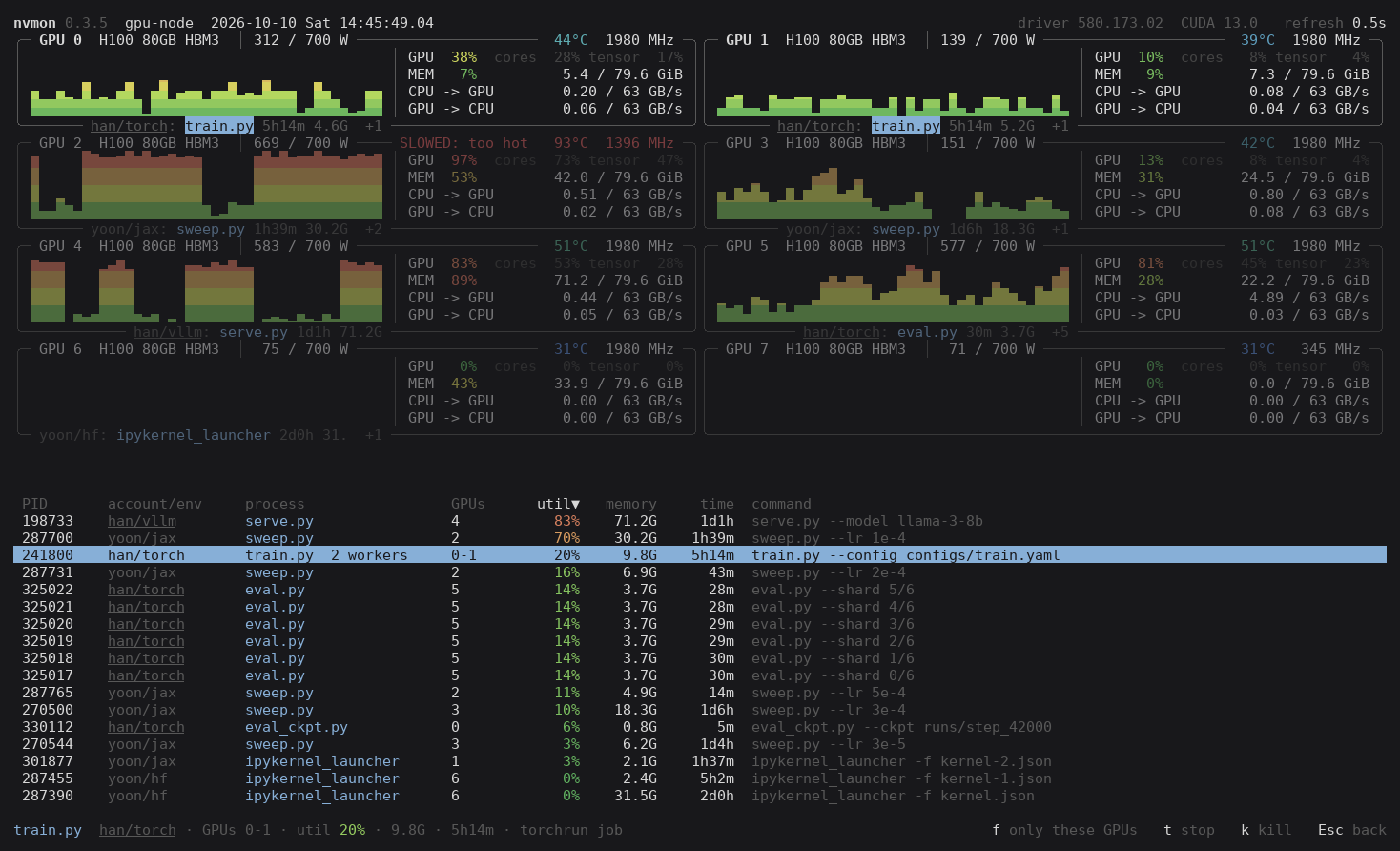
Processes in the graph's place: account, run time, memory, command. The wheel scrolls them; Shift+wheel or ← → sideways.
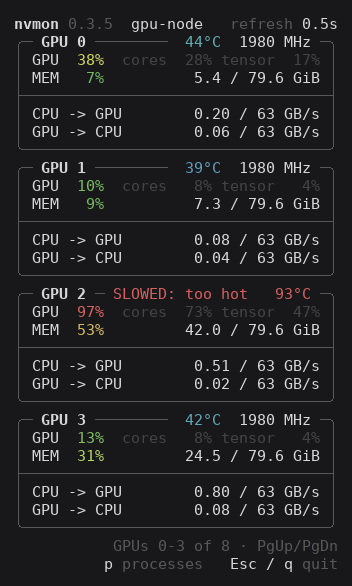
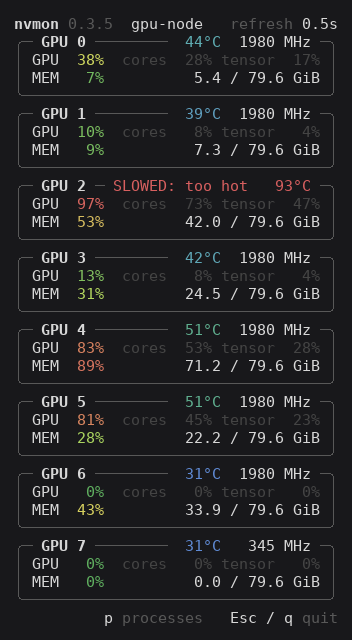
Numbers only and GPU and MEM only: narrow, always one column, for a window beside another.
| Numbers only | GPU and MEM only |
|---|---|
 |
 |
Processes and jobs: p
A job is a process, or a launcher (torchrun, deepspeed…) with its workers.
- Pick one: click a process, or press Tab (Tab and the arrows move on). Its GPUs stand out, the list opens with it picked, and the bottom line sums it up.
- Pick a GPU's jobs: click anywhere else in its box. The same again lets go, and closes the list it opened.
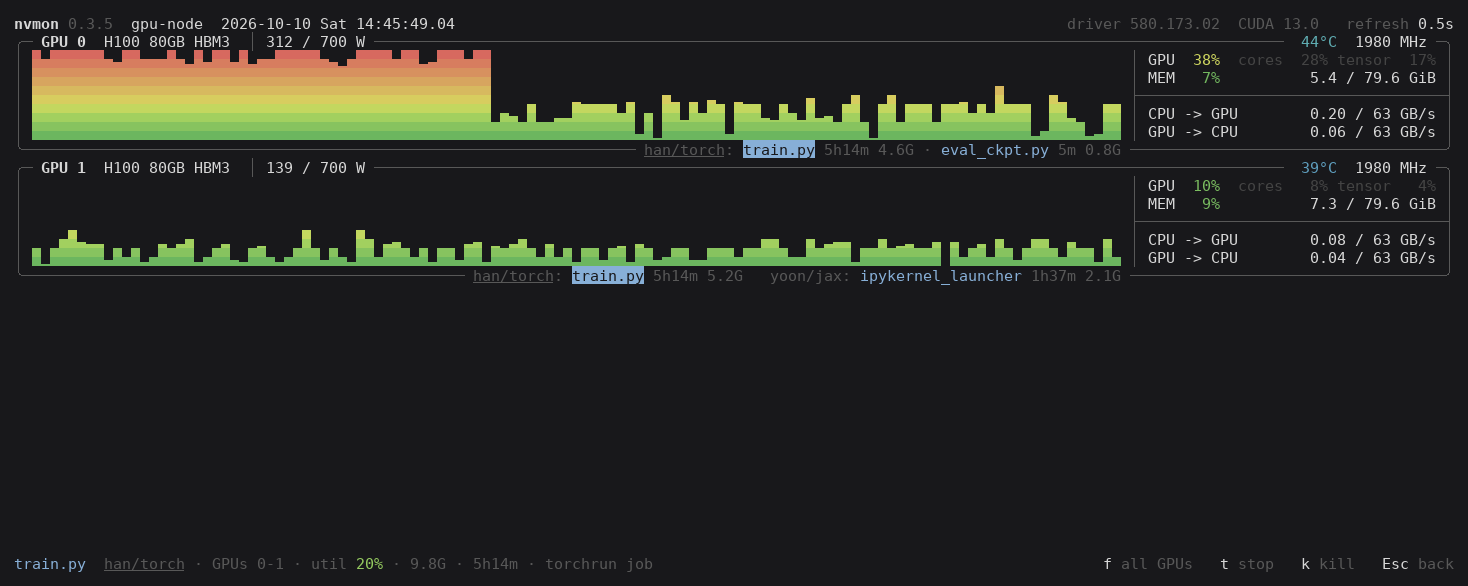
f, or a double click: only the picked jobs' GPUs; again for all.p: every job in a list. Click a heading to sort, again to reverse (ors,r). ← → scroll the picked job's command. Esc, or a click on an empty spot, lets go.tstops the picked jobs of yours (SIGTERM),kkills them (SIGKILL): after ay, and only those still the jobs you picked.
The list, busiest first, one job picked; and that job with f:
Themes: c
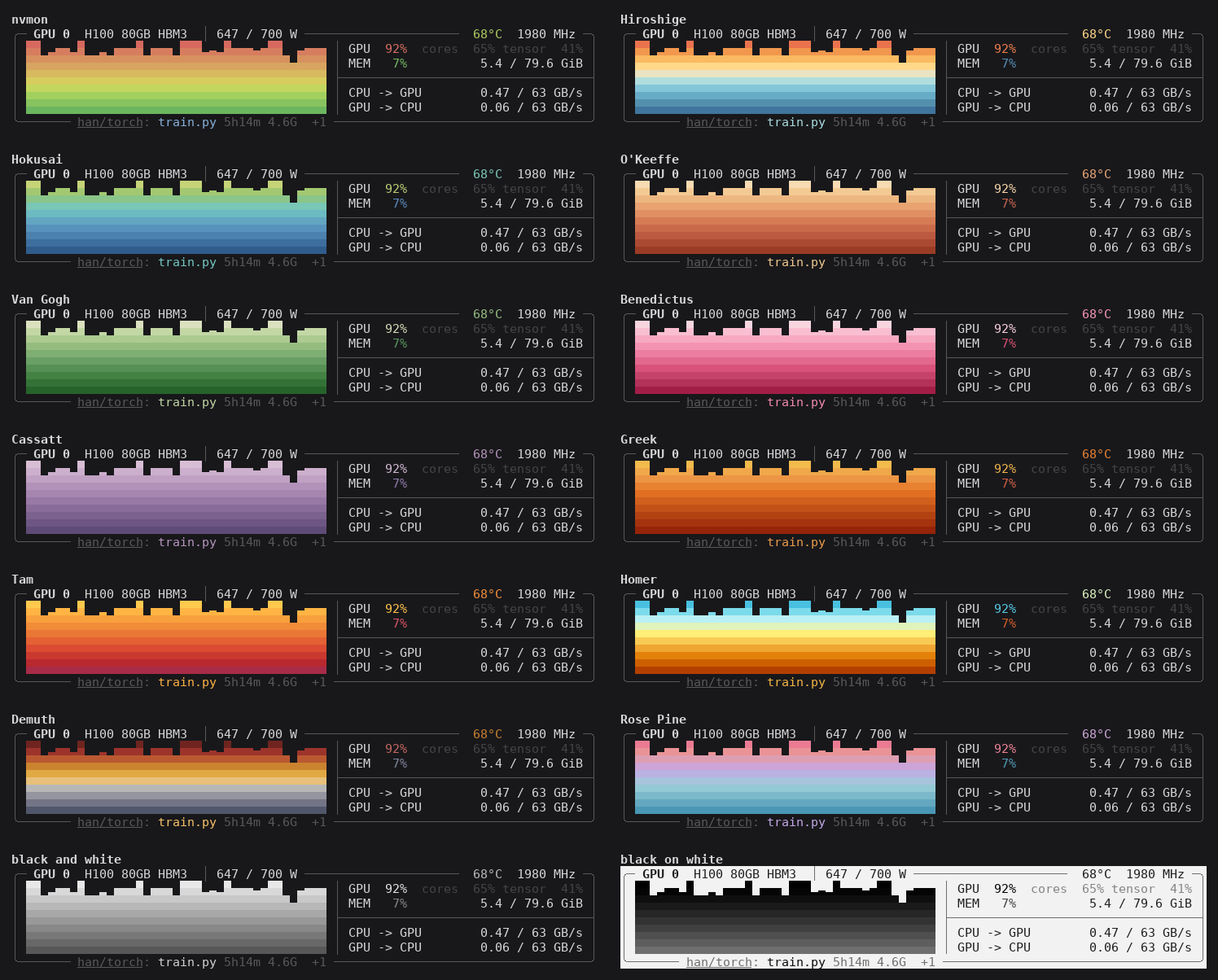
c goes through the themes, C back:
- nvmon, the default
- Hiroshige, Hokusai, O'Keeffe, Van Gogh, Bénédictus, Cassatt, Greek, Tam, Homer, Demuth: palettes of works at the Met, from MetBrewer
- Rosé Pine, from the editor theme
- black and white, and black on white
All keys
| Key | Does |
|---|---|
v / V |
next / previous view |
c / C |
next / previous theme |
p |
process list, open or close |
| point at a graph | utilization and memory then |
| click, Tab, ↑ ↓ | pick a job |
| click a GPU | pick its jobs |
f, double click |
only the picked jobs' GPUs, or all |
t, k, then y |
stop (SIGTERM) or kill (SIGKILL) the picked jobs |
click a heading, s, r |
sort the list, by the next heading, the other way |
| wheel, ← → | scroll; sideways the commands |
| PgUp, PgDn | scroll the GPUs |
0-9, click a number |
hide or show a GPU |
| Esc | a step back, then quit |
q, Ctrl+C |
quit |
Hold Shift to select text.
It remembers
The view, theme, list order and hidden GPUs, for each computer you connect from, in
~/.config/nvmon/settings.json (%APPDATA%\nvmon on Windows). Delete it to start afresh.
Terminals
- Line characters drawn two cells wide (Xshell, PuTTY and the like, set up for Korean, Chinese or Japanese): nvmon notices and draws in ASCII. No 24-bit color reported: 256 colors.
- Boxes still broken: use a font with one-cell line characters (D2Coding, Cascadia Mono, JetBrains Mono, DejaVu Sans Mono) and UTF-8.
- Windows: use Windows Terminal.
kends a process at once; there is not, as Windows has nothing like SIGTERM. - nvmon asks PyPI once at start for a newer release;
NVMON_NO_UPDATE_CHECK=1turns that off.
License
MIT. I designed nvmon's features and usability and tested it on shared H100 servers; most of the code was written with an AI coding assistant.
1 maintainer

Metadata
1 maintainer
Release files for nvmon 0.3.5
For a detailed explanation of source distributions (sdists) and built distributions (wheels), please see the package formats documentation.
Source distribution (sdist)
| File | Size | Uploaded | |
|---|---|---|---|
| nvmon-0.3.5.tar.gz | 47.3 kB | Details |
Built distribution (wheel)
| File | Interpreter | ABI | Platform | Reset |
|---|---|---|---|---|
| nvmon-0.3.5-py3-none-any.whl | Python 3 | none | any | Details |
Total release size: 95.5 kB
Release files / nvmon-0.3.5.tar.gz
| Download URL | nvmon-0.3.5.tar.gz |
|---|---|
| Size | 47.3 kB |
| Tags | Source |
|
SHA-256 checksum How to use checksums |
501aadf60f0bc915bedd8518257c08e233ef5ee4c2e8ca4ca2bd82105b6d1cc2
|
|
BLAKE2b-256 checksum How to use checksums |
c944b99485627529433b20a042d99e348397d49e845f85e14f21f9c7f8958b7e
|
| Upload date | |
|
Uploaded using Trusted Publishing? What is trusted publishing? |
Yes |
| Uploaded via |
twine/7.0.0 CPython/3.13.14
|
Provenance
Provenance describes where a file came from. On PyPI, provenance is shared via attestations, which provide a verifiable record of the build or publishing details. View details, limitations and caveats.


PyPI Publish Attestation
PyPI verified that this artifact, at this checksum, originated from the publisher listed below.
Signed by GitHub Actions, verified by PyPI on Oct 10, 2026.
Transparency logRelease files / nvmon-0.3.5-py3-none-any.whl
| Download URL | nvmon-0.3.5-py3-none-any.whl |
|---|---|
| Size | 48.3 kB |
| Tags | Python 3 |
|
SHA-256 checksum How to use checksums |
e844c8c11e00c1b13b10b4e49aab2c38d943aab402958d1ba2f00f63eb3c2563
|
|
BLAKE2b-256 checksum How to use checksums |
902abd006db754be2edcc9c040d0d162506e5fbb000982b2ccc6e7b69876a187
|
| Upload date | |
|
Uploaded using Trusted Publishing? What is trusted publishing? |
Yes |
| Uploaded via |
twine/7.0.0 CPython/3.13.14
|
Provenance
Provenance describes where a file came from. On PyPI, provenance is shared via attestations, which provide a verifiable record of the build or publishing details. View details, limitations and caveats.
PyPI Publish Attestation
PyPI verified that this artifact, at this checksum, originated from the publisher listed below.
Signed by GitHub Actions, verified by PyPI on Oct 10, 2026.
Transparency log













