
nvnodetop — NVIDIA Node Cluster Top




An nvtop-inspired, real-time GPU monitor for SLURM HPC clusters.
Monitor every GPU across all your running jobs — with utilisation bars, sparkline history, power draw, ECC errors and per-process detail — all from a single terminal window.
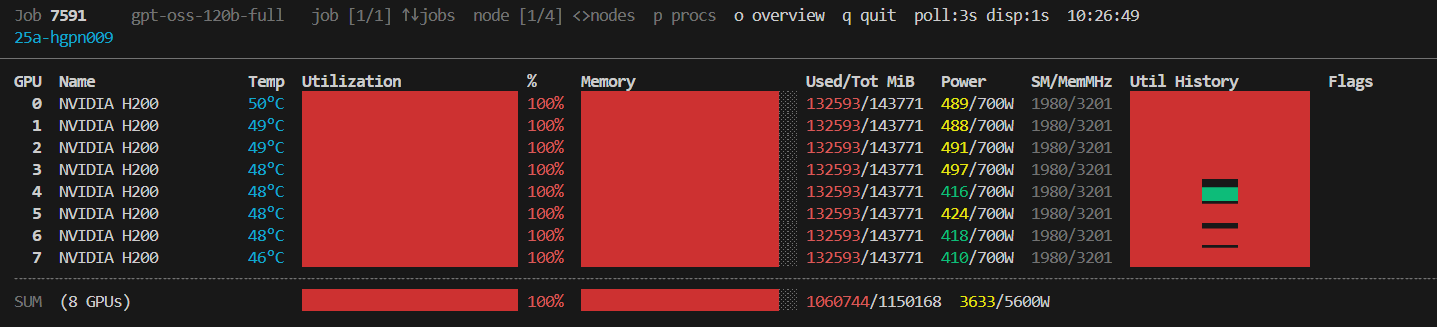

Table of Contents
- Features
- Requirements
- Installation
- Usage
- Display Layout
- How It Works
- Configuration
- Troubleshooting
- Contributing
- License
Features
- 🖥️ Multi-node, multi-job — cycles through every node assigned to your running SLURM jobs
- 📊 Rich GPU metrics — utilisation, memory (used/total), temperature, power draw/limit, SM & memory clock speeds
- 📈 Sparkline history — rolling utilisation history plotted in-line with Unicode block characters
- ⚡ Asynchronous polling — each node is polled in a dedicated background subprocess; the UI never blocks waiting for SSH
- 🚨 Alert flags — thermal throttle (
!THERM), power brake (!PWR), and uncorrected ECC errors are highlighted inline - 👤 Process table — per-GPU process list showing PID, username, command and GPU memory (toggle with
p) - 📐 Responsive layout — bar widths adapt dynamically to the terminal width
- ♻️ Graceful cleanup — all background SSH pollers and the temporary cache directory are cleaned up on exit
Requirements
| Requirement | Notes |
|---|---|
| Bash ≥ 4.0 | Required for associative arrays (declare -A) |
SLURM (squeue, scontrol) |
Must be available on the login node |
| SSH key auth | Passwordless SSH to compute nodes (e.g. via SLURM cluster config) |
nvidia-smi |
Must be installed on each compute node |
python3 |
Required on compute nodes for process-name/username resolution |
tput / stty |
Standard terminal utilities, available on virtually all Linux systems |
Note:
nvnodetoponly needs to be installed on your login node or local machine. The compute-node side runs a one-linernvidia-smiquery and a tiny inline Python3 snippet over SSH — no remote installation is needed.
Installation
Via pip (recommended)
pip install nvnodetop
This places the nvnodetop command on your PATH.
Via pipx (isolated)
pipx installs the tool into an isolated environment and exposes the command globally — ideal for system-wide HPC environments.
pipx install nvnodetop
Manual install
# Clone
git clone https://github.com/whats2000/nvnodetop.git
cd nvnodetop

# Make executable and add to PATH
chmod +x nvnodetop.sh
cp nvnodetop.sh ~/.local/bin/nvnodetop
Usage
nvnodetop [FETCH_INTERVAL [DISPLAY_INTERVAL]]
Simply run nvnodetop from any terminal on your HPC login node:
nvnodetop          # defaults: poll every 3 s, refresh UI every 1 s
nvnodetop 5        # poll every 5 s, refresh UI every 1 s
nvnodetop 5 2      # poll every 5 s, refresh UI every 2 s
Arguments
| Argument | Default | Description |
|---|---|---|
FETCH_INTERVAL |
3 |
Seconds between GPU data polls per node (SSH calls) |
DISPLAY_INTERVAL |
1 |
UI refresh rate in seconds |
Key Bindings
| Key | Action |
|---|---|
↑ / k / K |
Previous job |
↓ / j / J |
Next job |
→ / > / . |
Next node within current job |
← / < / , |
Previous node within current job |
p / P |
Toggle process table |
q / Q |
Quit |
Display Layout
  Job 12345678 my_train_job  job [1/2] ↑↓jobs  node [1/3] <>nodes  p procs  q quit  poll:3s disp:1s
  gpu-node-01                                                                         [stale 12s]
  ────────────────────────────────────────────────────────────────────────────────
  GPU  Name                Temp  Utilization       %  Memory        Used/Tot MiB  Power     SM/MemMHz  Util History  Flags
    0  NVIDIA A100-SXM4   52°C  ████████████████  78%  ████░░░░░    38012/40960  312/400W  1410/1593  ▄▄▅▆▇▇██▇▆▅▆
    1  NVIDIA A100-SXM4   48°C  ████████░░░░░░░░  50%  ██████░░░░   22016/40960  201/400W  1350/1500  ▃▄▄▅▅▄▅▅▄▅▅▄
  ╌╌╌╌╌╌╌╌╌╌╌╌╌╌╌╌╌╌╌╌╌╌╌╌╌╌╌╌╌╌╌╌╌╌╌╌╌╌╌╌╌╌╌╌╌╌╌╌╌╌╌╌╌╌╌╌╌╌╌╌╌╌╌╌╌╌╌╌╌╌╌╌╌╌╌
  SUM  (2 GPUs)                 ████████████░░░░  64%  █████████░   60028/81920  513/800W
GPU Row
| Field | Description |
|---|---|
| GPU | GPU index (0-based) |
| Name | GPU model name (truncated to 18 chars) |
| Temp | Core temperature in °C (cyan) |
| Utilisation bar | Coloured fill bar — green < 60 %, yellow < 85 %, red ≥ 85 % |
| % | Numeric GPU compute utilisation |
| Memory bar | Same colour coding, based on memory percentage |
| Used/Tot MiB | Absolute memory consumption |
| Power | Current draw / TDP limit in Watts |
| SM/MemMHz | Streaming Multiprocessor and memory clock speeds |
| Util History | Rolling sparkline of the last 20 utilisation samples |
| Flags | !THERM (thermal throttle), !PWR (power brake), ECC:N (ECC errors) |
Summary Row
Shows the average utilisation, total memory across all GPUs on the node, and total power draw.
Process Table
Toggle with p. Columns: GPU index, PID, username, command name (basename), GPU memory in MiB.
How It Works
Login Node                           Compute Nodes
┌─────────────────────┐              ┌──────────────────────┐
│ nvnodetop           │   SSH poll   │ nvidia-smi query     │
│  ├─ squeue --me ────┼─────────────►│ python3 proc resolve │
│  ├─ background      │◄─────────────┤ stdout → cache file  │
│  │   fetcher/node   │   CSV data   └──────────────────────┘
│  └─ UI render loop  │
└─────────────────────┘
- Job discovery —
squeue --me --states=Ris called every 30 seconds to find your running jobs and their assigned nodes. - Background pollers — One
_node_fetcher_loopsubprocess is spawned per unique node. Each loop SSHs into the node, runsnvidia-smifor GPU metrics and an inline Python3 snippet for process info, then writes the result atomically to a temp file (usingtmp+mv). - UI render loop — The main process reads the latest cached file, updates sparkline history arrays (which must live in the main shell for persistence), renders the frame, then calls
read_keywith a timeout equal toDISPLAY_INTERVAL. - Cleanup — A
trap cleanup INT TERM EXITensures all background pollers are killed and the cache directory is removed on exit.
Configuration
A small set of constants at the top of the script can be tweaked directly:
| Variable | Default | Description |
|---|---|---|
NODE_REFRESH_INTERVAL |
30 |
Seconds between squeue calls to discover node changes |
HISTORY_LEN |
20 |
Number of historical samples kept per GPU for the sparkline |
These can also be overridden at invocation time via environment variables (future enhancement).
Troubleshooting
No running SLURM jobs found
The script only displays nodes for your running jobs (squeue --me --states=R). Make sure you have at least one job in the R (Running) state.
GPU data shows Waiting for first data…
On first launch, the background SSH poller needs one full FETCH_INTERVAL cycle to collect data. Wait a few seconds.
[stale Xs] warning
The cached data is more than 3× FETCH_INTERVAL old, which usually means the SSH connection to that node is slow or timing out. Check your SSH connectivity to the compute node.
SSH connection refused / hang
Ensure passwordless SSH (BatchMode=yes) is configured for the compute nodes. The script uses ConnectTimeout=5 to avoid hanging.
declare -A / mapfile errors
Your Bash version is older than 4.0. Update Bash:
# On macOS (system bash is 3.2)
brew install bash
Contributing
Contributions, bug reports and feature requests are welcome!
- Fork the repository
- Create a feature branch:
git checkout -b feat/my-feature - Commit your changes with a descriptive message
- Open a Pull Request
Please ensure your changes are tested against a real SLURM cluster or a mocked environment before submitting.
License
This project is licensed under the MIT License — see the LICENSE file for details.
1 maintainer

Metadata
1 maintainer
Release files for nvnodetop 0.1.4
For a detailed explanation of source distributions (sdists) and built distributions (wheels), please see the package formats documentation.
Source distribution (sdist)
| File | Size | Uploaded | |
|---|---|---|---|
| nvnodetop-0.1.4.tar.gz | 16.9 kB | Details |
Built distribution (wheel)
| File | Interpreter | ABI | Platform | Reset |
|---|---|---|---|---|
| nvnodetop-0.1.4-py3-none-any.whl | Python 3 | none | any | Details |
Total release size: 33.6 kB
Release files / nvnodetop-0.1.4.tar.gz
| Download URL | nvnodetop-0.1.4.tar.gz |
|---|---|
| Size | 16.9 kB |
| Tags | Source |
|
SHA-256 checksum How to use checksums |
0b6d46ff049177d61e631d0ee6c1f42ada2312187e26b4be644a63e80e78e134
|
|
BLAKE2b-256 checksum How to use checksums |
0346dc09b19fd5426ba27f59ce555e7a4dc20696484a238333ca3adeb0b82c6d
|
| Upload date | |
|
Uploaded using Trusted Publishing? What is trusted publishing? |
Yes |
| Uploaded via |
twine/6.1.0 CPython/3.13.7
|
Provenance
Provenance describes where a file came from. On PyPI, provenance is shared via attestations, which provide a verifiable record of the build or publishing details. View details, limitations and caveats.


PyPI Publish Attestation
PyPI verified that this artifact, at this checksum, originated from the publisher listed below.
Signed by GitHub Actions, verified by PyPI on Mar 6, 2026.
Transparency logRelease files / nvnodetop-0.1.4-py3-none-any.whl
| Download URL | nvnodetop-0.1.4-py3-none-any.whl |
|---|---|
| Size | 16.7 kB |
| Tags | Python 3 |
|
SHA-256 checksum How to use checksums |
f50fc0ece991cabb1602ce28898dd3128c4cc30a408661a89cef93d49bbabd03
|
|
BLAKE2b-256 checksum How to use checksums |
e16d935981ac383e678cd69671bf910e6199e9123b5728881c46f8e0bd300966
|
| Upload date | |
|
Uploaded using Trusted Publishing? What is trusted publishing? |
Yes |
| Uploaded via |
twine/6.1.0 CPython/3.13.7
|
Provenance
Provenance describes where a file came from. On PyPI, provenance is shared via attestations, which provide a verifiable record of the build or publishing details. View details, limitations and caveats.
PyPI Publish Attestation
PyPI verified that this artifact, at this checksum, originated from the publisher listed below.
Signed by GitHub Actions, verified by PyPI on Mar 6, 2026.
Transparency log













