
An MCP server for accessing NWB (Neurodata Without Borders) files, providing AI agents with easy access to neuroscience data.

Project description
NWB Model Context Protocol (MCP) Server
An MCP server for accessing NWB (Neurodata Without Borders) files, providing AI agents easy access to neuroscience data.
Features
- 🚀 Rapid exploration of new datasets
- 🗂️ Automatically-generated analysis reports
- 🧠 Prompt templates instruct agents to get the most from the tools
- 💡 "No Code" mode allows analysis without modifying the local filesystem
- ⚡️ Uses lazynwb for efficient data access across multiple NWB files
- ☁️ Supports local and cloud data (e.g. on AWS S3)
- 🔒 Read-only access to NWB data
- 🛠️ Easy setup
Requirements
1. uv
uv is used to run the server with the required dependencies, in an isolated virtual environment.
See the uv installation guide for platform-specific instructions for a system-wide installation.
Alternatively, install with pip in your system Python environment:
pip install uv
🛈 Note
uv, likepip, is one of the few tools it makes sense to install "globally" to your system Python, rather than in a virtual environment, since it is used to manage new virtual environments and Python versions.
2. Copilot Chat extension
Available on the VS Code extensions marketplace (in Code Ocean, this postInstall file should be used).
🛈 Note
Similar agent extensions, such as Cline or Claude Code, should also be able to connect to the server.
Add server to Copilot Chat in VS Code

- ensure MCP is enabled in the settings UI, or with JSON setting
"chat.mcp.enabled": true - the first startup may take a few seconds as it downloads packages
🛈 Note
You may be prompted to choose between adding the server to a "global" or "workspace" config. If you intend to switch between datasets it may be preferable to have the
mcp.jsonconfig in your workspace, to be able to easily modify the path to your data. The global setting is convenient in that the server will be available in all VS Code instances.
Example mcp.json
{
    "servers": {
        "nwb": {
            "command": "uvx",
            "args": [
                "nwb-mcp-server",
                "--root_dir", "data",
                "--glob_pattern", "*.nwb"
            ]
        }
    }
}
Server configuration parameters
| Parameter | Description | Default |
|---|---|---|
| root_dir | Root directory to search for NWB files (forward slash ok on Windows) | "data" |
| glob_pattern | A glob pattern to apply to root_dir to locate NWB files. Use "**/*.nwb" for sub-directories. |
"*.nwb" |
| tables | Restrict the list of NWB tables to use, e.g. ["trials", "intervals/epochs"] |
null |
| infer_schema_length | Number of NWB files to scan to infer schema for all. Affects server startup time. | 1 |
| unattended | Run the server in unattended mode (no user prompts, for automation) | false |
| table_element_limit | Max elements (columns x rows) allowed in a table returned by a SQL query | 500 |
uvx parameters
Any of the following parameters can be added to the args list before nwb-mcp-server to customize
the environment the server runs in: uvx
parameters
--upgrade is useful to ensure the latest versions of dependencies are used.
🛈 Note
uvxis an alias foruv tool run, where "tool" means any pip-installable Python package that provides a command-line interface.
Usage
The server provides the tools for querying NWB files efficiently. Getting an agent to use them effectively requires careful design of the prompt, instructions, and the availability of other tools. This is a work in progress.
🛈 Note
The server creates a virtual, read-only SQL database from the NWB files, which the agent can query. Exploration of a dataset or basic analysis that can be expressed in SQL is possible entirely within the chat dialog, without the need for the agent to create and run Python scripts in the workspace.
Prompt templates
Use the provided prompt templates to add preset instructions that specify how the server should be
used (just start typing / followed by the name you gave the server):

Feel free to customize the instructions before submitting the prompt.


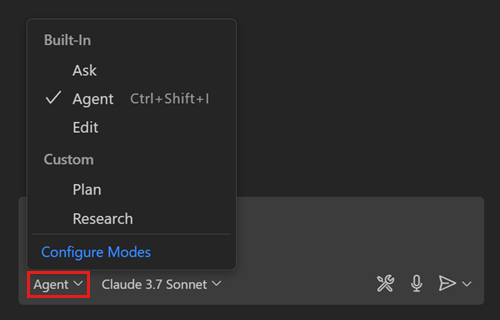
Custom chat modes
✨ Coming soon! ✨
As an alternative to prompt templates, use custom chat modes provided for data exploration and
analysis:
Non-NWB file support
🚧 Experimental 🚧
There is limited support for working with non-NWB files. Any set of files in tabular format than can
be read lazily using a pl.scan_<format> function, including parquet and csv, can be used with the
server. The provided prompt templates and chat modes are designed with the NWB format and
the lazynwb package in mind, so the agent will receive confusing instructions (although it
usually figures out the correct behavior!)
See the Polars I/O documentation for a complete list of compatible file formats.
Release history Release notifications | RSS feed


Download files
Download the file for your platform. If you're not sure which to choose, learn more about installing packages.
Source Distribution
Built Distribution
Filter files by name, interpreter, ABI, and platform.
If you're not sure about the file name format, learn more about wheel file names.
Copy a direct link to the current filters
File details
Details for the file nwb_mcp_server-0.1.3.tar.gz.
File metadata
- Download URL: nwb_mcp_server-0.1.3.tar.gz
- Upload date:
- Size: 14.3 kB
- Tags: Source
- Uploaded using Trusted Publishing? Yes
- Uploaded via: uv/0.8.10
File hashes
| Algorithm | Hash digest | |
|---|---|---|
| SHA256 |
914d20c70ceebd24536a47ca96309e9d3bdc996667c78dae3b375a6634d83583
|
|
| MD5 |
35e3f414cf6678a074256d9ae6fbfb4e
|
|
| BLAKE2b-256 |
437ac6187ec061488eb8a8bf26826051bf68ace77ffc9de00ad16c8003f63943
|
File details
Details for the file nwb_mcp_server-0.1.3-py3-none-any.whl.
File metadata
- Download URL: nwb_mcp_server-0.1.3-py3-none-any.whl
- Upload date:
- Size: 11.2 kB
- Tags: Python 3
- Uploaded using Trusted Publishing? Yes
- Uploaded via: uv/0.8.10
File hashes
| Algorithm | Hash digest | |
|---|---|---|
| SHA256 |
dfb3b8011d96427155077353f2eb859bf00c25d2c5de399bfa892dda3f71421b
|
|
| MD5 |
6a085e74fc1700f478fdb527bba6e909
|
|
| BLAKE2b-256 |
a65c661af6021a129efa54395a86d0bf21223c4f3263803bf435ef7e00ddb582
|






