
A lightweight, flexible API proxy with dynamic token rotation, load balancing, and rate limiting capabilities.
Verified details
These details have been verified by PyPIProject links
GitHub Statistics
Maintainers

Project description
🐾 NyaProxy - Universal API Proxy








Your Swiss Army Knife for API Proxy Management
🌟 Core Capabilities
| Feature | Description | Config Reference |
|---|---|---|
| 🔄 Token Rotation | Automatic key cycling across multiple providers | variables.keys |
| ⚖️ Load Balancing | 5 strategies: Round Robin, Random, Least Connections, Fastest Response, Weighted | load_balancing_strategy |
| 🚦 Rate Limiting | Granular controls per endpoint/key with smart queuing | rate_limit |
| 🕵️ Request Masking | Dynamic header substitution across multiple identity providers | headers + variables |
| 📊 Real-time Metrics | Interactive dashboard with request analytics and system health | dashboard.enabled |
📥 Installation
Prerequisites
- Python 3.8 or higher
- Docker (optional, for containerized deployment)
Quick Start
1. Install from PyPI
pip install nya-proxy
2. Create a simple configuration file
Create a config.yaml file with your API settings:
# Basic config.yaml example
nya_proxy:
  host: 0.0.0.0
  port: 8080
  api_key:
  logging:
    enabled: true
    level: info
    log_file: app.log
  proxy:
    enabled: false
    address: socks5://username:password@proxy.example.com:1080
  dashboard:
    enabled: true
  queue:
    enabled: true
    max_size: 200
    expiry_seconds: 300

default_settings:
  key_variable: keys
  load_balancing_strategy: round_robin
  rate_limit:
    endpoint_rate_limit: 10/s
    key_rate_limit: 10/m
    rate_limit_paths:
      - "*"
  retry:
    enabled: true
    mode: key_rotation
    attempts: 3
    retry_after_seconds: 1
    retry_request_methods: [ POST, GET, PUT, DELETE, PATCH, OPTIONS ]
    retry_status_codes: [ 429, 500, 502, 503, 504 ]
  timeouts:
    request_timeout_seconds: 300


apis:
  gemini:
    # Any OpenAI-Compatible API
    name: Google Gemini API
    # Gemini: https://generativelanguage.googleapis.com/v1beta/openai
    # OpenAI: https://api.openai.com/v1
    # Anthropic: https://api.anthropic.com/v1
    # DeepSeek: https://api.deepseek.com/v1
    # Mistral: https://api.mistral.ai/v1
    # OpenRouter: https://api.openrouter.ai/v1
    # Ollama: http://localhost:11434/v1
    endpoint: https://generativelanguage.googleapis.com/v1beta/openai
    aliases:
    - /gemini
    key_variable: keys
    headers:
      Authorization: 'Bearer ${{keys}}'
    variables:
      keys:
      - your_gemini_key_1
      - your_gemini_key_2
      - your_gemini_key_3
    load_balancing_strategy: least_requests
    rate_limit:
      # For Gemini, the rate limits (gemini-2.5-pro-exp-03-25) for each key are 5 RPM and 25 RPD
      # Ideally, the endpoint rate limit should be n x Per-Key-RPD, where n is the number of keys
      endpoint_rate_limit: 75/d
      key_rate_limit: 5/m
      # Rate limit paths are optional, but you can configure which paths to apply the rate limits to (regex supported), default is all paths "*"
      rate_limit_paths:
        - "/chat/*"
        - "/images/*"
3. Run NyaProxy
nyaproxy --config config.yaml
4. Verify the installation
Visit http://localhost:8080/dashboard to access the management dashboard.
Install from Source
# Clone the repository
git clone https://github.com/Nya-Foundation/nyaproxy.git
cd nyaproxy

# Install dependencies
pip install -e .

# Run NyaProxy
nyaproxy --config config.yaml
Docker (Production)
docker run -d \
  -p 8080:8080 \
  -v ${PWD}/config.yaml:/app/config.yaml \
  -v nya-proxy-logs:/app/logs \
  k3scat/nya-proxy:latest
📡 Service Endpoints
| Service | Endpoint | Description |
|---|---|---|
| API Proxy | http://localhost:8080/api/<endpoint_name> |
Main proxy endpoint for API requests |
| Dashboard | http://localhost:8080/dashboard |
Real-time metrics and monitoring |
| Config UI | http://localhost:8080/config |
Visual configuration interface |
Note: Replace 8080 with your configured port if different
🔧 API Configuration
OpenAI-Compatible APIs (Gemini, Anthropic, etc)
gemini:
  name: Google Gemini API
  endpoint: https://generativelanguage.googleapis.com/v1beta/openai
  aliases:
    - /gemini
  key_variable: keys
  headers:
    Authorization: 'Bearer ${{keys}}'
  variables:
    keys:
      - your_gemini_key_1
      - your_gemini_key_2
  load_balancing_strategy: least_requests
  rate_limit:
    endpoint_rate_limit: 75/d     # Total endpoint limit
    key_rate_limit: 5/m          # Per-key limit
    rate_limit_paths:
      - "/chat/*"            # Apply limits to specific paths
      - "/images/*"
Generic REST APIs
novelai:
  name: NovelAI API
  endpoint: https://image.novelai.net
  aliases:
    - /novelai
  key_variable: tokens
  headers:
    Authorization: 'Bearer ${{tokens}}'
  variables:
    tokens:
      - your_novelai_token_1
      - your_novelai_token_2
  load_balancing_strategy: round_robin
  rate_limit:
    endpoint_rate_limit: 10/s
    key_rate_limit: 2/s
🖥️ Management Interfaces
Real-time Metrics Dashboard

Monitor at http://localhost:8080/dashboard:
- Request volumes and response times
- Rate limit status and queue depth
- Key usage and performance metrics
- Error rates and status codes
Visual Configuration Interface

Manage at http://localhost:8080/config:
- Live configuration editing
- Syntax validation
- Variable management
- Rate limit adjustments
- Auto reload on save
🛡️ Advanced Reference Architecture (Advanced Deployment)
graph TD
    A[Client] --> B[Nginx]
    B --> C[NyaProxy]
    C --> D[Auth Service]
    D --> E[API Providers]
    F[Monitoring] --> D
🌌 Future Roadmap
graph LR
A[Q3 2025] --> B[🔄 Dynamic Json Body Substitution ]
A --> C[📡 gRPC/WebSocket Support]
B --> D[📈 API Key Usage/Balance Tracking]
C --> E[📊 UI/UX Enhancement ]
F[Q4 2025] --> G[🧩 Plugin System]
F --> H[🔍 Custom Metrics API]
❤️ Community

Need enterprise support? Contact k3scat@gmail.com
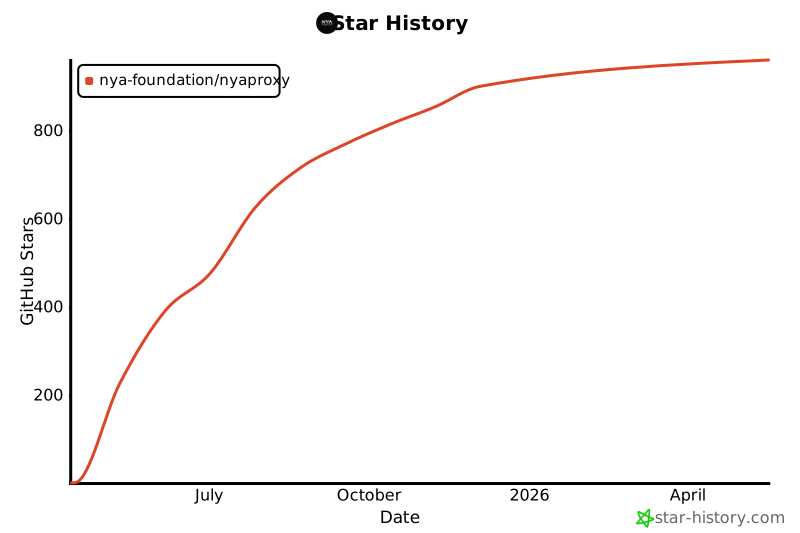
📈 Project Growth
Project details
Verified details
These details have been verified by PyPIProject links
GitHub Statistics
Maintainers
Release history Release notifications | RSS feed


Download files
Download the file for your platform. If you're not sure which to choose, learn more about installing packages.
Source Distribution
Built Distribution
Filter files by name, interpreter, ABI, and platform.
If you're not sure about the file name format, learn more about wheel file names.
Copy a direct link to the current filters
File details
Details for the file nya_proxy-0.0.6.tar.gz.
File metadata
- Download URL: nya_proxy-0.0.6.tar.gz
- Upload date:
- Size: 71.5 kB
- Tags: Source
- Uploaded using Trusted Publishing? Yes
- Uploaded via: twine/6.1.0 CPython/3.12.9
File hashes
| Algorithm | Hash digest | |
|---|---|---|
| SHA256 |
30525be63eb04306dc4bf8999b162134690ba133cad696893e01e1eaa007d7fa
|
|
| MD5 |
72ece6a40c667b4d94f858c799735627
|
|
| BLAKE2b-256 |
9b6cf88038715f395948d1ed09b18863fa8e8a452296648d79af862f940dfef9
|
Provenance
The following attestation bundles were made for nya_proxy-0.0.6.tar.gz:
Publisher:
publish.yml on Nya-Foundation/NyaProxy
-
Statement:
-
Statement type:
https://in-toto.io/Statement/v1 -
Predicate type:
https://docs.pypi.org/attestations/publish/v1 -
Subject name:
nya_proxy-0.0.6.tar.gz -
Subject digest:
30525be63eb04306dc4bf8999b162134690ba133cad696893e01e1eaa007d7fa - Sigstore transparency entry: 203502772
- Sigstore integration time:
-
Permalink:
Nya-Foundation/NyaProxy@ab65c167e9d7ec31243735aa98ff23e85c4aef1d -
Branch / Tag:
refs/heads/main - Owner: https://github.com/Nya-Foundation
-
Access:
public
-
Token Issuer:
https://token.actions.githubusercontent.com -
Runner Environment:
github-hosted -
Publication workflow:
publish.yml@ab65c167e9d7ec31243735aa98ff23e85c4aef1d -
Trigger Event:
push
-
Statement type:
File details
Details for the file nya_proxy-0.0.6-py3-none-any.whl.
File metadata
- Download URL: nya_proxy-0.0.6-py3-none-any.whl
- Upload date:
- Size: 79.3 kB
- Tags: Python 3
- Uploaded using Trusted Publishing? Yes
- Uploaded via: twine/6.1.0 CPython/3.12.9
File hashes
| Algorithm | Hash digest | |
|---|---|---|
| SHA256 |
11180a77f1c87bd2130996cc013ee8a54db08dc5fa69c29794fcfdb60c0b6ce5
|
|
| MD5 |
4236ec2cd3f009e63cc3e1524a2af468
|
|
| BLAKE2b-256 |
049c1245f30ad4d413418d6a24db02b7b7d16f2b4d1794d2cc148ed2c82da19a
|
Provenance
The following attestation bundles were made for nya_proxy-0.0.6-py3-none-any.whl:
Publisher:
publish.yml on Nya-Foundation/NyaProxy
-
Statement:
-
Statement type:
https://in-toto.io/Statement/v1 -
Predicate type:
https://docs.pypi.org/attestations/publish/v1 -
Subject name:
nya_proxy-0.0.6-py3-none-any.whl -
Subject digest:
11180a77f1c87bd2130996cc013ee8a54db08dc5fa69c29794fcfdb60c0b6ce5 - Sigstore transparency entry: 203502773
- Sigstore integration time:
-
Permalink:
Nya-Foundation/NyaProxy@ab65c167e9d7ec31243735aa98ff23e85c4aef1d -
Branch / Tag:
refs/heads/main - Owner: https://github.com/Nya-Foundation
-
Access:
public
-
Token Issuer:
https://token.actions.githubusercontent.com -
Runner Environment:
github-hosted -
Publication workflow:
publish.yml@ab65c167e9d7ec31243735aa98ff23e85c4aef1d -
Trigger Event:
push
-
Statement type:






