
A lightweight, flexible API proxy with dynamic token rotation, load balancing, and rate limiting capabilities.
Verified details
These details have been verified by PyPIProject links
GitHub Statistics
Maintainers

Project description
🐾 NyaProxy - Universal API Proxy
The smart way to balance, secure, and monitor all your API interactions









🌈 Introduction
[!WARNING] This project is currently under active development. Documentation may not reflect the latest changes. If you encounter unexpected behavior, please consider using a previous stable version or report issues on our GitHub repository.
NyaProxy acts like a smart, central manager for accessing various online services (APIs) – think AI tools (like OpenAI, Gemini, Anthropic), image generators, or almost any web service that uses access keys. It helps you use these services more reliably, efficiently, and securely.
Here's how NyaProxy can help:
- Share the Load: Automatically spreads requests across multiple access keys so no single key gets overwhelmed (Load Balancing).
- Stay Online: If one key fails, NyaProxy automatically tries another, keeping your application running smoothly (Failover/Resilience).
- Save Costs: Optimizes how your keys are used, potentially lowering your bills.
- Boost Security: Hides your actual access keys behind the proxy, adding a layer of protection.
- Track Usage: Provides a clear dashboard to see how your keys and services are being used in real-time.
🌟 Core Capabilities
| Feature | Description | Config Reference |
|---|---|---|
| 🔄 Token Rotation | Automatic key cycling across multiple providers | variables.keys |
| ⚖️ Load Balancing | 5 strategies: Round Robin, Random, Least Request, Fastest Response, Weighted | load_balancing_strategy |
| 🚦 Rate Limiting | Granular controls per endpoint/key with smart queuing | rate_limit |
| 🕵️ Request Masking | Dynamic header substitution across multiple identity providers | headers + variables |
| 📊 Real-time Metrics | Interactive dashboard with request analytics and system health | dashboard |
| 🔧 Body Substitution | Dynamic JSON payload transformation using JSONPath | request_body_substitution |
📥 Quick Start
One-Click Deployment (No Fuss, No Muss!)
Pick your favorite platform and let's go!

Deploy to Render |

Deploy to Railway |
[!NOTE] NyaProxy automatically creates a basic working configuration when it starts. You just need to access the
/configendpoint to add your API keys!
[!TIP] You can use Gemini AI Studio to get a free API key for testing. Gemini's API is OpenAI-compatible and works seamlessly with NyaProxy. Get a Gemini API key here.
Local Deployment (For the DIY Enthusiasts!)
Prerequisites
- Python 3.10 or higher
- Docker (optional, for containerized deployment)
Installation
1. Install from PyPI (the easiest way!)
pip install nya-proxy
2. Run NyaProxy
nyaproxy
...or provide your own config file:
nyaproxy --config config.yaml
3. Verify Your Setup
Visit http://localhost:8080/config to access the configuration UI.
[!IMPORTANT] If you expose this proxy to the internet, make sure to set a strong API key in your configuration to prevent unauthorized access. The first key in your API keys array will be used as the master key for accessing sensitive interfaces like the dashboard and configuration UI, while additional keys can be used for regular API requests only.
If no master API key is specified, no login page will be shown and anyone can access the dashboard and configuration UI. This is convenient for local testing but not recommended for production environments.
Check out http://localhost:8080/dashboard for the snazzy management dashboard with all your API traffic visualizations.
Detailed Deployment Guides
For step-by-step instructions tailored to beginners, check out our detailed deployment guides:
- Docker Deployment Guide - Run with Docker or Docker Compose
- PIP Installation Guide - Direct Python installation
Install from Source
# Clone the repository
git clone https://github.com/Nya-Foundation/nyaproxy.git
cd nyaproxy

# Install dependencies
pip install -e .

# Run NyaProxy
nyaproxy
Docker
docker run -d \
  -p 8080:8080 \
  # -v ${PWD}/config.yaml:/app/config.yaml \
  # -v ${PWD}/app.log:/app/app.log \
  k3scat/nya-proxy:latest
Configuration
Configuration reference can be found under Configs folder folder
# Basic config.yaml example for OpenAI API Compatible Endpoints
# NyaProxy Configuration File
# This file contains server settings and API endpoint configurations

server:
  api_key:
  logging:
    enabled: true
    level: debug
    log_file: app.log
  proxy:
    enabled: false
    address: socks5://username:password@proxy.example.com:1080
  dashboard:
    enabled: true
  cors:
    # Allow all origins with "*", but specify exact origins when allow_credentials is true for security
    allow_origins: ["*"]
    allow_credentials: true
    allow_methods: ["GET", "POST", "PUT", "DELETE", "OPTIONS"]
    allow_headers: ["*"]

# Default configuration applied to all API endpoints unless overridden
default_settings:
  key_variable: keys
  key_concurrency: true # Enable concurrent requests per API key for better performance
  randomness: 0.0 # Random delay of (0.0-x)s to introduce variability in request timing and avoid detection
  load_balancing_strategy: round_robin
  queue:
    max_size: 200
    expiry_seconds: 300
  rate_limit:
    enabled: true
    endpoint_rate_limit: 10/s # Default endpoint rate limit - can be overridden per API
    key_rate_limit: 10/m # Default key rate limit - can be overridden per API
    ip_rate_limit: 1000/d # IP-based rate limit to protect against abuse and key redistribution
    user_rate_limit: 1000/d # User-based rate limit per proxy API key defined in server section
    rate_limit_paths:
      - "*"
  retry:
    enabled: true
    mode: key_rotation
    attempts: 3
    retry_after_seconds: 1
    retry_request_methods: [ POST, GET, PUT, DELETE, PATCH, OPTIONS ]
    retry_status_codes: [ 429, 500, 502, 503, 504 ]
  timeouts:
    request_timeout_seconds: 300

  # Request body substitution settings
  request_body_substitution:
    enabled: false
    # Substitution rules for request body with JMEPath
    rules:
      - name: "Remove frequency_penalty"
        operation: remove
        path: "frequency_penalty"
        conditions:
          - field: "frequency_penalty"
            operator: "exists"
      - name: "Remove presence_penalty"
        operation: remove
        path: "presence_penalty"
        conditions:
          - field: "presence_penalty"
            operator: "exists"
apis:
  gemini:
    # OpenAI-compatible API endpoint
    name: Google Gemini API
    # Supported endpoints:
    # Gemini: https://generativelanguage.googleapis.com/v1beta/openai
    # OpenAI: https://api.openai.com/v1
    # Anthropic: https://api.anthropic.com/v1
    # DeepSeek: https://api.deepseek.com/v1
    # Mistral: https://api.mistral.ai/v1
    # OpenRouter: https://api.openrouter.ai/v1
    # Ollama: http://localhost:11434/v1
    endpoint: https://generativelanguage.googleapis.com/v1beta/openai
    aliases:
    - /gemini
    key_variable: keys
    headers:
      Authorization: 'Bearer ${{keys}}'
    variables:
      keys:
      - your_gemini_key_1
      - your_gemini_key_2
      - your_gemini_key_3
    load_balancing_strategy: least_requests
    rate_limit:
      enabled: true
      # For Gemini-2.5-pro-exp-03-25, rate limits per key are 5 RPM and 25 RPD
      # Endpoint rate limit should be n × Per-Key-RPD, where n is the number of keys
      endpoint_rate_limit: 75/d
      key_rate_limit: 5/m
      # Paths to apply rate limits (regex supported) - defaults to all paths "*"
      rate_limit_paths:
        - "/chat/*"
        - "/images/*"

  test:
    name: Test API
    endpoint: http://127.0.0.1:8082
    key_variable: keys
    randomness: 5
    headers:
      Authorization: 'Bearer ${{keys}}'
      User-Agent: ${{agents}}
    variables:
      keys:
      - your_test_key_1
      - your_test_key_2
      - your_test_key_3
      agents:
      - test_agent_1
      - test_agent_2
      - test_agent_3
    load_balancing_strategy: least_requests
    rate_limit:
      enabled: true
      endpoint_rate_limit: 20/m
      key_rate_limit: 5/m
      ip_rate_limit: 1000/d
      user_rate_limit: 1000/d
      rate_limit_paths:
        - "/v1/*"

  # feel free to add more APIs here, just follow the same structure as above
📡 Service Endpoints
| Service | Endpoint | Description |
|---|---|---|
| API Proxy | http://localhost:8080/api/<endpoint_name> |
Main proxy endpoint for API requests |
| Dashboard | http://localhost:8080/dashboard |
Real-time metrics and monitoring |
| Config UI | http://localhost:8080/config |
Visual configuration interface |
[!NOTE] Replace
8080andlocalhostwith your configured port and host setting if different
🔧 API Configuration
OpenAI-Compatible APIs (Gemini, Anthropic, etc)
gemini:
  name: Google Gemini API
  endpoint: https://generativelanguage.googleapis.com/v1beta/openai
  aliases:
    - /gemini
  key_variable: keys
  headers:
    Authorization: 'Bearer ${{keys}}'
  variables:
    keys:
      - your_gemini_key_1
      - your_gemini_key_2
  load_balancing_strategy: least_requests
  rate_limit:
    endpoint_rate_limit: 75/d     # Total endpoint limit
    key_rate_limit: 5/m          # Per-key limit
    rate_limit_paths:
      - "/chat/*"            # Apply limits to specific paths
      - "/images/*"
Generic REST APIs
novelai:
  name: NovelAI API
  endpoint: https://image.novelai.net
  aliases:
    - /novelai
  key_variable: tokens
  headers:
    Authorization: 'Bearer ${{tokens}}'
  variables:
    tokens:
      - your_novelai_token_1
      - your_novelai_token_2
  load_balancing_strategy: round_robin
  rate_limit:
    endpoint_rate_limit: 10/s
    key_rate_limit: 2/s
🔒 Security Features
Multiple API Keys Support
NyaProxy supports using multiple API keys for authentication:
server:
  api_key:
    - your_master_key_for_admin_access
    - another_api_key_for_proxy_only
    - yet_another_api_key_for_proxy_only
[!TIP] The first key in the list acts as the master key with full access to the dashboard and configuration UI. Additional keys can only be used for API proxy requests. This enables you to share limited access with different teams or services.
[!CAUTION] When sharing your NyaProxy instance, never share your master key. Instead, create additional keys for different users or applications.
Advanced Features
Dynamic Header Substitution
NyaProxy's powerful templating system allows you to create dynamic headers with variable substitution:
apis:
  my_api:
    headers:
      Authorization: 'Bearer ${{keys}}'
      X-Custom-Header: '${{custom_variables}}'
    variables:
      keys:
        - key1
        - key2
      custom_variables:
        - value1
        - value2
[!NOTE] Variables in headers are automatically substituted with values from your variables list, following your configured load balancing strategy.
Use cases include:
- Rotating between different authentication tokens
- Cycling through user agents to avoid detection
- Alternating between different account identifiers
Request Body Substitution
Dynamically transform JSON payloads using JMESPath expressions to add, replace, or remove fields:
request_body_substitution:
  enabled: true
  rules:
    - name: "Default to GPT-4"
      operation: set
      path: "model"
      value: "gpt-4"
      conditions:
        - field: "model"
          operator: "exists"
For detailed configuration options and examples, see the Request Body Substitution Guide.
🖥️ Management Interfaces
Real-time Metrics Dashboard
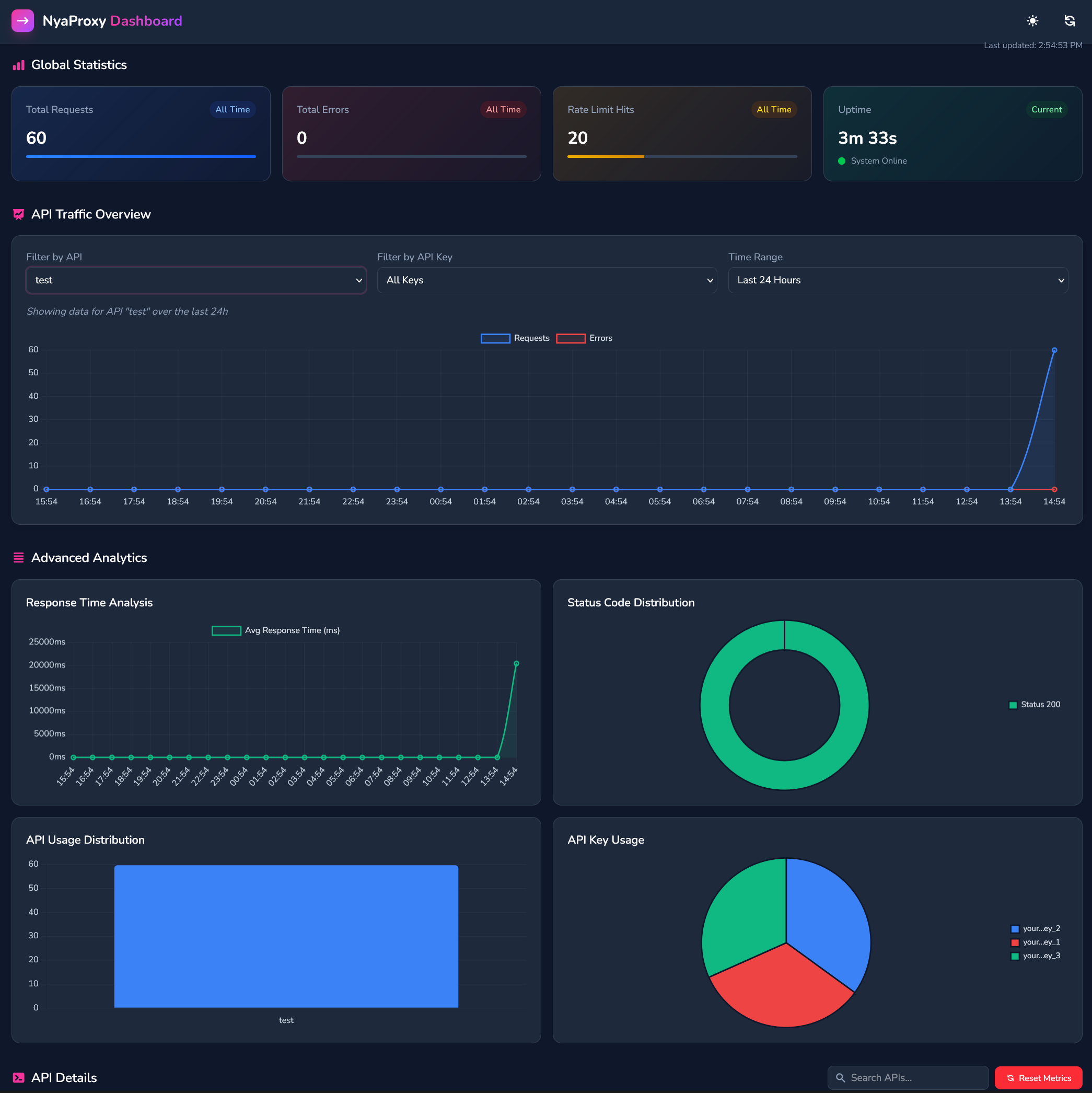
Monitor at http://localhost:8080/dashboard:
- Request volumes and response times
- Rate limit status and queue depth
- Key usage and performance metrics
- Error rates and status codes
Visual Configuration Interface
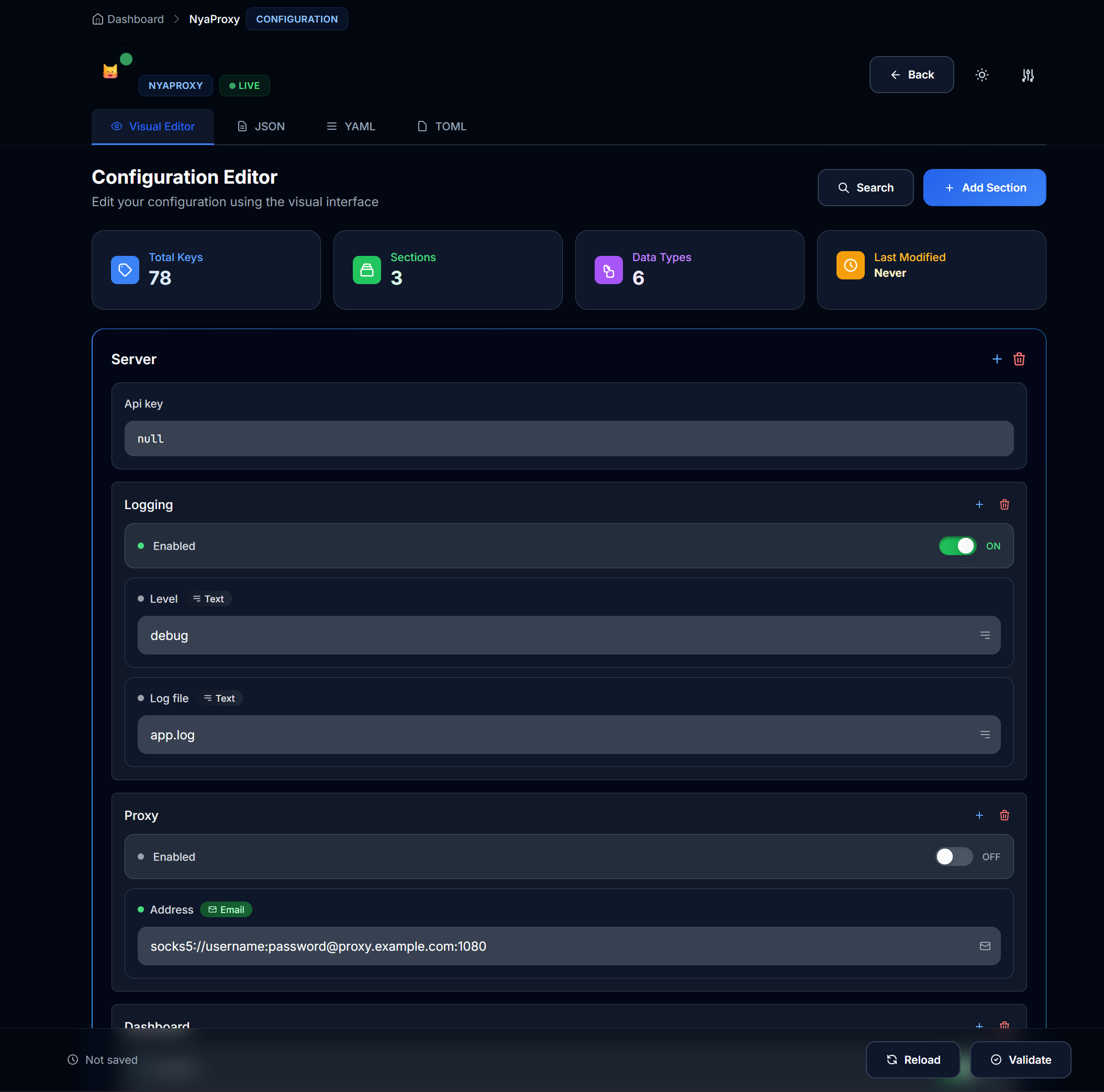
Manage at http://localhost:8080/config:
- Live configuration editing
- Syntax validation
- Variable management
- Rate limit adjustments
- Auto reload on save
🛡️ Reference Architecture
graph TD
    A[Client] --> B[Nginx]
    B --> C[NyaProxyAuth]
    C --> D[NyaProxyApp]
    D --> E[API Providers]
    F[Monitoring] --> D
🌌 Future Roadmap
graph LR
A[Q1 2025] --> B[📡 Documentation Enhancement ]
A --> C[🔄 Border Test Coverage ]
B --> D[📈 API Key Usage/Balance Tracking]
C --> E[📊 UI/UX Enhancement ]
F[Q2 2025] --> G[🧩 Plugin System]
F --> H[🔍 Custom Metrics API]
❤️ Community

[!NOTE] Need support? Contact k3scat@gmail.com or join our discord community at Nya Foundation
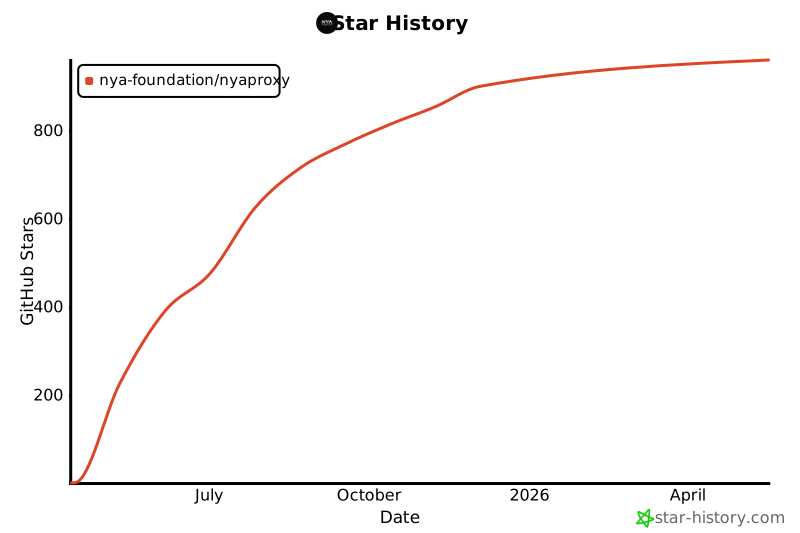
📈 Project Growth
Project details
Verified details
These details have been verified by PyPIProject links
GitHub Statistics
Maintainers
Release history Release notifications | RSS feed


Download files
Download the file for your platform. If you're not sure which to choose, learn more about installing packages.
Source Distribution
Built Distribution
Filter files by name, interpreter, ABI, and platform.
If you're not sure about the file name format, learn more about wheel file names.
Copy a direct link to the current filters
File details
Details for the file nya_proxy-0.4.0.tar.gz.
File metadata
- Download URL: nya_proxy-0.4.0.tar.gz
- Upload date:
- Size: 92.9 kB
- Tags: Source
- Uploaded using Trusted Publishing? Yes
- Uploaded via: twine/6.1.0 CPython/3.12.9
File hashes
| Algorithm | Hash digest | |
|---|---|---|
| SHA256 |
310541308250075158fc337f21107cd88efa024ad6f36598366dbbe5a9f453a7
|
|
| MD5 |
039ff67bfaa551f2650b8806c5da8edb
|
|
| BLAKE2b-256 |
ede6b92d39db9768e51ecb18ff2553b4465a1684c17a0f31c471c6b070cfc22c
|
Provenance
The following attestation bundles were made for nya_proxy-0.4.0.tar.gz:
Publisher:
publish.yml on Nya-Foundation/NyaProxy
-
Statement:
-
Statement type:
https://in-toto.io/Statement/v1 -
Predicate type:
https://docs.pypi.org/attestations/publish/v1 -
Subject name:
nya_proxy-0.4.0.tar.gz -
Subject digest:
310541308250075158fc337f21107cd88efa024ad6f36598366dbbe5a9f453a7 - Sigstore transparency entry: 246040953
- Sigstore integration time:
-
Permalink:
Nya-Foundation/NyaProxy@0416c9e3811fa572771880ed2e5a4d449a874139 -
Branch / Tag:
refs/heads/main - Owner: https://github.com/Nya-Foundation
-
Access:
public
-
Token Issuer:
https://token.actions.githubusercontent.com -
Runner Environment:
github-hosted -
Publication workflow:
publish.yml@0416c9e3811fa572771880ed2e5a4d449a874139 -
Trigger Event:
push
-
Statement type:
File details
Details for the file nya_proxy-0.4.0-py3-none-any.whl.
File metadata
- Download URL: nya_proxy-0.4.0-py3-none-any.whl
- Upload date:
- Size: 95.3 kB
- Tags: Python 3
- Uploaded using Trusted Publishing? Yes
- Uploaded via: twine/6.1.0 CPython/3.12.9
File hashes
| Algorithm | Hash digest | |
|---|---|---|
| SHA256 |
5f96d213315bcf62a421e8d95fd556ec124a4a740017f0fd95f18b3234a4a64a
|
|
| MD5 |
c2e1f7ed78cc254da7dc1382fd890ad6
|
|
| BLAKE2b-256 |
ea2abbbd266e086ec440873d80ee0be415b383586eac4fc676f6523490c1b8ad
|
Provenance
The following attestation bundles were made for nya_proxy-0.4.0-py3-none-any.whl:
Publisher:
publish.yml on Nya-Foundation/NyaProxy
-
Statement:
-
Statement type:
https://in-toto.io/Statement/v1 -
Predicate type:
https://docs.pypi.org/attestations/publish/v1 -
Subject name:
nya_proxy-0.4.0-py3-none-any.whl -
Subject digest:
5f96d213315bcf62a421e8d95fd556ec124a4a740017f0fd95f18b3234a4a64a - Sigstore transparency entry: 246040957
- Sigstore integration time:
-
Permalink:
Nya-Foundation/NyaProxy@0416c9e3811fa572771880ed2e5a4d449a874139 -
Branch / Tag:
refs/heads/main - Owner: https://github.com/Nya-Foundation
-
Access:
public
-
Token Issuer:
https://token.actions.githubusercontent.com -
Runner Environment:
github-hosted -
Publication workflow:
publish.yml@0416c9e3811fa572771880ed2e5a4d449a874139 -
Trigger Event:
push
-
Statement type:






