
nytimes-games






An unofficial Python client for the New York Times Games APIs: Wordle, Connections, Strands, Spelling Bee, Letter Boxed and the Daily, Mini, Midi and Bonus crosswords, plus your own stats and game progress.
NYT doesn't publish documentation or an API spec for these endpoints. This
package wraps them in one client with typed, validated
Pydantic models, so you can build archives,
stats dashboards, bots or your own games without reverse engineering NYT's
APIs first. Optional extras add the nytg command line tool and a REST API.
Installation
pip install nytimes-games
The package installs as nytimes-games and is imported as nytgames.
Python 3.10 or newer is required.
Quick start
from nytgames import NYTGamesClient

client = NYTGamesClient()

client.wordle("2025-06-12").solution
client.connections("2025-06-12").categories
client.crossword("mini")                  # today's Mini
client.crossword("daily", "1993-11-21")   # any Daily back to 1993
Your stats and game progress need your NYT session cookie:
client = NYTGamesClient(cookies="NYT-S=...")

stats = client.player_stats().stats
stats.wordle.calculatedStats.currentStreak
stats.connections.puzzles_won
stats.crossword_daily.dailyStats["monday"].avgTimeSeconds
What's available
Puzzles don't need cookies. Everything about you does.
Puzzles
| Game | Method | Available from | What you get | Spoilers |
|---|---|---|---|---|
| Wordle | wordle(date) |
2021-06-19 | Puzzle number, editor | solution |
| Connections | connections(date) |
2023-06-12 | The 16 cards (words or pictures) and starting board | categories (the groups) |
| Strands | strands(date) |
2024-03-04 | Theme clue and letter board | spangram, themeWords, word paths |
| Spelling Bee | spelling_bee_puzzle(date) |
2018-05-06 | Letters, word and pangram counts, forum-style hints | answers, pangrams |
| Letter Boxed | letter_boxed(date) |
2018-12-17 | Sides, par, every accepted word | ourSolution |
| Crossword | crossword(publish_type, date=None) |
Daily 1993-11-21, Mini 2014-08-21, Midi 2026-02-25, Bonus 1997 | Grid, clues, entries, rebus, circles and shading | cell answers |
| Crossword by ID | crossword_by_id(puzzle_id) |
Any crossword, e.g. both puzzles on a date with two | Same as crossword |
cell answers |
| Crossword schedule | crossword_oracle(publish_type) |
Current and next puzzle | Puzzle IDs and publish times | |
| WordleBot summary | wordlebot_summary(date) |
2021-06-19 | How everyone did: average guesses, skill and luck by mode, guess distributions, skill percentiles | guesses (the bot's solve paths) |
| Puzzle list | archive(game, date_start, date_end) |
Wordle, Connections, Strands, Daily, Mini, Midi | Puzzle IDs and dates for a range | Wordle solution |
You (needs your NYT-S cookie)
| Data | Method | What you get |
|---|---|---|
| Stats | player_stats() |
Streaks, win rates and distributions for every game you've played |
| Crossword progress | crossword_game(puzzle_ids, publish_type) |
Your filled squares, time, gold star, revealed and checked squares (up to 30 puzzles per call) |
| Crossword list | crossword_puzzles(publish_type, date_start=..., date_end=...) |
Daily, Mini and Bonus puzzles with your solved status and star (90 days or less per call) |
| Wordle progress | wordle_latest(puzzle_ids) |
Your guesses and result |
| WordleBot | wordlebot() |
Your luck and skill for today's Wordle, overall and by round (today only, after you've opened WordleBot) |
| Spelling Bee progress | spelling_bee_latest(puzzle_ids) |
Words you found and your rank (up to 30 puzzles per call) |
NYT doesn't record individual solve events, so progress means your saved game: the current state and totals, not a history of each move.
Dates are YYYY-MM-DD strings. publish_type is daily, mini, midi or
bonus, and date=None returns today's puzzle. NYT usually serves the next
day's puzzle a day early.
archive() is the quickest way to get puzzle IDs for a date range, for
example to check your progress on a month of puzzles:
midis = client.archive("crossword_midi", "2026-09-01", "2026-09-30")
client.crossword_game([p.id for p in midis], "midi")   # up to 30 IDs per call
Puzzle structure
The models include helpers for working with a puzzle's structure, for crossword research, trainers or solvers:
puzzle = client.crossword("daily", "2025-06-12")

for entry in puzzle.entries():
    entry.id            # "50-Across"
    entry.clue          # "Major basketball feat … or a feature shared by 3-, 6- and 9-Down"
    entry.answer        # "QUADRUPLEDOUBLE", with rebus squares' full answers
    entry.coordinates   # ((11, 0), (11, 1), …): (row, col) of each square
    entry.crossings     # ("50-Down", "51-Down", …)
    entry.references    # ("9-Down", "3-Down", "6-Down")
    entry.rebus         # True if the answer is longer than its squares

puzzle.squares()        # every square: answer, label, rebus, circled, shaded

client.strands(date).words()          # theme words and spangram with their paths
client.connections(date).board()      # the 4x4 starting board
Special puzzles are kept as they are: text square labels, extra clue lists
such as "Around" (entry IDs like Around-1), and entries that turn corners.
Crossword files
Export crosswords to the standard formats other crossword apps use, with your saved progress if you like:
from nytgames import formats

puzzle = client.crossword("daily", "2025-06-12")
game = client.crossword_game(puzzle.id, "daily")      # optional: your progress

open("daily.puz", "wb").write(formats.to_puz(puzzle, game))     # Across Lite
formats.to_ipuz(puzzle, game)                                    # ipuz, as a dict
open("daily.xml", "w").write(formats.to_xml(puzzle, game))      # Crossword Compiler XML
formats.export(puzzle, "ipuz")                                   # any format, as bytes
| Format | Notes |
|---|---|
.puz |
Across Lite, the most widely supported. Rebus squares, circles, your fill, revealed squares and the timer. Shaded squares are shown as circles, and text must fit Latin-1 (typographic quotes and dashes are converted) |
.ipuz |
The open ipuz JSON format. Rebus, circles, shading and your fill |
.xml |
Crossword Compiler rectangular-puzzle XML. Rebus, circles, shading, your fill and revealed or penciled squares |
A few special puzzles use gimmicks these formats can't represent, such as
squares labeled with text or clues that wind around the grid. Exporting them
raises NYTGamesExportError, whose reasons say why; export_problems(puzzle, fmt) returns the reasons without exporting. fidelity(puzzle, fmt) lists
what an export approximates, such as italics in clues or shading shown as
circles in .puz. Exported files are for personal
use: the puzzles are copyrighted by The New York Times.
Spelling Bee extras:
from nytgames import spelling_bee_hints

puzzle = client.spelling_bee_puzzle("2026-10-03")
spelling_bee_hints(puzzle)      # Spelling Bee Forum style hints: counts, pairs, points
client.spelling_bee_puzzles()   # every puzzle on the game page (about two weeks)
Cookies
To get your NYT-S cookie, log in at nytimes.com, open your browser's
developer tools, and find the NYT-S cookie for .nytimes.com (Application
tab in Chrome, Storage tab in Firefox). Treat it like a password: it gives
access to your NYT account.
cookies can be:
- a
Cookieheader string:"NYT-S=...; nyt-a=..." - a dict:
{"NYT-S": "..."} - a list of cookie objects with
nameandvaluekeys, such as a JSON export from the Cookie-Editor browser extension - either of those as a JSON string, so
NYT_COOKIES="$(cat cookies.json)"works with an export file
Cookies that can't be sent (for example with line breaks in a value) raise
ValueError before any request is made, and error messages never include
cookie values.
Errors
HTTP errors from NYT are raised as NYTGamesHTTPError, a subclass of
requests.HTTPError:
| Exception | When |
|---|---|
NYTGamesAuthenticationError |
401 or 403, usually a missing or expired NYT-S cookie |
NYTGamesNotFoundError |
404, for example a date with no puzzle |
NYTGamesRateLimitError |
429 after retrying; retry_after has NYT's suggested wait, if any |
NYTGamesHTTPError |
any other HTTP error |
NYTGamesParseError |
an NYT page didn't contain the expected game data (a ValueError) |
from nytgames import NYTGamesNotFoundError

try:
    client.wordle("1900-01-01")
except NYTGamesNotFoundError:
    print("No puzzle that day")
Network behavior
Failed connections, timeouts, rate limits (429) and NYT server errors are
retried up to 3 times with exponential backoff, honoring NYT's Retry-After
header. Adjust with NYTGamesClient(retries=5, backoff=1.0, timeout=60), or
turn retries off with retries=0.
You can pass your own requests session, used as is (without the client's
retries). For example, to cache responses with
requests-cache:
import requests_cache

session = requests_cache.CachedSession("nyt_cache", expire_after=3600)
client = NYTGamesClient(session=session)
Cookies are sent only to NYT (or the base_url you set) and are never logged.
Models
Every method returns Pydantic models from nytgames.models. Fields NYT adds
later are kept rather than rejected, so new NYT fields don't break your code.
Use .model_dump() to get plain dicts, and by_alias=True to keep NYT's
original keys, such as "Queen Bee" in the Spelling Bee ranks.
Examples
examples/ has small projects built on the package: an
alternative Letter Boxed solver using the
day's accepted words, clue reuse across recent
crosswords, your solve times by weekday and
constructor, and your own REST API in Docker.
Async apps
NYTGamesClient is synchronous, but works in async apps as long as its calls
run outside the event loop.
FastAPI: declare routes with plain def. FastAPI runs those in a thread
pool, so the client's requests don't block the event loop. (The routes in
nytgames.api work this way.)
from fastapi import FastAPI
from nytgames import NYTGamesClient

app = FastAPI()
client = NYTGamesClient()


@app.get("/wordle/{date}")
def wordle(date: str):
    return client.wordle(date)
In an async def route, use await run_in_threadpool(client.wordle, date)
(from fastapi.concurrency) instead of calling the client directly.
Other asyncio code (bots, aiohttp, scripts): run calls with
asyncio.to_thread. To fetch several puzzles at once, limit how many run at
a time to be polite to NYT, and give each task its own client, since
requests sessions aren't guaranteed to be thread safe:
import asyncio
from nytgames import NYTGamesClient


async def connections(dates: list[str]):
    limit = asyncio.Semaphore(4)

    async def fetch(day: str):
        async with limit:
            return await asyncio.to_thread(NYTGamesClient().connections, day)

    return await asyncio.gather(*(fetch(day) for day in dates))


puzzles = asyncio.run(connections(["2025-06-10", "2025-06-11", "2025-06-12"]))
In Home Assistant, use await hass.async_add_executor_job(client.wordle, date).
A native async client is tracked in
#19.
Command line
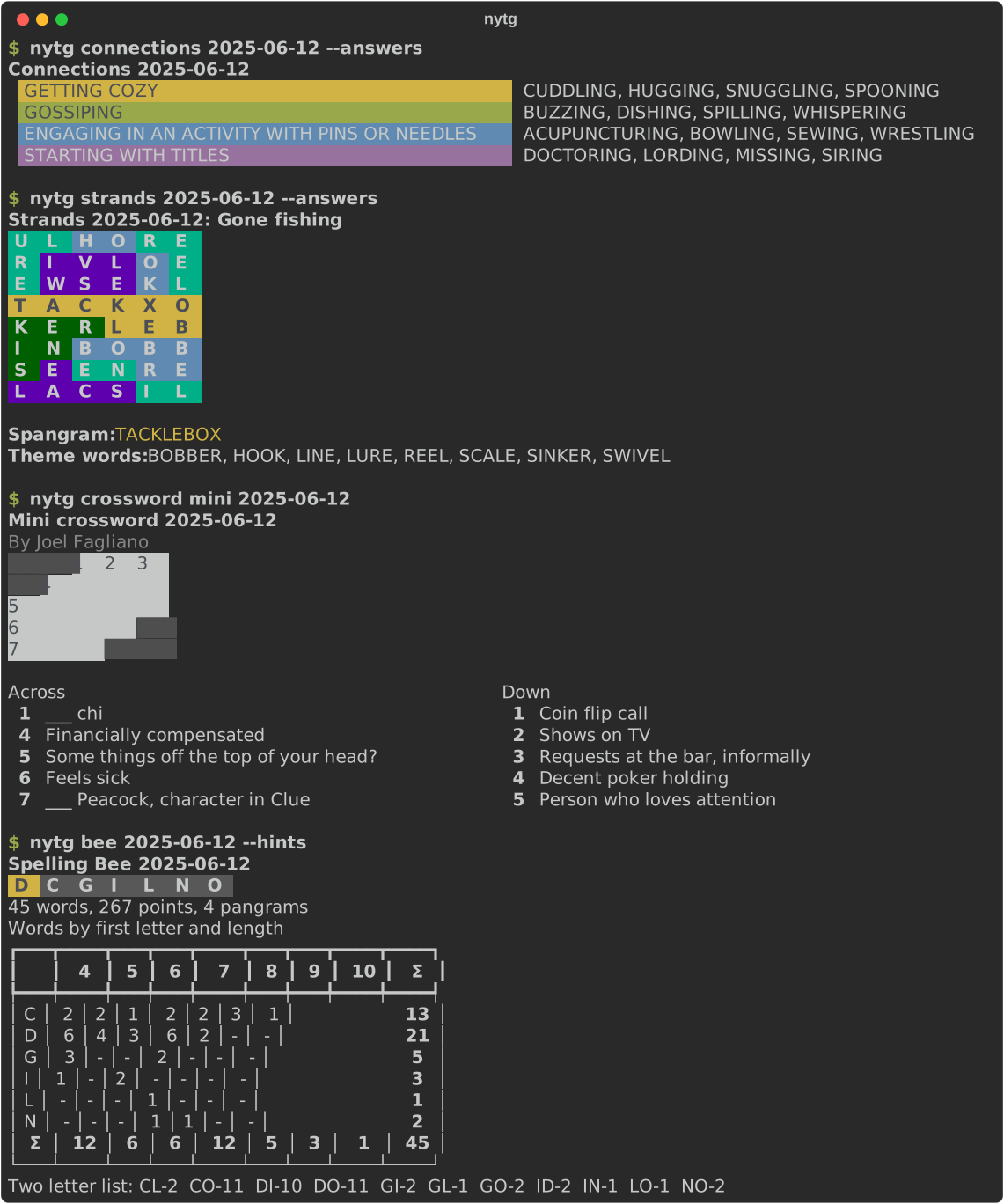
The optional cli extra installs nytg:
pipx install "nytimes-games[cli]" # or: pip install "nytimes-games[cli]"
nytg wordle                      # today's Wordle, without the answer
nytg wordle yesterday --answers
nytg connections friday -a       # the groups, in their colors
nytg strands 2025-06-12
nytg bee --hints                 # Spelling Bee Forum style hints
nytg letter-boxed
nytg crossword mini              # the grid and clues
nytg crossword daily 1993-11-21 --answers
nytg crossword mini --save mini.puz     # or .ipuz, or .xml (Crossword Compiler)
nytg crossword daily yesterday --save daily.ipuz --progress   # with your progress
Answers are hidden unless you pass --answers, in every output format.
Dates can be YYYY-MM-DD, today, yesterday, tomorrow or a weekday, and
first for the first puzzle in nytg archive.
Your stats and history
Log in once with your NYT-S cookie (see Cookies):
nytg auth login                  # paste the cookie; it's checked, then saved
nytg auth status
nytg stats                       # every game at a glance
nytg stats crossword             # averages, bests and streaks by weekday
nytg today                       # which of today's games you've played
nytg wordlebot                   # your WordleBot luck and skill vs. everyone (any date for everyone)
nytg history crossword --from 2026-01-01 -f csv > solves.csv
nytg history wordle --from monday
nytg history bee
Cookies are read from --cookies, then the NYT_COOKIES environment
variable, then the active profile.
Archiving
nytg archive connections --from first --out puzzles/
saves each date as puzzles/connections/YYYY-MM-DD.json. Run it again to
resume: saved dates are skipped. A manifest.json records when each file was
fetched, NYT's update time and a hash; with --overwrite, puzzles NYT has
since changed keep their previous version in revisions/. Crosswords can be archived as crossword files
with --as puz, --as ipuz or --as xml; puzzles that can't be saved in that
format are listed as unsupported. Games: wordle, connections, strands,
spelling-bee, letter-boxed, crossword-daily, crossword-mini and
crossword-midi.
Output formats
Every command takes --format (-f), like gcloud:
| Format | Output |
|---|---|
table |
Tables and grids (the default) |
json, yaml |
All the data |
csv |
One row per item, nested fields as dotted columns |
value(FIELD,...) |
Tab separated values for scripts, e.g. value(categories[0].title) |
nytg wordle --answers -f "value(solution)"
nytg stats -f json | jq '.[] | select(.game == "Wordle")'
Profiles and settings
Settings are saved per profile in ~/.config/nytg/config.ini (readable only
by you), similar to gcloud configurations:
nytg config set format json      # default output format for this profile
nytg config list
nytg --profile alice auth login  # a second NYT account
nytg config profiles activate alice
nytg config profiles list
--profile or NYTG_PROFILE picks a profile for one command. Run
nytg --install-completion for shell completion.
Building your own command line
nytgames.cli.extension lets you build a command line with every nytg
command plus your own, sharing its root options (--profile, --cookies,
--format), output formats and error messages:
import typer
from nytgames.cli.extension import FormatOption, create_app, emit, get_client, run

app = create_app(name="mytool", help="My NYT tools.", version="1.0.0")
db = typer.Typer(help="Query my archive.")
app.add_typer(db, name="db")


@db.command("midis")
def midis(fmt: FormatOption = None) -> None:
    """September's Midi crosswords."""
    puzzles = get_client().archive("crossword_midi", "2026-09-01", "2026-09-30")
    emit([{"date": p.print_date, "by": p.byline} for p in puzzles], fmt)


def main() -> None:   # point your [project.scripts] entry here
    run(app)
Each create_app() call returns an independent app. emit(data, fmt, table) prints JSON-compatible data in the requested format, with an optional
function that renders the table format. get_client() returns a client with
the cookies nytg would use. The other modules in nytgames.cli are
internal.
REST API
The optional api extra serves everything as a REST API with
FastAPI, including interactive docs at
/docs.
pip install "nytimes-games[api]"
uvicorn nytgames.api:app
To customize it, write your own main.py:
from nytgames.api import create_app

app = create_app(title="My NYT Games API")   # any FastAPI settings
Or mount the routes in an existing FastAPI app:
from fastapi import FastAPI
from nytgames.api import add_exception_handlers, router

app = FastAPI()
app.include_router(router, prefix="/nyt")
add_exception_handlers(app)   # NYT errors become 404s and 403s instead of 500s
By default each request is made with the cookies sent to the API:
curl -H "Cookie: NYT-S=..." http://localhost:8000/player/stats
To use your own cookies for every request instead, override the client:
from nytgames import NYTGamesClient
from nytgames.api import get_client

app.dependency_overrides[get_client] = lambda: NYTGamesClient(cookies="NYT-S=...")
Anyone who can reach that API can then see your stats and progress, so keep it private.
examples/api has a complete main.py and Dockerfile for
running your own instance in a container.
Endpoints
| Route | NYT endpoint |
|---|---|
GET /archive/{game}/{date_start}/{date_end} |
svc/games/v1/archive/{game}/{date_start}/{date_end} |
GET /connections/{date} |
svc/connections/v2/{date}.json |
GET /crosswords/daily/today |
svc/crosswords/v6/puzzle/daily.json |
GET /crosswords/daily/{date} |
svc/crosswords/v6/puzzle/daily/{date}.json |
GET /crosswords/mini/today |
svc/crosswords/v6/puzzle/mini.json |
GET /crosswords/mini/{date} |
svc/crosswords/v6/puzzle/mini/{date}.json |
GET /crosswords/midi/today |
svc/crosswords/v6/puzzle/midi.json |
GET /crosswords/midi/{date} |
svc/crosswords/v6/puzzle/midi/{date}.json |
GET /crosswords/bonus/{date} |
svc/crosswords/v6/puzzle/bonus/{date}.json |
GET /crosswords/{publish_type}/{date}/download?format=puz |
A .puz, .ipuz or .xml file (&progress=true adds your progress) |
GET /crosswords/puzzles |
svc/crosswords/v3/puzzles.json |
GET /crosswords/id/{puzzle_id} |
svc/crosswords/v6/puzzle/{puzzle_id}.json |
GET /crosswords/oracle/{publish_type} |
svc/crosswords/v2/oracle/{publish_type}.json |
GET /crosswords/game/{game_id}?publish_type=daily |
svc/games/state/crossword_{publish_type}/latests |
GET /letter-boxed/{date} |
svc/letter-boxed/v1/{date}.json |
GET /player/stats |
svc/games/state/wordleV2/latests?puzzle_ids=0 |
GET /spelling-bee |
Scraped from puzzles/spelling-bee |
GET /spelling-bee/latest |
svc/games/state/spelling_bee/latests |
GET /spelling-bee/{date} |
svc/spelling-bee/v1/{date}.json |
GET /spelling-bee/{date}/hints |
Computed from the puzzle above |
GET /strands/{date} |
svc/strands/v2/{date}.json |
GET /wordlebot |
svc/int/run/cubby/public-api/v1/responses/wordlebot/reader (today, needs cookies) |
GET /wordlebot/{date}/summary |
static01.nyt.com/newsgraphics/2022/wordlebot/{solution}-{date}/summary.json |
GET /wordle/latest |
svc/games/state/wordleV2/latests |
GET /wordle/{date} |
svc/wordle/v2/{date}.json |
NYT errors are returned with NYT's status code, for example 404 for a date with no puzzle.
Staying current with NYT
NYT changes these APIs without notice. Every morning a live check fetches a real puzzle from every game and endpoint, and exports today's Mini to every file format. The NYT live check badge above shows the latest result and date, and failures open an issue automatically.
Contributing
NYT changes these APIs without notice, so bug reports with the failing date and error are very welcome. See CONTRIBUTING.md to set up a development environment.
License
MIT. This project is not affiliated with or endorsed by The New York Times. NYT puzzles are copyrighted by The New York Times; please respect their terms of service and don't republish puzzle content.
1 maintainer

Metadata
1 maintainer
Release files for nytimes-games 0.8.4
For a detailed explanation of source distributions (sdists) and built distributions (wheels), please see the package formats documentation.
Source distribution (sdist)
| File | Size | Uploaded | |
|---|---|---|---|
| nytimes_games-0.8.4.tar.gz | 87.2 kB | Details |
Built distribution (wheel)
| File | Interpreter | ABI | Platform | Reset |
|---|---|---|---|---|
| nytimes_games-0.8.4-py3-none-any.whl | Python 3 | none | any | Details |
Total release size: 153.4 kB
Release files / nytimes_games-0.8.4.tar.gz
| Download URL | nytimes_games-0.8.4.tar.gz |
|---|---|
| Size | 87.2 kB |
| Tags | Source |
|
SHA-256 checksum How to use checksums |
95ce42bb2d2b16b669f6a102fa7870a6a024aafe4e724d1a352a04f44ea3f3e9
|
|
BLAKE2b-256 checksum How to use checksums |
4700c8560c0906d52e96fe687cf32723fbf91ae295ca7358483d9d8658cd93db
|
| Upload date | |
|
Uploaded using Trusted Publishing? What is trusted publishing? |
Yes |
| Uploaded via |
twine/7.0.0 CPython/3.13.14
|
Provenance
Provenance describes where a file came from. On PyPI, provenance is shared via attestations, which provide a verifiable record of the build or publishing details. View details, limitations and caveats.


PyPI Publish Attestation
PyPI verified that this artifact, at this checksum, originated from the publisher listed below.
Signed by GitHub Actions, verified by PyPI on Oct 5, 2026.
Transparency logRelease files / nytimes_games-0.8.4-py3-none-any.whl
| Download URL | nytimes_games-0.8.4-py3-none-any.whl |
|---|---|
| Size | 66.2 kB |
| Tags | Python 3 |
|
SHA-256 checksum How to use checksums |
727827e9e73542f998da75c0039debe77829ea12f45e404ca49bf76faf634fba
|
|
BLAKE2b-256 checksum How to use checksums |
df6054ef6a3f95c3d348d52c8cae360b870e7ebaa7288486296545d60b3f3f67
|
| Upload date | |
|
Uploaded using Trusted Publishing? What is trusted publishing? |
Yes |
| Uploaded via |
twine/7.0.0 CPython/3.13.14
|
Provenance
Provenance describes where a file came from. On PyPI, provenance is shared via attestations, which provide a verifiable record of the build or publishing details. View details, limitations and caveats.
PyPI Publish Attestation
PyPI verified that this artifact, at this checksum, originated from the publisher listed below.
Signed by GitHub Actions, verified by PyPI on Oct 5, 2026.
Transparency log













