
oak
PyPi: https://pypi.org/project/oak-logging/1.0.0/ Try it out! https://kavya-24.github.io/oak-logging/
A tiny, dependency-free logging framework for Python, built on top of the
standard library's logging. It gives you:
- Levels —
debug,info,warning,error,exception - Structured errors — a dedicated formatter prints exception type, message and traceback in a readable block
- PII scrubbing — redacts emails, phone numbers, SSNs, credit cards, IPs,
and sensitive field names (passwords, tokens, API keys, ...) from messages
and
extrafields - JSON output — structured, machine-friendly lines for shipping to log aggregators
- Colored CLI logs — automatic ANSI colors on TTYs
- Simple initialization — one
init()call to configure everything
Zero dependencies. Python 3.9+.
Install
pip install oak-logging # import stays `import oak`
Or from source:
pip install -e .
Quick start
import oak

log = oak.init("DEBUG")

log.debug("entering parse loop")
log.info("user signed up", extra={"user_id": 42})
log.warning("disk at 90%", extra={"usage_pct": 90.1})
log.error("payment failed")
Output (colors shown when writing to a terminal):
2026-08-01 15:30:00 DEBUG app: entering parse loop
2026-08-01 15:30:00 INFO  app: user signed up
2026-08-01 15:30:00 WARNING app: disk at 90%
2026-08-01 15:30:00 ERROR app: payment failed
Initialization options
log = oak.init(
    level="DEBUG",          # str or int; default "INFO"
    output="console",       # "console", "json", or a file path
    format="%(asctime)s %(levelname)s %(name)s: %(message)s",
    error_format=True,      # structured block for ERROR+ logs
    pii_scrubbing=True,     # redact PII from messages and extra fields
    color=None,             # None=auto (TTY), True=force, False=off
    name="app",             # underlying stdlib logger name
)
You can also configure the root logger imperatively with oak.configure(...),
and grab additional loggers with oak.get_logger("worker") — they share the
same configuration.
PII scrubbing
PII is redacted from the log message itself and from any extra values:
-
Pattern-based — known PII shapes are redacted anywhere in the message:
log.info("contact jane@example.com or 555-123-4567")
# contact [REDACTED] or [REDACTED]
-
Key-based —
extrafields whose names look sensitive are redacted (including nested dicts and lists):log.info("signup", extra={ "email": "jane@example.com", # redacted "password": "hunter2", # redacted "user_id": 7, # kept })
extrais not printed by default — it behaves exactly like stdlib logging: reference a key in your format string to see it, and the scrubbed value is what gets logged:log = oak.init(format="%(asctime)s %(levelname)s %(email)s") # 2026-08-01 15:30:00 INFO [REDACTED]
Covered patterns: email, phone numbers, SSNs, credit card numbers, IPv4 and
MAC addresses. Sensitive key names include email, password, token,
api_key, ssn, credit_card, and more. Disable scrubbing with
pii_scrubbing=False if you ever need to (not recommended).
Scrubbing helpers are public too: oak.scrub_message, oak.scrub_extra,
oak.scrub_value, and oak.REDACTED.
Structured errors
With the default error_format=True, ERROR/exception logs get a readable,
structured error block:
try:
    json.loads(bad_payload)
except ValueError:
    log.exception("could not parse payload")
2026-08-01 15:30:00 ERROR app: could not parse payload
  ERROR TYPE: JSONDecodeError
  ERROR MSG : Expecting value: line 1 column 1 (char 0)
  TRACEBACK:
  Traceback (most recent call last):
    ...
JSON output
log = oak.init("INFO", json=True)
log.info("order placed")
log.error("payment failed for jane@example.com")
{"ts": "2026-08-01T15:30:00", "level": "INFO", "logger": "app", "message": "order placed"}
{"ts": "2026-08-01T15:30:00", "level": "ERROR", "logger": "app", "message": "payment failed for [REDACTED]"}
File output
log = oak.init(level="INFO", output="app.log")
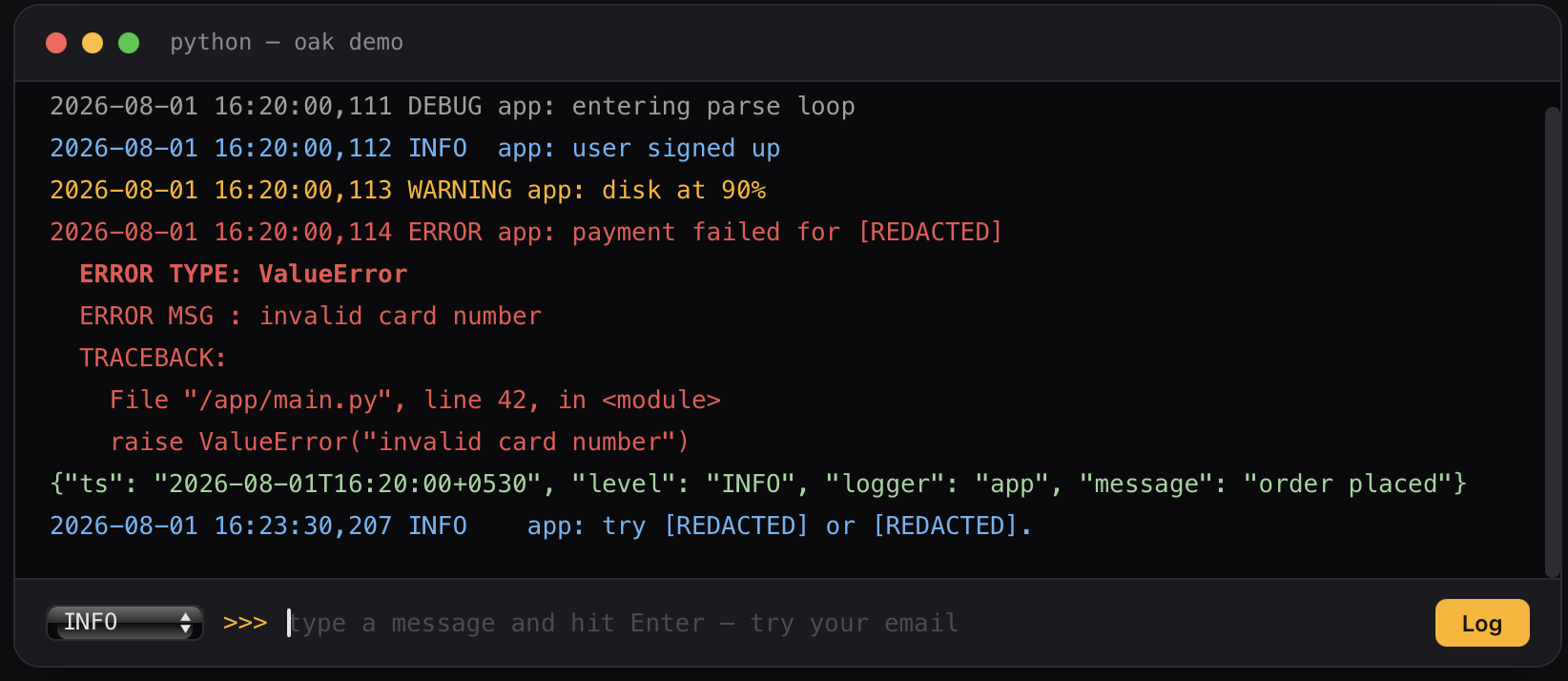
Demo
oak-demo
Development
python -m venv .venv
.venv/bin/pip install -e . pytest
.venv/bin/python -m pytest
License
MIT
1 maintainer

Release files for oak-logging 1.0.0
For a detailed explanation of source distributions (sdists) and built distributions (wheels), please see the package formats documentation.
Source distribution (sdist)
| File | Size | Uploaded | |
|---|---|---|---|
| oak_logging-1.0.0.tar.gz | 11.5 kB | Details |
Built distribution (wheel)
| File | Interpreter | ABI | Platform | Reset |
|---|---|---|---|---|
| oak_logging-1.0.0-py3-none-any.whl | Python 3 | none | any | Details |
Total release size: 21.6 kB
Release files / oak_logging-1.0.0.tar.gz
| Download URL | oak_logging-1.0.0.tar.gz |
|---|---|
| Size | 11.5 kB |
| Tags | Source |
|
SHA-256 checksum How to use checksums |
2c59f8f8433ce5aa1a209004410942af4c31c3011c47fea6d29c9f641f687eb3
|
|
BLAKE2b-256 checksum How to use checksums |
acebc4a134a83de7c95fcbe14f31f0c4a499d774cde6aeb9f77fa61c9f248c7b
|
| Upload date | |
|
Uploaded using Trusted Publishing? What is trusted publishing? |
No |
| Uploaded via |
twine/7.0.0 CPython/3.12.5
|
Release files / oak_logging-1.0.0-py3-none-any.whl
| Download URL | oak_logging-1.0.0-py3-none-any.whl |
|---|---|
| Size | 10.1 kB |
| Tags | Python 3 |
|
SHA-256 checksum How to use checksums |
bcd3e6beb1f1f2959e861ff044a6c78b5524b380f66bdcb1c5997753b38d5086
|
|
BLAKE2b-256 checksum How to use checksums |
07c90bfcaf2a73522fd952a8115735ba4ffea9da8b0a2c3e3654ebef57cc43eb
|
| Upload date | |
|
Uploaded using Trusted Publishing? What is trusted publishing? |
No |
| Uploaded via |
twine/7.0.0 CPython/3.12.5
|













