
A tiny, dependency-free logging framework with PII scrubbing, JSON output, and colored CLI logs

Project description
oak
PyPi: https://pypi.org/project/oak-logging/1.0.0/ Try it out! https://kavya-24.github.io/oak-logging/
A tiny, dependency-free logging framework for Python, built on top of the
standard library's logging. It gives you:
- Levels —
debug,info,warning,error,exception - Structured errors — a dedicated formatter prints exception type, message and traceback in a readable block
- PII scrubbing — redacts emails, phone numbers, SSNs, credit cards, IPs,
and sensitive field names (passwords, tokens, API keys, ...) from messages
and
extrafields - JSON output — structured, machine-friendly lines for shipping to log aggregators
- Colored CLI logs — automatic ANSI colors on TTYs
- Simple initialization — one
init()call to configure everything
Zero dependencies. Python 3.9+.
Install
pip install oak-logging # import stays `import oak`
Or from source:
pip install -e .
Quick start
import oak

log = oak.init("DEBUG")

log.debug("entering parse loop")
log.info("user signed up", extra={"user_id": 42})
log.warning("disk at 90%", extra={"usage_pct": 90.1})
log.error("payment failed")
Output (colors shown when writing to a terminal):
2026-08-01 15:30:00 DEBUG app: entering parse loop
2026-08-01 15:30:00 INFO  app: user signed up
2026-08-01 15:30:00 WARNING app: disk at 90%
2026-08-01 15:30:00 ERROR app: payment failed
Initialization options
log = oak.init(
    level="DEBUG",          # str or int; default "INFO"
    output="console",       # "console", "json", or a file path
    format="%(asctime)s %(levelname)s %(name)s: %(message)s",
    error_format=True,      # structured block for ERROR+ logs
    pii_scrubbing=True,     # redact PII from messages and extra fields
    color=None,             # None=auto (TTY), True=force, False=off
    name="app",             # underlying stdlib logger name
)
You can also configure the root logger imperatively with oak.configure(...),
and grab additional loggers with oak.get_logger("worker") — they share the
same configuration.
PII scrubbing
PII is redacted from the log message itself and from any extra values:
-
Pattern-based — known PII shapes are redacted anywhere in the message:
log.info("contact jane@example.com or 555-123-4567")
# contact [REDACTED] or [REDACTED]
-
Key-based —
extrafields whose names look sensitive are redacted (including nested dicts and lists):log.info("signup", extra={ "email": "jane@example.com", # redacted "password": "hunter2", # redacted "user_id": 7, # kept })
extrais not printed by default — it behaves exactly like stdlib logging: reference a key in your format string to see it, and the scrubbed value is what gets logged:log = oak.init(format="%(asctime)s %(levelname)s %(email)s") # 2026-08-01 15:30:00 INFO [REDACTED]
Covered patterns: email, phone numbers, SSNs, credit card numbers, IPv4 and
MAC addresses. Sensitive key names include email, password, token,
api_key, ssn, credit_card, and more. Disable scrubbing with
pii_scrubbing=False if you ever need to (not recommended).
Scrubbing helpers are public too: oak.scrub_message, oak.scrub_extra,
oak.scrub_value, and oak.REDACTED.
Structured errors
With the default error_format=True, ERROR/exception logs get a readable,
structured error block:
try:
    json.loads(bad_payload)
except ValueError:
    log.exception("could not parse payload")
2026-08-01 15:30:00 ERROR app: could not parse payload
  ERROR TYPE: JSONDecodeError
  ERROR MSG : Expecting value: line 1 column 1 (char 0)
  TRACEBACK:
  Traceback (most recent call last):
    ...
JSON output
log = oak.init("INFO", json=True)
log.info("order placed")
log.error("payment failed for jane@example.com")
{"ts": "2026-08-01T15:30:00", "level": "INFO", "logger": "app", "message": "order placed"}
{"ts": "2026-08-01T15:30:00", "level": "ERROR", "logger": "app", "message": "payment failed for [REDACTED]"}
File output
log = oak.init(level="INFO", output="app.log")
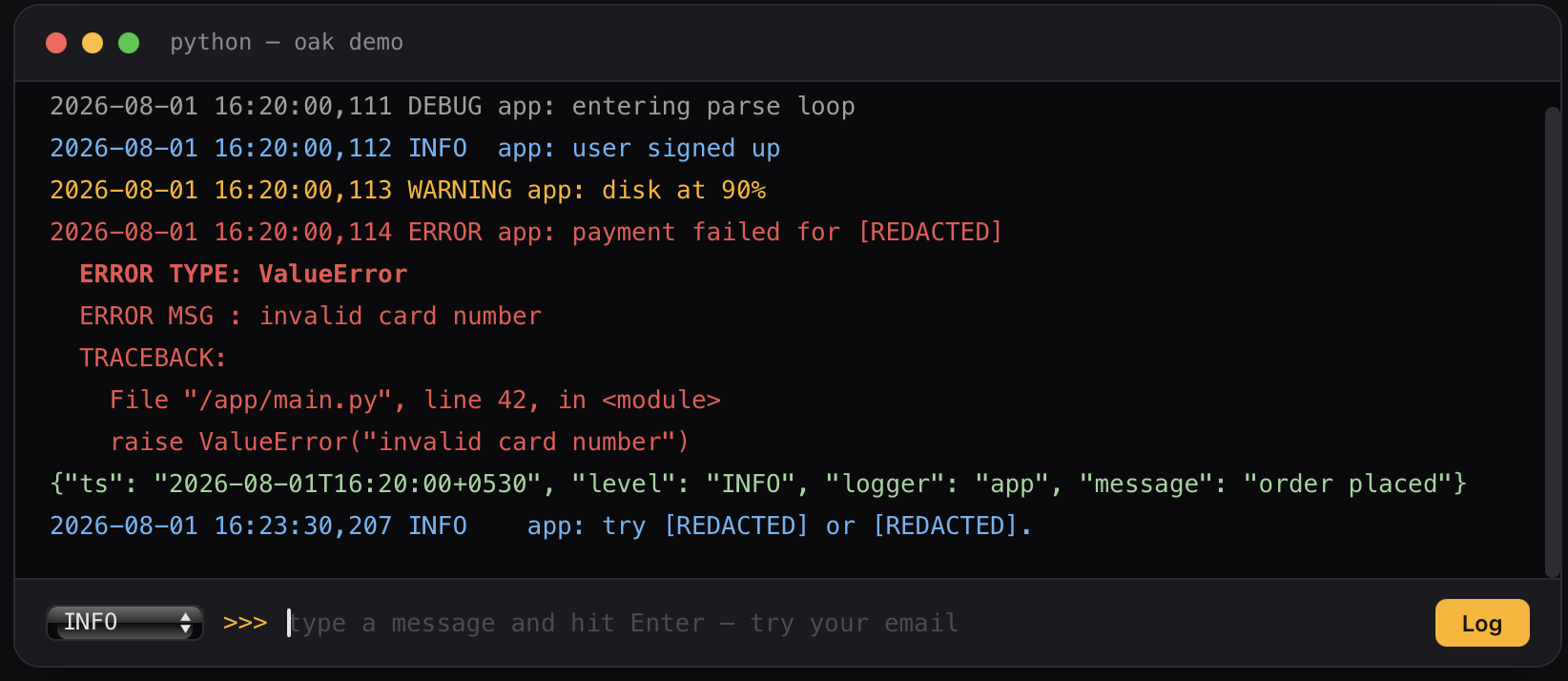
Demo
oak-demo
Development
python -m venv .venv
.venv/bin/pip install -e . pytest
.venv/bin/python -m pytest
License
MIT
Release history Release notifications | RSS feed

Download files
Download the file for your platform. If you're not sure which to choose, learn more about installing packages.
Source Distribution
Built Distribution
Filter files by name, interpreter, ABI, and platform.
If you're not sure about the file name format, learn more about wheel file names.
Copy a direct link to the current filters
File details
Details for the file oak_logging-1.0.0.tar.gz.
File metadata
- Download URL: oak_logging-1.0.0.tar.gz
- Upload date:
- Size: 11.5 kB
- Tags: Source
- Uploaded using Trusted Publishing? No
- Uploaded via: twine/7.0.0 CPython/3.12.5
File hashes
| Algorithm | Hash digest | |
|---|---|---|
| SHA256 |
2c59f8f8433ce5aa1a209004410942af4c31c3011c47fea6d29c9f641f687eb3
|
|
| MD5 |
c6ffd1886b50d0bc211ddfa64d32c0c0
|
|
| BLAKE2b-256 |
acebc4a134a83de7c95fcbe14f31f0c4a499d774cde6aeb9f77fa61c9f248c7b
|
File details
Details for the file oak_logging-1.0.0-py3-none-any.whl.
File metadata
- Download URL: oak_logging-1.0.0-py3-none-any.whl
- Upload date:
- Size: 10.1 kB
- Tags: Python 3
- Uploaded using Trusted Publishing? No
- Uploaded via: twine/7.0.0 CPython/3.12.5
File hashes
| Algorithm | Hash digest | |
|---|---|---|
| SHA256 |
bcd3e6beb1f1f2959e861ff044a6c78b5524b380f66bdcb1c5997753b38d5086
|
|
| MD5 |
799e526c318de477b87d8237800c8ebb
|
|
| BLAKE2b-256 |
07c90bfcaf2a73522fd952a8115735ba4ffea9da8b0a2c3e3654ebef57cc43eb
|






