
ob-analytics




Limit order book analytics and visualization for Python.
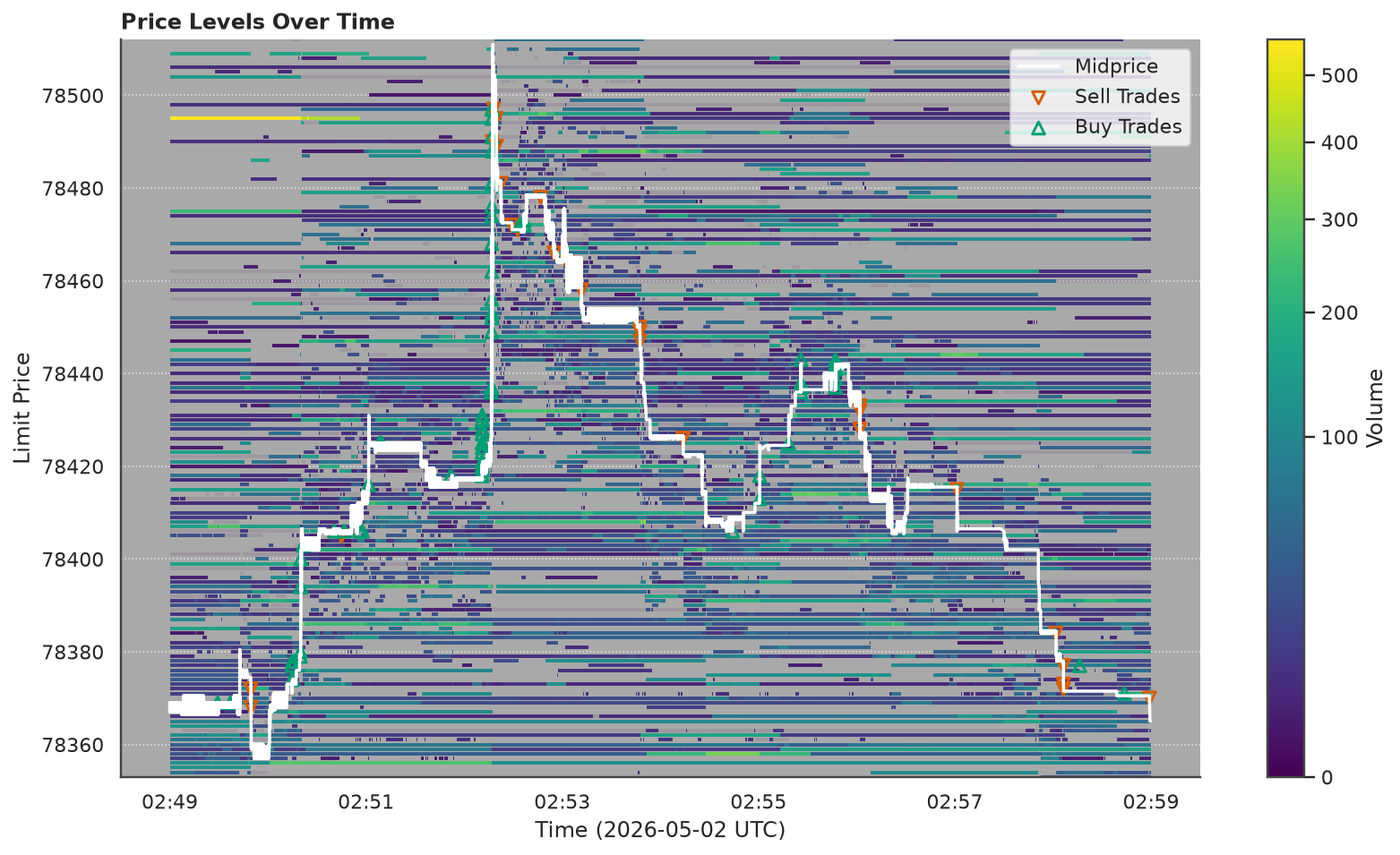
Reconstruct trades from raw exchange events, classify order types, compute depth metrics, and visualize market microstructure — from Bitstamp-style CSVs or LOBSTER message and orderbook files.
Ported from the R obAnalytics CRAN package. Now a standalone Python package with a pipeline API, pluggable formats, flow-toxicity metrics, and Matplotlib/Plotly backends.
Installation
pip install ob-analytics
With uv:
uv add ob-analytics
Optional extras:
pip install "ob-analytics[interactive]"   # Plotly figures
pip install "ob-analytics[live]"          # live exchange capture (websockets)
From source
Latest main, or a local clone for development:
pip install git+https://github.com/mczielinski/ob-analytics.git

# or
git clone https://github.com/mczielinski/ob-analytics.git
cd ob-analytics
pip install -e ".[interactive,live]"
Requires Python 3.11+. Core dependencies: NumPy, pandas, matplotlib, seaborn, pydantic, pyarrow, loguru.
Scale: in-memory (pandas) — comfortable to ~5M events (~5 GiB, session-scale data); for larger inputs, pre-slice by time window. See Scale envelope.
Quickstart
Bitstamp (bundled sample)
A 30-minute Bitstamp BTC/USD live capture (~314k events, ~280 trades) is
bundled with the package as paired orders.csv.gz + trades.csv. Point the
pipeline at the orders path; the companion trades file is auto-resolved:
from ob_analytics import Pipeline, sample_csv_path

result = Pipeline().run(sample_csv_path())

result.events         # enriched events with order types and aggressiveness
result.trades         # trades from the live feed, with maker/taker attribution
result.depth          # price-level volume time series
result.depth_summary  # best bid/ask, BPS bins, spread
LOBSTER
trading_date lives on RunContext, not on LobsterFormat:
from ob_analytics import Pipeline, LobsterFormat, RunContext

result = Pipeline(
    format=LobsterFormat(),
    ctx=RunContext(trading_date="2012-06-21"),
).run("/path/to/lobster_data")
Flow-toxicity metrics
Flow-toxicity metrics are plain functions you call on result.trades after
the run — no pipeline configuration, no plugin registry:
from ob_analytics import Pipeline, compute_vpin, compute_kyle_lambda, sample_csv_path

result = Pipeline().run(sample_csv_path())
vpin = compute_vpin(result.trades, bucket_volume=10.0)
kyle = compute_kyle_lambda(result.trades)
Add your own by writing a function over a trades DataFrame — see the Extending guide.
Live capture (Bitstamp)
With the [live] extra installed, capture a live order book straight to
orders.csv / trades.csv that the pipeline understands:
ob-analytics capture bitstamp --pair btcusd --out ./capture --minutes 30
ob-analytics capture --list shows registered venues. Add new ones by
implementing the LiveCapturer protocol in ob_analytics.live.
See the full quickstart for step-by-step usage, configuration, custom loaders, flow-toxicity metrics, CLI commands, and demo scripts.
Development
The project uses uv for dependency
management. A uv.lock lockfile is committed for reproducible installs.
git clone https://github.com/mczielinski/ob-analytics.git
cd ob-analytics
uv sync --group dev --extra interactive
Pre-commit hooks (Ruff lint/format, ty type check) are configured in
.pre-commit-config.yaml:
uv run pre-commit install
Testing & CI
uv run pytest tests/ -v
uv run ruff check ob_analytics/ tests/
uv run ty check ob_analytics/
CI runs automatically on push/PR via GitHub Actions — lint, type check, pytest on Python 3.11/3.12/3.13, and Codecov coverage upload.
See ARCHITECTURE.md (or the rendered Architecture page) for design decisions, the module map, and class diagrams. See CHANGELOG.md for the release history.
Documentation
API reference generated from docstrings using Zensical (installed as a dev dependency):
uv run zensical serve      # local preview at http://localhost:8000
uv run zensical build      # static site in site/
Contributing
See CONTRIBUTING.md for development setup, code style, and conventions for adding new formats.
License
ob-analytics is licensed under the GNU General Public License v2.0 or later (GPL-2.0-or-later) — see LICENSE.md.
It is a Python port of the R obAnalytics package (© 2015–2016 Philip Stubbings), which is GPL-2.0-or-later; that copyleft is inherited here.
Citation
If you use ob-analytics in published work, please cite it — GitHub's Cite this repository button reads CITATION.cff, which also credits the original R obAnalytics lineage.
1 maintainer

Metadata
1 maintainer
Release files for ob-analytics 0.1.0
For a detailed explanation of source distributions (sdists) and built distributions (wheels), please see the package formats documentation.
Source distribution (sdist)
| File | Size | Uploaded | Provenance | |
|---|---|---|---|---|
| ob_analytics-0.1.0.tar.gz | 3.0 MB | With provenance | Details |
Built distribution (wheel)
| File | Interpreter | ABI | Platform | Reset |
|---|---|---|---|---|
| ob_analytics-0.1.0-py3-none-any.whl | Python 3 | none | any | Details |
Total release size: 6.0 MB
Release files / ob_analytics-0.1.0.tar.gz
| Download URL | ob_analytics-0.1.0.tar.gz |
|---|---|
| Size | 3.0 MB |
| Tags | Source |
|
SHA-256 checksum How to use checksums |
bcaa848677e4aefa1ab26be76ad6db842493f6d439a76644dfc6d798b273f719
|
|
BLAKE2b-256 checksum How to use checksums |
2009e16dc6de32fc86afcd1e4a1d64253056d9e553c1719e35dad4d953644f1b
|
| Upload date | |
|
Uploaded using Trusted Publishing? What is trusted publishing? |
Yes |
| Uploaded via |
twine/6.1.0 CPython/3.13.12
|
Provenance
Provenance describes where a file came from. On PyPI, provenance is shared via attestations, which provide a verifiable record of the build or publishing details. View details, limitations and caveats.


PyPI Publish Attestation
PyPI verified that this artifact, at this checksum, originated from the publisher listed below.
Signed by GitHub Actions, verified by PyPI on Jul 1, 2026.
Transparency logRelease files / ob_analytics-0.1.0-py3-none-any.whl
| Download URL | ob_analytics-0.1.0-py3-none-any.whl |
|---|---|
| Size | 3.0 MB |
| Tags | Python 3 |
|
SHA-256 checksum How to use checksums |
0326a93aaee4ea08356d8dea59868d68592623a2434bbe4d9be379fa855c9c62
|
|
BLAKE2b-256 checksum How to use checksums |
f9e2b74c288b5c5b226da16128068436e954f6fdad9f984c55899b94a83ac6bf
|
| Upload date | |
|
Uploaded using Trusted Publishing? What is trusted publishing? |
Yes |
| Uploaded via |
twine/6.1.0 CPython/3.13.12
|
Provenance
Provenance describes where a file came from. On PyPI, provenance is shared via attestations, which provide a verifiable record of the build or publishing details. View details, limitations and caveats.
PyPI Publish Attestation
PyPI verified that this artifact, at this checksum, originated from the publisher listed below.
Signed by GitHub Actions, verified by PyPI on Jul 1, 2026.
Transparency logSecurity for ob-analytics 0.1.0
Provenance
Provenance describes where a file came from. On PyPI, provenance is shared via attestations, which provide a verifiable record of the build or publishing details. View details, limitations and caveats.
Full provenance
All 2 files in this release have been uploaded with provenance metadata.
Attestation for ob_analytics-0.1.0.tar.gz
PyPI Publish Attestation
PyPI verified that this artifact, at this checksum, originated from the publisher listed below.
Signed by GitHub Actions, verified by PyPI on Jul 1, 2026.
Transparency logA note on package security
PyPI is a repository for distributing packages, not a service for auditing them. While third-party security researchers and our staff do their best to detect and remove malicious packages, PyPI cannot guarantee the quality, security or suitability of any given package.













