
Limit order book analytics and visualization — reconstruct trades, classify orders, and visualize market microstructure from raw exchange events.
Verified details
These details have been verified by PyPIProject links
GitHub Statistics
Maintainers

Project description
ob-analytics




Limit order book analytics and visualization for Python.
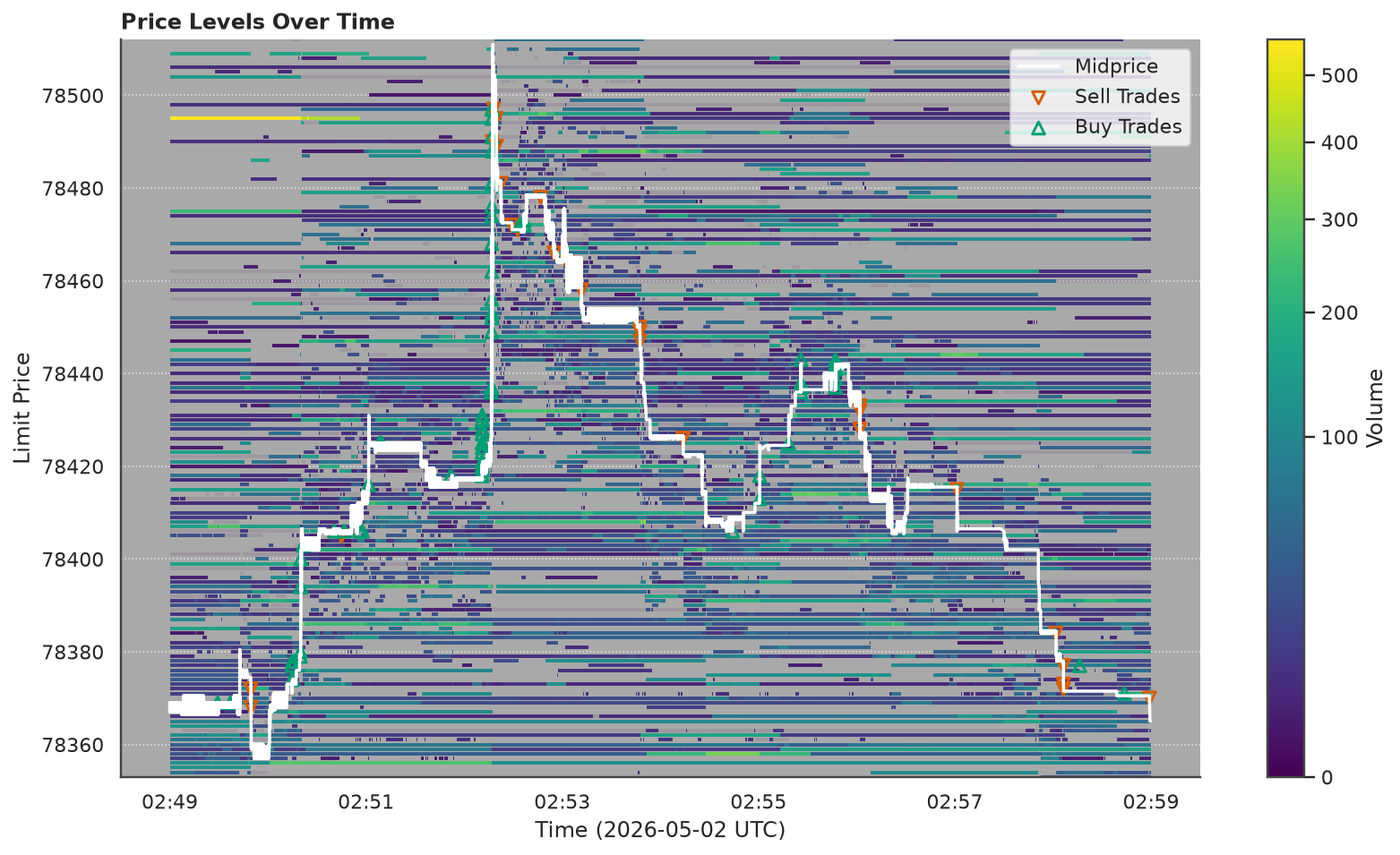
Reconstruct trades from raw exchange events, classify order types, compute depth metrics, and visualize market microstructure — from Bitstamp-style CSVs or LOBSTER message and orderbook files.
Ported from the R obAnalytics CRAN package. Now a standalone Python package with a pipeline API, pluggable formats, flow-toxicity metrics, and Matplotlib/Plotly backends.
Installation
pip install ob-analytics
With uv:
uv add ob-analytics
Optional extras:
pip install "ob-analytics[interactive]"   # Plotly figures
pip install "ob-analytics[live]"          # live exchange capture (websockets)
From source
Latest main, or a local clone for development:
pip install git+https://github.com/mczielinski/ob-analytics.git

# or
git clone https://github.com/mczielinski/ob-analytics.git
cd ob-analytics
pip install -e ".[interactive,live]"
Requires Python 3.11+. Core dependencies: NumPy, pandas, matplotlib, seaborn, pydantic, pyarrow, loguru.
Scale: in-memory (pandas) — comfortable to ~5M events (~5 GiB, session-scale data); for larger inputs, pre-slice by time window. See Scale envelope.
Quickstart
Bitstamp (bundled sample)
A 30-minute Bitstamp BTC/USD live capture (~314k events, ~280 trades) is
bundled with the package as paired orders.csv.gz + trades.csv. Point the
pipeline at the orders path; the companion trades file is auto-resolved:
from ob_analytics import Pipeline, sample_csv_path

result = Pipeline().run(sample_csv_path())

result.events         # enriched events with order types and aggressiveness
result.trades         # trades from the live feed, with maker/taker attribution
result.depth          # price-level volume time series
result.depth_summary  # best bid/ask, BPS bins, spread
LOBSTER
trading_date lives on RunContext, not on LobsterFormat:
from ob_analytics import Pipeline, LobsterFormat, RunContext

result = Pipeline(
    format=LobsterFormat(),
    ctx=RunContext(trading_date="2012-06-21"),
).run("/path/to/lobster_data")
Flow-toxicity metrics
Flow-toxicity metrics are plain functions you call on result.trades after
the run — no pipeline configuration, no plugin registry:
from ob_analytics import Pipeline, compute_vpin, compute_kyle_lambda, sample_csv_path

result = Pipeline().run(sample_csv_path())
vpin = compute_vpin(result.trades, bucket_volume=10.0)
kyle = compute_kyle_lambda(result.trades)
Add your own by writing a function over a trades DataFrame — see the Extending guide.
Live capture (Bitstamp)
With the [live] extra installed, capture a live order book straight to
orders.csv / trades.csv that the pipeline understands:
ob-analytics capture bitstamp --pair btcusd --out ./capture --minutes 30
ob-analytics capture --list shows registered venues. Add new ones by
implementing the LiveCapturer protocol in ob_analytics.live.
See the full quickstart for step-by-step usage, configuration, custom loaders, flow-toxicity metrics, CLI commands, and demo scripts.
Development
The project uses uv for dependency
management. A uv.lock lockfile is committed for reproducible installs.
git clone https://github.com/mczielinski/ob-analytics.git
cd ob-analytics
uv sync --group dev --extra interactive
Pre-commit hooks (Ruff lint/format, ty type check) are configured in
.pre-commit-config.yaml:
uv run pre-commit install
Testing & CI
uv run pytest tests/ -v
uv run ruff check ob_analytics/ tests/
uv run ty check ob_analytics/
CI runs automatically on push/PR via GitHub Actions — lint, type check, pytest on Python 3.11/3.12/3.13, and Codecov coverage upload.
See ARCHITECTURE.md (or the rendered Architecture page) for design decisions, the module map, and class diagrams. See CHANGELOG.md for the release history.
Documentation
API reference generated from docstrings using Zensical (installed as a dev dependency):
uv run zensical serve      # local preview at http://localhost:8000
uv run zensical build      # static site in site/
Contributing
See CONTRIBUTING.md for development setup, code style, and conventions for adding new formats.
License
ob-analytics is licensed under the GNU General Public License v2.0 or later (GPL-2.0-or-later) — see LICENSE.md.
It is a Python port of the R obAnalytics package (© 2015–2016 Philip Stubbings), which is GPL-2.0-or-later; that copyleft is inherited here.
Citation
If you use ob-analytics in published work, please cite it — GitHub's Cite this repository button reads CITATION.cff, which also credits the original R obAnalytics lineage.
Project details
Verified details
These details have been verified by PyPIProject links
GitHub Statistics
Maintainers
Release history Release notifications | RSS feed

Download files
Download the file for your platform. If you're not sure which to choose, learn more about installing packages.
Source Distribution
Built Distribution
Filter files by name, interpreter, ABI, and platform.
If you're not sure about the file name format, learn more about wheel file names.
Copy a direct link to the current filters
File details
Details for the file ob_analytics-0.1.0.tar.gz.
File metadata
- Download URL: ob_analytics-0.1.0.tar.gz
- Upload date:
- Size: 3.0 MB
- Tags: Source
- Uploaded using Trusted Publishing? Yes
- Uploaded via: twine/6.1.0 CPython/3.13.12
File hashes
| Algorithm | Hash digest | |
|---|---|---|
| SHA256 |
bcaa848677e4aefa1ab26be76ad6db842493f6d439a76644dfc6d798b273f719
|
|
| MD5 |
104227ff44b531a25f081bb0d834beff
|
|
| BLAKE2b-256 |
2009e16dc6de32fc86afcd1e4a1d64253056d9e553c1719e35dad4d953644f1b
|
Provenance
The following attestation bundles were made for ob_analytics-0.1.0.tar.gz:
Publisher:
release.yml on mczielinski/ob-analytics
-
Statement:
-
Statement type:
https://in-toto.io/Statement/v1 -
Predicate type:
https://docs.pypi.org/attestations/publish/v1 -
Subject name:
ob_analytics-0.1.0.tar.gz -
Subject digest:
bcaa848677e4aefa1ab26be76ad6db842493f6d439a76644dfc6d798b273f719 - Sigstore transparency entry: 2037686386
- Sigstore integration time:
-
Permalink:
mczielinski/ob-analytics@3657ecdca3c436615d28e2bcf939c8377bc5af41 -
Branch / Tag:
refs/tags/v0.1.0 - Owner: https://github.com/mczielinski
-
Access:
public
-
Token Issuer:
https://token.actions.githubusercontent.com -
Runner Environment:
github-hosted -
Publication workflow:
release.yml@3657ecdca3c436615d28e2bcf939c8377bc5af41 -
Trigger Event:
push
-
Statement type:
File details
Details for the file ob_analytics-0.1.0-py3-none-any.whl.
File metadata
- Download URL: ob_analytics-0.1.0-py3-none-any.whl
- Upload date:
- Size: 3.0 MB
- Tags: Python 3
- Uploaded using Trusted Publishing? Yes
- Uploaded via: twine/6.1.0 CPython/3.13.12
File hashes
| Algorithm | Hash digest | |
|---|---|---|
| SHA256 |
0326a93aaee4ea08356d8dea59868d68592623a2434bbe4d9be379fa855c9c62
|
|
| MD5 |
432e0e09639a1416dc2f2e26f7bd555e
|
|
| BLAKE2b-256 |
f9e2b74c288b5c5b226da16128068436e954f6fdad9f984c55899b94a83ac6bf
|
Provenance
The following attestation bundles were made for ob_analytics-0.1.0-py3-none-any.whl:
Publisher:
release.yml on mczielinski/ob-analytics
-
Statement:
-
Statement type:
https://in-toto.io/Statement/v1 -
Predicate type:
https://docs.pypi.org/attestations/publish/v1 -
Subject name:
ob_analytics-0.1.0-py3-none-any.whl -
Subject digest:
0326a93aaee4ea08356d8dea59868d68592623a2434bbe4d9be379fa855c9c62 - Sigstore transparency entry: 2037686838
- Sigstore integration time:
-
Permalink:
mczielinski/ob-analytics@3657ecdca3c436615d28e2bcf939c8377bc5af41 -
Branch / Tag:
refs/tags/v0.1.0 - Owner: https://github.com/mczielinski
-
Access:
public
-
Token Issuer:
https://token.actions.githubusercontent.com -
Runner Environment:
github-hosted -
Publication workflow:
release.yml@3657ecdca3c436615d28e2bcf939c8377bc5af41 -
Trigger Event:
push
-
Statement type:






