
Convert Obsidian notes into an AI-maintained wiki using local or cloud LLMs
Verified details
These details have been verified by PyPIProject links
GitHub Statistics
Maintainers

Project description
obsidian-llm-wiki
Turn your raw notes into a self-improving, interlinked wiki — powered by a local LLM.
Drop a markdown file into a folder. The pipeline reads it, extracts concepts, and creates or updates wiki articles with the new knowledge. Reject a draft and explain why — the next compile addresses your feedback. Over time your wiki compounds: every note you add (and every draft you review) makes the whole smarter.
Local-first, provider-flexible. Runs 100% locally with Ollama by default. Also works with any OpenAI-compatible endpoint — Groq, Together AI, LM Studio, vLLM, Azure OpenAI, and more.
The idea (Karpathy's LLM Wiki)
This project is a practical implementation of the pattern described by Andrej Karpathy in "The LLM Wiki" — a vision for a personal knowledge base where:
"The LLM doesn't just store what you tell it — it synthesizes, cross-references, and keeps everything current. You add raw material; it does the bookkeeping."
The key insight: treat your notes as source material, not as the final artifact. The LLM compiles them into a structured wiki that grows smarter as you add more. Unlike a chatbot that forgets, the wiki persists and compounds.
You write raw notes  →  LLM extracts concepts  →  Wiki articles created/updated
     raw/                    (automatic)                    wiki/
  quantum.md          "Qubit", "Superposition"       Qubit.md   ←──┐
  ml-basics.md        "Neural Network", "SGD"    Superposition.md  │
  physics.md          "Qubit" (again!)           Neural Network.md │
                                                      ↑  linked via [[wikilinks]]
The wiki lives in Obsidian, so you get the graph view, backlinks, and Dataview queries for free.
Features
- Concept-driven, incremental compilation — each concept gets its own article, updated only when its source notes change
- Rejection feedback loop — reject a draft with a reason; the next compile injects your feedback into the prompt so the model addresses it
- Draft annotations — low-confidence or single-source drafts are flagged with
<!-- olw-auto: ... -->comments (invisible in Obsidian, stripped on approval) - Rich review interface —
olw reviewlists drafts ranked by rejection count, shows diffs vs published and vs the last rejected version - Pipeline orchestrator —
olw runruns ingest → compile → lint → [approve] as one command with timing and failure classification - Selective recompile — after a file save, only concepts linked to that source are recompiled (not the entire wiki)
- Self-maintenance —
olw maintain --fixrepairs broken wikilinks via the alias map, creates stub articles for genuinely missing targets, and normalizes[[Alias]]links across published pages to[[Canonical|Alias]] - Manual edit protection — edited an article by hand? The compiler detects the change and skips it
- Source traceability — every article links back to the raw notes it was built from; optional inline citations can attach claim-level
[S1](#Sources)markers - File watcher —
olw watchauto-processes anything dropped intoraw/ - Wiki health checks —
olw lintdetects orphans, broken links, stale articles (no LLM needed) - Query your wiki —
olw query "what is X?"answers from your published articles - Safe switch advisor —
olw comparepreviews your current vault against one challenger model/provider config in isolated vaults and recommends whether to switch - Git safety net — every auto-action is committed;
olw undoreverts safely - Concept aliases — aliases (e.g.
PCfor "Program Counter") are extracted at ingest, written to each article's frontmatter, and used to resolve queries and repair broken wikilinks (olw maintain --fixrewrites[[PC]]to[[Program Counter|PC]]) - Knowledge item audit — explicitly evidenced named references and prominent quoted titles are preserved as candidates without forcing them into concept articles
- Multi-language — automatically detects the language of each note at ingest time; articles are written in the detected language; override globally with
language = "en"inwiki.toml - Language-agnostic evidence rules — concept normalization and item preservation avoid topic-specific deny lists and language-specific word lists; named references are accepted only when explicitly evidenced in the note
- Multi-provider — swap Ollama for Groq, Together AI, LM Studio, vLLM, Azure OpenAI, or any OpenAI-compatible endpoint via
olw setup - Offline test suite — 600+ tests run without Ollama or any provider
Quick start
1. Install
From PyPI (recommended):
pip install obsidian-llm-wiki
Or with uv:
uv tool install obsidian-llm-wiki
From source (latest development version):
git clone https://github.com/kytmanov/obsidian-llm-wiki-local
cd obsidian-llm-wiki-local
python install.py
install.py detects uv or falls back to pip, verifies the install, and tells you to run the next step.
2. Install and start Ollama
# Install Ollama: https://ollama.com/download
ollama pull gemma4:e4b      # fast model — analysis and routing
ollama pull qwen2.5:14b     # heavy model — article writing (optional, 7B+ recommended)
Minimal setup: pull only
gemma4:e4band set bothfastandheavyto it in the wizard.
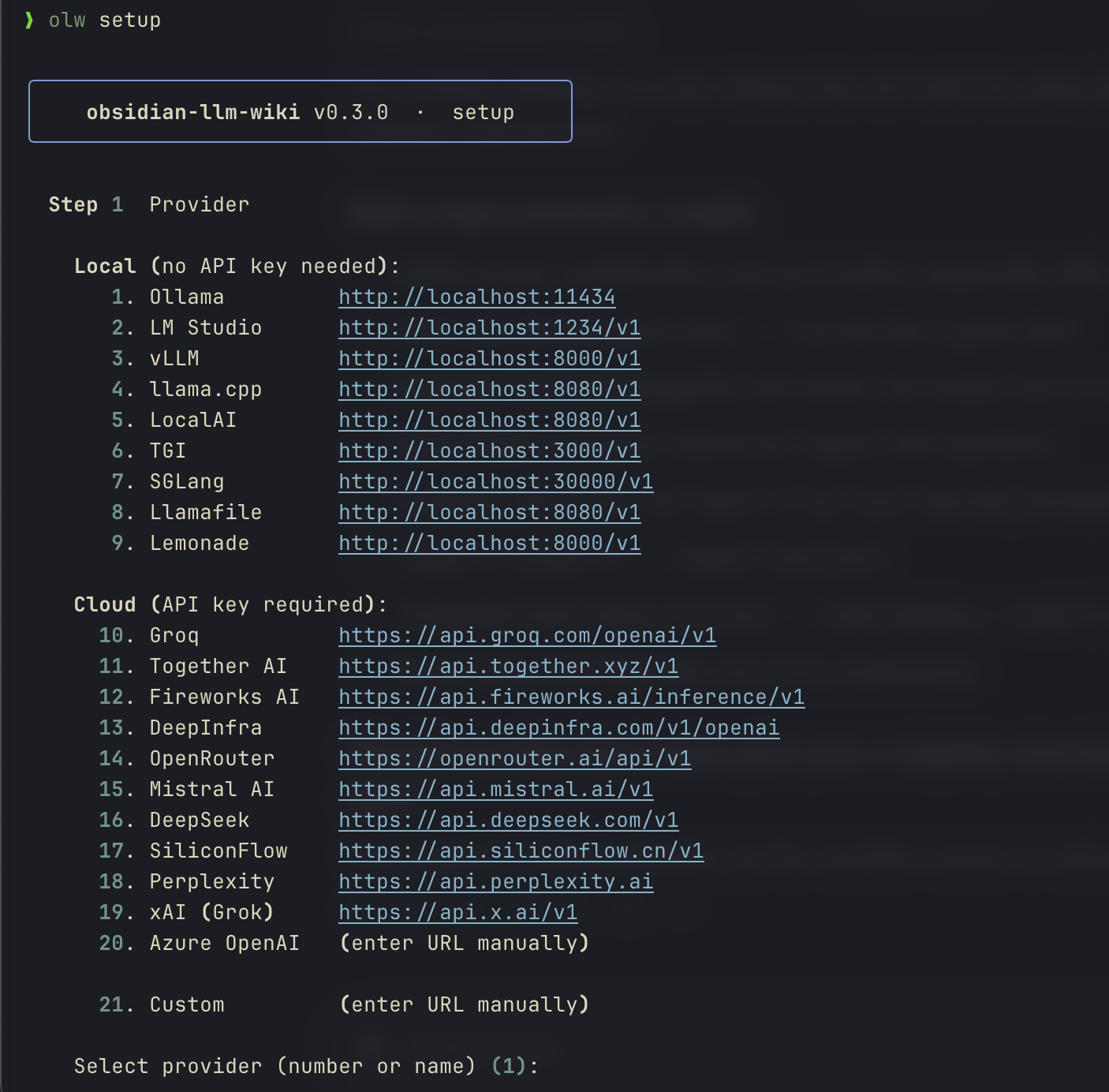
3. Run the setup wizard
olw setup
An interactive wizard selects a provider, configures the URL and optional API key, picks fast and heavy models, sets an optional default vault, and offers experimental features. Takes ~30 seconds.
╭──────────────────────────────────────────────────╮
│      obsidian-llm-wiki  ·  setup                 │
╰──────────────────────────────────────────────────╯

  Step 1  Provider

    Local (no API key needed):
       1. Ollama          http://localhost:11434  [default]
       2. LM Studio       http://localhost:1234/v1
       3. vLLM            http://localhost:8000/v1
       ...
    Cloud (API key required):
      10. Groq            https://api.groq.com/openai/v1
      11. Together AI     https://api.together.xyz/v1
      ...

    Select provider (number or name) [1]: _

  Step 2  URL
    Base URL [http://localhost:11434]: _
    ✓ connected

  Step 3  Fast model  (analysis & routing · 3–8B recommended)
    #  Model           Size
    1  gemma4:e4b      9.6 GB
    2  phi4-mini       2.5 GB
    Select (number or name) [1]: _
  ...
Settings are saved to ~/.config/olw/config.toml (Mac/Linux) or %APPDATA%\olw\config.toml (Windows). API keys are stored only in this user-private file, never in wiki.toml.
Experimental setup choices are saved only as defaults for new vaults. Runtime behavior is controlled by each vault's wiki.toml.
4. Set up your vault
olw init ~/my-wiki
This creates the folder structure and a wiki.toml pre-filled with your setup wizard choices.
To enable experimental inline source citations for an existing vault:
olw config inline-source-citations on --vault ~/my-wiki
olw config inline-source-citations status --vault ~/my-wiki
Turn them off at any time with:
olw config inline-source-citations off --vault ~/my-wiki
Manual fallback:
[pipeline]
inline_source_citations = true
5. Add some notes
Drop any .md files into ~/my-wiki/raw/. Web clips, book notes, meeting notes, anything.
~/my-wiki/raw/
  quantum-computing.md
  ml-fundamentals.md
  physics-lecture.md
6. Run the full pipeline
# One command: ingest + compile + lint + optional auto-approve
olw run

# Or step by step:
olw ingest --all
olw compile
olw review        # interactive draft review
If you set a default vault in olw setup, the --vault flag is optional. Otherwise use --vault ~/my-wiki or export OLW_VAULT=~/my-wiki.
Open ~/my-wiki as an Obsidian vault. The graph view shows your connected wiki.
Before approving drafts, use a draft-review graph filter:
-path:raw -path:wiki/sources -path:_resources -file:Welcome
After approving drafts, use a published-only graph filter:
-path:raw -path:wiki/sources -path:wiki/.drafts -path:_resources -file:Welcome
The published-only filter hides wiki/.drafts, so it will look empty until drafts are approved. Run olw doctor to print graph guidance for the current vault.
Want to preview a model or provider switch before changing wiki.toml?
olw compare --heavy-model qwen2.5:14b
olw compare rebuilds isolated preview vaults from the same raw/ notes and tells you whether to switch, keep your current config, or review the diffs manually.
7. Keep it running (optional)
olw watch
# Drop a file in raw/ → ingest + compile happen automatically (selective: only linked concepts)
Compare a new model or provider
olw compare is a vault switch advisor, not a benchmark harness. It compares your
current vault config against one challenger config using the same active vault and
the same raw/ notes.
# Same provider, different heavy model
olw compare --heavy-model qwen2.5:14b

# Try a different local provider
olw compare \
  --provider lm_studio \
  --provider-url http://localhost:1234/v1 \
  --fast-model google/gemma-4-e4b \
  --heavy-model google/gemma-4-e4b

# Quick spot-check on a large vault
olw compare --heavy-model qwen2.5:14b --sample-n 20
What it does:
- rebuilds the current config and challenger config in isolated preview vaults
- writes reports under
.olw/compare/<run_id>/ - leaves your active
raw/andwiki/untouched and does not modify active.olw/state outside.olw/compare/ - returns one verdict:
switch,keep_current, ormanual_review
Useful options:
--queries path/to/queries.tomladds a few representative questions to the comparison--out /tmp/my-comparewrites artifacts outside the vault if you want to inspect them elsewhere--keep-artifactsretains the ephemeral preview vaults instead of deleting them after the run--sample-n Nlimits the preview to the firstNraw notes for a fast spot-check--allow-cloud-uploadis required when the challenger uses a cloud provider
Notes:
- compare previews automated generated output, not the final curated vault after human review
- the report includes a ready-to-copy
wiki.tomlsnippet for the challenger when the verdict isswitch
Minimal queries.toml example:
[[query]]
id = "backprop"
question = "What is backpropagation?"
expected_contains = ["chain rule"]
Reports are written as Markdown and JSON by default:
report.md— recommendation-first summary with next stepsreport.json— full machine-readable reportsummary.json— compact verdict and reason summary
How it works
The pipeline has three stages, each using the LLM for a different purpose:
raw/note.md
    │
    ▼ olw ingest  (or olw run)
    Fast LLM (3B–8B)
    • Reads note
    • Extracts concept names
    • Preserves explicitly evidenced named references as knowledge item candidates
    • Writes quality score + summary to state.db
    • Creates wiki/sources/Note.md (source summary page)
    │
    ▼ olw compile
    Heavy LLM (7B–14B)
    • For each concept: gathers all source notes that mention it
    • Injects rejection feedback from previous reviews into the prompt
    • Writes a wiki article with [[wikilinks]] to related concepts
    • Adds quality annotations if confidence is low or sources are sparse
    • Lands in wiki/.drafts/ for review
    │
    ▼ olw review  (or olw approve)
    • Interactive numbered menu — approve / reject / diff / edit
    • Rejection feedback stored and injected into next compile
    • On approve: annotations stripped, article published to wiki/
    • Updates wiki/index.md (navigation layer)
    • Git commits the change
No vector databases, no embeddings. wiki/index.md acts as the routing layer for olw query. This keeps the setup simple and works well up to ~100 source notes.
The pipeline is intentionally conservative. Strong concepts become draft articles; explicitly evidenced named references become auditable knowledge item candidates. This keeps source-specific names visible without generating low-evidence articles from them.
Multi-language support
olw detects the language of each raw note during ingest and stores it. At compile time, the article is written in that language — no configuration needed.
Extraction and cleanup are designed to be language-agnostic. The pipeline avoids hard-coded natural-language word lists for title/entity promotion. Instead, it uses structural evidence, explicit source evidence, and conservative confidence levels so notes in any language follow the same rules.
How it works:
- Ingest — the fast model detects the primary language and stores an ISO 639-1 code (
en,fr,de, …) per note in the state DB. - Compile — when all source notes for a concept share the same language, the heavy model is instructed to write the article in that language. If sources are mixed, it falls back to matching the source text.
- Config override — set
languageinwiki.tomlto force a specific output language for the whole vault, regardless of what the model detected.
[pipeline]
language = "fr"   # all articles will be written in French
Leave language unset (the default) to let auto-detection drive it per concept.
Example: a French note ingested alongside English notes produces a French article for French-only concepts and an English article for concepts sourced from English notes. Setting language = "en" forces everything to English.
This language setting controls generated article language only. It does not enable language-specific concept merging or ontology decisions.
Knowledge item candidates
Not every useful reference deserves a wiki article. During ingest, olw keeps a separate knowledge item ledger for ambiguous, low-evidence references found explicitly in notes:
- LLM-proposed named references accepted only when the exact text appears in the title, filename, or body
- structurally prominent quoted titles, such as
"A Practical Guide To Notes" - confirmed concepts mirrored into the ledger as confirmed knowledge items
These items are not compiled into articles by default. They are preserved for later review, classification, or future evidence accumulation.
olw items audit
olw items show "Example Reference"
This is deliberately conservative: a named reference should not become a concept article unless the source content supports it. The item ledger keeps the reference from disappearing while avoiding hallucinated articles.
Rejection feedback loop
When you reject a draft:
olw review
# Select draft → [r]eject → "The overview section is too vague, needs concrete examples"
The feedback is stored in the state database. On the next compile of that concept, the prompt includes:
PREVIOUS REJECTIONS — address these issues:
- The overview section is too vague, needs concrete examples
After 5 rejections of the same concept without an approval, the concept is auto-blocked and excluded from future compiles until you explicitly re-enable it:
olw unblock "Quantum Computing"
Draft annotations
Drafts with low confidence or sparse sources are annotated with HTML comments that are invisible in Obsidian's preview but visible in the editor:
<!-- olw-auto: low-confidence (0.32) — verify before publishing -->
<!-- olw-auto: single-source — cross-reference recommended -->

## Overview
...
Annotations are stripped automatically when you approve a draft. olw review surfaces them as a warning in the draft list.
Vault structure
my-wiki/
├── raw/                        ← YOUR NOTES (never modified by olw)
│   ├── quantum-computing.md
│   └── ml-fundamentals.md
├── wiki/
│   ├── Quantum Computing.md    ← concept articles (flat, one per concept)
│   ├── Machine Learning.md
│   ├── sources/                ← auto-generated source summaries
│   │   ├── Quantum Computing Fundamentals.md
│   │   └── ML Fundamentals.md
│   ├── queries/                ← saved Q&A answers (olw query --save)
│   ├── .drafts/                ← pending human review
│   ├── index.md                ← auto-generated navigation + routing layer
│   └── log.md                  ← append-only operation history
├── vault-schema.md             ← LLM context: conventions for this vault
├── wiki.toml                   ← configuration
└── .olw/
    ├── compare/                ← compare reports + optional preview vault artifacts
    ├── state.db                ← SQLite: notes, concepts, articles, items, rejections, stubs
    └── pipeline.lock           ← advisory lock (auto-released when the holding process exits)
raw/ is immutable — olw never writes to it. All metadata lives in state.db.
Configuration
wiki.toml (created by olw init):
[models]
fast = "gemma4:e4b"        # extraction, analysis, query routing
heavy = "qwen2.5:14b"     # article generation, Q&A answers
# Single-model: set heavy = fast

# ── Local Ollama (default) ────────────────────────────────────────────────────
[ollama]
url = "http://localhost:11434"   # supports LAN: http://192.168.1.x:11434
timeout = 600
fast_ctx = 16384                 # context window for fast model (tokens)
heavy_ctx = 32768                # context window for heavy model (tokens)

# ── Any other provider (replaces [ollama] when present) ──────────────────────
# [provider]
# name = "groq"                              # or lm_studio, vllm, together, azure, custom …
# url  = "https://api.groq.com/openai/v1"
# timeout = 120
# fast_ctx = 8192
# heavy_ctx = 32768
# azure_api_version = "2024-02-15-preview"  # Azure only

[pipeline]
auto_approve = false             # true = skip draft review
auto_commit = true               # git commit after each operation
auto_maintain = false            # true = run maintain checks after each compile
max_concepts_per_source = 8      # limit concepts extracted per note
watch_debounce = 3.0             # seconds after last file event before processing
ingest_parallel = false          # true = parallel chunk analysis (needs OLLAMA_NUM_PARALLEL>=4)
# language = "en"               # ISO 639-1 output language; autodetects from notes if unset
# inline_source_citations = false
# source_citation_style = "legend-only"  # legend-only | inline-wikilink
# draft_media = "reference"              # reference | embed | omit
API keys are never stored in
wiki.toml. They are read at runtime from the provider-specific env var (e.g.GROQ_API_KEY), the genericOLW_API_KEYenv var, or theapi_keyfield in~/.config/olw/config.toml(written byolw setup).
Tuning context windows
heavy_ctx controls how much source material the heavy model reads when writing articles (source budget = heavy_ctx / 2 chars) and how long the generated article can be. Defaults target 16 GB VRAM. If you use a model with a large context window (e.g. gemma4:e4b supports 128K), increase it.
| VRAM | Recommended heavy_ctx |
Source budget | Notes |
|---|---|---|---|
| 8 GB | 8192 |
~4K chars | Minimum; short articles |
| 16 GB | 32768 |
~16K chars | Default |
| 32 GB+ | 65536 |
~32K chars | Rich multi-source articles |
fast_ctx controls ingest analysis. Notes longer than fast_ctx / 2 chars are automatically split into chunks and analyzed in sequence — all content is covered, no truncation.
| VRAM | Recommended fast_ctx |
Notes per chunk |
|---|---|---|
| 8 GB | 8192 |
~4K chars |
| 16 GB | 16384 |
~8K chars — Default |
| 32 GB+ | 32768 |
~16K chars |
Speeding up long-note ingest
For vaults with many long notes (>8K chars), enable parallel chunk analysis:
[pipeline]
ingest_parallel = true   # requires OLLAMA_NUM_PARALLEL>=4
Also set in your shell before starting Ollama:
OLLAMA_NUM_PARALLEL=4 ollama serve
This lets Ollama process multiple chunks simultaneously. On 16 GB VRAM with gemma4:e4b (9.6 GB), 4 parallel slots fit comfortably (~12.8 GB total). Wall time for a 25K-char note drops from ~39s to ~14s.
After editing wiki.toml, no reinstall is needed. Run olw compile --force to regenerate articles with the new context budget.
Commands
| Command | Description |
|---|---|
olw setup |
Interactive setup wizard: pick provider, models, vault |
olw init PATH |
Create vault structure and git repo |
olw init PATH --existing |
Adopt an existing Obsidian vault |
olw doctor |
Check provider connectivity, models, vault structure |
olw run |
Full pipeline: ingest → compile → lint → [approve] |
olw run --auto-approve |
Full pipeline, publish without review |
olw run --dry-run |
Report what would happen, make no changes |
olw compare --heavy-model MODEL |
Compare current vault config against one challenger model |
olw compare --provider NAME --provider-url URL ... |
Compare a provider switch safely in isolated preview vaults |
olw ingest --all |
Analyze all raw notes |
olw ingest FILE |
Analyze one note |
olw compile |
Generate wiki articles → .drafts/ |
olw compile --retry-failed |
Retry previously failed notes |
olw review |
Interactive draft review (approve / reject / diff) |
olw approve --all |
Publish all drafts without review |
olw approve FILE |
Publish one draft |
olw reject FILE |
Discard a draft (prompts for feedback) |
olw reject FILE --feedback "..." |
Discard with feedback for next compile |
olw reject --all |
Discard all drafts (prompts once for shared feedback) |
olw reject --all --feedback "..." |
Discard all drafts with feedback |
olw unblock "Concept" |
Re-enable a concept blocked after 5 rejections |
olw maintain |
Health check + stubs + orphan and merge suggestions |
olw maintain --fix |
Repair broken alias links, create stubs, normalize alias wikilinks |
olw maintain --dry-run |
Report issues without making changes |
olw items audit |
Show preserved non-concept knowledge item candidates |
olw items show NAME |
Show one knowledge item and its source mentions |
olw status |
Show pipeline state and pending drafts |
olw status --failed |
List failed notes with error messages |
olw query "question" |
Answer from your wiki |
olw query "..." --save |
Answer and save to wiki/queries/ |
olw lint |
Health check: orphans, broken links, stale articles |
olw lint --fix |
Auto-fix missing frontmatter fields |
olw watch |
File watcher — auto-pipeline on new notes |
olw watch --auto-approve |
Watch + auto-publish (no manual review) |
olw undo |
Revert last [olw] git commit |
olw clean |
Clear state DB + wiki/, keep raw/ notes |
All commands accept --vault PATH or the env var OLW_VAULT.
Providers
Run olw setup to pick a provider interactively. All providers are also configurable directly in wiki.toml.
| Provider | Type | Embeddings | Notes |
|---|---|---|---|
| Ollama | local | ✓ | default; full offline |
| LM Studio | local | ✓ | |
| vLLM | local | ✓ | |
| llama.cpp | local | — | |
| LocalAI | local | ✓ | |
| TGI | local | — | |
| SGLang | local | ✓ | |
| Llamafile | local | — | |
| Lemonade | local | — | |
| Groq | cloud | — | fast inference, free tier |
| Together AI | cloud | ✓ | |
| Fireworks AI | cloud | ✓ | |
| DeepInfra | cloud | ✓ | |
| OpenRouter | cloud | — | routes to many models |
| Mistral AI | cloud | ✓ | |
| DeepSeek | cloud | — | |
| SiliconFlow | cloud | ✓ | |
| Perplexity | cloud | — | |
| xAI (Grok) | cloud | — | |
| Azure OpenAI | cloud | ✓ | see azure_api_version |
| Custom | any | — | enter URL manually |
RAG (embeddings) requires a provider that supports /v1/embeddings. The default index-based query works with all providers.
Model recommendations
| Role | Ollama | Cloud |
|---|---|---|
| Fast (analysis + routing) | gemma4:e4b, llama3.2:3b |
llama-3.1-8b-instant (Groq), mistral-7b |
| Heavy (article writing) | qwen2.5:14b, llama3.1:8b |
llama-3.3-70b (Groq), mistral-large |
| Single model (everything) | llama3.1:8b, mistral:7b |
any 7B+ |
Any model with JSON format / response_format: json_object support works. The tool degrades gracefully with smaller models.
Obsidian tips
- Graph view — concept pages link to source pages and each other via
[[wikilinks]]; before approval use-path:raw -path:wiki/sources -path:_resources -file:Welcome, after approval add-path:wiki/.drafts - Source citations — when inline citations are enabled, the default style stays graph-quiet as
[S1](#Sources)links while source pages link once in## Sources; setsource_citation_style = "inline-wikilink"if you want every citation to create a source edge - Media — source pages preserve
![[media]]embeds; generated drafts default to plain media references to avoid attachment nodes dominating the graph (draft_media = "reference") - Draft review — drafts live in
wiki/.drafts/and may not appear in Obsidian's default graph filters; useolw doctorfor the recommended draft-review and published-only filters - Dataview — query by
status: published,confidence: > 0.7,tags: [physics], etc. - Backlinks — every concept page shows which source pages mention it
- Web Clipper — save web articles directly to
raw/(see docs/web-clipper-setup.md)
Quality principles for contributors and AI agents
- Prefer deterministic, auditable cleanup over broad LLM-driven merging.
- Do not use LLM aliases as automatic merge authority; aliases are weak evidence.
- Keep concept extraction language-agnostic. Avoid hard-coded English or other language-specific word lists unless the feature is explicitly scoped to that language.
- Preserve weak entity references as knowledge item candidates rather than generating unsupported concept articles.
- Source pages and
[S1](#Sources)citations should remain graph-quiet by default; source-page edges belong in## Sources. - Generated drafts should avoid media embeds by default. Source pages can preserve embeds; draft articles should usually contain plain media references.
- Raw notes are immutable. All generated state belongs under
wiki/and.olw/.
Running the tests
All tests are offline — no Ollama required.
git clone https://github.com/kytmanov/obsidian-llm-wiki-local
cd obsidian-llm-wiki-local
uv sync --group dev
uv run pytest
For the full end-to-end smoke test (requires a running provider):
# Ollama (default)
bash scripts/smoke_test.sh

# LM Studio or any other OpenAI-compatible endpoint
PROVIDER=lm_studio bash scripts/smoke_test.sh

# LM Studio with the validated local baseline model
PROVIDER=lm_studio FAST_MODEL=gemma4:e4b HEAVY_MODEL=gemma4:e4b \
bash scripts/smoke_test.sh

# Compare smoke test
PROVIDER=lm_studio FAST_MODEL=gemma4:e4b HEAVY_MODEL=gemma4:e4b \
bash scripts/compare_smoke.sh
If LM Studio rejects the short alias, use the exact loaded model id it reports, for example google/gemma-4-e4b.
FAQ
Q: I ran olw compile but nothing appears in Obsidian.
Drafts land in wiki/.drafts/ — Obsidian hides dotfolders by default so they won't show in the graph yet. Run:
olw review        # interactive review
# or
olw approve --all
Articles move to wiki/ and become fully visible.
Q: Compile says "2 article(s) failed: Methodology, Sprints" — what do I do?
Failed concepts are retried automatically on the next run. Or force a retry:
olw compile --retry-failed
If the same concepts keep failing, the LLM is likely struggling with JSON output for those specific titles. Try increasing heavy_ctx in wiki.toml (see Tuning context windows).
Q: I see structured_output attempt N failed messages during compile — is something broken?
No. This is the built-in 3-tier retry system working as designed. The model occasionally echoes the JSON schema structure instead of flat output — the retry corrects it. Articles are still generated. A real failure surfaces as article(s) failed: ... in the summary line.
Q: olw ingest --all && olw compile gives "Missing option '--vault'".
Run olw setup first to configure a default vault, or pass it explicitly:
export OLW_VAULT=~/my-wiki
olw ingest --all && olw compile
Q: I changed models in olw setup but olw compile still uses the old model.
Re-run olw init on your vault — it syncs the model settings from your global config into wiki.toml:
olw init ~/my-wiki
Q: A concept keeps getting rejected — how do I stop it from recompiling?
After 5 rejections with feedback (olw reject --feedback "…"), the concept is auto-blocked and excluded from future compiles. olw status lists blocked concepts. To re-enable one:
olw unblock "Concept Name"
Q: Can I use a cloud provider like Groq or Together AI instead of Ollama?
Yes. Run olw setup and select the provider from the numbered list. Enter your API key when prompted — it is stored only in ~/.config/olw/config.toml. Alternatively set the provider-specific env var before each command:
export GROQ_API_KEY=gsk_...
olw run
The pipeline, vault structure, and all olw commands work identically regardless of provider.
Q: I changed providers in olw setup but wiki.toml still shows [ollama].
Re-run olw init on your vault to sync the global config into wiki.toml:
olw init ~/my-wiki
For existing vaults with a [ollama] section you can also add a [provider] block manually — it takes precedence over [ollama] when present.
Why not just use a chatbot?
Chatbots forget. Every conversation starts fresh. This tool builds a persistent artifact — a wiki that grows with every note you add, that you can open in Obsidian, search, query, and edit by hand.
The LLM is a compiler, not a conversation partner. You give it raw material; it produces structured knowledge. The output is plain markdown files you own forever.
License
MIT — see LICENSE.
Project details
Verified details
These details have been verified by PyPIProject links
GitHub Statistics
Maintainers
Release history Release notifications | RSS feed


Download files
Download the file for your platform. If you're not sure which to choose, learn more about installing packages.
Source Distribution
Built Distribution
Filter files by name, interpreter, ABI, and platform.
If you're not sure about the file name format, learn more about wheel file names.
Copy a direct link to the current filters
File details
Details for the file obsidian_llm_wiki-0.7.1.tar.gz.
File metadata
- Download URL: obsidian_llm_wiki-0.7.1.tar.gz
- Upload date:
- Size: 263.5 kB
- Tags: Source
- Uploaded using Trusted Publishing? Yes
- Uploaded via: twine/6.1.0 CPython/3.13.12
File hashes
| Algorithm | Hash digest | |
|---|---|---|
| SHA256 |
bf1d66e501baa8d11b5bec24a6b9cccc1d1af0a7df72b5851ea9f0f19fc06291
|
|
| MD5 |
7d4c0b1b6a2fb9b20e4cda6d522ae184
|
|
| BLAKE2b-256 |
82b1cd4867f8dae5163d83e5cfa5a46c84a1782c10f6abb1b8d24b2ddecdcb5f
|
Provenance
The following attestation bundles were made for obsidian_llm_wiki-0.7.1.tar.gz:
Publisher:
release.yml on kytmanov/obsidian-llm-wiki-local
-
Statement:
-
Statement type:
https://in-toto.io/Statement/v1 -
Predicate type:
https://docs.pypi.org/attestations/publish/v1 -
Subject name:
obsidian_llm_wiki-0.7.1.tar.gz -
Subject digest:
bf1d66e501baa8d11b5bec24a6b9cccc1d1af0a7df72b5851ea9f0f19fc06291 - Sigstore transparency entry: 1396111279
- Sigstore integration time:
-
Permalink:
kytmanov/obsidian-llm-wiki-local@fcd8acbf75ae547d59b5f2d6c4ec83a241cbe4f0 -
Branch / Tag:
refs/tags/v0.7.1 - Owner: https://github.com/kytmanov
-
Access:
public
-
Token Issuer:
https://token.actions.githubusercontent.com -
Runner Environment:
github-hosted -
Publication workflow:
release.yml@fcd8acbf75ae547d59b5f2d6c4ec83a241cbe4f0 -
Trigger Event:
push
-
Statement type:
File details
Details for the file obsidian_llm_wiki-0.7.1-py3-none-any.whl.
File metadata
- Download URL: obsidian_llm_wiki-0.7.1-py3-none-any.whl
- Upload date:
- Size: 129.7 kB
- Tags: Python 3
- Uploaded using Trusted Publishing? Yes
- Uploaded via: twine/6.1.0 CPython/3.13.12
File hashes
| Algorithm | Hash digest | |
|---|---|---|
| SHA256 |
f4c6aa3176358a9d99d47a89cbc835e925fce712ea01ee8cfcf1fbad1fe44c52
|
|
| MD5 |
8f7a0c150fbf3a269e2e9331ccb9d32d
|
|
| BLAKE2b-256 |
615114b0ec86ac1b7cc15d39873eb02a5bcce0f021993e3e64cceec733d6513f
|
Provenance
The following attestation bundles were made for obsidian_llm_wiki-0.7.1-py3-none-any.whl:
Publisher:
release.yml on kytmanov/obsidian-llm-wiki-local
-
Statement:
-
Statement type:
https://in-toto.io/Statement/v1 -
Predicate type:
https://docs.pypi.org/attestations/publish/v1 -
Subject name:
obsidian_llm_wiki-0.7.1-py3-none-any.whl -
Subject digest:
f4c6aa3176358a9d99d47a89cbc835e925fce712ea01ee8cfcf1fbad1fe44c52 - Sigstore transparency entry: 1396111289
- Sigstore integration time:
-
Permalink:
kytmanov/obsidian-llm-wiki-local@fcd8acbf75ae547d59b5f2d6c4ec83a241cbe4f0 -
Branch / Tag:
refs/tags/v0.7.1 - Owner: https://github.com/kytmanov
-
Access:
public
-
Token Issuer:
https://token.actions.githubusercontent.com -
Runner Environment:
github-hosted -
Publication workflow:
release.yml@fcd8acbf75ae547d59b5f2d6c4ec83a241cbe4f0 -
Trigger Event:
push
-
Statement type:






