
OCA tool to help with modules migration
Verified details
These details have been verified by PyPIProject links
GitHub Statistics
Maintainers

Project description

oca-port
Tool helping to port an addon or missing commits of an addon from one branch to another.
Installing
$ pipx install oca-port
$ #OR
$ git clone git@github.com:oca/oca-port.git
$ cd oca-port
$ pipx install .
To automatically apply code patterns with odoo-module-migrator, install library with below syntax:
$ pipx inject --include-deps oca-port git+https://github.com/OCA/odoo-module-migrator.git@master
Using
If the addon does not exist on the target branch, it will assist the user in the migration, following the OCA migration guide.
If the addon already exists on the target branch, it will retrieve commits not fully ported grouped by Pull Request and propose to port them.
Syntax:
$ oca-port <source> <target> <module_path> [options]
$ oca-port --help
GitHub Token
GITHUB_TOKEN can be passed by exposing to environment:
$ export GITHUB_TOKEN=<token>
Alternatively, you can pass the token directly using the --github-token option
If neither method is used, the tool will attempt to obtain the token using the gh client (if it's installed).
Example
To check if an addon could be migrated or to get eligible commits to port:
$ cd <path/to/OCA/cloned_repository>
$ oca-port origin/16.0 origin/18.0 <module_path> --verbose --dry-run
To effectively migrate the addon or port its commits, remove the --dry-run option
so the tool will create a working local branch automatically (called destination)
from the <target> branch:
$ oca-port origin/16.0 origin/18.0 <module_path>
You can control the destination with the --destination option:
$ oca-port origin/16.0 origin/18.0 <module_path> --destination camptocamp/18.0-port-things
Module located in subfolder
The module can be located in a subfolder, and the tool can be used in any kind of repository, e.g:
$ oca-port origin/main origin/18.0-mig --source-version=16.0 --target-version=18.0 --upstream-org=camptocamp ./odoo/local-src/MY_MODULE --verbose --destination sebalix/18.0-mig-MY_MODULE
- parameters
--source-versionand--target-versionare mandatory as soon as thesource/targetparameters cannot be recognized as Odoo versions (hereorigin/mainis hosting a16.0version) --upstream-orgdefaults toOCA, here we set it tocamptocampfor GitHub API requests
Move/rename a module
To move or rename a module, the --move-to parameter can be used:
$ oca-port origin/16.0 origin/18.0 <module_path> --move-to <new_module_path>
NOTE: the rename will be handled thanks to git-filter-repo
so the whole git history will be available in the new folder.
Blacklist
You can also directly blacklist a bunch of PRs on a given branch thanks to the
oca-port-pr tool:
$ oca-port-pr blacklist OCA/wms#250,OCA/wms#251 16.0 shopfloor
You could give a more detailed reason of this blacklist with --reason parameter:
$ oca-port-pr blacklist OCA/wms#250,OCA/wms#251 16.0 shopfloor --reason "Refactored in 16.0, not needed anymore"
And if the module has been moved to another repository, you can specify its remote as well:
$ git remote add new_repo git@github.com:OCA/new-repo.git
$ oca-port-pr blacklist OCA/wms#250,OCA/wms#251 16.0 shopfloor --remote new_repo
Migration of addon
The tool follows the usual OCA migration guide to port commits of an addon, and will invite the user to fullfill the mentionned steps that can't be performed automatically.
Output example:
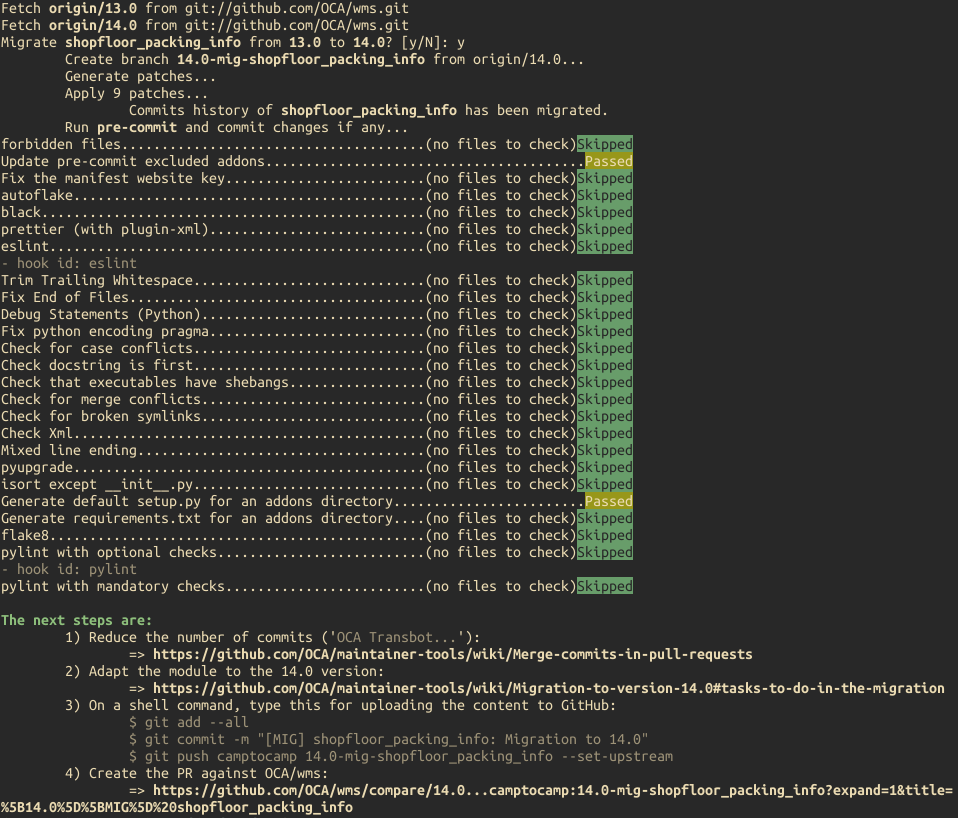
If used with the --non-interactive option, the returned exit code is 100
if an addon could be migrated.
Port of commits/Pull Requests
The tool will ask the user if he wants to open draft pull requests against the upstream repository.
If there are several Pull Requests to port, it will ask the user if he wants to base the next PR on the previous one, allowing the user to cumulate ported PRs in one branch and creating a draft PR against the upstream repository with all of them.
More details here : OCA Days 2022 - Sébastien Alix and Simone Orsi: oca-port:new OCA tool to help with modules migration
Output example (with --verbose):
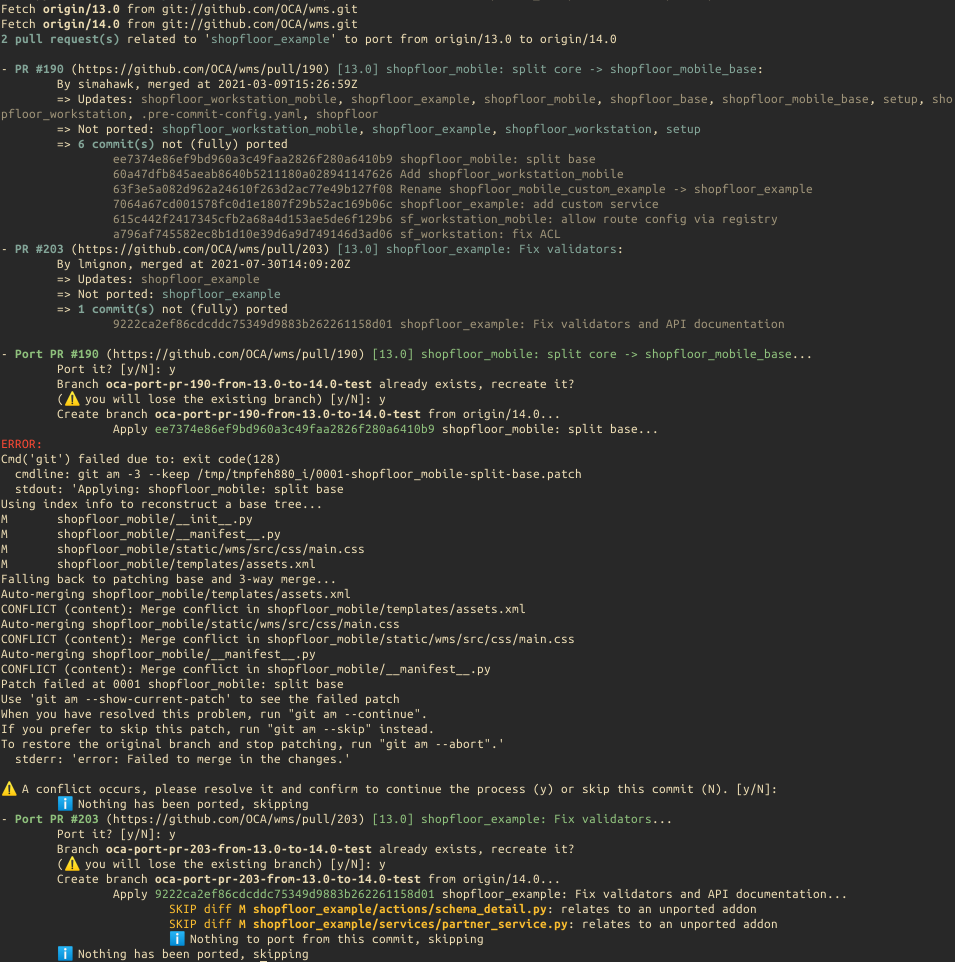
If used with the --non-interactive option, the returned exit code is 110
if some pull requests/commits could be ported.
API
You can also use oca-port as a Python package:
>>> import oca_port,json
>>> app = oca_port.App(
...     source="origin/14.0",
...     target="origin/16.0",
...     addon_path="stock_move_auto_assign",
...     upstream_org="OCA",
...     repo_path="/home/odoo/OCA/stock-logistics-warehouse",
...     output="json",
...     fetch=True,
...     github_token="<TOKEN>"
... )
>>> json_data = app.run()
>>> data = json.loads(json_data)
>>> from pprint import pprint as pp
>>> pp(data)
{'process': 'port_commits',
 'results': {'1631': {'author': 'TDu',
                      'merged_at': '2023-04-04T17:06:03Z',
                      'missing_commits': ['41416c1d7dad15ce4745e07d0541c79e938c2710',
                                          'd43985a443e29641447a3811f2310d54b886ab3d',
                                          '6bd9fcff3e814a6802c7aefadb9c646194cde42b'],
                      'ref': 'OCA/stock-logistics-warehouse#1631',
                      'title': '[14][ADD] stock_move_auto_assign_auto_release '
                               '- backport',
                      'url': 'https://github.com/OCA/stock-logistics-warehouse/pull/1631'}}}
Project details
Verified details
These details have been verified by PyPIProject links
GitHub Statistics
Maintainers
Release history Release notifications | RSS feed


Download files
Download the file for your platform. If you're not sure which to choose, learn more about installing packages.
Source Distribution
Built Distribution
Filter files by name, interpreter, ABI, and platform.
If you're not sure about the file name format, learn more about wheel file names.
Copy a direct link to the current filters
File details
Details for the file oca_port-0.22.tar.gz.
File metadata
- Download URL: oca_port-0.22.tar.gz
- Upload date:
- Size: 51.5 kB
- Tags: Source
- Uploaded using Trusted Publishing? Yes
- Uploaded via: twine/6.1.0 CPython/3.13.12
File hashes
| Algorithm | Hash digest | |
|---|---|---|
| SHA256 |
ca9993b5eed993d1c213a86590de1e8be211cc607379150b1d4b60476f6da5d3
|
|
| MD5 |
603b32880a10a29a65785b7caa5b87cb
|
|
| BLAKE2b-256 |
b7db6a29568099bb8e15884b51e9ef0626ea5cde5f58548b069e5a72f6ff53e0
|
Provenance
The following attestation bundles were made for oca_port-0.22.tar.gz:
Publisher:
publish.yml on OCA/oca-port
-
Statement:
-
Statement type:
https://in-toto.io/Statement/v1 -
Predicate type:
https://docs.pypi.org/attestations/publish/v1 -
Subject name:
oca_port-0.22.tar.gz -
Subject digest:
ca9993b5eed993d1c213a86590de1e8be211cc607379150b1d4b60476f6da5d3 - Sigstore transparency entry: 1789289093
- Sigstore integration time:
-
Permalink:
OCA/oca-port@bdcbe593182fca94dcd93544f20a150c3eb3f6b5 -
Branch / Tag:
refs/tags/v0.22 - Owner: https://github.com/OCA
-
Access:
public
-
Token Issuer:
https://token.actions.githubusercontent.com -
Runner Environment:
github-hosted -
Publication workflow:
publish.yml@bdcbe593182fca94dcd93544f20a150c3eb3f6b5 -
Trigger Event:
push
-
Statement type:
File details
Details for the file oca_port-0.22-py3-none-any.whl.
File metadata
- Download URL: oca_port-0.22-py3-none-any.whl
- Upload date:
- Size: 56.5 kB
- Tags: Python 3
- Uploaded using Trusted Publishing? Yes
- Uploaded via: twine/6.1.0 CPython/3.13.12
File hashes
| Algorithm | Hash digest | |
|---|---|---|
| SHA256 |
9230fa152c5b486f59f511307aa6dfd00aea396d9cb86de3f44a2e06841a9d57
|
|
| MD5 |
5e75da9ea71d059f37b6452096c0948f
|
|
| BLAKE2b-256 |
3171a88bca4fa54adc5b1d0d379b48d113cb60e861179f725e94096ddd995722
|
Provenance
The following attestation bundles were made for oca_port-0.22-py3-none-any.whl:
Publisher:
publish.yml on OCA/oca-port
-
Statement:
-
Statement type:
https://in-toto.io/Statement/v1 -
Predicate type:
https://docs.pypi.org/attestations/publish/v1 -
Subject name:
oca_port-0.22-py3-none-any.whl -
Subject digest:
9230fa152c5b486f59f511307aa6dfd00aea396d9cb86de3f44a2e06841a9d57 - Sigstore transparency entry: 1789289117
- Sigstore integration time:
-
Permalink:
OCA/oca-port@bdcbe593182fca94dcd93544f20a150c3eb3f6b5 -
Branch / Tag:
refs/tags/v0.22 - Owner: https://github.com/OCA
-
Access:
public
-
Token Issuer:
https://token.actions.githubusercontent.com -
Runner Environment:
github-hosted -
Publication workflow:
publish.yml@bdcbe593182fca94dcd93544f20a150c3eb3f6b5 -
Trigger Event:
push
-
Statement type:






