
Python Tamil OCR package

Project description
OCR Tamil - Easy, Accurate and Simple to use Tamil OCR


OCR Tamil can help you extract text from signboard, nameplates, storefronts etc., from Natural Scenes with high accuracy. This version of OCR is much more robust to tilted text compared to the Tesseract, Paddle OCR and Easy OCR as they are primarily built to work on the documents texts and not on natural scenes. This model is work in progress, feel free to contribute!!!
Currently supports two languages (English + Tamil). Accuracy of the model can be improved by adjusting the Text detection model as per your requirements. Achieved the accuracy of around >95% (98% NED) in validation set
Comparison between Tesseract OCR and OCR Tamil
| Input Image | OCR TAMIL | Tesseract |
|---|---|---|
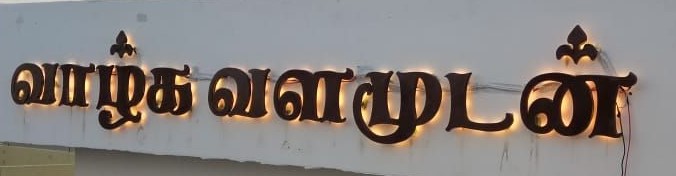 |
வாழ்கவளமுடன் | க் க்கஸாரகளள௮ஊகஎளமுடன் |
 |
ரெடிமேட்ஸ் | NO OUTPUT |
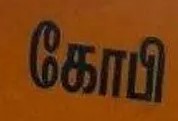 |
கோபி | NO OUTPUT |
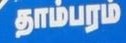 |
தாம்பரம் | NO OUTPUT |
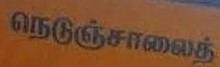 |
நெடுஞ்சாலைத் | NO OUTPUT |
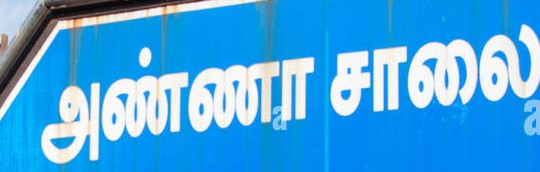 |
அண்ணாசாலை | NO OUTPUT |
Obtained Tesseract results using the huggingface space with Tamil as language
How to Install and Use OCR Tamil
Tested using Python 3.10 on Windows & Linux (Ubuntu 22.04) Machines
Pip
- Using PIP install
pip install ocr_tamil - Download the model weights from from the GDRIVE and keep it in the local folder to use in step 3
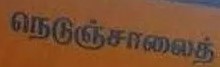
- Use the below code for text recognition at word level by inserting the image_path and model path
Text Recognition
from ocr_tamil.ocr import OCR
image_path = r"test_images\1.jpg" # insert your own path here (step 2 file location)
model_path = r"parseq_tamil_v6.ckpt" # add the full path of the model(step 2 file location)
ocr = OCR(tamil_model_path=model_path)
texts = ocr.predict(image_path)
with open("output.txt","w",encoding="utf-8") as f:
    f.write(texts)
>>>> நெடுஞ்சாலைத்
Text Detect + Recognition
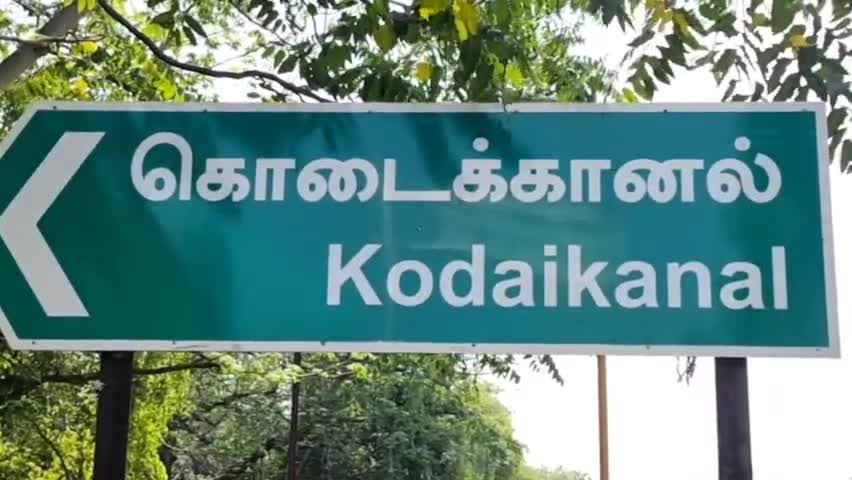
- Use the below code for text detection and recognition by inserting the image_path and model path s (both detection and recognition models)
from ocr_tamil.ocr import OCR
image_path = r"test_images\0.jpg" # insert your own path here
model_path = r"parseq_tamil_v6.ckpt" # add the full path of the parseq model
text_detect_model = "craft_mlt_25k.pth" # add the full path of the craft model
ocr = OCR(detect=True,tamil_model_path=model_path,detect_model_path=text_detect_model)
texts = ocr.predict(image_path)
with open("output.txt","w",encoding="utf-8") as f:
    f.write(texts)

>>>> கொடைக்கானல் Kodaikanal
Github
-
Clone the repository
-
Pip install the required modules using
pip install -r requirements.txt -
Download the models weights from the GDRIVE and keep it under model_weights
|___model_weights |_____craft_mlt_25k.pth |_____parseq_tamil_v6.ckpt -
Run the below code by providing the path
Text Recognition
from ocr_tamil.ocr import OCR

image_path = r"test_images\1.jpg" # insert your own path here
ocr = OCR()
texts = ocr.predict(image_path)
with open("output.txt","w",encoding="utf-8") as f:
    f.write(texts)

>>>> நெடுஞ்சாலைத்
Text Detect + Recognition
from ocr_tamil.ocr import OCR

image_path = r"test_images\0.jpg" # insert your own path here
ocr = OCR(detect=True)
texts = ocr.predict(image_path)
with open("output.txt","w",encoding="utf-8") as f:
    f.write(texts)

>>>> கொடைக்கானல் Kodaikanal
Applications
- Navigating autonomous vehicles based on the signboards
- License plate recognition
Limitations
- Unable to read the text if they are present in rotated forms


- Currently supports Only English and Tamil Language
Thanks to the below contibuters for making awesome Text detection and text recognition models
Text detection - CRAFT TEXT DECTECTION
Text recognition - PARSEQ
@InProceedings{bautista2022parseq,
  title={Scene Text Recognition with Permuted Autoregressive Sequence Models},
  author={Bautista, Darwin and Atienza, Rowel},
  booktitle={European Conference on Computer Vision},
  pages={178--196},
  month={10},
  year={2022},
  publisher={Springer Nature Switzerland},
  address={Cham},
  doi={10.1007/978-3-031-19815-1_11},
  url={https://doi.org/10.1007/978-3-031-19815-1_11}
}
@inproceedings{baek2019character,
  title={Character Region Awareness for Text Detection},
  author={Baek, Youngmin and Lee, Bado and Han, Dongyoon and Yun, Sangdoo and Lee, Hwalsuk},
  booktitle={Proceedings of the IEEE Conference on Computer Vision and Pattern Recognition},
  pages={9365--9374},
  year={2019}
}
CITATION
@InProceedings{GnanaPrasath,
  title={Tamil OCR},
  author={Gnana Prasath D},
  month={01},
  year={2024},
  url={https://github.com/gnana70/tamil_ocr}
}
Release history Release notifications | RSS feed


Download files
Download the file for your platform. If you're not sure which to choose, learn more about installing packages.
Source Distribution
Built Distribution
Filter files by name, interpreter, ABI, and platform.
If you're not sure about the file name format, learn more about wheel file names.
Copy a direct link to the current filters
File details
Details for the file ocr_tamil-0.1.1.tar.gz.
File metadata
- Download URL: ocr_tamil-0.1.1.tar.gz
- Upload date:
- Size: 42.2 kB
- Tags: Source
- Uploaded using Trusted Publishing? No
- Uploaded via: twine/4.0.2 CPython/3.10.13
File hashes
| Algorithm | Hash digest | |
|---|---|---|
| SHA256 |
8ed409f08c3897b4b86d46879fb0da15b65a65391d09ae6dc626ab37bff7f1d4
|
|
| MD5 |
cba874afa900f7cba6d05ae3f4053032
|
|
| BLAKE2b-256 |
819afb66954cb21f4c054f6ccf7237fbe89bef7633baf80f6a933b300190a96d
|
File details
Details for the file ocr_tamil-0.1.1-py3-none-any.whl.
File metadata
- Download URL: ocr_tamil-0.1.1-py3-none-any.whl
- Upload date:
- Size: 50.0 kB
- Tags: Python 3
- Uploaded using Trusted Publishing? No
- Uploaded via: twine/4.0.2 CPython/3.10.13
File hashes
| Algorithm | Hash digest | |
|---|---|---|
| SHA256 |
2de2b4be3868d1942f39ffbccf76aeacb6a19c7fee2ce321bac9e75e90e5e71f
|
|
| MD5 |
a8d7fc357b790510a66c1810d0004ebe
|
|
| BLAKE2b-256 |
3fd0b709dc88babbe25ca7354ab505f21de64aeecacd6e169fdb5b663a17c4d5
|






