
User roles

Project description





This module was written to extend the standard functionality regarding users and groups management. It helps creating well-defined user roles and associating them to users.
It can become very hard to maintain a large number of user profiles over time, juggling with many technical groups. For this purpose, this module will help you to:
define functional roles by aggregating low-level groups,
set user accounts with the predefined roles (roles are cumulative),
update groups of all relevant user accounts (all at once),
ensure that user accounts will have the groups defined in their roles (nothing more, nothing less). In other words, you can not set groups manually on a user as long as there is roles configured on it,
activate/deactivate roles depending on the date (useful to plan holidays, etc)
get a quick overview of roles and the related user accounts.
That way you make clear the different responsabilities within a company, and are able to add and update user accounts in a scalable and reliable way.
Table of contents
Configuration
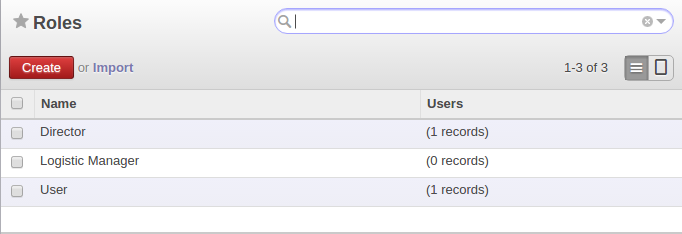
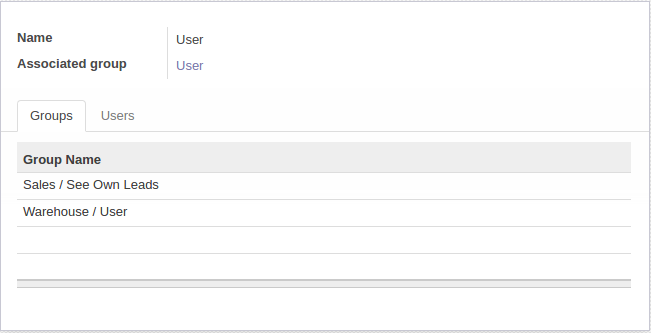
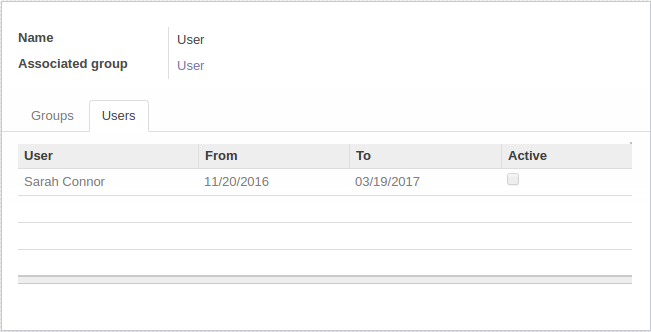
To configure this module, you need to go to Settings / Users / Roles, and create a new role. From there, you can add groups to compose your role, and then associate users to it.
You can also define default roles for a new user by editing the user called “Default User”.
Roles:
Add groups:
Add users (with dates or not):
Instead of creating roles from scratch, it is possible to create a role based on the groups of an existing user: select or open the user and choose “Create role from user” in the action menu.
Usage
To use this module, you need to:
Go to Configuration / Users / Users choose user and set Roles:

Bug Tracker
Bugs are tracked on GitHub Issues. In case of trouble, please check there if your issue has already been reported. If you spotted it first, help us to smash it by providing a detailed and welcomed feedback.
Do not contact contributors directly about support or help with technical issues.
Credits
Contributors
Sébastien Alix <sebastien.alix@camptocamp.com>
Duc, Dao Dong <duc.dd@komit-consulting.com> (https://komit-consulting.com)
Jean-Charles Drubay <jc@komit-consulting.com> (https://komit-consulting.com)
Alan Ramos <alan.ramos@jarsa.com.mx> (https://www.jarsa.com.mx)
Harald Panten <harald.panten@sygel.es>
Kevin Khao <kevin.khao@akretion.com>
Tatiana Deribina <tatiana.deribina@sprintit.fi> (https://sprintit.fi)
Guillem Casassas <guillem.casassas@forgeflow.com>
Guillaume Pothier <gpothier@caligrafix.cl>
Do not contact contributors directly about support or help with technical issues.
Other credits
Images
Oxygen Team: Icon (LGPL)
Maintainers
This module is maintained by the OCA.

OCA, or the Odoo Community Association, is a nonprofit organization whose mission is to support the collaborative development of Odoo features and promote its widespread use.
Current maintainers:



This module is part of the OCA/server-backend project on GitHub.
You are welcome to contribute. To learn how please visit https://odoo-community.org/page/Contribute.
Release history Release notifications | RSS feed


Download files
Download the file for your platform. If you're not sure which to choose, learn more about installing packages.
Source Distributions
Built Distribution
Filter files by name, interpreter, ABI, and platform.
If you're not sure about the file name format, learn more about wheel file names.
Copy a direct link to the current filters
File details
Details for the file odoo_addon_base_user_role-17.0.1.0.1.2-py3-none-any.whl.
File metadata
- Download URL: odoo_addon_base_user_role-17.0.1.0.1.2-py3-none-any.whl
- Upload date:
- Size: 261.2 kB
- Tags: Python 3
- Uploaded using Trusted Publishing? No
- Uploaded via: twine/4.0.1 CPython/3.8.10
File hashes
| Algorithm | Hash digest | |
|---|---|---|
| SHA256 |
618bc205bdcb4cd812df71df1b9235db6f04af0c836d9558e857edf33ee33a08
|
|
| MD5 |
8fe74a0e68a682b0d5e0c2d5543ad5ef
|
|
| BLAKE2b-256 |
dd1d3d0b1566837efadbbcc6524e526ee94df3cfc0ac579db6496ecf2856dc69
|






