

Recurring - Contracts Management





This module enables contracts management with recurring invoicing functions.
It works for customer contract and supplier contracts.
A rich set of reccurence patterns are available.
You can print and send contracts by email. Contracts are shown in portal.
A lot of additional features are available in the contract repository.
Table of contents
Configuration
To view discount field in contract line, you need to set Discount on lines in user access rights.
Contract templates can be created from the Configuration > Contracts > Contract Templates menu. They allow to define default Journal, Pricelist and Contract lines when creating a contract.
To use it, just select the template on the contract and fields will be filled automatically.
Usage
Contracts are available in Invoicing > Customers > Customer Contracts and Invoicing > Vendors > Supplier Contracts.
Click on New to create a new contact. Here is an overview:
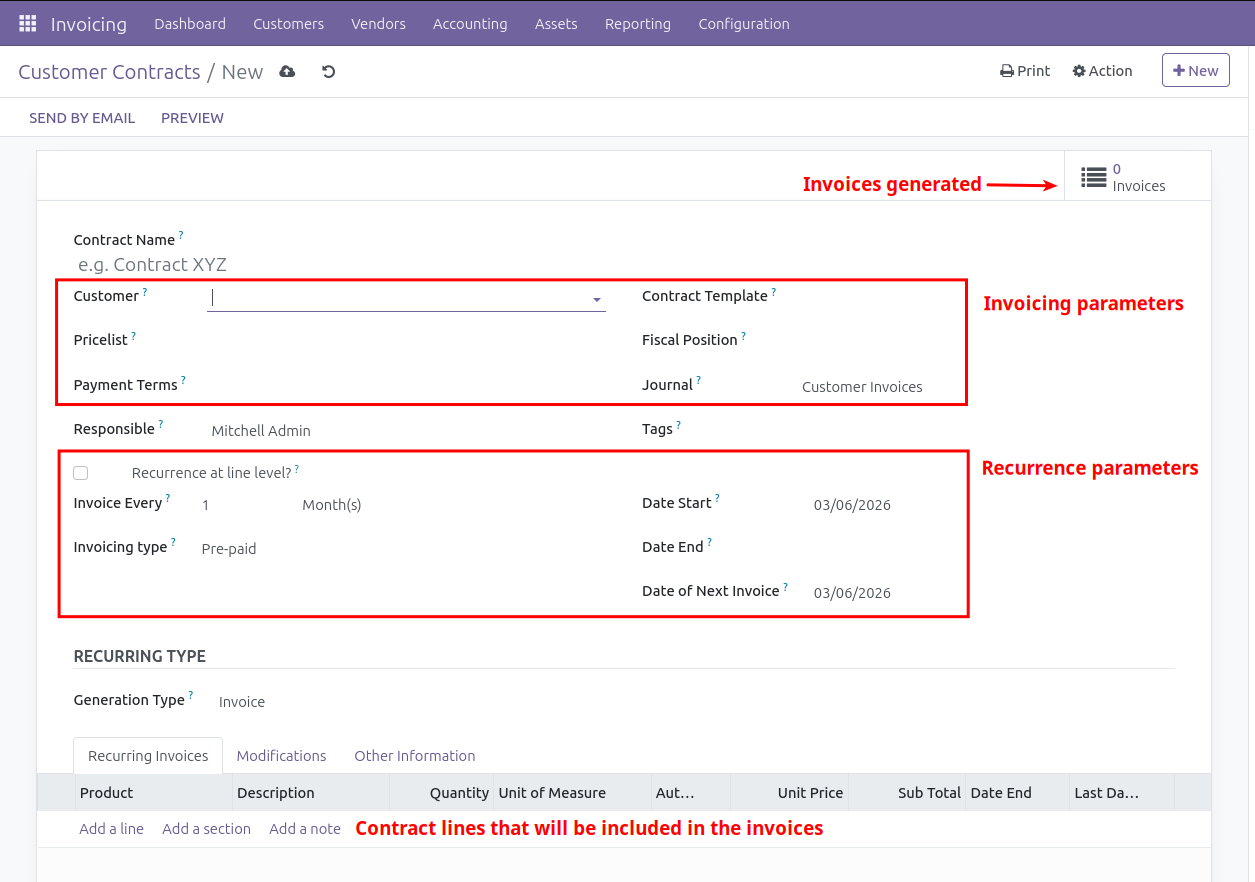
Invoicing parameters :
the partner (customer or supplier depending on the type of contract)
the Journal is filled with the default customer/supplier journal (first in sequence in Configuration > Journals)
Pricelist, Payment terms and Fiscal position are filled in from the partner information, if available
Recurrence parameters :
Invoice every : Invoicing interval, in terms of days, weeks, months, months last day, semesters or years
Start Date of the contract, from which the invoicing period will start
End Date of the contract is optional. If not filled the invoice generation will never stop.
The Date of Next Invoice is automatically computed, but can be can be modified manually
Invoicing type : pre-paid or post-paid. A pre-paid contract generates the invoice at the beginning of the invoicing period, a post paid contract generates it at the end.
Generation Type has only one option “Invoice”. Other options are added in separate modules.
Recurrence at lines level : see below
Contract lines
These lines will be used to generate the invoice lines. You can fill in the product with a description, a quantity and a price.
The Description can include the markers #START#, #END# and #INVOICEMONTHNAME# in the description field. This will display the start/end date or the start month of the invoiced period in the invoice line description.
Check Auto-price for having the price automatically obtained and updated from the price list.
Reccurence at lines level
Recurrence at lines level is a different “mode”, where each contract line has it’s own recurrence properties. For instance, one line starts on 02/02/2026 and is invoiced every 2 weeks, and another line starts on 04/04/2026 and is invoiced yearly.
However, this mode and offers more reccurrence features, besides those already presented.
Contract lines are now opened in a form view.
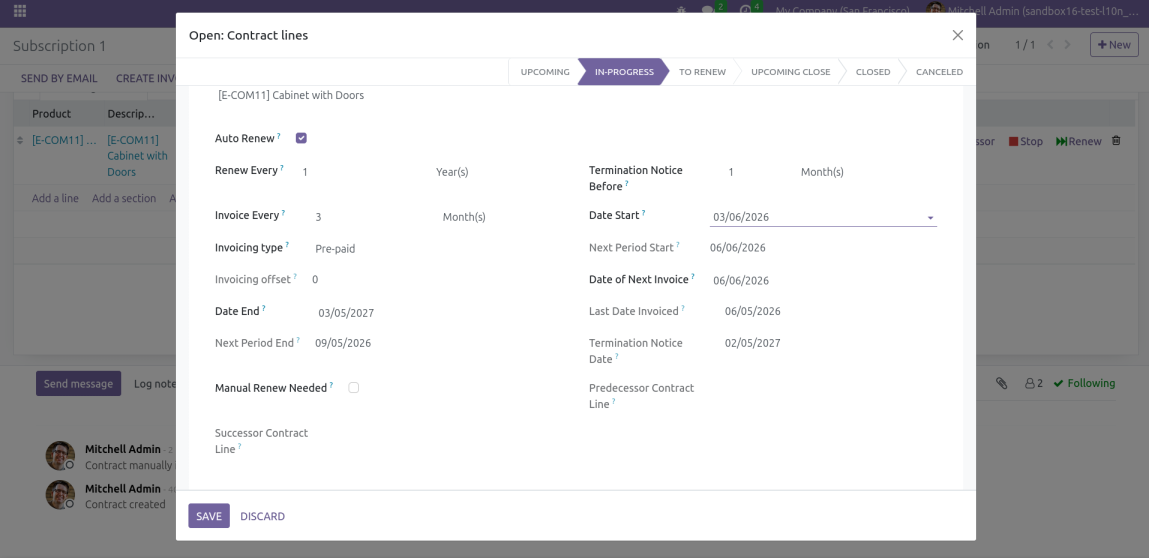
Auto-renew : contract lines will be automatically renewed when the End Date is reached. The End Date will be postponed by the duration set in the Renew Every field.
The field Termination Notice before will set the duration before the End Date when the contract line state will change from In Progress to Upocoming close. By default, the state changes one month before the End Date.
Lines can also be manually renewed in advance using the green Renew button.

You can Stop a contract line using the red button at the right.
A pop up will open asking for an Stop Date. In a pre-paid contract, this date must be after the end of the period already invoiced. For instance, if the last invoice covers the period from 01/01/2026 to 31/01/2026, the stop date must be equal or after 31/01/2026.
You can also Stop and plan a successor. A popup will ask for a new Start and End date. The contract line will be stopped and a new one will be created with the given Start and End dates.
Invoice generation
The Generate Recurring Invoices from Contracts cron, available in Settings > Technical > Automation > Scheduled Action, runs daily to generate the invoices. Execution time and frequency can be configured in the cron settings.
If you are in debug mode, you can click on the Create Invoices button.

Reporting
The Show recurring invoices shortcut on contracts shows all invoices created from the contract.
The menu Invoicing > Reporting > Contracts > Customer Contract Lines/Supplier Contract Lines allows to view all contract lines in a list view. Lines can be edited from there. Note : pivot view is not available in this report.
Printing, sending by email and portal access
The contract pdf report can be printed from the Print menu.
The contract can be sent by email with the Send by Email button
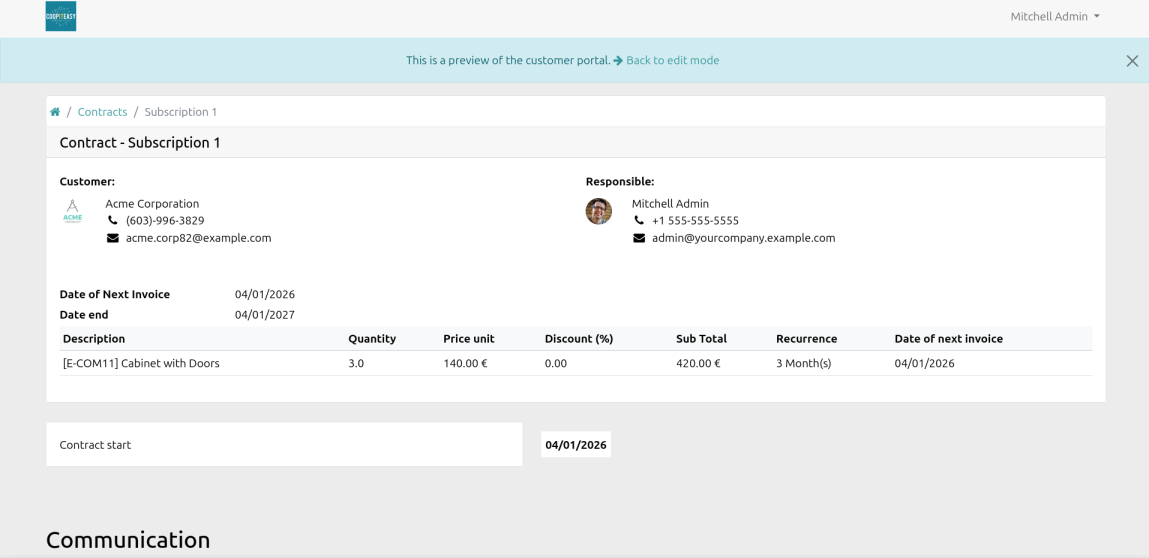
Contracts appear in portal to following users:
Known issues / Roadmap
Recover states and others functional fields in Contracts.
Add recurrence flag at template level.
Bug Tracker
Bugs are tracked on GitHub Issues. In case of trouble, please check there if your issue has already been reported. If you spotted it first, help us to smash it by providing a detailed and welcomed feedback.
Do not contact contributors directly about support or help with technical issues.
Credits
Contributors
Angel Moya <angel.moya@domatix.com>
Dave Lasley <dave@laslabs.com>
Miquel Raïch <miquel.raich@eficent.com>
Souheil Bejaoui <souheil.bejaoui@acsone.eu>
Thomas Binsfeld <thomas.binsfeld@acsone.eu>
Guillaume Vandamme <guillaume.vandamme@acsone.eu>
Raphaël Reverdy <raphael.reverdy@akretion.com>
-
Pedro M. Baeza
Carlos Dauden
Vicent Cubells
Rafael Blasco
Víctor Martínez
Iván Antón <ozono@ozonomultimedia.com>
-
Antoni Marroig <amarroig@apsl.net>
Maintainers
This module is maintained by the OCA.

OCA, or the Odoo Community Association, is a nonprofit organization whose mission is to support the collaborative development of Odoo features and promote its widespread use.
This module is part of the OCA/contract project on GitHub.
You are welcome to contribute. To learn how please visit https://odoo-community.org/page/Contribute.
1 maintainer

Metadata
1 maintainer
Release files for odoo-addon-contract 16.0.2.18.0.5
For a detailed explanation of source distributions (sdists) and built distributions (wheels), please see the package formats documentation.
Built distribution (wheel)
| File | Interpreter | ABI | Platform | Actions Reset |
|---|---|---|---|---|
| odoo_addon_contract-16.0.2.18.0.5-py3-none-any.whl | Python 3 | none | any | Details for odoo_addon_contract-16.0.2.18.0.5-py3-none-any.whl |
Release files / odoo_addon_contract-16.0.2.18.0.5-py3-none-any.whl
| Download URL | odoo_addon_contract-16.0.2.18.0.5-py3-none-any.whl |
|---|---|
| Size | 1.3 MB |
| Tags | Python 3 |
|
SHA-256 checksum How to use checksums |
a2ce0f3fe751f377590a7495517ae561342a07125cd80ac36eaac74e8a532616
|
|
BLAKE2b-256 checksum How to use checksums |
97b06c38877bf8bcb4af203da805e1eac295507d46766de5b309168afee2ade4
|
| Upload date | |
|
Uploaded using Trusted Publishing? What is trusted publishing? |
No |
| Uploaded via |
twine/7.0.0 CPython/3.14.4
|
Security for odoo-addon-contract 16.0.2.18.0.5
Provenance
Provenance describes where a file came from. On PyPI, provenance is shared via attestations, which provide a verifiable record of the build or publishing details. View details, limitations and caveats.
No provenance found
None of the files in this release were uploaded with provenance metadata.
A note on package security
PyPI is a repository for distributing packages, not a service for auditing them. While third-party security researchers and our staff do their best to detect and remove malicious packages, PyPI cannot guarantee the quality, security or suitability of any given package.
To learn more about protecting yourself from malicious actors, visit our package security documentation.














