
Set a default account for all companies of a product

Project description





This module extends the functionality of products and accounting to allow you to propagate multi-company product template and product category accounts from the current company to all other companies where you have access rights.
Table of contents
Configuration
To configure this module, you need to:
Install some module that lets you manage products, such as sale, purchase… (if not already installed).
Usage
To use this module, you need to:
Go to a product’s form view. It can be the product template or the variant.
Enter the “Accounting” tab.
Click on “Propagate expense/income account to other companies”.
Known issues / Roadmap
Since this module propagates product accounts based on the account code, it should only be used in a database where all companies belong to the same country.
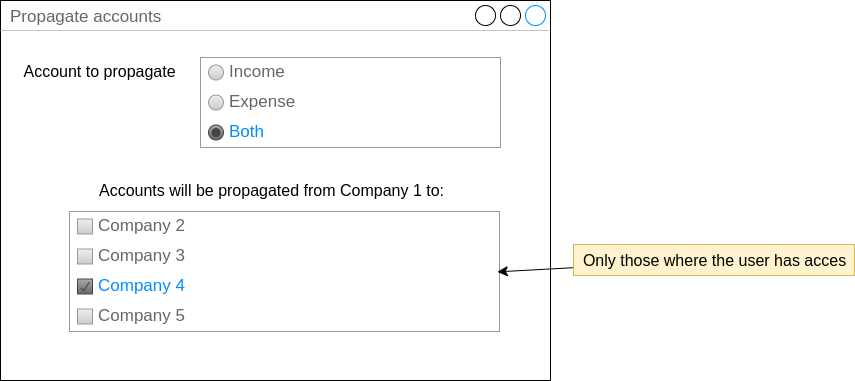
We could add a wizard that allows the user to select multiple products and propagate their accounts to multiple companies, in mass. This would improve the usability and fix the issue on multi-country installations. Example:
Bug Tracker
Bugs are tracked on GitHub Issues. In case of trouble, please check there if your issue has already been reported. If you spotted it first, help us to smash it by providing a detailed and welcomed feedback.
Do not contact contributors directly about support or help with technical issues.
Credits
Contributors
Jairo Llopis (Moduon)
Telmo Santos <telmo.santos@camptocamp.com>
Maintainers
This module is maintained by the OCA.

OCA, or the Odoo Community Association, is a nonprofit organization whose mission is to support the collaborative development of Odoo features and promote its widespread use.
Current maintainer:

This module is part of the OCA/multi-company project on GitHub.
You are welcome to contribute. To learn how please visit https://odoo-community.org/page/Contribute.
Release history Release notifications | RSS feed


Download files
Download the file for your platform. If you're not sure which to choose, learn more about installing packages.
Source Distributions
Built Distribution
Filter files by name, interpreter, ABI, and platform.
If you're not sure about the file name format, learn more about wheel file names.
Copy a direct link to the current filters
File details
Details for the file odoo_addon_product_account_multicompany_default-16.0.0.2.0.1-py3-none-any.whl.
File metadata
- Download URL: odoo_addon_product_account_multicompany_default-16.0.0.2.0.1-py3-none-any.whl
- Upload date:
- Size: 70.7 kB
- Tags: Python 3
- Uploaded using Trusted Publishing? No
- Uploaded via: twine/5.1.1 CPython/3.12.3
File hashes
| Algorithm | Hash digest | |
|---|---|---|
| SHA256 |
32a69d6b3853d7c762de83a310ed483e55bf53a5807f2f063e7fee2bbb479cba
|
|
| MD5 |
9b9142460479c1e2bfe224f25e75d628
|
|
| BLAKE2b-256 |
bd7546d3fd215a9d4438c123bcc5660dfdccc7e9d40fa20efe7904b189b9fb28
|






