

Stock batch picking extended





This module:
Adds extra fields to the batch picking creation wizard Adds extra fields and functionalities to the batch picking form.
Table of contents
Configuration
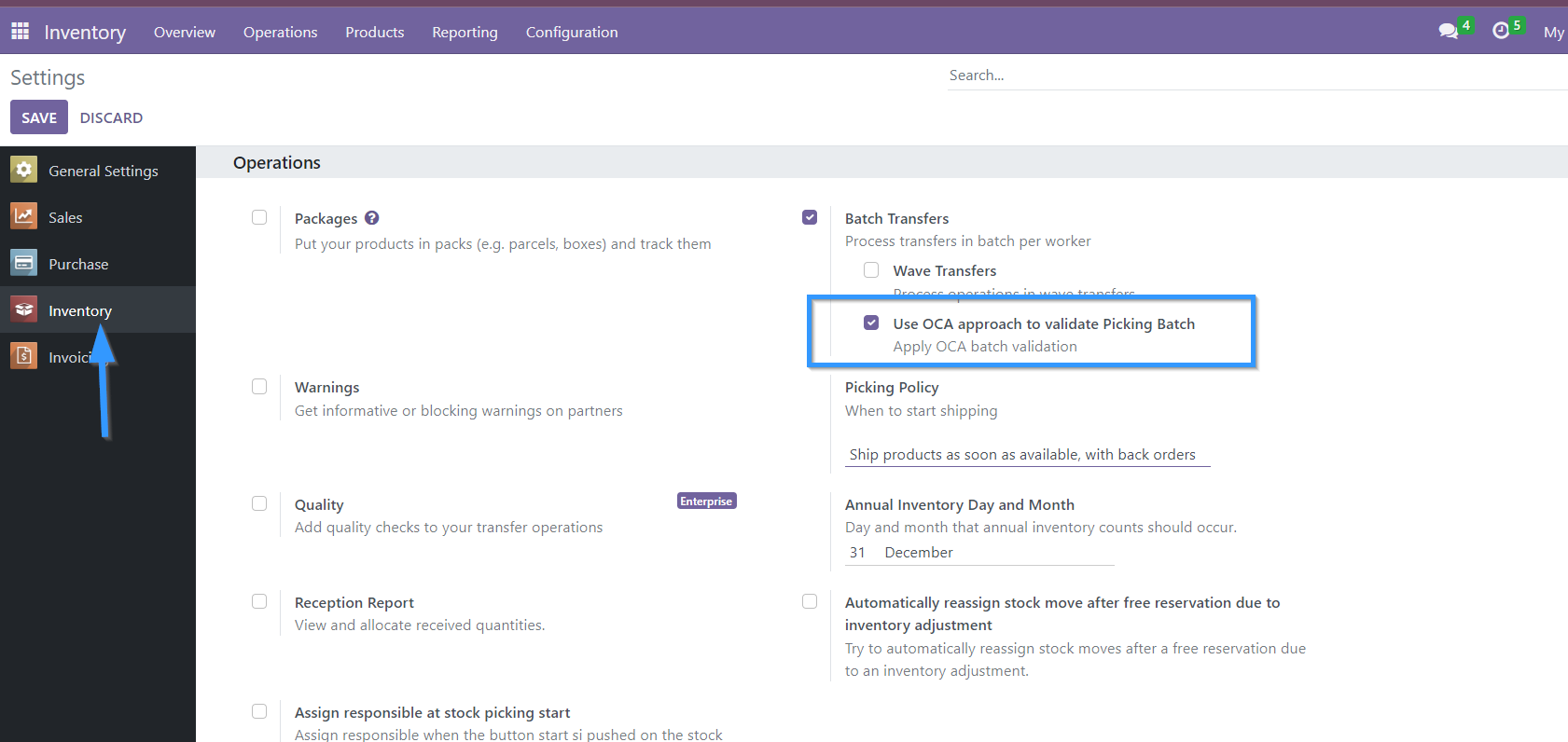
In Inventory / Settings / Batch Picking it is possible to activate or deactivate which approach for batch handling will be used per company. By default after installation this option will be activated for all companies.
Usage
When you create a batch pick, the creation wizard will appear with the new fields added.
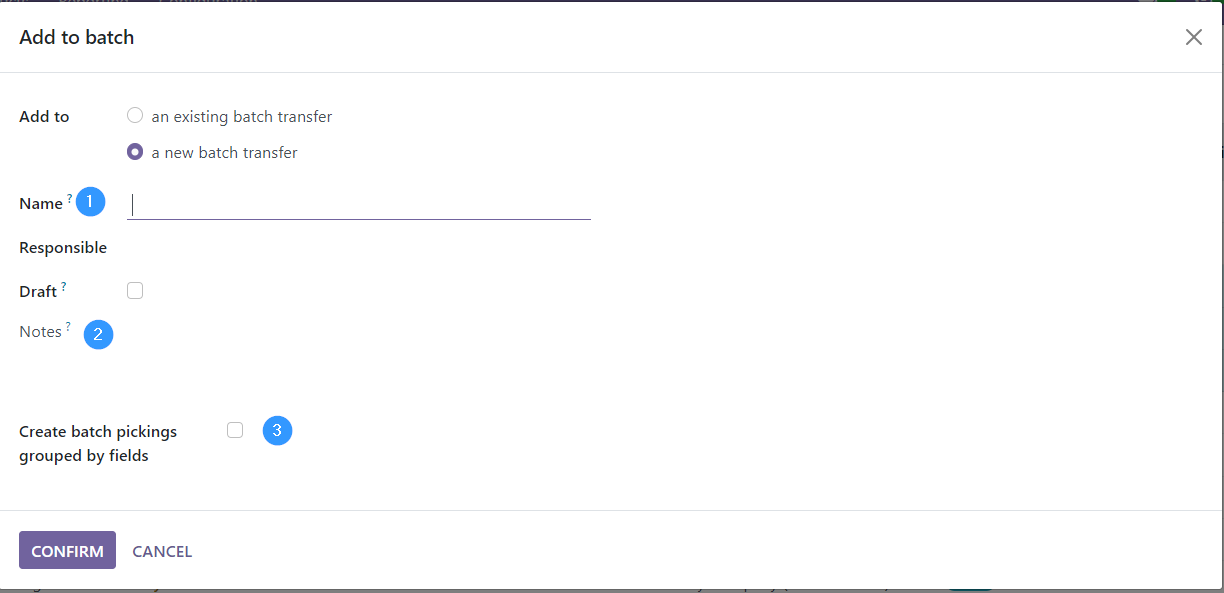
Name: Allows to rename the batch. But be careful, if this is done, it overwrites the name that Odoo assigns to the batch by default.
Notes: Allows to add notes to the batch.
Allows you to group the batch by the fields of the model stock_picking
Adds to the form view of batch picking:
In “Draft” status:
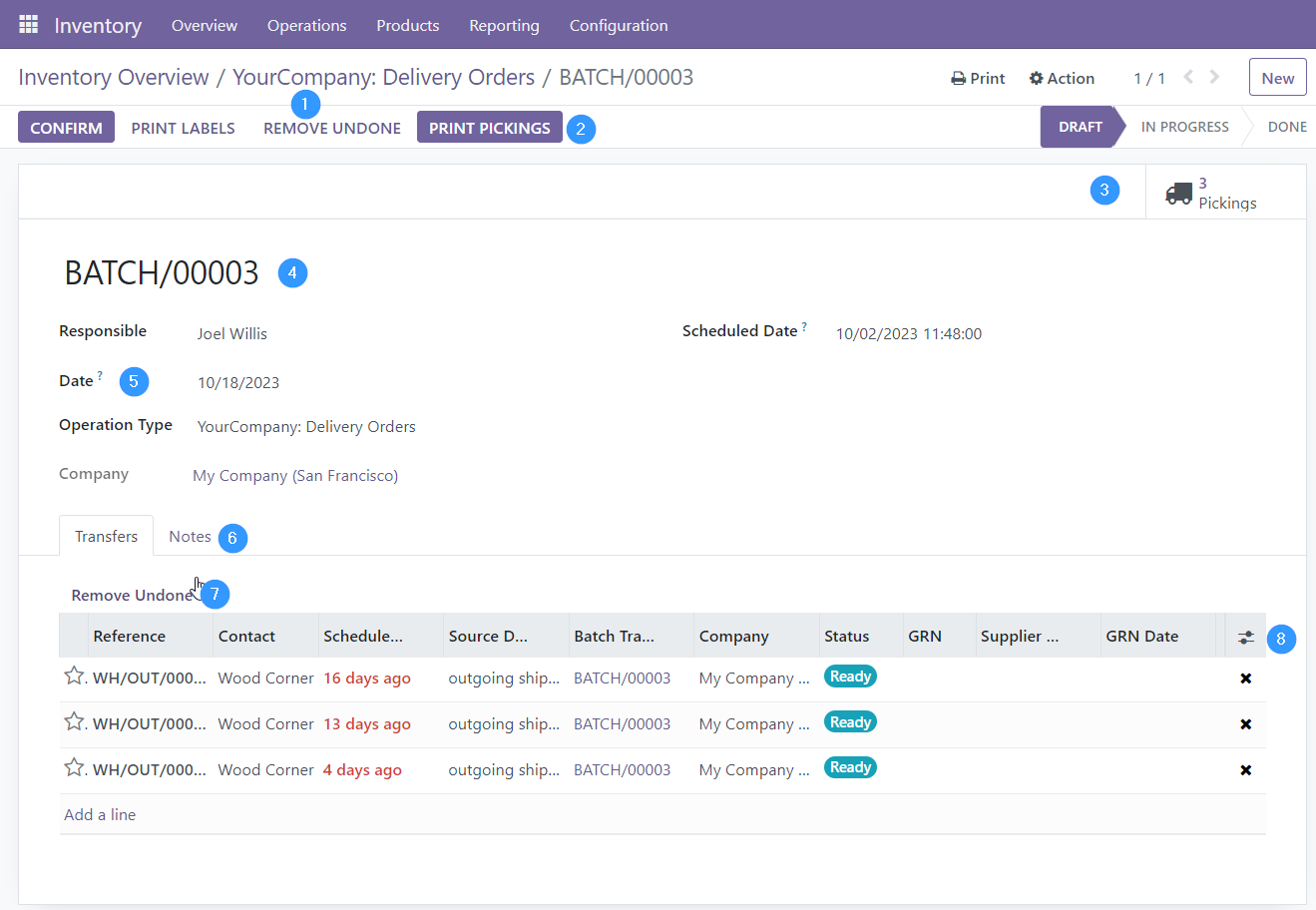
Delete all delivery notes in the batch whose status is not done or canceled.
Print pickings.
Smart button with counting and access to pickings.
Rename the batch if it is in draft status.
Date. On which the batch picking is to be processed.
Notes. Reflects the notes that have been entered from the wizard and allows you to modify them.
Delete all delivery notes from the batch whose status is not done or canceled.
Allows to add more fields to the list of pickings.
“In progress” status:
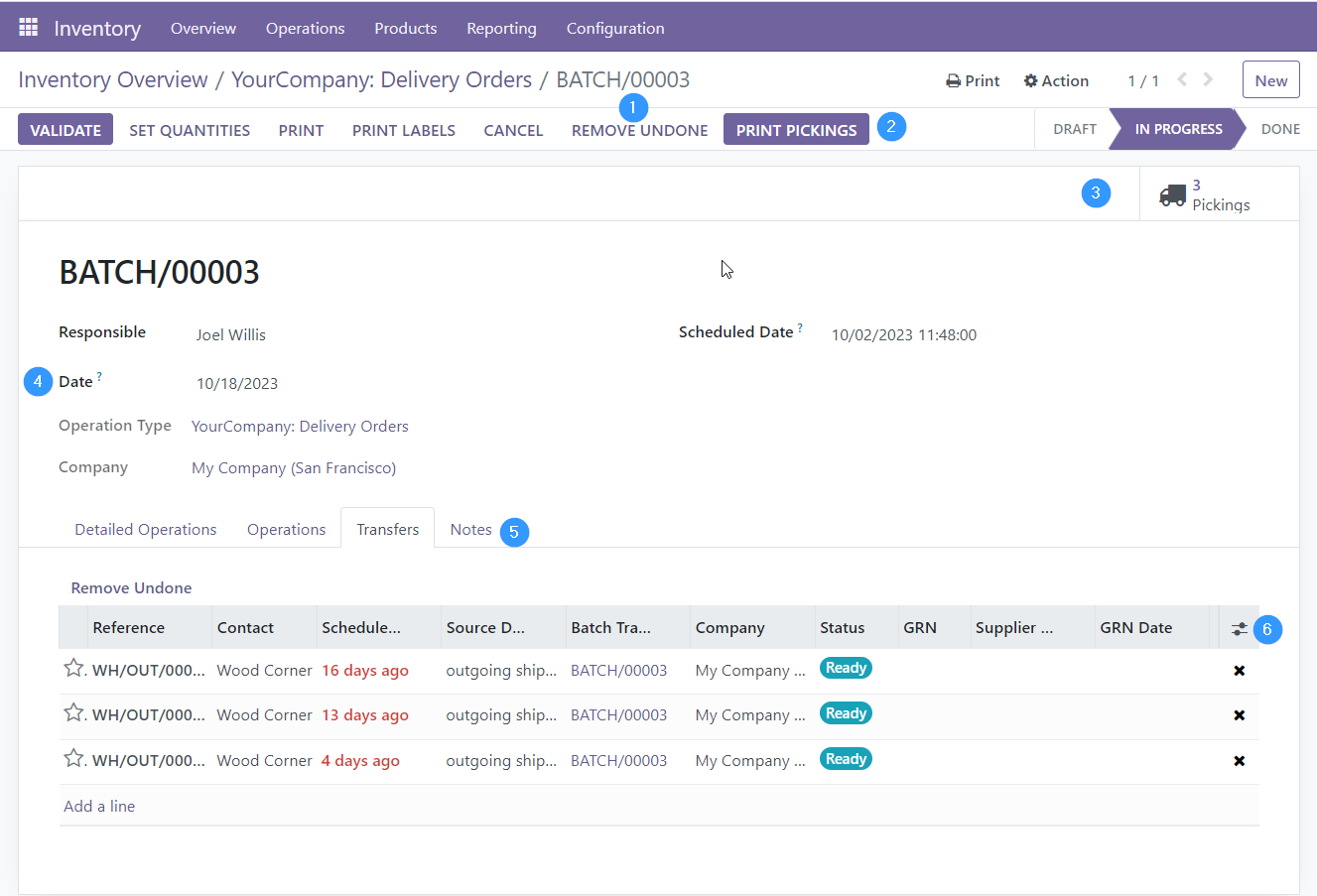
Delete all pickings in the batch whose status is not done or cancelled.
Print pickings.
Smart button with counting and access to pickings.
Date. On which the batch picking is to be processed. It can be changed in this state.
Notes. Reflects the notes that have been entered from the wizard and allows you to modify them.
Allows to add more fields to the list of pickings.
Note: If a batch is cancelled, it cancels all batch picks and sets the batch statuses to cancel as well only if the user has set the OCA batch validation approach in the inventory settings.
In “Done” status:
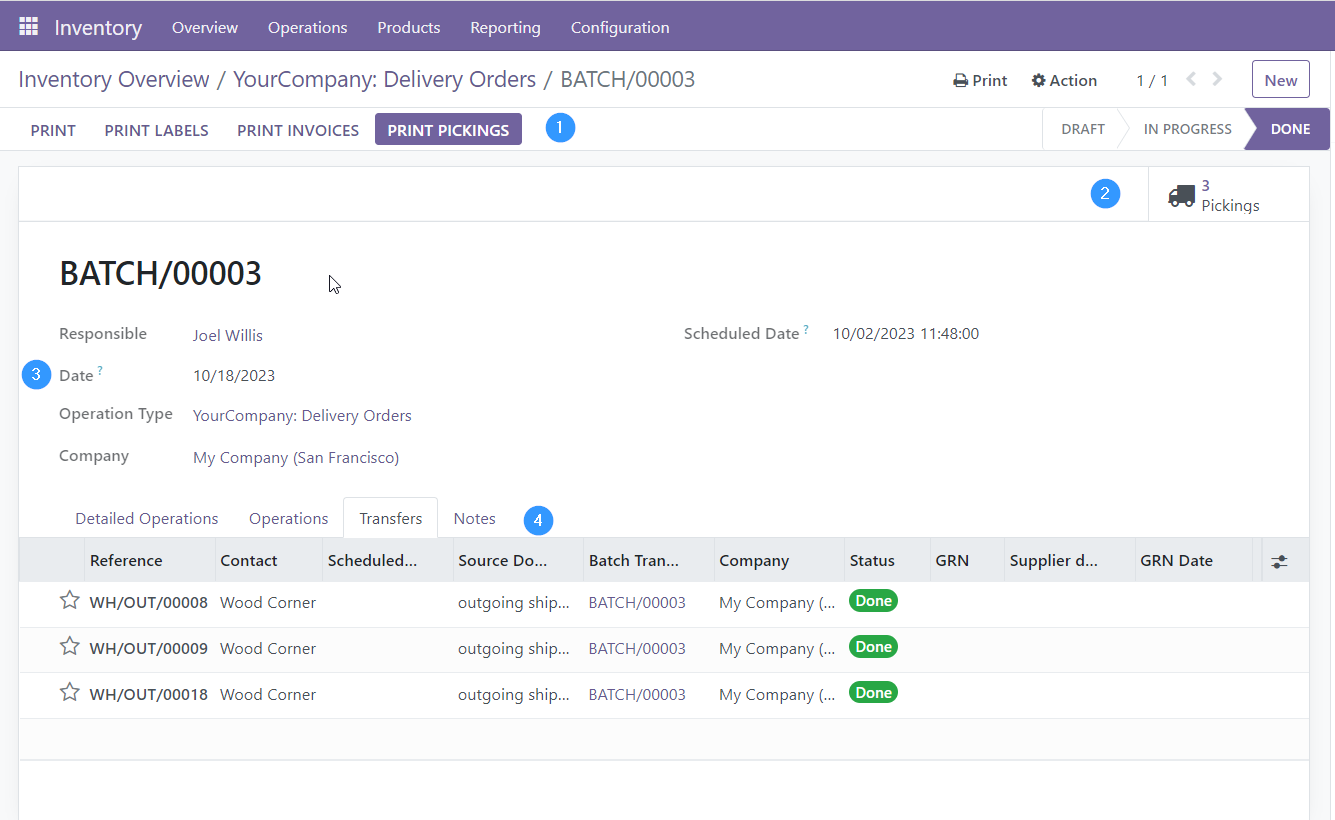
Print pickings.
Smart button with counting and access to pickings.
Date. On which the batch picking is to be processed. Already it can’t be modified in this state.
Notes. Reflects the notes that have been entered from the wizard and allows you to modify them.
Bug Tracker
Bugs are tracked on GitHub Issues. In case of trouble, please check there if your issue has already been reported. If you spotted it first, help us to smash it by providing a detailed and welcomed feedback.
Do not contact contributors directly about support or help with technical issues.
Credits
Contributors
picking_dispatch
Peter Langenberg <peter.langenberg@bubbles-it.be>
Rudolf Schnapka <rs@techno-flex.de>
Matthieu Dietrich <matthieu.dietrich@camptocamp.com>
Romain Deheele <romain.deheele@camptocamp.com>
Leonardo Pistone <leonardo.pistone@camptocamp.com>
Guewen Baconnier <guewen.baconnier@camptocamp.com>
Yannick Vaucher <yannick.vaucher@camptocamp.com>
Alexandre Fayolle <alexandre.fayolle@camptocamp.com>
Joël Grand-Guillaume <joel.grandguillaume@camptocamp.com>
Cyril Gaudin <cyril.gaudin@camptocamp.com>
Iryna Vyshnevska <i.vyshnevska@mobilunity.com>
stock_batch_picking
-
Cyril Gaudin
Maksym Yankin
-
Carlos Dauden
Sergio Teruel
César A. Sánchez
Carlos Lopez
Andrii Kompaniiets
-
Son Ho <sonhd@trobz.com>
Maintainers
This module is maintained by the OCA.

OCA, or the Odoo Community Association, is a nonprofit organization whose mission is to support the collaborative development of Odoo features and promote its widespread use.
Current maintainers:



This module is part of the OCA/stock-logistics-workflow project on GitHub.
You are welcome to contribute. To learn how please visit https://odoo-community.org/page/Contribute.
1 maintainer

Release files for odoo-addon-stock-picking-batch-extended 19.0.1.0.0.2
For a detailed explanation of source distributions (sdists) and built distributions (wheels), please see the package formats documentation.
Built distribution (wheel)
| File | Interpreter | ABI | Platform | Reset |
|---|---|---|---|---|
| odoo_addon_stock_picking_batch_extended-19.0.1.0.0.2-py3-none-any.whl | Python 3 | none | any | Details |
Release files / odoo_addon_stock_picking_batch_extended-19.0.1.0.0.2-py3-none-any.whl
| Download URL | odoo_addon_stock_picking_batch_extended-19.0.1.0.0.2-py3-none-any.whl |
|---|---|
| Size | 381.7 kB |
| Tags | Python 3 |
|
SHA-256 checksum How to use checksums |
9f578894b2ef84c567766ab8527e043e10d54001cc3c732c5da8ed8106616490
|
|
BLAKE2b-256 checksum How to use checksums |
67698a22fe145a35d0b684bcf564df1248b61f8e7401c050f3d7c07b74a56486
|
| Upload date | |
|
Uploaded using Trusted Publishing? What is trusted publishing? |
No |
| Uploaded via |
twine/7.0.0 CPython/3.14.4
|














