
Allows manage a lot of pickings in batch

Project description

Stock batch picking extended





This module:
Adds extra fields to the batch picking creation wizard Adds extra fields and functionalities to the batch picking form.
Table of contents
Configuration
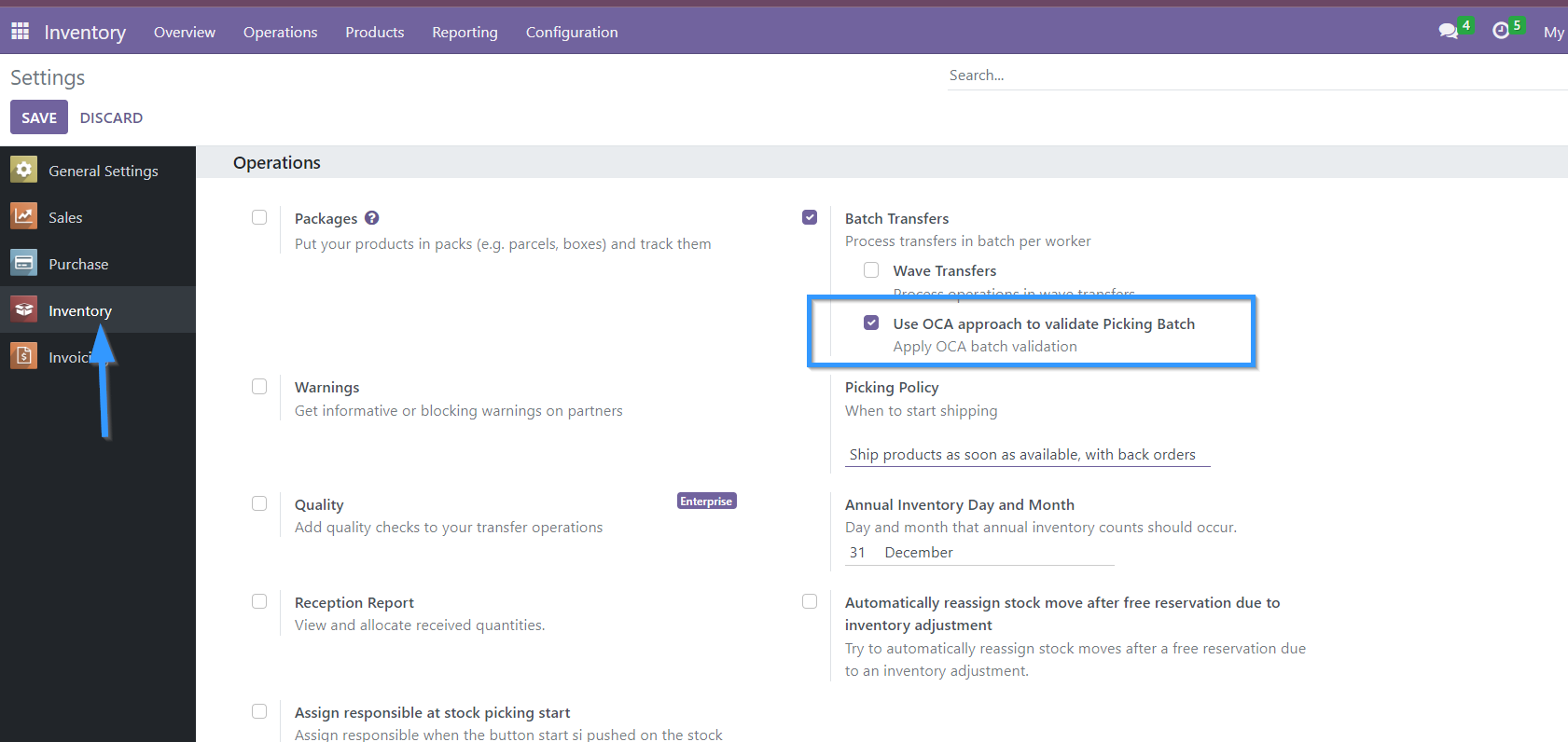
In Inventory / Settings / Batch Picking it is possible to activate or deactivate which approach for batch handling will be used per company. By default after installation this option will be activated for all companies.
Usage
When you create a batch pick, the creation wizard will appear with the new fields added.
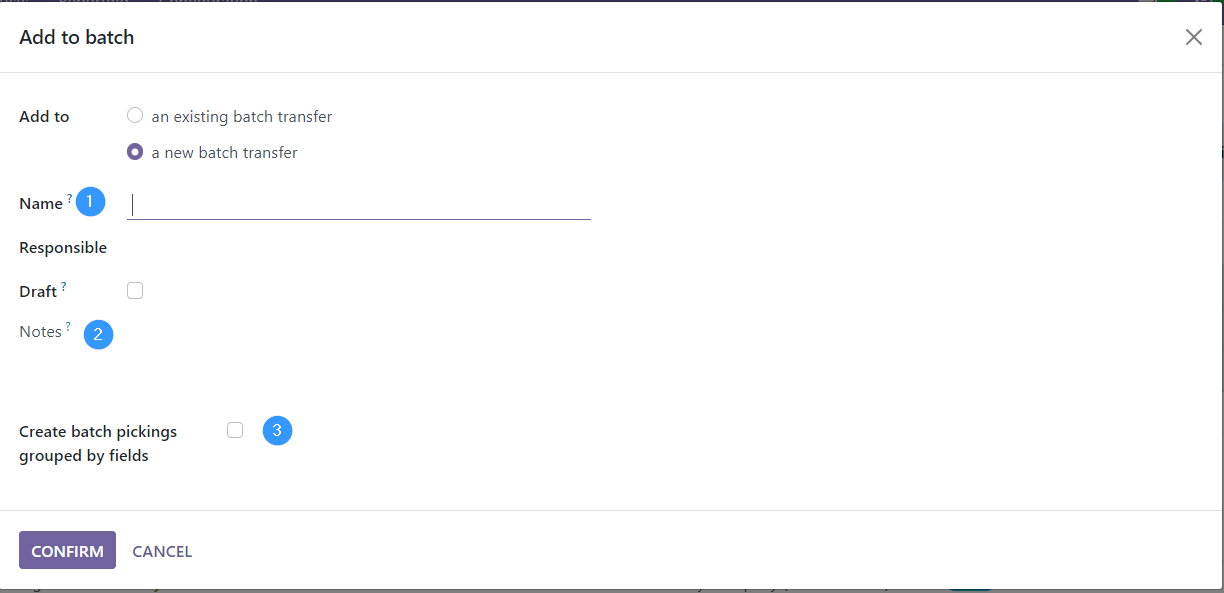
Name: Allows to rename the batch. But be careful, if this is done, it overwrites the name that Odoo assigns to the batch by default.
Notes: Allows to add notes to the batch.
Allows you to group the batch by the fields of the model stock_picking
Adds to the form view of batch picking:
In “Draft” status:
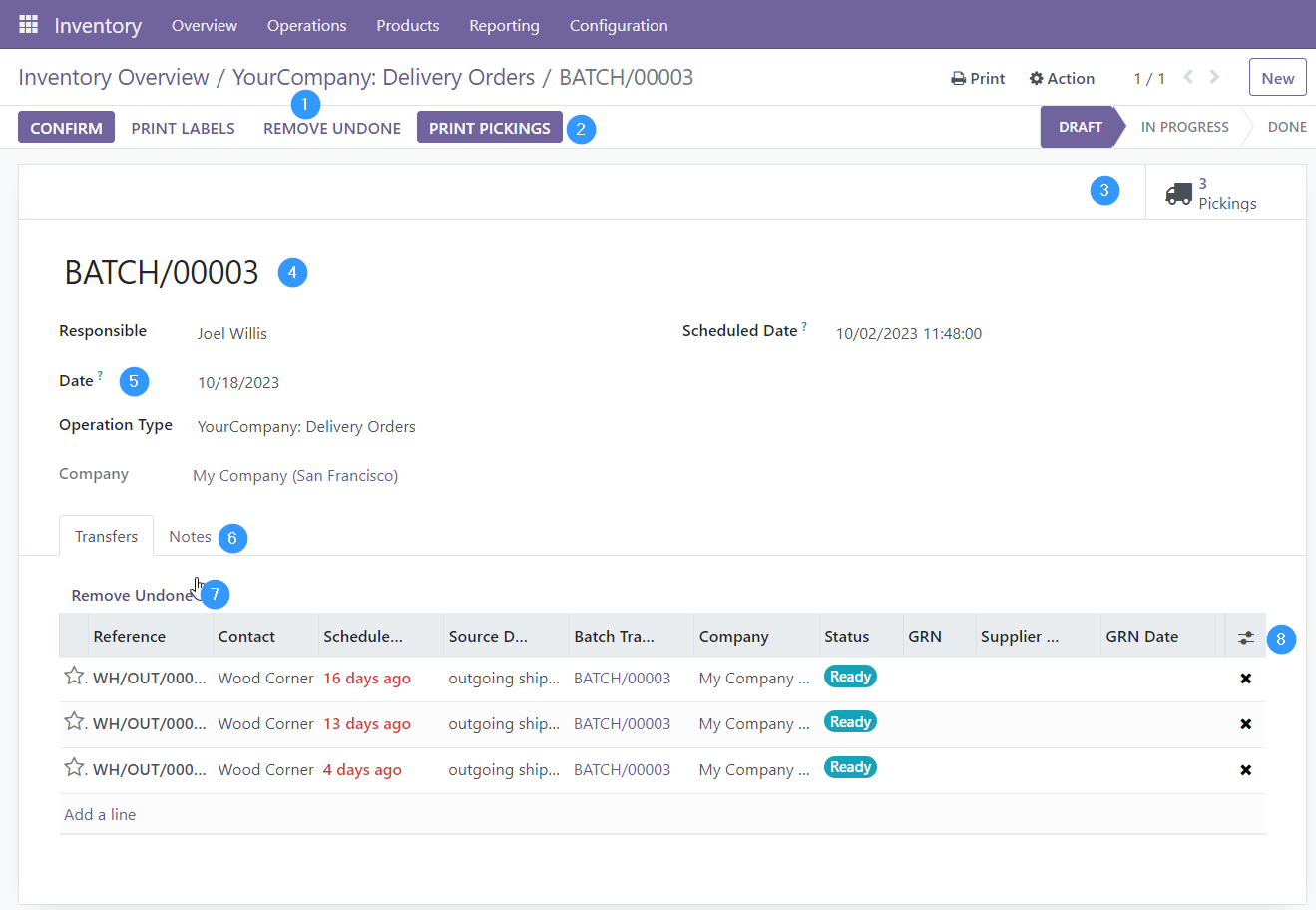
Delete all delivery notes in the batch whose status is not done or canceled.
Print pickings.
Smart button with counting and access to pickings.
Rename the batch if it is in draft status.
Date. On which the batch picking is to be processed.
Notes. Reflects the notes that have been entered from the wizard and allows you to modify them.
Delete all delivery notes from the batch whose status is not done or canceled.
Allows to add more fields to the list of pickings.
“In progress” status:
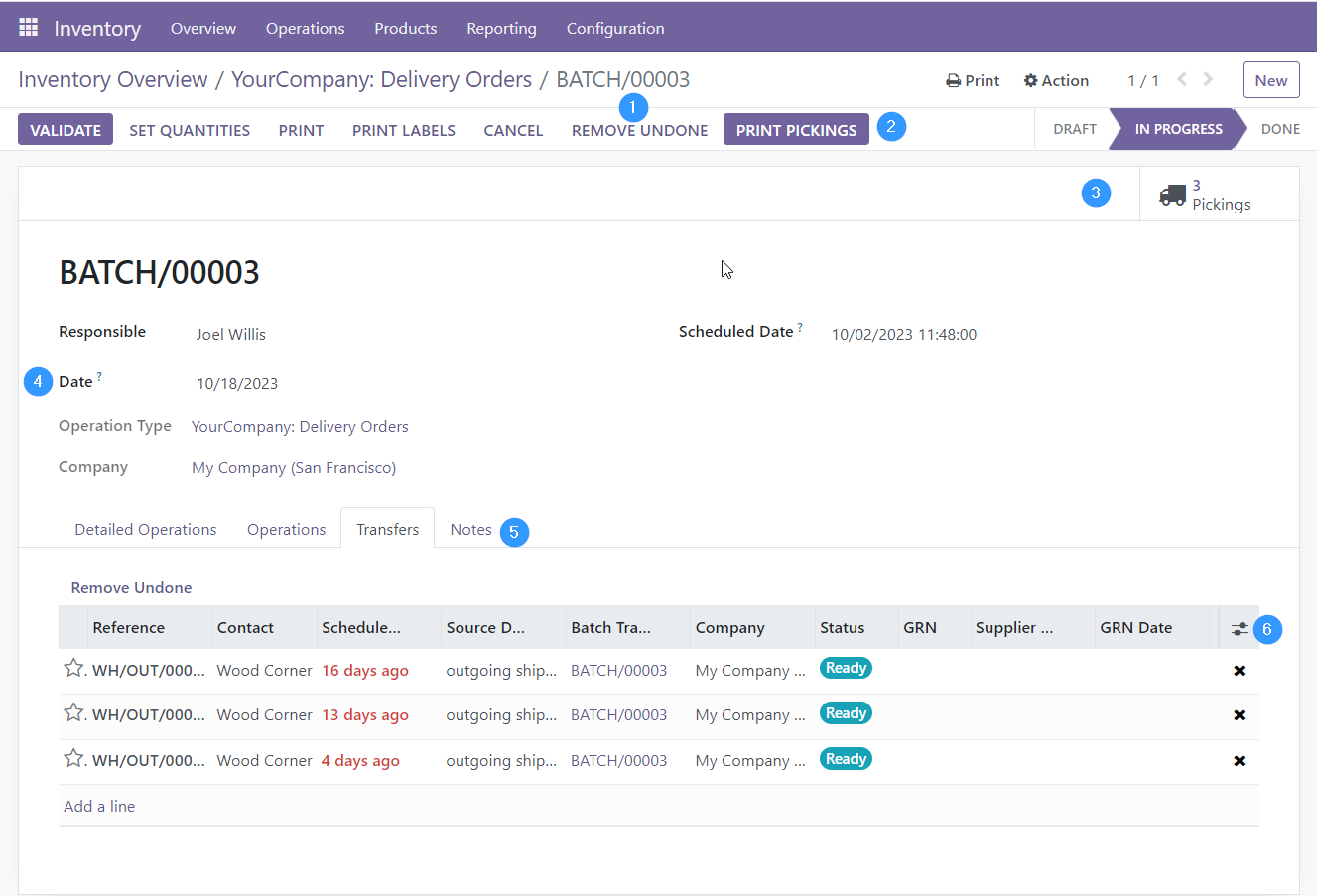
Delete all pickings in the batch whose status is not done or cancelled.
Print pickings.
Smart button with counting and access to pickings.
Date. On which the batch picking is to be processed. It can be changed in this state.
Notes. Reflects the notes that have been entered from the wizard and allows you to modify them.
Allows to add more fields to the list of pickings.
Note: If a batch is cancelled, it cancels all batch picks and sets the batch statuses to cancel as well only if the user has set the OCA batch validation approach in the inventory settings.
In “Done” status:
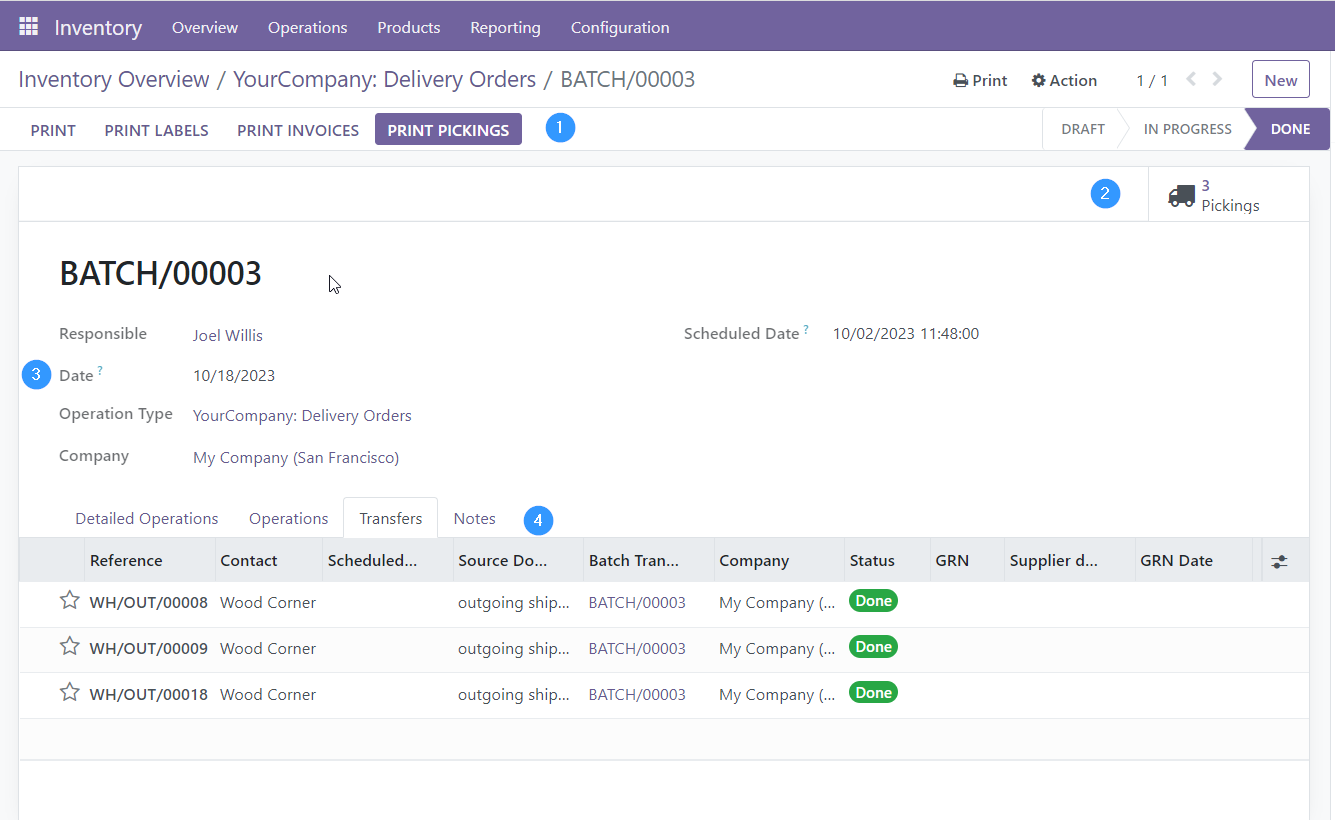
Print pickings.
Smart button with counting and access to pickings.
Date. On which the batch picking is to be processed. Already it can’t be modified in this state.
Notes. Reflects the notes that have been entered from the wizard and allows you to modify them.
Bug Tracker
Bugs are tracked on GitHub Issues. In case of trouble, please check there if your issue has already been reported. If you spotted it first, help us to smash it by providing a detailed and welcomed feedback.
Do not contact contributors directly about support or help with technical issues.
Credits
Contributors
picking_dispatch
Peter Langenberg <peter.langenberg@bubbles-it.be>
Rudolf Schnapka <rs@techno-flex.de>
Matthieu Dietrich <matthieu.dietrich@camptocamp.com>
Romain Deheele <romain.deheele@camptocamp.com>
Leonardo Pistone <leonardo.pistone@camptocamp.com>
Guewen Baconnier <guewen.baconnier@camptocamp.com>
Yannick Vaucher <yannick.vaucher@camptocamp.com>
Alexandre Fayolle <alexandre.fayolle@camptocamp.com>
Joël Grand-Guillaume <joel.grandguillaume@camptocamp.com>
Cyril Gaudin <cyril.gaudin@camptocamp.com>
Iryna Vyshnevska <i.vyshnevska@mobilunity.com>
stock_batch_picking
-
Cyril Gaudin
Maksym Yankin
-
Carlos Dauden
Sergio Teruel
César A. Sánchez
Carlos Lopez
-
Son Ho <sonhd@trobz.com>
Other credits
The migration of this module from 13.0 to 14.0 was financially supported by Camptocamp
Maintainers
This module is maintained by the OCA.

OCA, or the Odoo Community Association, is a nonprofit organization whose mission is to support the collaborative development of Odoo features and promote its widespread use.
Current maintainers:



This module is part of the OCA/stock-logistics-workflow project on GitHub.
You are welcome to contribute. To learn how please visit https://odoo-community.org/page/Contribute.
Release history Release notifications | RSS feed


Download files
Download the file for your platform. If you're not sure which to choose, learn more about installing packages.
Source Distributions
Built Distribution
Filter files by name, interpreter, ABI, and platform.
If you're not sure about the file name format, learn more about wheel file names.
Copy a direct link to the current filters
File details
Details for the file odoo_addon_stock_picking_batch_extended-18.0.1.0.0.7-py3-none-any.whl.
File metadata
- Download URL: odoo_addon_stock_picking_batch_extended-18.0.1.0.0.7-py3-none-any.whl
- Upload date:
- Size: 383.1 kB
- Tags: Python 3
- Uploaded using Trusted Publishing? No
- Uploaded via: twine/6.2.0 CPython/3.12.3
File hashes
| Algorithm | Hash digest | |
|---|---|---|
| SHA256 |
52afc928b2f3e9dc033049b7d812b00416f13763ba779f02d36097f8c8320099
|
|
| MD5 |
1fbe423610e1082eaac4d399afffa88d
|
|
| BLAKE2b-256 |
30da63bb2eb9bce8180a8a195c0299694d04fb28d2b38dd31efb641dfd369dc0
|






