

Web Notify





Send instant notification messages to the user in live.
This technical module allows you to send instant notification messages from the server to the user in live. Two kinds of notification are supported.
Success: Displayed in a success theme color flying popup div
Danger: Displayed in a danger theme color flying popup div
Warning: Displayed in a warning theme color flying popup div
Information: Displayed in a info theme color flying popup div
Default: Displayed in a default theme color flying popup div
Table of contents
Installation
This module is based on the Instant Messaging Bus. To work properly, the server must be launched in gevent mode.
Usage
To send a notification to the user you just need to call one of the new methods defined on res.users:
self.env.user.notify_success(message='My success message')or
self.env.user.notify_danger(message='My danger message')or
self.env.user.notify_warning(message='My warning message')or
self.env.user.notify_info(message='My information message')or
self.env.user.notify_default(message='My default message')The notifications can bring interactivity with some buttons.
One allowing to refresh the active view
Another allowing to send a window / client action
The reload button is activated when sending the notification with:
The action can be used using the action keyword and we can choose which name to give to our button with the button_name key in the action context params key:
action = self.env["ir.actions.act_window"]._for_xml_id('sale.action_orders')
action.update({
   'res_id': self.id,
   'views': [(False, 'form')],
})
action["context"].setdefault("params", {})
action["context"]["params"]["button_name"] = "Sales"
action["context"]["params"]["button_icon"] = "fa-eye"
self.env.user.notify_info('My information message', action=action)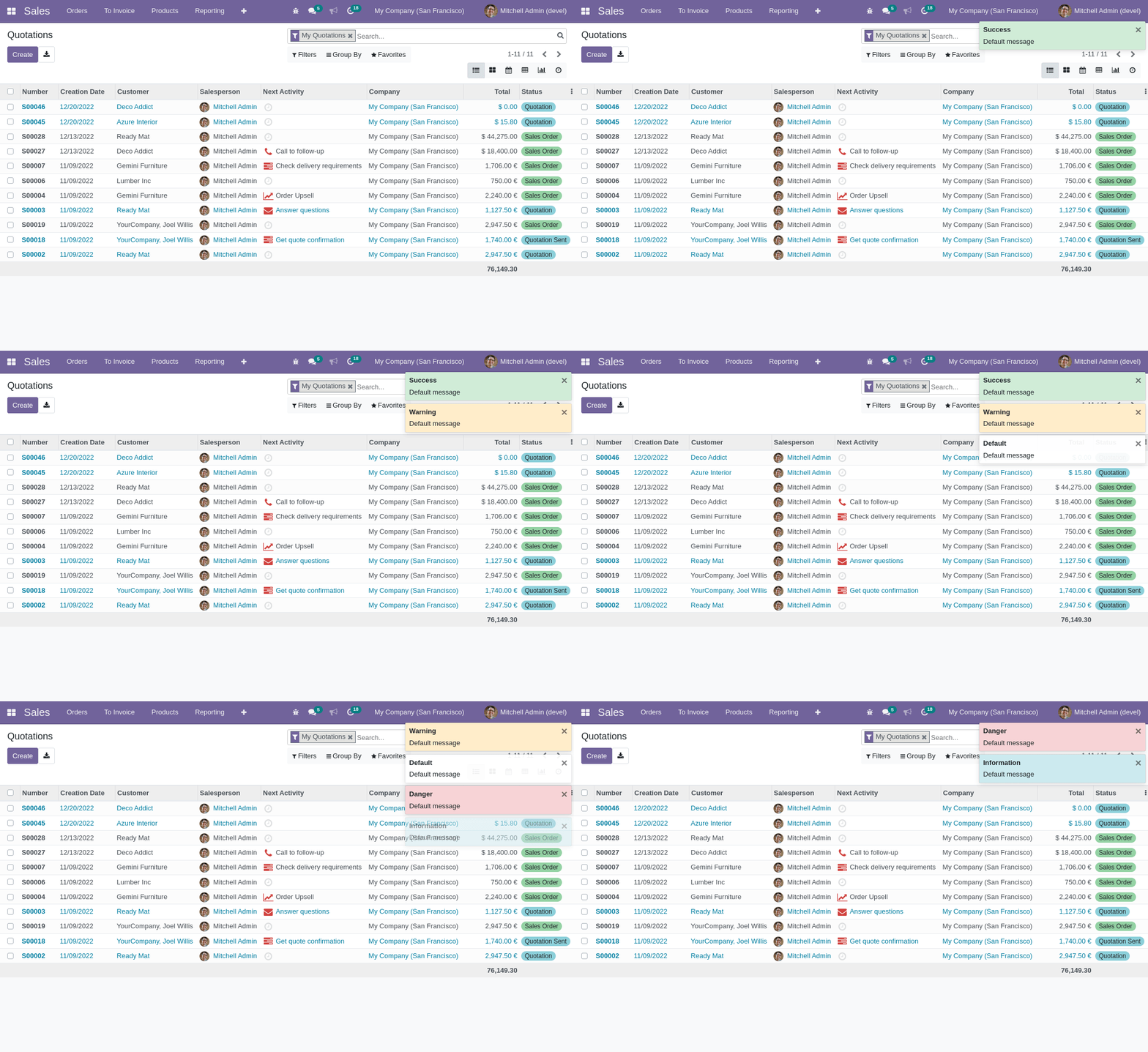
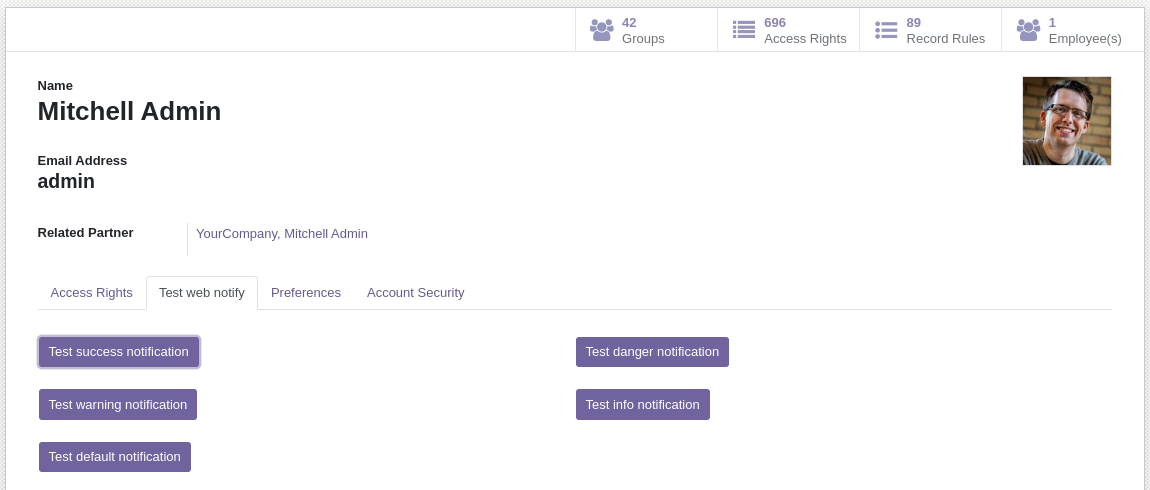
You can test the behaviour of the notifications by installing this module in a demo database. Access the users form through Settings -> Users & Companies. You’ll see a tab called “Test web notify”, here you’ll find two buttons that’ll allow you test the module.
Bug Tracker
Bugs are tracked on GitHub Issues. In case of trouble, please check there if your issue has already been reported. If you spotted it first, help us to smash it by providing a detailed and welcomed feedback.
Do not contact contributors directly about support or help with technical issues.
Credits
Contributors
Laurent Mignon <laurent.mignon@acsone.eu>
Serpent Consulting Services Pvt. Ltd.<jay.vora@serpentcs.com>
Aitor Bouzas <aitor.bouzas@adaptivecity.com>
Shepilov Vladislav <shepilov.v@protonmail.com>
Kevin Khao <kevin.khao@akretion.com>
-
David Vidal
Nikul Chaudhary <nchaudhary@opensourceintegrators.com>
Tris Doan <tridm@trobz.com>
Maintainers
This module is maintained by the OCA.

OCA, or the Odoo Community Association, is a nonprofit organization whose mission is to support the collaborative development of Odoo features and promote its widespread use.
This module is part of the OCA/web project on GitHub.
You are welcome to contribute. To learn how please visit https://odoo-community.org/page/Contribute.
1 maintainer

Release files for odoo-addon-web-notify 19.0.1.0.0.2
For a detailed explanation of source distributions (sdists) and built distributions (wheels), please see the package formats documentation.
Built distribution (wheel)
| File | Interpreter | ABI | Platform | Reset |
|---|---|---|---|---|
| odoo_addon_web_notify-19.0.1.0.0.2-py3-none-any.whl | Python 3 | none | any | Details |
Release files / odoo_addon_web_notify-19.0.1.0.0.2-py3-none-any.whl
| Download URL | odoo_addon_web_notify-19.0.1.0.0.2-py3-none-any.whl |
|---|---|
| Size | 305.6 kB |
| Tags | Python 3 |
|
SHA-256 checksum How to use checksums |
9e47bbed2837fc972b93d03b8c25b8a8d6fec07030cd923bd84fed8c6f882283
|
|
BLAKE2b-256 checksum How to use checksums |
544a3ccf4eb92e1390cd9e40dccb4b600f6b4716c344706e335ae9422d082b86
|
| Upload date | |
|
Uploaded using Trusted Publishing? What is trusted publishing? |
No |
| Uploaded via |
twine/6.2.0 CPython/3.12.3
|














