

Web URL widget advanced





Extend URL, CopyClipboardURL widget features to ease customization of anchor’s text.
By default, the URL, CopyClipboardURL widget will show the plain URL. You can specify an attribute to provide a static label too.
With this module, you can use a field for link’s inner text using attribute ‘text_field’. You can also add a prefix to the link using attribute ‘prefix_name’.
Until 13.0 this functionality was separated in modules ‘web_widget_url_advanced’ and ‘web_widget_prefixed_url’
Table of contents
Usage
Use url, CopyClipboardURL widget as you do usually, then add an extra parameter text_ field to indicate which field (present in the view already) must be used for the anchor text.
<field name="some_url" widget="url" text_field="another_field" />M2O fields are supported: display_name is used automatically.
For example, in the partner form, if you want to display the website link with partner’s name as anchor you can do:
<field name="website" widget="url" text_field="name" placeholder="e.g. www.odoo.com"/>This is going to change the rendering from
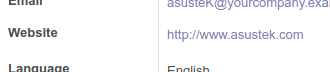
to
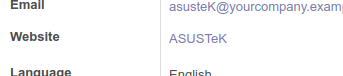
Or user can add any hyperlink text using ‘prefix_name’ attribute
<field name="skype_name" widget="url" prefix_name="skype"/>both can be applied inside the options attribute too:
<field name="skype_name" widget="url" options="{'prefix_name': 'skype'}"/>Bug Tracker
Bugs are tracked on GitHub Issues. In case of trouble, please check there if your issue has already been reported. If you spotted it first, help us to smash it by providing a detailed and welcomed feedback.
Do not contact contributors directly about support or help with technical issues.
Credits
Contributors
Simone Orsi <simone.orsi@camptocamp.com>
-
Alexey Pelykh <alexey.pelykh@corphub.eu>
Jay Vora <jay.vora@serpentcs.com>
Swapnesh Shah <s.shah.serpentcs@gmail.com>
Joan Sisquella <joan.sisquella@forgeflow.com>
Peerapong Supasompob <peerapong.supasompob@gmail.com>
Nedas Žilinskas <nedas.zilinskas@avoin.systems>
-
Vang Nguyen Phu
Maintainers
This module is maintained by the OCA.

OCA, or the Odoo Community Association, is a nonprofit organization whose mission is to support the collaborative development of Odoo features and promote its widespread use.
This module is part of the OCA/web project on GitHub.
You are welcome to contribute. To learn how please visit https://odoo-community.org/page/Contribute.
1 maintainer

Metadata
1 maintainer
Release files for odoo-addon-web-widget-url-advanced 19.0.1.0.0.2
For a detailed explanation of source distributions (sdists) and built distributions (wheels), please see the package formats documentation.
Built distribution (wheel)
| File | Interpreter | ABI | Platform | Reset |
|---|---|---|---|---|
| odoo_addon_web_widget_url_advanced-19.0.1.0.0.2-py3-none-any.whl | Python 3 | none | any | Details |
Release files / odoo_addon_web_widget_url_advanced-19.0.1.0.0.2-py3-none-any.whl
| Download URL | odoo_addon_web_widget_url_advanced-19.0.1.0.0.2-py3-none-any.whl |
|---|---|
| Size | 40.5 kB |
| Tags | Python 3 |
|
SHA-256 checksum How to use checksums |
afcc6738c6ce151a3aecd9ad234a9fdcb7453dcd2d5b95d19bd20ef94021b488
|
|
BLAKE2b-256 checksum How to use checksums |
17b8478292c1c644ba5a7d2ec3c0757541af2eb573e6ff862cf8e377f2d1fdd0
|
| Upload date | |
|
Uploaded using Trusted Publishing? What is trusted publishing? |
No |
| Uploaded via |
twine/6.2.0 CPython/3.12.3
|














