
Odoo Drivers







This tools is intented to be used with the Odoo Point of sale application. It replaces the Odoo IoT Box or the Community pywebdriver library.
Once installed locally in the cashier computer, devices will be discovered by the tool, once plugged, and communication can be done with the Odoo Point of Sale module.
Table of contents
Run
odoo-driver\
  --address 0.0.0.0\
  --port 8069\
  --secure\
  --refresh-devices-delay 1\
  --log-level INFO\
  --log-folder false
(The values displayed above are the default values.
-
-a / --address: address where the web service will be available -
-p / --port: port where the web service will be available -
--secure/--unsecure: expose webservice with https (or http, if--unsecureis selected). -
-r / --refresh-devices-delay: interval in seconds between two checks of devices connected to usb ports. -
-l / --log-level: Possible values:DEBUG/INFO/SUCCESS/WARNING/ERROR/CRITICAL.
Note:
DEBUG will log all the data received, including images received by the printer device.
Use INFO level or higher in production outside a debugging situation.
-f / --log-folder: Optional directory that will contains logs. If defined, it should exist and be writable.
Usage
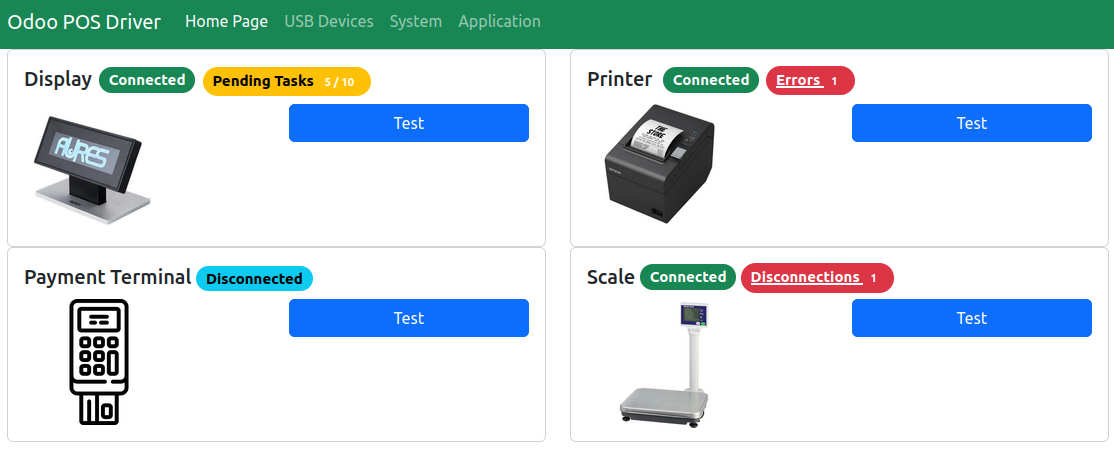
Go the home page of the tool, via https://localhost:8069.
If you choose https deployment, you should accept the first time a security exception in your browser.

Pages are available to test connections, see errors, etc.
Installation
Run it manually
- install the latest released version:
pipx install odoo-driver
- or Install the latest version:
pipx install git+https://gitlab.com/odoo-driver/odoo-driver.git
Note: use --python python3.10 (or higher) option, if your default python environment is under python 3.10 version.
Production deployment
You can discover scripts to deploy odoo driver in production here.
Compatible Plugins
| Function | Protocol | URL |
|---|---|---|
| Printers | ESC/POS | odoo-driver-plugin-printer-escpos |
| Payment Terminals | Telium | odoo-driver-plugin-payment-telium |
| LCD Displays | ESC/POS | odoo-driver-plugin-display-escpos |
| Scale | Toledo 8217 | odoo-driver-plugin-scale-toledo-8217 |
How to Contribute
Welcome contributions
-
If the project is not translated into your language, you can propose a translation. (Refer to the
update_translation.shhelper script.) -
If you tested a plugin with a driver that is not referenced in the
usb_devices.pyfile, and if all works correctly, please feel free to make an Merge Request, to mark this device as compatible. (add an image, make a change inusb_devices.pyand in theREADME.mdfiles) -
If you've encountered a problem or bug that you've solved, the patch will be very welcome !
-
If you face an issue and you have a budget, you can ask for a quotation to try to solve the problem.
Unwelcome contributions
-
Please do not use AI to propose Merge Requests and / or write issues. Such 'contributions' will be closed. (If you don't have time to contribute, don't ask time for review.)
-
Please do not propose a Merge Request before opening first an issue on gitlab, if you want to add new feature, new devices, etc.
Separate contributions
- If you want to develop a plugin that is not developped, feel free to create
a new project, named
odoo-driver-plugin-FUNCTION-PROTOCOL. you can take example on the existing projects.
Credits
Authors
Contributors
- Sylvain LE GAL https://www.grap.coop/
Extra authorship
The following projects were useful and studied to realize this library:
-
Pywebdriver (AGPL-3.0). Main contributors are:
- Sylvain LE GAL https://www.grap.coop/
- Sylvain CALADOR https://akretion.com/
- Sébastien BEAU https://akretion.com/
- Carmen BIANCA BAKKER https://coopiteasy.be/
- Alexis DE LATTRE https://akretion.com/
- Quentin DUPONT https://www.grap.coop/
- Pierrick BRUN https://akretion.com/
- Hugues DE KEYZER https://coopiteasy.be/
-
Odoo (AGPL-3.0 up to version 8.0, and then LGPL-3.0 from version 9.0 onwards), by Odoo SA, specially "hw_" modules.
Images
-
Main Application icon, by AbtoCreative (Flaticon).
-
Unknown device icon, by Freepik (Flaticon).
Develop
Local Installation
To install the odoo-driver library and some plugins, you can refer to this documentation:
https://gitlab.com/odoo-driver/odoo-driver-env
Documentation
Ressources used to develop this tools:
USB
List of USB devices by code:
Python Plugins
poetry
gevent
- https://medium.com/@aniruddhasalve/secure-deployment-of-your-flask-app-with-https-using-gevent-wsgi-server-ef8c445ba6a6
- "Gevent - Permission Denied": https://stackoverflow.com/questions/24001147/python-bind-socket-error-errno-13-permission-denied
- "Gevent - Logging": https://stackoverflow.com/questions/7574813/how-to-use-logging-inside-gevent
flask
Flask & Systemd
Hashing files in folder
2 maintainers


Release files for odoo-driver 3.1.1
For a detailed explanation of source distributions (sdists) and built distributions (wheels), please see the package formats documentation.
Source distribution (sdist)
| File | Size | Uploaded | |
|---|---|---|---|
| odoo_driver-3.1.1.tar.gz | 155.1 kB | Details |
Built distribution (wheel)
| File | Interpreter | ABI | Platform | Reset |
|---|---|---|---|---|
| odoo_driver-3.1.1-py3-none-any.whl | Python 3 | none | any | Details |
Total release size: 316.0 kB
Release files / odoo_driver-3.1.1.tar.gz
| Download URL | odoo_driver-3.1.1.tar.gz |
|---|---|
| Size | 155.1 kB |
| Tags | Source |
|
SHA-256 checksum How to use checksums |
d0bd974ff4345b28f37fbe17deffc5633fa66202a9578620fe6a7c7845ed9788
|
|
BLAKE2b-256 checksum How to use checksums |
3ebcd4e9157744edad7e9fd1b97b1c5356db5d7beea0d10d20609980d3946256
|
| Upload date | |
|
Uploaded using Trusted Publishing? What is trusted publishing? |
No |
| Uploaded via |
poetry/2.5.1 CPython/3.12.3 Linux/7.0.0-31-generic
|
Release files / odoo_driver-3.1.1-py3-none-any.whl
| Download URL | odoo_driver-3.1.1-py3-none-any.whl |
|---|---|
| Size | 160.9 kB |
| Tags | Python 3 |
|
SHA-256 checksum How to use checksums |
32cd8c0ff5fce80f731d21f83679be9f7d9f113761dbf43a5bd112aafe7337d8
|
|
BLAKE2b-256 checksum How to use checksums |
73ee87065cf264862d586bfe6a5fd49429db3e241db2fe53e2b2410a3e76514f
|
| Upload date | |
|
Uploaded using Trusted Publishing? What is trusted publishing? |
No |
| Uploaded via |
poetry/2.5.1 CPython/3.12.3 Linux/7.0.0-31-generic
|














