
MCP Server for PowerPoint manipulation using python-pptx

Project description
Office-PowerPoint-MCP-Server


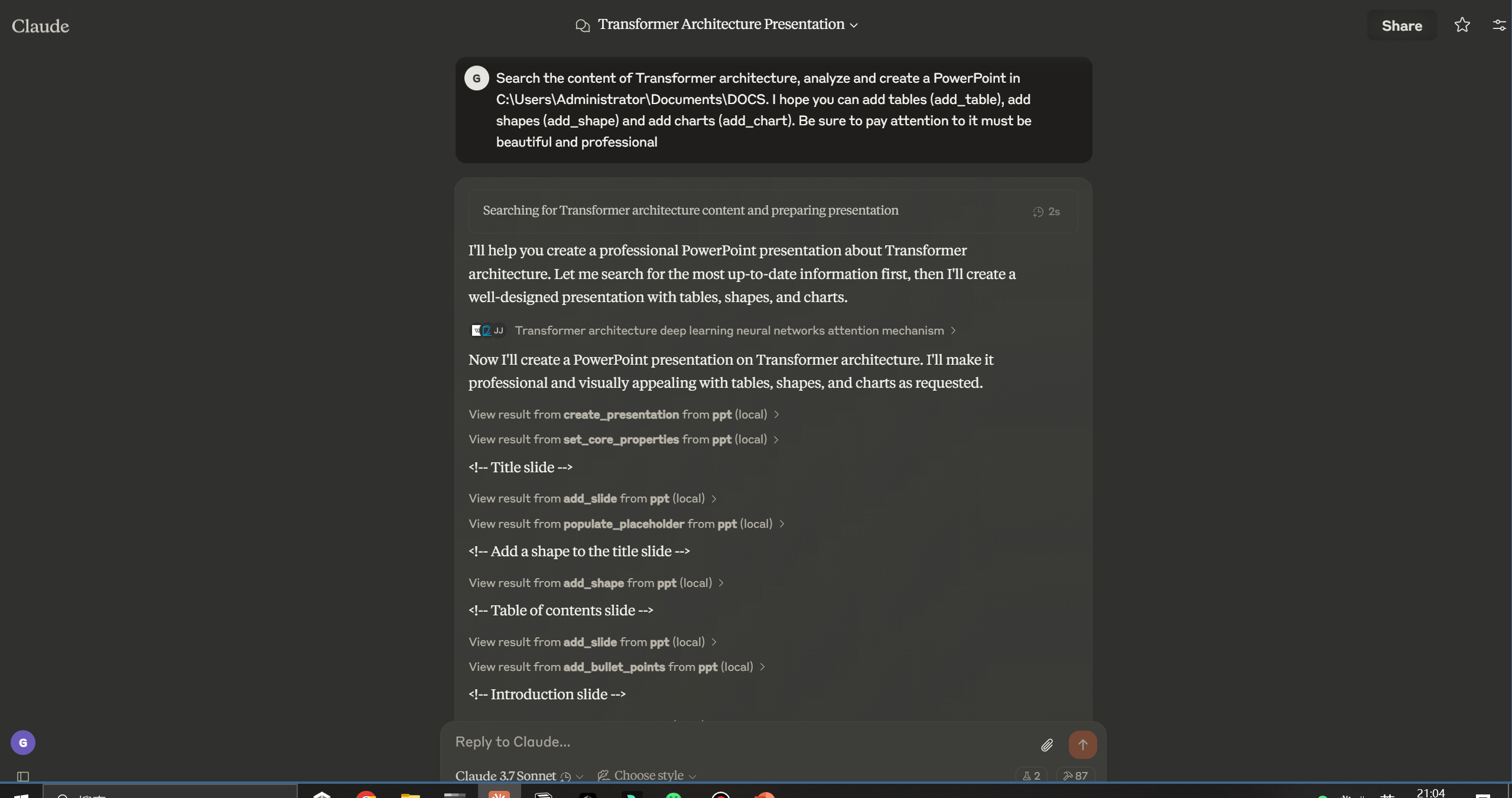
A MCP (Model Context Protocol) server for PowerPoint manipulation using python-pptx. This server provides tools for creating, editing, and manipulating PowerPoint presentations through the MCP protocol.
Example
Pormpt
Output
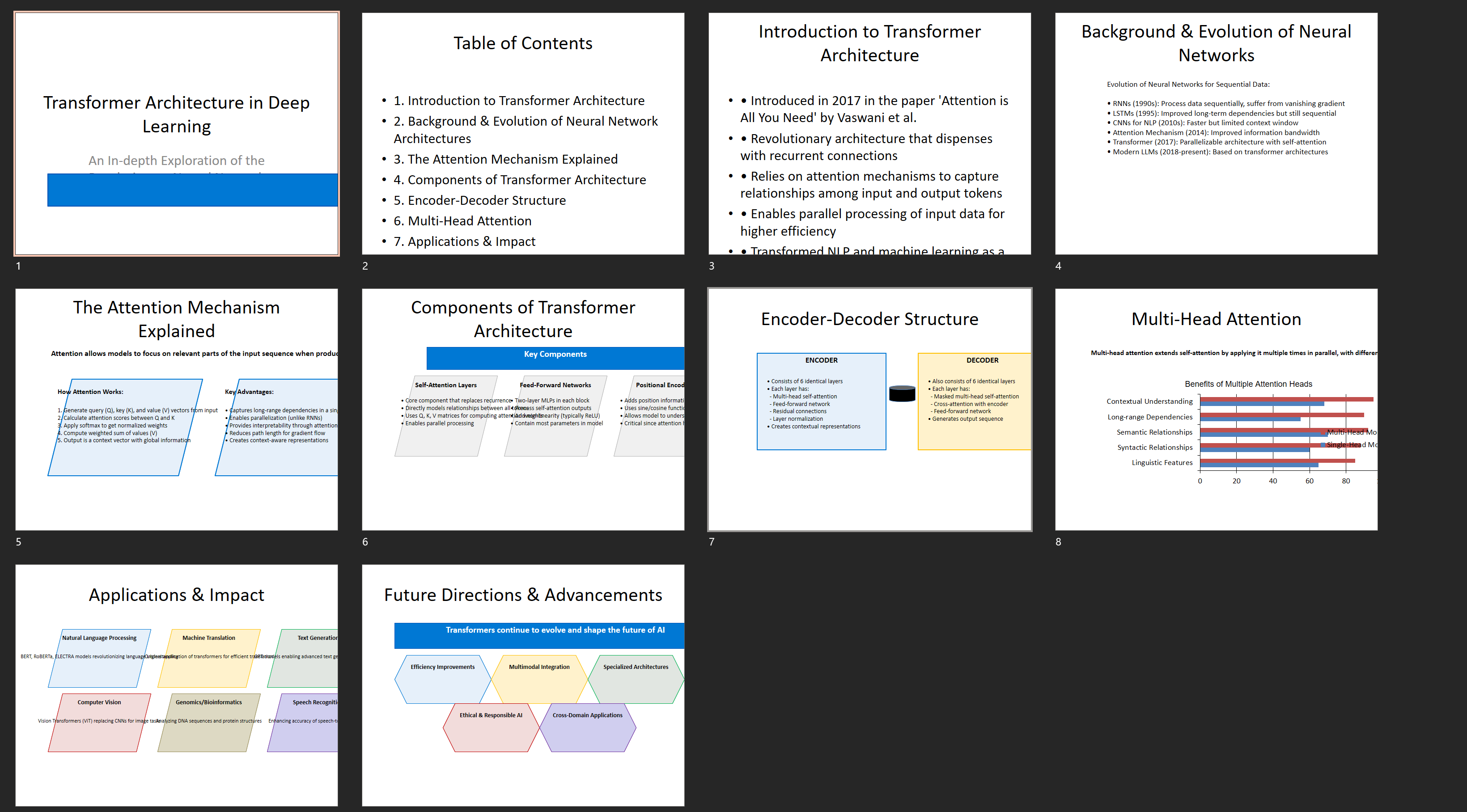
Demo's GIF -> (./public/demo.mp4)

Features
- Round-trip any Open XML presentation (.pptx file) including all its elements
- Add slides
- Populate text placeholders, for example to create a bullet slide
- Add image to slide at arbitrary position and size
- Add textbox to a slide; manipulate text font size and bold
- Add table to a slide
- Add auto shapes (e.g. polygons, flowchart shapes, etc.) to a slide
- Add and manipulate column, bar, line, and pie charts
- Access and change core document properties such as title and subject
Installation
Installing via Smithery
To install PowerPoint Manipulation Server for Claude Desktop automatically via Smithery:
npx -y @smithery/cli install @GongRzhe/Office-PowerPoint-MCP-Server --client claude
Prerequisites
- Python 3.10 or higher
- pip package manager
Installation Options
Option 1: Using the Setup Script (Recommended)
The easiest way to set up the PowerPoint MCP Server is using the provided setup script, which automates the installation process:
python setup_mcp.py
This script will:
- Check prerequisites
- Offer installation options:
- Install from PyPI (recommended for most users)
- Set up local development environment
- Install required dependencies
- Generate the appropriate MCP configuration file
- Provide instructions for integrating with Claude Desktop
The script offers different paths based on your environment:
- If you have
uvxinstalled, it will configure using UVX (recommended) - If the server is already installed, it provides configuration options
- If the server is not installed, it offers installation methods
Option 2: Manual Installation
-
Clone the repository:
git clone https://github.com/GongRzhe/Office-PowerPoint-MCP-Server.git
cd Office-PowerPoint-MCP-Server
-
Install dependencies:
pip install -r requirements.txt
-
Make the server executable:
chmod +x ppt_mcp_server.py
Usage
Starting the Server
Run the server:
python ppt_mcp_server.py
MCP Configuration
Option 1: Local Python Server
Add the server to your MCP settings configuration file:
{
  "mcpServers": {
    "ppt": {
      "command": "python",
      "args": ["/path/to/ppt_mcp_server.py"],
      "env": {}
    }
  }
}
Option 2: Using UVX (No Local Installation Required)
If you have uvx installed, you can run the server directly from PyPI without local installation:
{
  "mcpServers": {
    "ppt": {
      "command": "uvx",
      "args": [
        "--from", "office-powerpoint-mcp-server", "ppt_mcp_server"
      ],
      "env": {}
    }
  }
}
Available Tools
Presentation Tools
- create_presentation: Create a new PowerPoint presentation
- open_presentation: Open an existing PowerPoint presentation from a file
- save_presentation: Save the current presentation to a file
- get_presentation_info: Get information about the current presentation
- set_core_properties: Set core document properties of the current presentation
Slide Tools
- add_slide: Add a new slide to the current presentation
- get_slide_info: Get information about a specific slide
- populate_placeholder: Populate a placeholder with text
- add_bullet_points: Add bullet points to a placeholder
Text Tools
- add_textbox: Add a textbox to a slide
Image Tools
- add_image: Add an image to a slide
- add_image_from_base64: Add an image from a base64 encoded string to a slide
Table Tools
- add_table: Add a table to a slide
- format_table_cell: Format a table cell
Shape Tools
- add_shape: Add an auto shape to a slide
Chart Tools
- add_chart: Add a chart to a slide
Examples
Creating a New Presentation
# Create a new presentation
result = use_mcp_tool(
    server_name="ppt",
    tool_name="create_presentation",
    arguments={}
)
presentation_id = result["presentation_id"]

# Add a title slide
result = use_mcp_tool(
    server_name="ppt",
    tool_name="add_slide",
    arguments={
        "layout_index": 0,  # Title slide layout
        "title": "My Presentation",
        "presentation_id": presentation_id
    }
)
slide_index = result["slide_index"]

# Populate subtitle placeholder
result = use_mcp_tool(
    server_name="ppt",
    tool_name="populate_placeholder",
    arguments={
        "slide_index": slide_index,
        "placeholder_idx": 1,  # Subtitle placeholder
        "text": "Created with PowerPoint MCP Server",
        "presentation_id": presentation_id
    }
)

# Save the presentation
result = use_mcp_tool(
    server_name="ppt",
    tool_name="save_presentation",
    arguments={
        "file_path": "my_presentation.pptx",
        "presentation_id": presentation_id
    }
)
Adding a Chart
# Add a chart slide
result = use_mcp_tool(
    server_name="ppt",
    tool_name="add_slide",
    arguments={
        "layout_index": 1,  # Content slide layout
        "title": "Sales Data",
        "presentation_id": presentation_id
    }
)
slide_index = result["slide_index"]

# Add a column chart
result = use_mcp_tool(
    server_name="ppt",
    tool_name="add_chart",
    arguments={
        "slide_index": slide_index,
        "chart_type": "column",
        "left": 1.0,
        "top": 2.0,
        "width": 8.0,
        "height": 4.5,
        "categories": ["Q1", "Q2", "Q3", "Q4"],
        "series_names": ["2023", "2024"],
        "series_values": [
            [100, 120, 140, 160],
            [110, 130, 150, 170]
        ],
        "has_legend": True,
        "legend_position": "bottom",
        "has_data_labels": True,
        "title": "Quarterly Sales",
        "presentation_id": presentation_id
    }
)
License
MIT
Release history Release notifications | RSS feed


Download files
Download the file for your platform. If you're not sure which to choose, learn more about installing packages.
Source Distribution
Built Distribution
Filter files by name, interpreter, ABI, and platform.
If you're not sure about the file name format, learn more about wheel file names.
Copy a direct link to the current filters
File details
Details for the file office_powerpoint_mcp_server-1.0.1.tar.gz.
File metadata
- Download URL: office_powerpoint_mcp_server-1.0.1.tar.gz
- Upload date:
- Size: 67.1 MB
- Tags: Source
- Uploaded using Trusted Publishing? No
- Uploaded via: twine/6.1.0 CPython/3.11.7
File hashes
| Algorithm | Hash digest | |
|---|---|---|
| SHA256 |
8aa64c10736451698cc340c00cf0704dd5b38bbb90dfd057db70be75c96c69b0
|
|
| MD5 |
1e52d2ed9db8d3ed2203e2ca61199756
|
|
| BLAKE2b-256 |
cf09be65c76f38c25d0e47cabe730ebb5a700581e3df4789ec73cf7fea0173d5
|
File details
Details for the file office_powerpoint_mcp_server-1.0.1-py3-none-any.whl.
File metadata
- Download URL: office_powerpoint_mcp_server-1.0.1-py3-none-any.whl
- Upload date:
- Size: 18.6 kB
- Tags: Python 3
- Uploaded using Trusted Publishing? No
- Uploaded via: twine/6.1.0 CPython/3.11.7
File hashes
| Algorithm | Hash digest | |
|---|---|---|
| SHA256 |
41edbcfd1d06605854797894dd273f0f6bffe0e0628746237c9ac57cae654ba6
|
|
| MD5 |
3f6156c00cdcb5449ffb86b8ebc6e1dd
|
|
| BLAKE2b-256 |
ee4308f4e0396602b40eda21ae31d028061670b5c7431f11b6298f9a94a95765
|






