
Investment portfolio analyzing & optimization tools

Project description

Okama








okama is a Python library for investment portfolio analysis and optimization. It applies concepts commonly used in quantitative finance.
okama provides access to free end-of-day historical market data and macroeconomic indicators through an API.
...entities should not be multiplied without necessity
-- William of Ockham (c. 1287–1347)
Table of contents
- Okama main features
- Financial data and macroeconomic indicators
- Installation
- Getting started
- Examples
- Documentation
- Financial Widgets
- MCP server
- Roadmap
- Contributing to okama
- Communication
Okama main features
- Investment portfolio constrained Markowitz Mean-Variance Analysis (MVA) and optimization
- Rebalanced portfolio optimization with constraints (multi-period Efficient Frontier)
- Advanced rebalancing strategies: Rebalancing-bands (threshold-based), Calendar-based or hybrid
- Investment portfolios with complex contributions / withdrawals cash flows (DCF)
- Money-weighted internal rate of return (IRR/MWRR) for portfolio cash flows — on historical data and across Monte Carlo forecast paths
- Monte Carlo Simulations for financial assets and investment portfolios, reproducible with a random
seed - Forecasting with popular theoretical distributions: normal, lognormal and Student's (T)
- Degrees of freedom optimization for Student's t-distribution to fit well at a given confidence level
- Testing distributions on historical data
- Popular risk metrics: VAR, CVaR, semi-deviation, variance and drawdowns
- Different financial ratios: CAPE10, Sharpe ratio, Sortino ratio, Diversification ratio
- Dividend yield and other dividend indicators for stocks
- Backtesting and comparing historical performance of a broad range of assets and indexes in multiple currencies
- Methods to track the performance of index funds (ETF) and compare them with benchmarks
- Main macroeconomic indicators: inflation, central banks rates
- Matplotlib visualization scripts for the Efficient Frontier, Transition map and assets risk / return performance
Financial data and macroeconomic indicators
End of day historical data
- Stocks and ETF for main world markets
- Mutual funds
- Commodities
- Stock indexes
Currencies
- FX currencies
- Crypto currencies
- Central bank exchange rates
Macroeconomic indicators
For many countries (China, USA, United Kingdom, European Union, Russia, Israel etc.):
- Inflation
- Central bank rates
- CAPE10 (Shiller P/E) Cyclically adjusted price-to-earnings ratios
Other historical data
- Real estate prices
- Top bank rates
Installation
Requirements
- Python 3.11 or newer
- Core dependencies: pandas, numpy, scipy (plus
matplotlib,pyarrow,statsmodels,archand others). See pyproject.toml for the full list of dependencies and version constraints.
Install from PyPI
pip install okama
Or with uv:
uv add okama          # add to a uv-managed project
uv pip install okama  # or pip-style install into the active environment
Install the latest development version from GitHub
git clone -b dev https://github.com/mbk-dev/okama.git
cd okama
poetry install
Getting started
[!NOTE] All examples below are written for Jupyter Notebook / IPython. In a plain Python interpreter, wrap the displayed objects in
print(...).
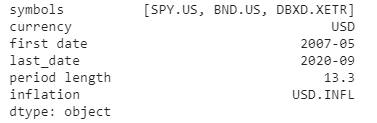
1. Compare several assets from different stock markets. Get USD-adjusted performance
import okama as ok

x = ok.AssetList(['SPY.US', 'BND.US', 'DBXD.XFRA'], ccy='USD')
x
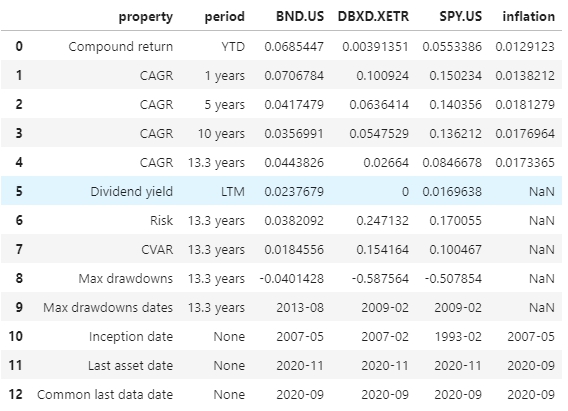
Get the main parameters for the set:
x.describe()
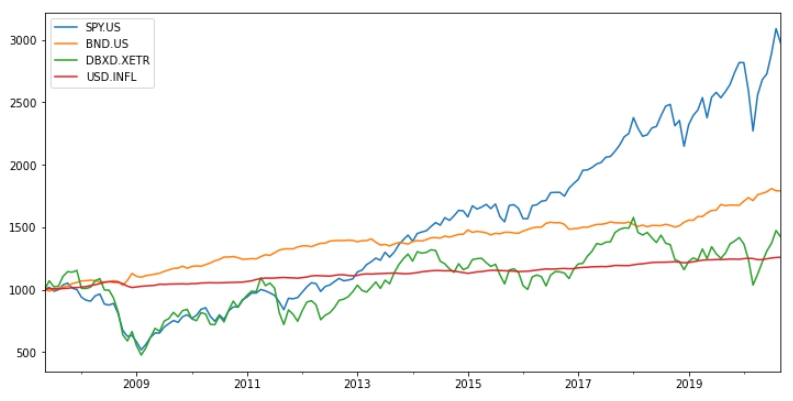
Get the assets accumulated return, plot it and compare with the USD inflation:
x.wealth_indexes.plot()
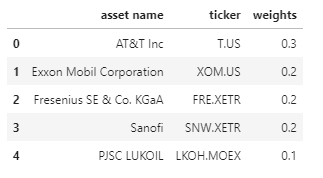
2. Create a dividend stocks portfolio with base currency EUR
weights = [0.3, 0.2, 0.2, 0.2, 0.1]
assets = ['T.US', 'XOM.US', 'FRE.XFRA', 'SNW.XFRA', 'LKOH.MOEX']
pf = ok.Portfolio(assets, weights=weights, ccy='EUR')
pf.table
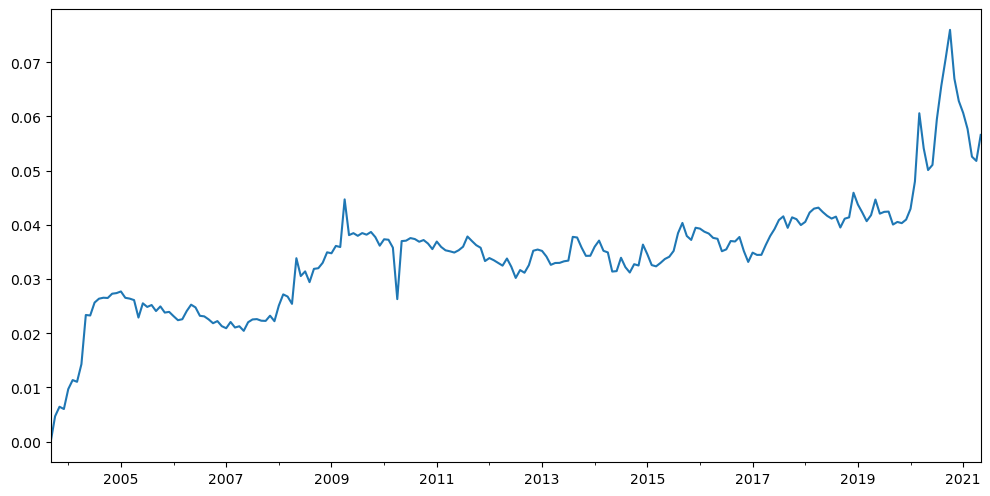
Plot the dividend yield of the portfolio (adjusted to the base currency).
pf.dividend_yield.plot()
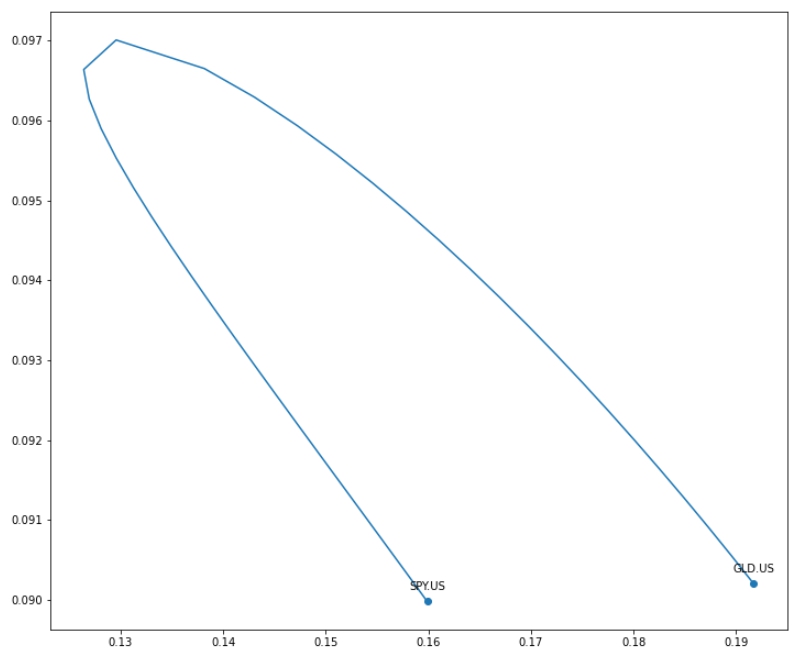
3. Draw an Efficient Frontier for 2 popular ETF: SPY and GLD
ls = ['SPY.US', 'GLD.US']
curr = 'USD'
last_date = '2020-10'
# Rebalancing period is one year (default value)
frontier = ok.EfficientFrontier(ls, last_date=last_date, ccy=curr, rebalancing_strategy=ok.Rebalance(period='year'))
frontier.names

Get the Efficient Frontier points for rebalanced portfolios and plot the chart with the assets risk/CAGR points:
import matplotlib.pyplot as plt

points = frontier.ef_points

fig = plt.figure(figsize=(12,6))
fig.subplots_adjust(bottom=0.2, top=1.5)
frontier.plot_assets(kind='cagr')  # plots the assets points on the chart
ax = plt.gca()
ax.plot(points.Risk, points.CAGR)
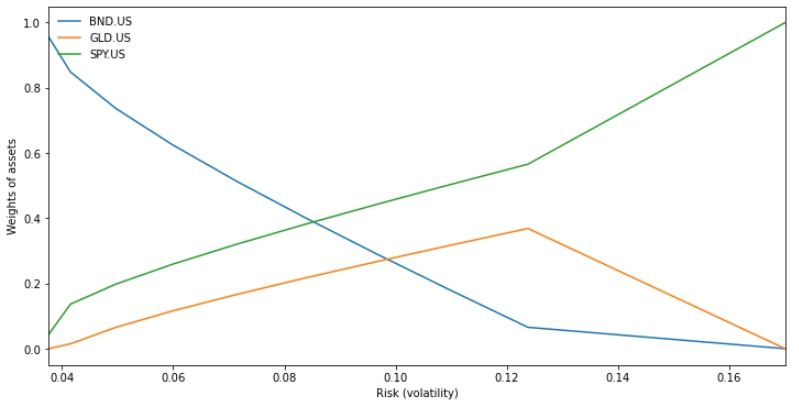
4. Get a Transition Map for allocations
ls = ['SPY.US', 'GLD.US', 'BND.US']
ok.EfficientFrontier(ls, ccy='USD').plot_transition_map(x_axe='risk')
Examples
More examples are available as Jupyter Notebooks:
- howto — main features of the okama package:
Asset,AssetList, andPortfolioobjects. - index funds performance — compare ETFs and mutual funds with their benchmarks: tracking difference, tracking error, beta, and correlation.
- investment portfolios — portfolio properties and comparison of multiple portfolios.
- investment portfolios with DCF — portfolio strategies with cash flows (withdrawals and contributions), backtesting and longevity forecasts with Monte Carlo simulation.
- macroeconomics — historical inflation, key rates, and other macroeconomic indicators.
- efficient frontier single period — classic Markowitz frontiers with monthly rebalanced portfolios (
EfficientFrontierSingle). - efficient frontier multi-period — multi-period optimization with custom rebalancing frequencies or without rebalancing.
- backtesting distribution — backtest portfolio return distributions with Jarque-Bera, Kolmogorov-Smirnov, and related diagnostics.
- financial database — query the okama database for stocks, ETFs, mutual funds, indexes, currencies, and macroeconomic data.
- forecasting — forecast portfolio performance with normal, lognormal, Student's t, and historical distributions.
- rebalancing portfolio — compare calendar-based, threshold-based, and hybrid portfolio rebalancing strategies.
[!TIP] You can try the notebooks on Google Colab without installing anything:
Documentation
The official documentation is hosted on readthedocs.org: https://okama.readthedocs.io/
Financial Widgets
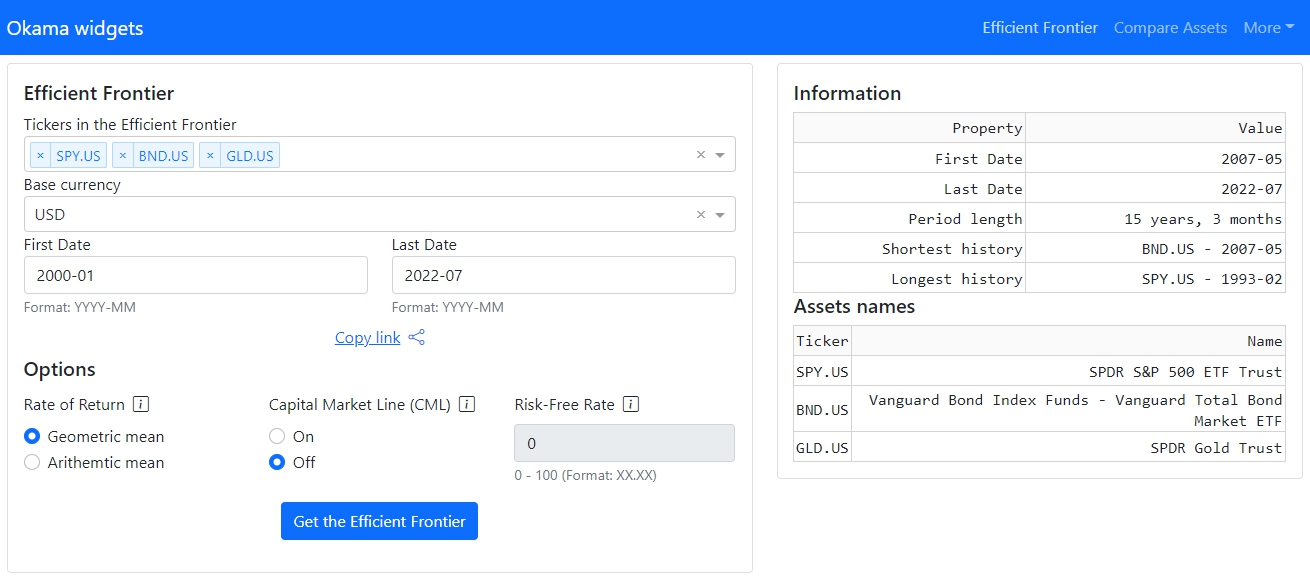
okama-dash repository has interactive financial widgets (multi-page web application) built with the okama package and Dash (plotly) framework. Working example is available at okama.io.
MCP server
okama-mcp is an MCP (Model Context Protocol) server that exposes the okama toolkit to AI assistants — Claude Desktop, Claude Code, Cursor, and any other MCP-compatible client. Ask the AI to backtest a portfolio, build an efficient frontier, or run a Monte Carlo retirement forecast — it calls okama directly, no Python code needed.
uvx okama-mcp stdio # run straight from PyPI
okama-mcp is free and open source — no hosted service, no registration; you run it yourself, locally or on your own server. See mcp.okama.io for installation and client configuration.
Roadmap
The plan for okama is to add more functions that will be useful to investors and asset managers.
- Add support for a series of investment portfolios (a financial plan comprising multiple investment strategies, each active until a specific date, after which it transitions to another).
- Add multidimensional Monte Carlo with Ledoit-Wolf shrinkage
- Add Omega ratio to EfficientFrontier and Portfolio classes.
- Add Black-Litterman asset allocation
- Add different utility functions for optimizers: IRR, portfolio survival period, semi-deviation, VaR, CVaR, drawdowns etc.
- Add more functions based on suggestions from users.
Contributing to okama
Contributions are most welcome. Have a look at the Contribution Guide for more.
Feel free to ask questions on Discussions.
As contributors and maintainers to this project, you are expected to abide by okama's code of conduct. More information can be found at: Contributor Code of Conduct
Communication
For basic usage questions (e.g., "Is XXX currency supported by okama?") and for sharing ideas please use GitHub Discussions. Russian language community is available at okama.io forums.
Release history Release notifications | RSS feed


Download files
Download the file for your platform. If you're not sure which to choose, learn more about installing packages.
Source Distribution
Built Distribution
Filter files by name, interpreter, ABI, and platform.
If you're not sure about the file name format, learn more about wheel file names.
Copy a direct link to the current filters
File details
Details for the file okama-2.2.2.tar.gz.
File metadata
- Download URL: okama-2.2.2.tar.gz
- Upload date:
- Size: 125.7 kB
- Tags: Source
- Uploaded using Trusted Publishing? No
- Uploaded via: poetry/2.4.1 CPython/3.14.5 Linux/6.18.33.1-microsoft-standard-WSL2
File hashes
| Algorithm | Hash digest | |
|---|---|---|
| SHA256 |
59059c1630406884dfb10075a8846137314aec7346c02553cd43513e5ec49958
|
|
| MD5 |
59e5037c1613ce7f428d1f3a375deebb
|
|
| BLAKE2b-256 |
52bab09c55ab2523dbbfb361b8b9a6909c7fabafca88860ed1300343c0ad4f7b
|
File details
Details for the file okama-2.2.2-py3-none-any.whl.
File metadata
- Download URL: okama-2.2.2-py3-none-any.whl
- Upload date:
- Size: 135.4 kB
- Tags: Python 3
- Uploaded using Trusted Publishing? No
- Uploaded via: poetry/2.4.1 CPython/3.14.5 Linux/6.18.33.1-microsoft-standard-WSL2
File hashes
| Algorithm | Hash digest | |
|---|---|---|
| SHA256 |
d6b7683c890ca29b44c87ff1d9d5faeb903f16c96d2520c200c44ac93497be63
|
|
| MD5 |
67e30b8472399baf30affb36f1752891
|
|
| BLAKE2b-256 |
78b9e203a20275e62abba79ddaa3e4aefd62c9a0a85ccd13fb10b11d39802417
|






