

Ollajev
Like Ollama, for decision models.
Run System One decision models from Hugging Face on your machine, behind the same /v1/systemone API as TypeSafe's Jev.
Product page · Install · Quick start · Models · API
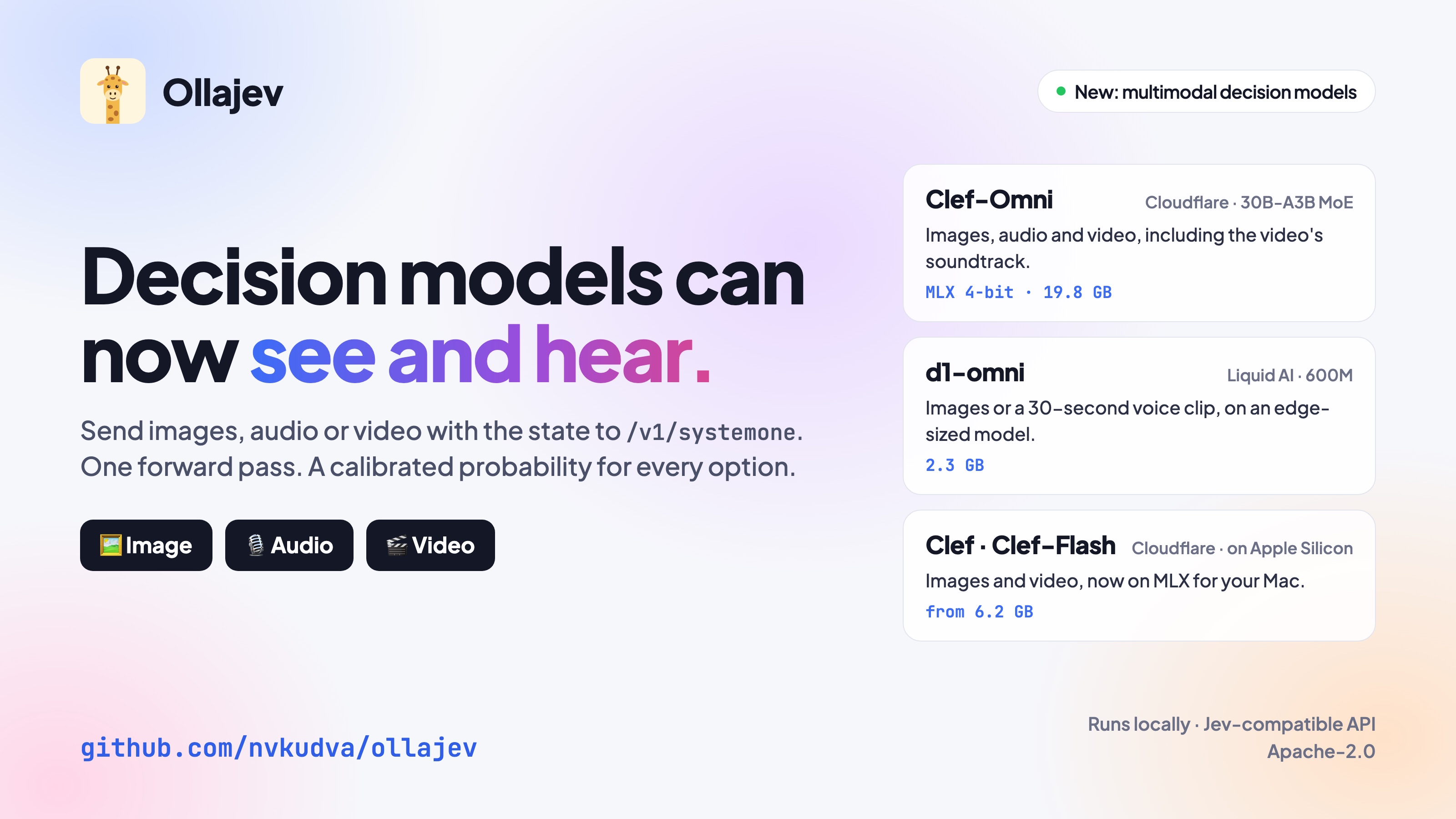
- No generated text. Send one state and any number of typed questions; get a calibrated probability for each, in one forward pass.
- Images, audio and video beside the state, with Clef-Omni, d1-omni, and Clef on Apple Silicon through MLX.
- Ollama-style workflow:
pull,list,run,serve,ps,rm, plus a terminal model manager and a browser playground. - Drop-in for
typesafe-sdk: pointTYPESAFE_BASE_URLat it; same routes, same request and response shapes.
Install
curl -fsSL https://raw.githubusercontent.com/nvkudva/ollajev/main/install.sh | sh   # macOS, Linux
brew install nvkudva/tap/ollajev                                                    # Homebrew
uv tool install ollajev                                                             # PyPI
Windows (PowerShell): irm https://raw.githubusercontent.com/nvkudva/ollajev/main/install.ps1 | iex
- llama.cpp is compiled during the install: macOS needs the Xcode Command Line Tools (
xcode-select --install), Linux a C/C++ compiler (sudo apt install build-essential). The script checks both. - Add
-s -- --serviceto the script (or runbrew services start ollajev) to keep the server running at login. - With
uvon Linux, add--index https://download.pytorch.org/whl/cpu, or PyPI's PyTorch brings several GB of CUDA libraries.
Uninstall
curl -fsSL https://raw.githubusercontent.com/nvkudva/ollajev/main/install.sh | sh -s -- --uninstall
With Homebrew: brew uninstall ollajev. With uv: ollajev service uninstall; uv tool uninstall ollajev.
Config and logs stay in ~/.ollajev; models stay in the Hugging Face cache (ollajev rm <model> first to free them).
Quick start
ollajev           # first run opens the model manager: pick a model, Enter to download, s to serve
ollajev serve     # serve the default model and open the playground
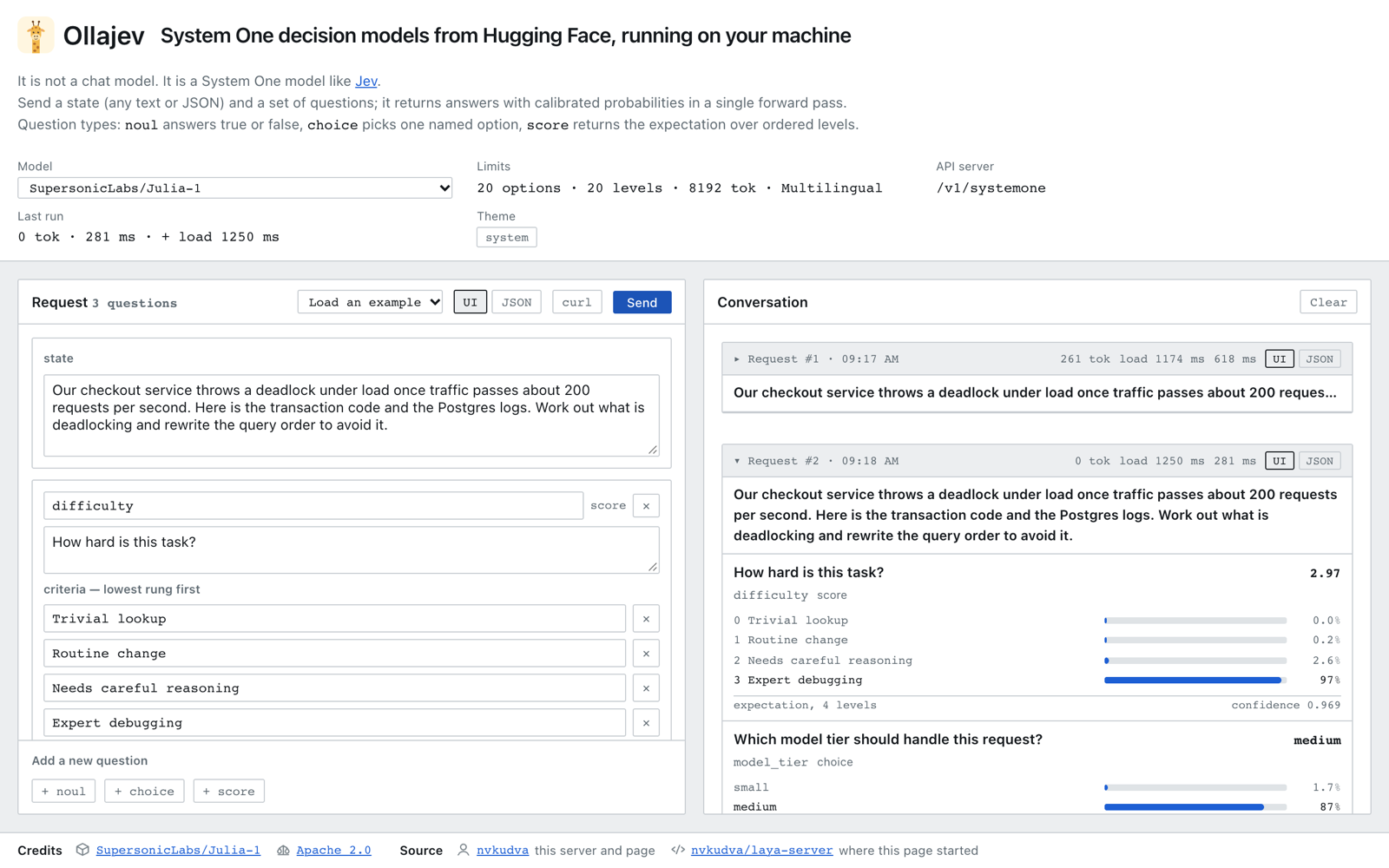
The playground at http://127.0.0.1:8000/playground lets you pick or download a model, write a state and questions, attach an image, audio clip or video, and compare answers across models.
Example
curl -s http://127.0.0.1:8000/v1/systemone -H 'content-type: application/json' -d '{
  "state": "I was charged twice for the same order and nobody answers my emails. I want my money back now.",
  "questions": {
    "area":    {"type": "choice", "instructions": "Which product area is this about?",
                "criteria": {"refund & dispute": "A billing dispute or refund request", "card": "Anything about a card",
                             "other": null}},
    "urgency": {"type": "score", "instructions": "How urgent is this message?",
                "criteria": ["Can wait", "Needs attention this week", "Needs attention today"]},
    "refund":  {"type": "noul", "instructions": "The customer is asking for a refund."}
  }
}'
{
  "model": "Mapika/decider-4b-GGUF:Q4_K_M",
  "answers": {
    "area":    {"type": "choice", "choice": "refund & dispute", "confidence": 0.9642,
                "probabilities": {"refund & dispute": 0.9761, "card": 0.0104, "other": 0.0135}},
    "urgency": {"type": "score", "score": 1.712, "confidence": 0.568,
                "probabilities": {"0": 0.0099, "1": 0.2682, "2": 0.7219}},
    "refund":  {"type": "noul", "noul": 0.9433, "confidence": 0.8866}
  },
  "usage": {"input_tokens": 198, "output_tokens": 0}
}
About 0.4 s on an M3 Max. Question types: noul (yes/no), choice (pick one), score (expected level on an ordered scale). Leave model out to use the default; send "model": "<name>" to use another.
Images, audio and video
Add images, audio or videos as base64 data URLs:
curl -s http://127.0.0.1:8000/v1/systemone -H 'content-type: application/json' -d '{
  "model": "LiquidAI/d1-omni-600M",
  "state": "",
  "images": ["data:image/jpeg;base64,'"$(base64 < cats.jpg | tr -d '\n')"'"],
  "questions": {"cats": {"type": "choice", "instructions": "How many cats are there?",
                         "criteria": {"one": "One", "two": "Two", "more": "Three or more"}}}
}'
GET /v1/models lists what each model reads in limits.inputs. URLs and file paths are refused, so a request never makes the server fetch or read anything. Video is sampled at 2 fps and capped at 5 minutes.
Models
A model name is its Hugging Face repo id. GGUF repos take a quant tag (user/repo:Q8_0; Q4_K_M by default).
| Model | Size | Runs on | Reads |
|---|---|---|---|
Mapika/decider-4b-GGUF:Q4_K_M (default) |
2.7 GB | llama.cpp | text |
Mapika/decider-2b-GGUF:Q4_K_M, :Q8_0 |
1.2 / 2.0 GB | llama.cpp | text |
Mapika/decider-2b, decider-0.8b |
3.8 / 1.5 GB | PyTorch | text |
convaiinnovations/laya, laya-multilingual, laya-typed-decisions |
0.7–0.9 GB | PyTorch | text |
SupersonicLabs/Julia-1 |
0.6 GB | PyTorch (CPU) | text, 2–20 options |
com-kotobalabs/open-jev-deberta-v3-large |
1.7 GB | PyTorch | text, 512 tokens |
jaredpalmer/kev-0.5b … kev-9b |
1–19.5 GB | PyTorch | text |
internlm/Intern-Decision-0.8B, -2B, -4B |
1.7–9.1 GB | PyTorch | text |
llm-semantic-router/Decision-1.0-Kai-0.6B, -Lex-0.6B |
2.3 GB | PyTorch | text, 1024 tokens |
wfzyx/von, heman10x/rlcd-modernbert-151m |
1.6 / 0.7 GB | PyTorch | text |
alibiserikbay/JevK5, JevK5-2B |
8.4 / 3.8 GB | PyTorch | text |
OmniJev/OneJev-0.8B, -4B |
2.2 / 10.4 GB | PyTorch | text |
LiquidAI/d1-omni-600M |
2.35 GB | PyTorch | text + images or a 30 s voice clip |
mlx-community/clef-flash-4bit, -8bit |
6.2 / 10.7 GB | MLX (Apple Silicon) | text, images, video |
mlx-community/clef-4bit, -8bit |
16.3 / 29.8 GB | MLX (Apple Silicon) | text, images, video |
mlx-community/clef-omni-4bit, -8bit |
19.8 / 35 GB | MLX (Apple Silicon) | text, images, audio, video |
Cloudflare/clef-flash, clef, clef-omni |
19–71 GB | PyTorch | text, images, video (+ audio for omni) |
Any other repo from these families works too, such as a fine-tune: press a in the manager or ollajev pull user/repo. ollajev show <model> prints a model's limits; requests over them get a 422.
Commands
| Command | What it does |
|---|---|
ollajev |
start the server (the first run opens the model manager) |
ollajev setup |
open the model manager |
ollajev serve [model] |
start the server (--host, --port, --no-browser) |
ollajev run [model] |
ask questions from the terminal |
ollajev pull <model> [--trust] |
download a model |
ollajev list · ps · show <model> |
downloaded models · loaded models · details and limits |
ollajev stop <model> · rm <model> |
unload from memory · delete the download |
ollajev cp <model> <alias> |
give a model a short name |
ollajev service install |
run the server in the background at login (launchd, systemd) |
Run ollajev <command> --help for options. Models load on first request and unload after OLLAJEV_KEEP_ALIVE.
Model manager keys
| Key | What it does |
|---|---|
| Enter | download if needed and make default |
s |
serve the selected model |
p · x · u |
download · delete · unload |
d · c · i |
make default · short name · info |
a |
add any Hugging Face repo |
w · l |
open the playground · follow the server log |
o |
settings: device, address, port, keep-alive, models in memory |
f · ? · q |
filter · all keys · quit |
API
| Route | Purpose |
|---|---|
POST /v1/systemone |
answer questions about a state (Jev / System One wire format) |
GET /v1/models |
downloaded models, with limits and readable inputs |
GET /api/tags · /api/ps |
downloaded · loaded models (Ollama style) |
POST /api/pull · /api/show · /api/copy · /api/stop, DELETE /api/delete |
manage models; pull streams NDJSON progress |
/playground |
the browser playground |
Errors are {"detail": [{"loc", "msg", "type"}]}: 404 model not downloaded, 403 not trusted, 422 invalid or over the model's limits, 503 not enough memory. Confidence uses TypeSafe's formulas, so it means the same thing for every model.
Configuration
Settings (o in the manager) are saved to ~/.ollajev/config.json; environment variables override them.
| Variable | Default | Meaning |
|---|---|---|
OLLAJEV_HOST |
127.0.0.1:8000 |
bind address |
OLLAJEV_KEEP_ALIVE |
5m |
idle time before a model unloads (-1 = never) |
OLLAJEV_MAX_LOADED_MODELS |
1 |
models in memory at once |
OLLAJEV_DEVICE |
best available | cpu, mps or cuda |
OLLAJEV_MODELS |
Hugging Face cache | where weights are stored |
OLLAJEV_API_KEY |
none | bearer token; required to listen beyond localhost |
OLLAJEV_MAX_BODY_BYTES |
64 MiB | largest request body |
Security
- Local by default. The server binds to
127.0.0.1and checks the Host header against DNS rebinding. Listening elsewhere requiresOLLAJEV_API_KEY; put TLS in front before exposing it beyond a LAN. - Repo code needs your trust. Julia, open-jev, Intern-Decision, Decision-1.0 and d1 run Python from their repo. The first
pullshows the commit and asks you to trust it; trust is CLI-only, never over HTTP. Every repo is pinned to its first-downloaded commit. - See SECURITY.md.
Known limits
- Requests to one model run one at a time (concurrent forwards crash on Apple GPUs).
- Before a load, free memory is checked against the weights plus 10%; a very long request can still run out.
Cloudflare/clef-omnineeds about 64 GB of GPU memory; on a Mac usemlx-community/clef-omni-4bit. The 8-bit MLX copies were not tested.- d1-omni-600M is under the LFM Open License v1.0: commercial use only for organisations under 10M USD annual revenue.
Development
uv sync && uv run pytest
See CONTRIBUTING.md and the Changelog.
License
Apache-2.0. Vendored loaders keep their own licenses; see NOTICE. Ollajev is an independent project, not affiliated with Ollama or TypeSafe.
1 maintainer

Metadata
1 maintainer
Release files for ollajev 0.3.1
For a detailed explanation of source distributions (sdists) and built distributions (wheels), please see the package formats documentation.
Source distribution (sdist)
| File | Size | Uploaded | |
|---|---|---|---|
| ollajev-0.3.1.tar.gz | 9.9 MB | Details |
Built distribution (wheel)
| File | Interpreter | ABI | Platform | Reset |
|---|---|---|---|---|
| ollajev-0.3.1-py3-none-any.whl | Python 3 | none | any | Details |
Total release size: 10.1 MB
Release files / ollajev-0.3.1.tar.gz
| Download URL | ollajev-0.3.1.tar.gz |
|---|---|
| Size | 9.9 MB |
| Tags | Source |
|
SHA-256 checksum How to use checksums |
3b183489cb5ef99b1cbab95c8b9949f4aaf198263480044387e4a02ca5c7987c
|
|
BLAKE2b-256 checksum How to use checksums |
d8c7b2c526ada993eda855fbfa5f7a20279d49095443ead994cfd20979872521
|
| Upload date | |
|
Uploaded using Trusted Publishing? What is trusted publishing? |
Yes |
| Uploaded via |
twine/7.0.0 CPython/3.13.14
|
Provenance
Provenance describes where a file came from. On PyPI, provenance is shared via attestations, which provide a verifiable record of the build or publishing details. View details, limitations and caveats.


PyPI Publish Attestation
PyPI verified that this artifact, at this checksum, originated from the publisher listed below.
Signed by GitHub Actions, verified by PyPI on Oct 10, 2026.
Transparency logRelease files / ollajev-0.3.1-py3-none-any.whl
| Download URL | ollajev-0.3.1-py3-none-any.whl |
|---|---|
| Size | 225.0 kB |
| Tags | Python 3 |
|
SHA-256 checksum How to use checksums |
cef8bb0493a37487c6753bea7dcb83567767a2965d9a4aca01fd30ac09d14011
|
|
BLAKE2b-256 checksum How to use checksums |
6108f0fa7172f8e2acea602b4dc5b737196ba8d1da538d80114689a36bd5a9fc
|
| Upload date | |
|
Uploaded using Trusted Publishing? What is trusted publishing? |
Yes |
| Uploaded via |
twine/7.0.0 CPython/3.13.14
|
Provenance
Provenance describes where a file came from. On PyPI, provenance is shared via attestations, which provide a verifiable record of the build or publishing details. View details, limitations and caveats.
PyPI Publish Attestation
PyPI verified that this artifact, at this checksum, originated from the publisher listed below.
Signed by GitHub Actions, verified by PyPI on Oct 10, 2026.
Transparency log













