







English · 简体中文 | 🌐 omnilimb.com
Omnilimb
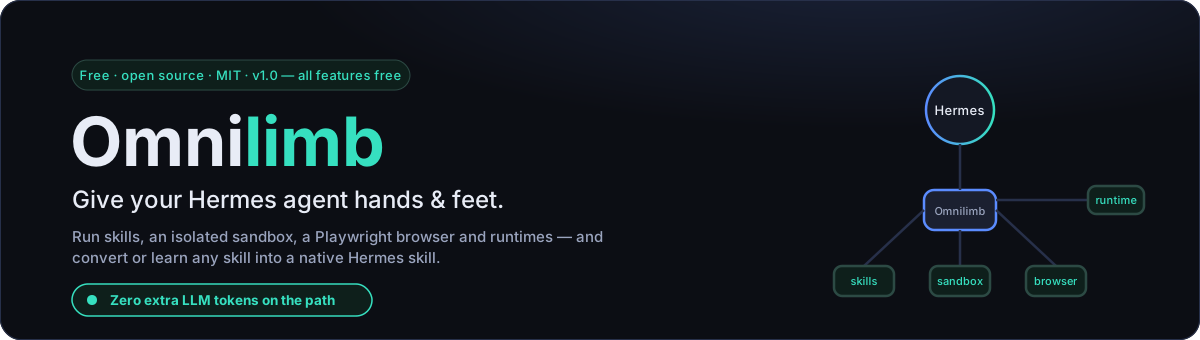
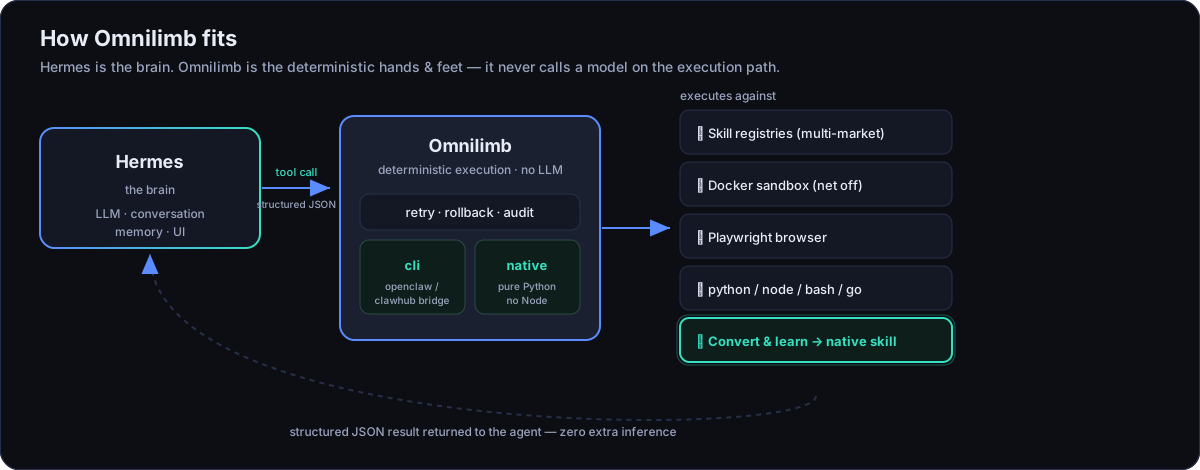
Your Hermes agent is the brain. Omnilimb is the hands and feet.
Built for the latest Hermes Agent (v0.17.0), Omnilimb is a Hermes plugin that lets an agent find, install, run and manage OpenClaw / ClawHub community skills — and gives it an isolated sandbox, a real Playwright browser, and multi-language runtimes. Every capability is exposed as a small, deterministic structured-JSON tool the agent calls directly, so there are zero extra LLM tokens on the execution path and no second "agent loop" burning your budget.
New in 1.0: Learn (学习技能) — point Omnilimb at any source and it distills a
native Hermes skill for you. Drive it from the dashboard's visual /learn
form, or just tell the agent "学习 <something>" in plain language.
The same task, without a second model call — Omnilimb executes deterministically: same result, a very different token bill.
ℹ️ Compatible with OpenClaw & ClawHub; not affiliated with them. "Omnilimb" is an independent product (omnilimb.com).
pip install omnilimb # then: hermes plugins enable omnilimb
Why Omnilimb
- 💸 Zero extra tokens. The execution path never calls a model — the agent decides once, Omnilimb does the work deterministically and hands back JSON. Cheaper, faster, reproducible.
- 🛡️ Deterministic & safe. Retry, rollback and an optional audit log; the Docker sandbox runs with the network off by default. Path-traversal and zip-slip guarded.
- 🧠 Convert & learn. Turn any skill into a native Hermes skill — or learn a new one from a single sentence.
No lock-in and no phone-home (search talks only to the market you pick), runs with or without Node, and works across multiple markets — see Pick your market and Pick your backend below.
What it does
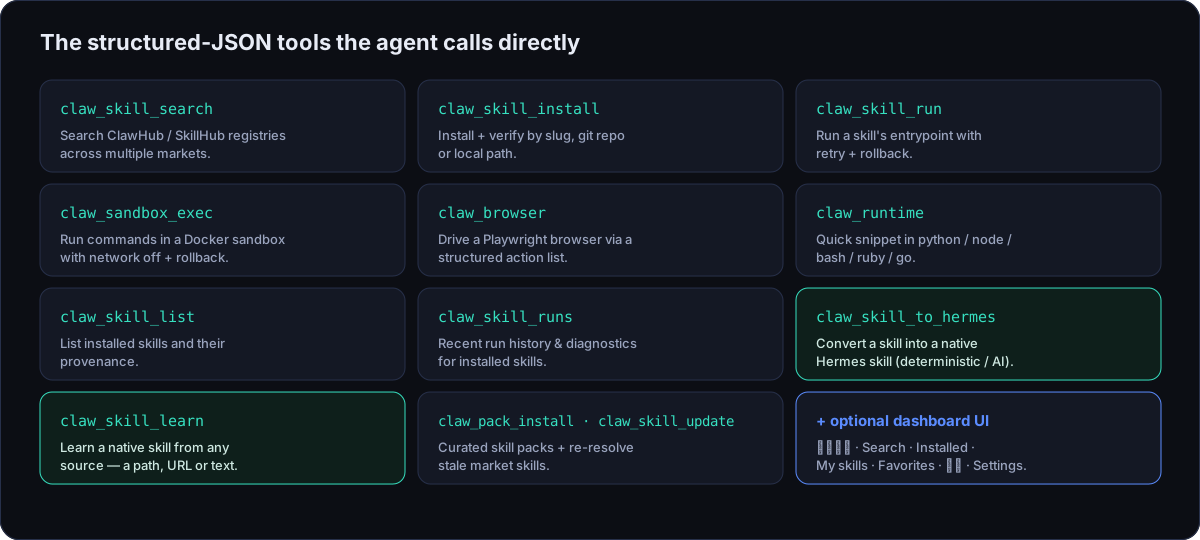
A small set of structured-JSON tools your agent calls directly — grouped into three jobs:
🧩 Run community skills — find & install by slug / git repo / local path (verified), run a skill's entrypoint deterministically (retry + rollback, no second AI loop), discover across markets with a per-skill health check (体检), and manage everything installed (view/edit, smoke-test, import/export). Works with or without Node via two backends.
🛡️ Execute safely — an isolated Docker sandbox (network off by default, instant rollback), Playwright browser automation via a structured action list, multi-language runtimes (python / node / bash / ruby / go), and an optional JSONL audit log.
✨ Convert & learn · new in 1.0 — convert an installed market skill into a native Hermes skill (deterministic or AI-curated), or Learn one from any source (a path, URL, or pasted text). A deterministic, no-LLM Skill butler (技能管家) health-checks, recommends and diagnoses your skills, with Learn built in.
Every tool — free in 1.0
In 1.0 every tool is free — no tiers, no license. Omnilimb registers these structured-JSON tools the agent can call:
| Tool | What it does |
|---|---|
claw_skill_search |
Search the ClawHub / SkillHub registry |
claw_skill_install |
Install + verify a skill (slug / git:owner/repo@ref / local path) |
claw_skill_run |
Deterministically run a skill's script entrypoint |
claw_sandbox_exec |
Run a command in an isolated (Docker) sandbox with rollback |
claw_browser |
Playwright browser automation via a structured action list |
claw_runtime |
Quick snippet in python / node / bash / ruby / go |
claw_skill_list |
List locally installed skills and their provenance |
claw_skill_runs |
Recent run history for installed skills (diagnostics) |
claw_skill_to_hermes |
Convert an installed skill into a native Hermes skill (deterministic or AI-curated) |
claw_skill_learn |
Learn a native Hermes skill from any source — a path, a URL, or pasted text (the open-ended /learn) |
claw_pack_list / claw_pack_install |
Browse and install curated, vendor-vetted skill packs |
claw_skill_update |
Re-resolve + reinstall stale market skills |
Convert & learn — turn anything into a native Hermes skill
Two free tools take you from "found a skill" to "Hermes has it natively":
claw_skill_to_hermesconverts an already-installed market skill into a native Hermes skill under<HERMES_HOME>/skills/<name>/. Pickdeterministic(pure, offline, reproducible) orai_curated(a configured OpenAI-compatible model rewrites the docs, with a deterministic fallback).claw_skill_learnwidens the intake to any source — a local path, a URL, or pasted text/notes — and authors a native skill from it. It's the open-ended equivalent of/learn.
Both run a structural validation loop, write transactionally, and are
idempotent (re-running an unchanged source is a no-op, matched by source
hash). Output lands in <HERMES_HOME>/skills/<name>/ and loads like any native
skill. Drive Learn from the dashboard's visual 技能管家 → 学习技能 (/learn)
form, or just tell the agent in plain language — "learn <source>" /
"学习 <来源>". Everything you convert or learn shows up together in the
dashboard's My skills (我的技能) library, tagged by origin (转换 / 学习).
Quickstart
As a pip package:
pip install omnilimb               # core
pip install "omnilimb[browser]"    # + Playwright
playwright install chromium        # one-time browser download
hermes plugins enable omnilimb
As a directory plugin (simplest):
cp -r omnilimb ~/.hermes/plugins/omnilimb
hermes plugins enable omnilimb
Verify inside a session:
/exo doctor
Try it locally — no Hermes, no GUI
The plugin is a headless engine; the way to feel it is to call its tools and read the JSON they return:
python scripts/demo.py doctor                  # backend status
python scripts/demo.py search github 5         # live ClawHub search
python scripts/demo.py runtime python "print(6*7)"
python scripts/demo.py sandbox "echo hi"
python scripts/demo.py menu                    # interactive
Pick your market
Switch the skills marketplace with omnilimb.market (or OMNILIMB_MARKET):
| Market | Source | Notes |
|---|---|---|
clawhub (default) |
clawhub.ai | Official OpenClaw registry, HTTP API v1 |
skillhub |
api.skillhub.cn | China-focused market; server-side search, public zip download |
clawhub-cn |
mirror-cn.clawhub.com | Official China mirror (Volcengine) |
skillsmp |
skillsmp.com | GitHub-hosted skill index |
Add more under omnilimb.markets in ~/.hermes/config.yaml (each is
{id, type, base_url, label} where type is one of
clawhub | skillhub | clawhub_mirror | skillsmp). A new adapter class in
omnilimb/registries.py is all it takes to support a new kind of market.
Pick your backend
Set omnilimb.backend in ~/.hermes/config.yaml (or OMNILIMB_BACKEND):
| Mode | Behaviour |
|---|---|
cli |
Bridges to the real openclaw / clawhub CLIs. Best registry parity. Requires Node + OpenClaw. |
native |
Fully decoupled Python substrate. No Node. Handles sandbox/browser/runtime + git:/local skill installs natively. |
auto (default) |
cli if the openclaw binary is on PATH, else native. |
Dashboard UI (optional)
A dependency-free web UI ships in dashboard/ for the Hermes dashboard (rebuilt
for the v0.17.0 plugin SDK; bilingual EN / 简体中文). After enabling the plugin
and restarting hermes dashboard, an Omnilimb tab appears (after Skills),
with these sub-tabs:
- 技能管家 (Skill butler) — the default view: a deterministic, no-LLM butler that health-checks, recommends and diagnoses your skills (and scans the audit log) from quick actions or a typed command — with the 学习技能 (learn-from-any-source) form built right in.
- Search — discovery across markets, plus a Discover mode (recommended / rising / hot / newest leaderboards + category filter), a per-skill health check (体检), and a one-click 全部体检 (health-check all) that scores every result (0–100 + grade) before you install.
- Installed — each skill expands to a detail view: 体检 health score,
readiness (binaries + API keys), credentials,
SKILL.mdview/edit, smoke test, a one-click Update (with live progress), → Hermes convert, and export/import. - My skills (我的技能) — the native skills you've converted and learned, gathered in one library and tagged by origin (转换 / 学习), with a front-matter view and guarded uninstall.
- Favorites — bookmarked skills.
- 审查 (Audit) — the optional JSONL audit log.
- Settings — backend / market / sandbox / cache / paths, with a compact overview.
The UI follows the active dashboard theme and language automatically.
See it in action
Real screenshots from the Omnilimb dashboard tab — the deterministic skill butler, market search with one-click 全部体检 (health-check all), installed-skill management, and the 学习技能 (Learn) form (click any image to enlarge):
 技能管家 (Skill butler) — a deterministic, no-LLM butler: health-check, recommend, diagnose, plus Learn. |
 Search — one-click “Health-check all” scores every result (0–100 + grade) before you install. |
 Installed — health, credentials, smoke-test, Update & → Hermes convert. |
 学习技能 (Learn) — distill a native Hermes skill from a path, URL or text. |
🌐 Project site: omnilimb.com
Configure (~/.hermes/config.yaml)
omnilimb:
  backend: auto            # auto | cli | native
  market: clawhub          # clawhub | skillhub | clawhub-cn | skillsmp
  sandbox_enabled: true
  sandbox_image: "python:3.12-slim"
  sandbox_network: false
  default_timeout_s: 120
  max_retries: 2
  rollback: true
  registry_base_url: "https://clawhub.ai"
  browser_headless: true
  audit_log: false         # write a JSONL audit log of tool calls
  cache_enabled: true      # local SQLite cache for discovery + search fallback
  discover_ttl_s: 21600    # discovery leaderboard cache TTL (6h)
  cache_max_age_s: 604800  # max staleness for offline search fallback (7d)
Settings changed from the dashboard's Settings tab are written to a separate
overrides file (omnilimb.overrides.json), never to your hand-authored
config.yaml. Resolution order is env > overrides > config.yaml.
Security
Third-party skills are untrusted code. Prefer claw_sandbox_exec with
network: false for anything you don't fully trust. Without Docker, sandbox
calls run locally and are flagged "sandboxed": false. Skill file operations
and uninstall are path-traversal guarded; archive extraction is zip-slip
protected. See SECURITY.md to report a vulnerability.
Development
pip install -e ".[dev,browser]"
pytest -q
See CONTRIBUTING.md for the architecture rules (the plugin
never imports or modifies Hermes core, every handler returns JSON and never
raises) and how to add a market or backend.
License
Open 1.0 — every tool and dashboard feature is free, under MIT. No paid tier, nothing to unlock — free, forever.
This repository is the full edition: skill discovery / install / run / sandbox /
browser / runtimes, plus skill → native Hermes conversion (deterministic +
AI-curated), open-ended claw_skill_learn, curated packs, auto-update, and the
full dashboard (including the 技能管家 console).
MIT — see LICENSE. Not affiliated with OpenClaw / ClawHub.
1 maintainer

Metadata
1 maintainer
Release files for omnilimb 1.0.2
For a detailed explanation of source distributions (sdists) and built distributions (wheels), please see the package formats documentation.
Source distribution (sdist)
| File | Size | Uploaded | |
|---|---|---|---|
| omnilimb-1.0.2.tar.gz | 157.8 kB | Details |
Built distribution (wheel)
| File | Interpreter | ABI | Platform | Reset |
|---|---|---|---|---|
| omnilimb-1.0.2-py3-none-any.whl | Python 3 | none | any | Details |
Total release size: 314.0 kB
Release files / omnilimb-1.0.2.tar.gz
| Download URL | omnilimb-1.0.2.tar.gz |
|---|---|
| Size | 157.8 kB |
| Tags | Source |
|
SHA-256 checksum How to use checksums |
56d43cd64bc04452971010a72f64917db5f873e3c4400cf6328a374e205596a2
|
|
BLAKE2b-256 checksum How to use checksums |
dc2f4ac74e10a01815d48e77d48f8979df8cf73e53fba846eefbfd3239f4d547
|
| Upload date | |
|
Uploaded using Trusted Publishing? What is trusted publishing? |
No |
| Uploaded via |
twine/6.2.0 CPython/3.11.9
|
Release files / omnilimb-1.0.2-py3-none-any.whl
| Download URL | omnilimb-1.0.2-py3-none-any.whl |
|---|---|
| Size | 156.2 kB |
| Tags | Python 3 |
|
SHA-256 checksum How to use checksums |
4123d50844758da21f898d2db6b1d95b492499a51d9154b7e50426d528fbdbd0
|
|
BLAKE2b-256 checksum How to use checksums |
eff3b43fae35b38a1d754b272a051a4a3f9db265d208715fd5c94e0d7e7e887f
|
| Upload date | |
|
Uploaded using Trusted Publishing? What is trusted publishing? |
No |
| Uploaded via |
twine/6.2.0 CPython/3.11.9
|














