
Run ClawHub skills, sandbox, Playwright browser & multi-language runtimes as Hermes hands/feet. Structured JSON, zero extra LLM tokens.

Project description







English · 简体中文 | 🌐 omnilimb.com
Omnilimb
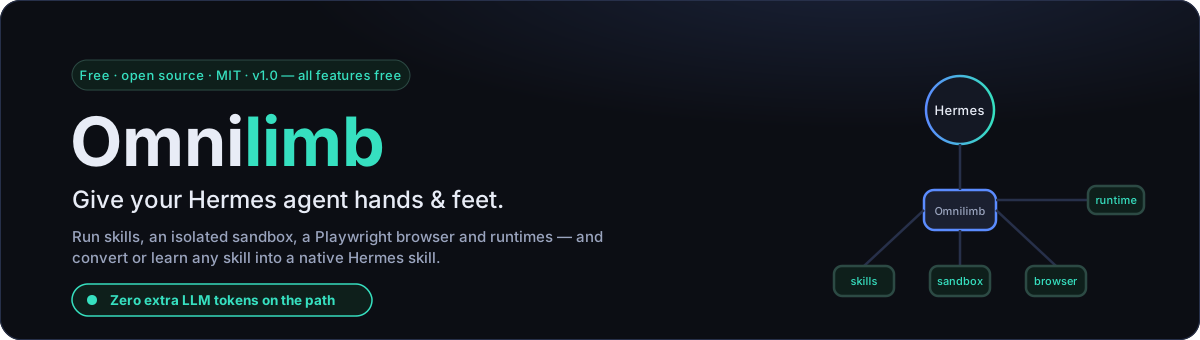
Your Hermes agent is the brain. Omnilimb is the hands and feet.
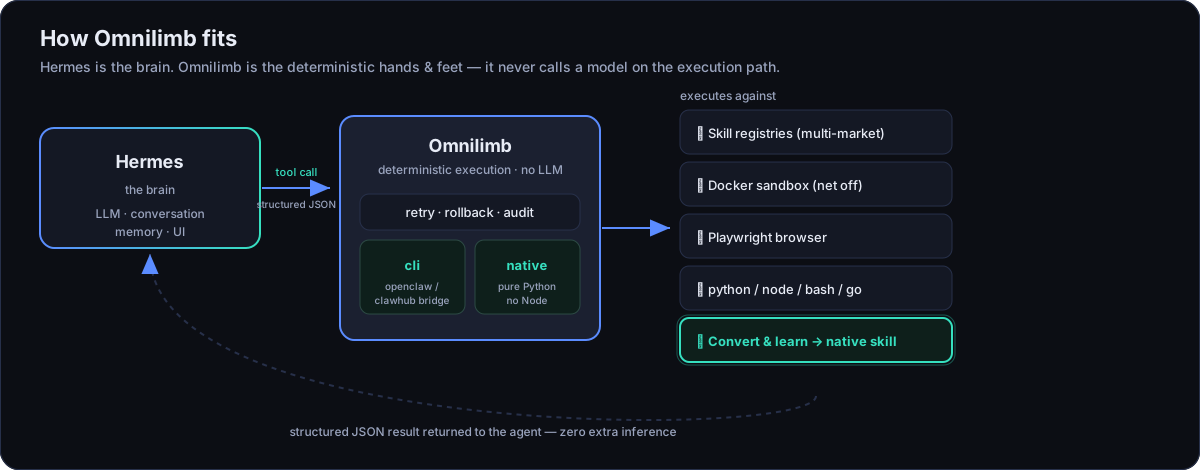
Built for the latest Hermes Agent (v0.17.0), Omnilimb is a Hermes plugin that lets an agent find, install, run and manage OpenClaw / ClawHub community skills — and gives it an isolated sandbox, a real Playwright browser, and multi-language runtimes. Every capability is exposed as a small, deterministic structured-JSON tool the agent calls directly, so there are zero extra LLM tokens on the execution path and no second "agent loop" burning your budget.
New in 1.0: Learn (学习技能) — point Omnilimb at any source and it distills a
native Hermes skill for you. Drive it from the dashboard's visual /learn
form, or just tell the agent "学习 <something>" in plain language.
ℹ️ Compatible with OpenClaw & ClawHub; not affiliated with them. "Omnilimb" is an independent product (omnilimb.com).
pip install omnilimb # then: hermes plugins enable omnilimb
Why Omnilimb
- ⚡ Zero token overhead. The execution path never calls a model. The agent decides once; Omnilimb does the work deterministically and hands back JSON.
- 🧰 A whole toolbox, one small surface. Discovery, install, run, sandbox, browser, runtimes — plus skill → native Hermes conversion and open-ended learning — with no sprawling API to learn.
- 🛡️ Safe by default. Third-party skills run in a Docker sandbox with the network off and automatic rollback. Path-traversal and zip-slip guarded.
- 🔌 No lock-in, no phone-home. Search talks only to the market you pick. Your code, caches and audit log stay on your machine.
- 🪶 Runs with or without Node. The
nativebackend is pure Python; theclibackend bridges the realopenclaw/clawhubbinaries for full parity. - 🌐 Bring your own market. ClawHub, SkillHub, the official China mirror, a GitHub index — or add your own adapter in a few lines.
The tools
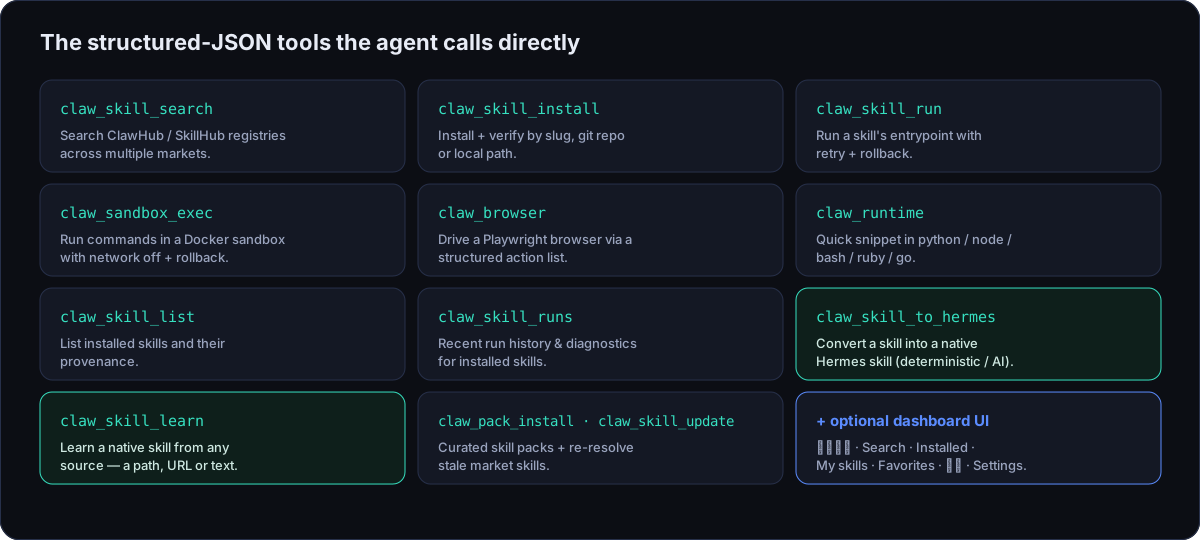
In 1.0 every tool is free — no tiers, no license. Omnilimb registers these structured-JSON tools the agent can call:
| Tool | What it does |
|---|---|
claw_skill_search |
Search the ClawHub / SkillHub registry |
claw_skill_install |
Install + verify a skill (slug / git:owner/repo@ref / local path) |
claw_skill_run |
Deterministically run a skill's script entrypoint |
claw_sandbox_exec |
Run a command in an isolated (Docker) sandbox with rollback |
claw_browser |
Playwright browser automation via a structured action list |
claw_runtime |
Quick snippet in python / node / bash / ruby / go |
claw_skill_list |
List locally installed skills and their provenance |
claw_skill_runs |
Recent run history for installed skills (diagnostics) |
claw_skill_to_hermes |
Convert an installed skill into a native Hermes skill (deterministic or AI-curated) |
claw_skill_learn |
Learn a native Hermes skill from any source — a path, a URL, or pasted text (the open-ended /learn) |
claw_pack_list / claw_pack_install |
Browse and install curated, vendor-vetted skill packs |
claw_skill_update |
Re-resolve + reinstall stale market skills |
Convert & learn — turn anything into a native Hermes skill
Two free tools take you from "found a skill" to "Hermes has it natively":
claw_skill_to_hermesconverts an already-installed market skill into a native Hermes skill under<HERMES_HOME>/skills/<name>/. Pickdeterministic(pure, offline, reproducible) orai_curated(a configured OpenAI-compatible model rewrites the docs, with a deterministic fallback).claw_skill_learnwidens the intake to any source — a local path, a URL, or pasted text/notes — and authors a native skill from it. It's the open-ended equivalent of/learn.
Both run a structural validation loop, write transactionally, and are
idempotent (re-running an unchanged source is a no-op, matched by source
hash). Output lands in <HERMES_HOME>/skills/<name>/ and loads like any native
skill. Drive Learn from the dashboard's visual 技能管家 → 学习技能 (/learn)
form, or just tell the agent in plain language — "learn <source>" /
"学习 <来源>". Everything you convert or learn shows up together in the
dashboard's My skills (我的技能) library, tagged by origin (转换 / 学习).
Quickstart
As a pip package:
pip install omnilimb               # core
pip install "omnilimb[browser]"    # + Playwright
playwright install chromium        # one-time browser download
hermes plugins enable omnilimb
As a directory plugin (simplest):
cp -r omnilimb ~/.hermes/plugins/omnilimb
hermes plugins enable omnilimb
Verify inside a session:
/exo doctor
Try it locally — no Hermes, no GUI
The plugin is a headless engine; the way to feel it is to call its tools and read the JSON they return:
python scripts/demo.py doctor                  # backend status
python scripts/demo.py search github 5         # live ClawHub search
python scripts/demo.py runtime python "print(6*7)"
python scripts/demo.py sandbox "echo hi"
python scripts/demo.py menu                    # interactive
Pick your market
Switch the skills marketplace with omnilimb.market (or OMNILIMB_MARKET):
| Market | Source | Notes |
|---|---|---|
clawhub (default) |
clawhub.ai | Official OpenClaw registry, HTTP API v1 |
skillhub |
api.skillhub.cn | China-focused market; server-side search, public zip download |
clawhub-cn |
mirror-cn.clawhub.com | Official China mirror (Volcengine) |
skillsmp |
skillsmp.com | GitHub-hosted skill index |
Add more under omnilimb.markets in ~/.hermes/config.yaml (each is
{id, type, base_url, label} where type is one of
clawhub | skillhub | clawhub_mirror | skillsmp). A new adapter class in
omnilimb/registries.py is all it takes to support a new kind of market.
Pick your backend
Set omnilimb.backend in ~/.hermes/config.yaml (or OMNILIMB_BACKEND):
| Mode | Behaviour |
|---|---|
cli |
Bridges to the real openclaw / clawhub CLIs. Best registry parity. Requires Node + OpenClaw. |
native |
Fully decoupled Python substrate. No Node. Handles sandbox/browser/runtime + git:/local skill installs natively. |
auto (default) |
cli if the openclaw binary is on PATH, else native. |
Dashboard UI (optional)
A dependency-free web UI ships in dashboard/ for the Hermes dashboard (rebuilt
for the v0.17.0 plugin SDK; bilingual EN / 简体中文). After enabling the plugin
and restarting hermes dashboard, an Omnilimb tab appears (after Skills),
with these sub-tabs:
- 技能管家 (Skill butler) — the default view: a deterministic, no-LLM butler that health-checks, recommends and diagnoses your skills (and scans the audit log) from quick actions or a typed command — with the 学习技能 (learn-from-any-source) form built right in.
- Search — discovery across markets, plus a Discover mode (recommended / rising / hot / newest leaderboards + category filter), a per-skill health check (体检), and a one-click 全部体检 (health-check all) that scores every result (0–100 + grade) before you install.
- Installed — each skill expands to a detail view: 体检 health score,
readiness (binaries + API keys), credentials,
SKILL.mdview/edit, smoke test, a one-click Update (with live progress), → Hermes convert, and export/import. - My skills (我的技能) — the native skills you've converted and learned, gathered in one library and tagged by origin (转换 / 学习), with a front-matter view and guarded uninstall.
- Favorites — bookmarked skills.
- 审查 (Audit) — the optional JSONL audit log.
- Settings — backend / market / sandbox / cache / paths, with a compact overview.
The UI follows the active dashboard theme and language automatically.
See it in action
Real screenshots from the Omnilimb dashboard tab — the deterministic skill butler, market search with one-click 全部体检 (health-check all), installed-skill management, and the 学习技能 (Learn) form (click any image to enlarge):
 技能管家 (Skill butler) — a deterministic, no-LLM butler: health-check, recommend, diagnose, plus Learn. |
 Search — one-click “Health-check all” scores every result (0–100 + grade) before you install. |
 Installed — health, credentials, smoke-test, Update & → Hermes convert. |
 学习技能 (Learn) — distill a native Hermes skill from a path, URL or text. |
🌐 Project site: omnilimb.com
Configure (~/.hermes/config.yaml)
omnilimb:
  backend: auto            # auto | cli | native
  market: clawhub          # clawhub | skillhub | clawhub-cn | skillsmp
  sandbox_enabled: true
  sandbox_image: "python:3.12-slim"
  sandbox_network: false
  default_timeout_s: 120
  max_retries: 2
  rollback: true
  registry_base_url: "https://clawhub.ai"
  browser_headless: true
  audit_log: false         # write a JSONL audit log of tool calls
  cache_enabled: true      # local SQLite cache for discovery + search fallback
  discover_ttl_s: 21600    # discovery leaderboard cache TTL (6h)
  cache_max_age_s: 604800  # max staleness for offline search fallback (7d)
Settings changed from the dashboard's Settings tab are written to a separate
overrides file (omnilimb.overrides.json), never to your hand-authored
config.yaml. Resolution order is env > overrides > config.yaml.
Security
Third-party skills are untrusted code. Prefer claw_sandbox_exec with
network: false for anything you don't fully trust. Without Docker, sandbox
calls run locally and are flagged "sandboxed": false. Skill file operations
and uninstall are path-traversal guarded; archive extraction is zip-slip
protected. See SECURITY.md to report a vulnerability.
Development
pip install -e ".[dev,browser]"
pytest -q
See CONTRIBUTING.md for the architecture rules (the plugin
never imports or modifies Hermes core, every handler returns JSON and never
raises) and how to add a market or backend.
License
Open 1.0 — every tool and dashboard feature is free, under MIT. There is no paid tier and no license to buy. (The optional Ed25519 licensing machinery is retained but dormant; it only re-engages if a downstream build explicitly sets
OMNILIMB_ENFORCE_LICENSE=1.)
This repository is the full edition: skill discovery / install / run / sandbox /
browser / runtimes, plus skill → native Hermes conversion (deterministic +
AI-curated), open-ended claw_skill_learn, curated packs, auto-update, and the
full dashboard (including the 技能管家 console).
MIT — see LICENSE. Not affiliated with OpenClaw / ClawHub.


Download files
Download the file for your platform. If you're not sure which to choose, learn more about installing packages.
Source Distribution
Built Distribution
Filter files by name, interpreter, ABI, and platform.
If you're not sure about the file name format, learn more about wheel file names.
Copy a direct link to the current filters
File details
Details for the file omnilimb-1.0.0.tar.gz.
File metadata
- Download URL: omnilimb-1.0.0.tar.gz
- Upload date:
- Size: 157.3 kB
- Tags: Source
- Uploaded using Trusted Publishing? No
- Uploaded via: twine/6.2.0 CPython/3.11.9
File hashes
| Algorithm | Hash digest | |
|---|---|---|
| SHA256 |
906efc92e50df6225ede7a6a193862fead328473b63e0c9b6aae696110cef4fa
|
|
| MD5 |
e73046abad47b2cc3767bdc754945189
|
|
| BLAKE2b-256 |
0b97a7e558ab22d0bca17a35503ef925add6b164786316012fa5018e8ce090d4
|
File details
Details for the file omnilimb-1.0.0-py3-none-any.whl.
File metadata
- Download URL: omnilimb-1.0.0-py3-none-any.whl
- Upload date:
- Size: 155.9 kB
- Tags: Python 3
- Uploaded using Trusted Publishing? No
- Uploaded via: twine/6.2.0 CPython/3.11.9
File hashes
| Algorithm | Hash digest | |
|---|---|---|
| SHA256 |
a05e4488af1bcd660450b02a2ac01a0435854ee33b06321e05ff1b6371efccad
|
|
| MD5 |
977d761eaa0d887fb54e0ecdc60430c9
|
|
| BLAKE2b-256 |
56949fddf40dba6ea5b5a3c28e4fa3ffe21bc6977d136d02cf32d079f5d0d867
|






