
Omnipy is a high level Python library for type-driven data wrangling and scalable workflow orchestration (under development)

Project description

Omnipy is a high level Python library for type-driven data wrangling and scalable workflow orchestration.
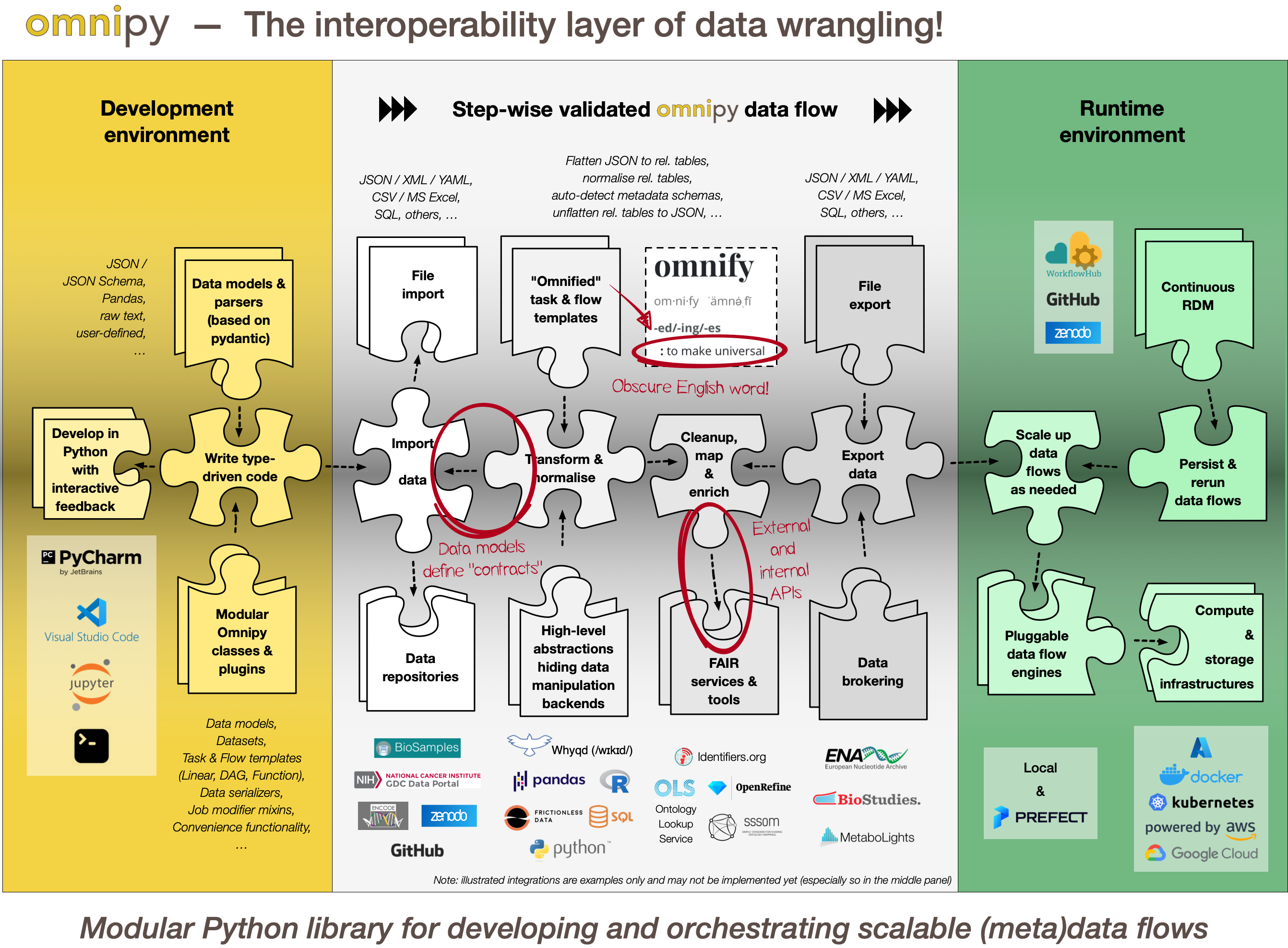
Updates
- Feb 3, 2023: Documentation of the Omnipy API is still sparse. However, for examples of running code, please check out the omnipy-examples repo.
- Dec 22, 2022: Omnipy is the new name of the Python package formerly known as uniFAIR. We are very grateful to Dr. Jamin Chen, who gracefully transferred ownership of the (mostly unused) "omnipy" name in PyPI to us!_
Installation and use
For basic information on installation and use of omnipy, read the INSTALL.md file.
Contribute to omnipy development
For basic information on how to set up a development environment to effectively contribute to the omnipy library, read the CONTRIBUTING.md file.
Overview of Omnipy
Generic functionality
(NOTE: Read the section Transformation on the FAIRtracks.net website for a more detailed and better formatted version of the following description!)
Omnipy is designed primarily to simplify development and deployment of (meta)data transformation processes in the context of FAIRification and data brokering efforts. However, the functionality is very generic and can also be used to support research data (and metadata) transformations in a range of fields and contexts beyond life science, including day-to-day research scenarios:
Data wrangling in day-to-day research
Researchers in life science and other data-centric fields often need to extract, manipulate and integrate data and/or metadata from different sources, such as repositories, databases or flat files. Much research time is spent on trivial and not-so-trivial details of such "data wrangling":
- reformat data structures
- clean up errors
- remove duplicate data
- map and integrate dataset fields
- etc.
General software for data wrangling and analysis, such as Pandas, R or Frictionless, are useful, but researchers still regularly end up with hard-to-reuse scripts, often with manual steps.
Step-wise data model transformations
With the Omnipy Python package, researchers can import (meta)data in almost any shape or form: nested JSON; tabular (relational) data; binary streams; or other data structures. Through a step-by-step process, data is continuously parsed and reshaped according to a series of data model transformations.
"Parse, don't validate"
Omnipy follows the principles of "Type-driven design" (read Technical note #2: "Parse, don't validate" on the FAIRtracks.net website for more info). It makes use of cutting-edge Python type hints and the popular pydantic package to "pour" data into precisely defined data models that can range from very general (e.g. "any kind of JSON data", "any kind of tabular data", etc.) to very specific (e.g. "follow the FAIRtracks JSON Schema for track files with the extra restriction of only allowing BigBED files").
Data types as contracts
Omnipy tasks (single steps) or flows (workflows) are defined as transformations from specific input data models to specific output data models. pydantic-based parsing guarantees that the input and output data always follows the data models (i.e. data types). Thus, the data models defines "contracts" that simplifies reuse of tasks and flows in a mix-and-match fashion.
Catalog of common processing steps
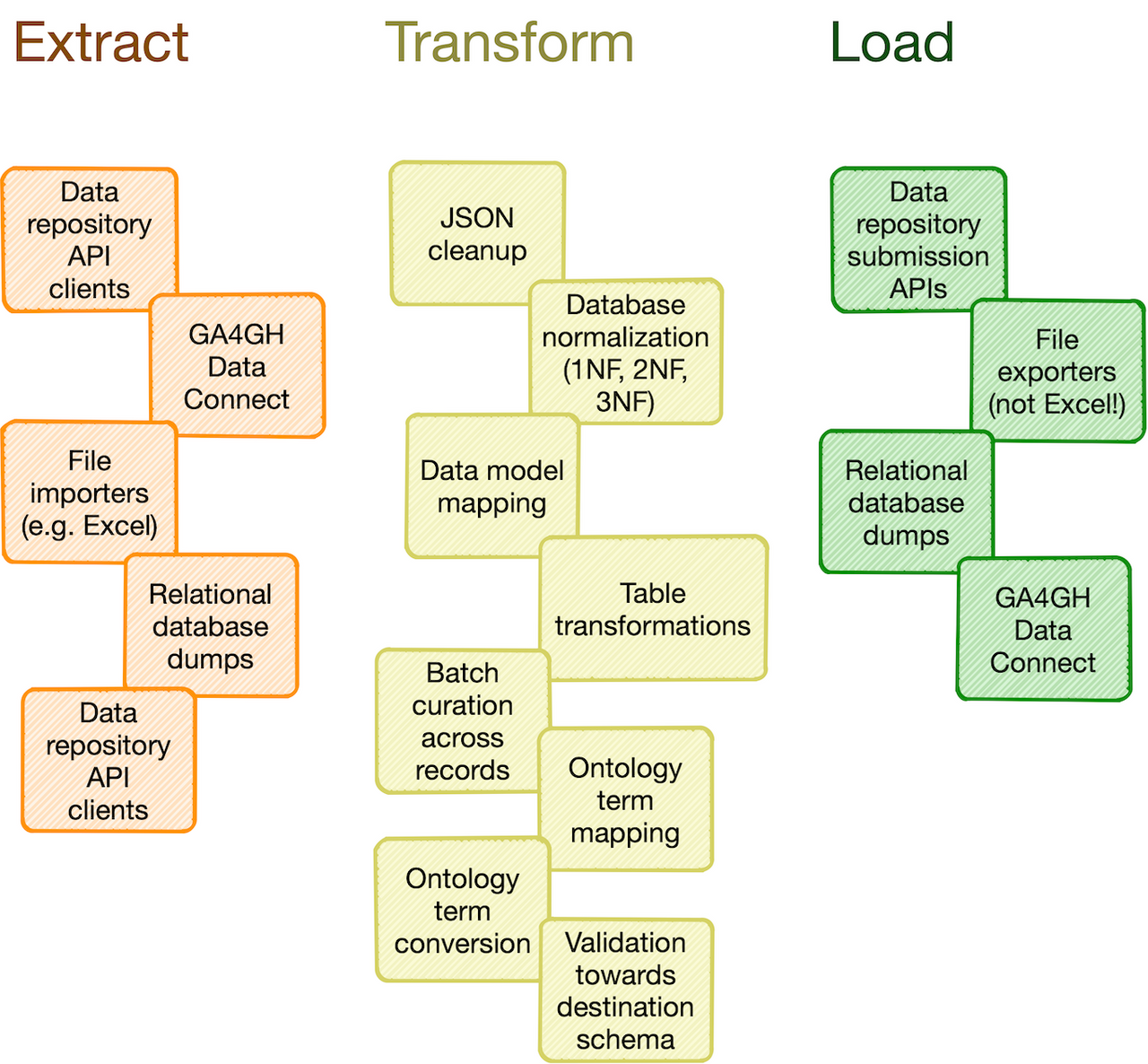
Omnipy is built from the ground up to be modular. We aim to provide a catalog of commonly useful functionality ranging from:
- data import from REST API endpoints, common flat file formats, database dumps, etc.
- flattening of complex, nested JSON structures
- standardization of relational tabular data (i.e. removing redundancy)
- mapping of tabular data between schemas
- lookup and mapping of ontology terms
- semi-automatic data cleaning (through e.g. Open Refine)
- support for common data manipulation software and libraries, such as Pandas, R, Frictionless, etc.
In particular, we will provide a FAIRtracks module that contains data models and processing steps to transform metadata to follow the FAIRtracks standard.
Refine and apply templates
An Omnipy module typically consists of a set of generic task and flow templates with related data models, (de)serializers, and utility functions. The user can then pick task and flow templates from this extensible, modular catalog, further refine them in the context of a custom, use case-specific flow, and apply them to the desired compute engine to carry out the transformations needed to wrangle data into the required shape.
Rerun only when needed
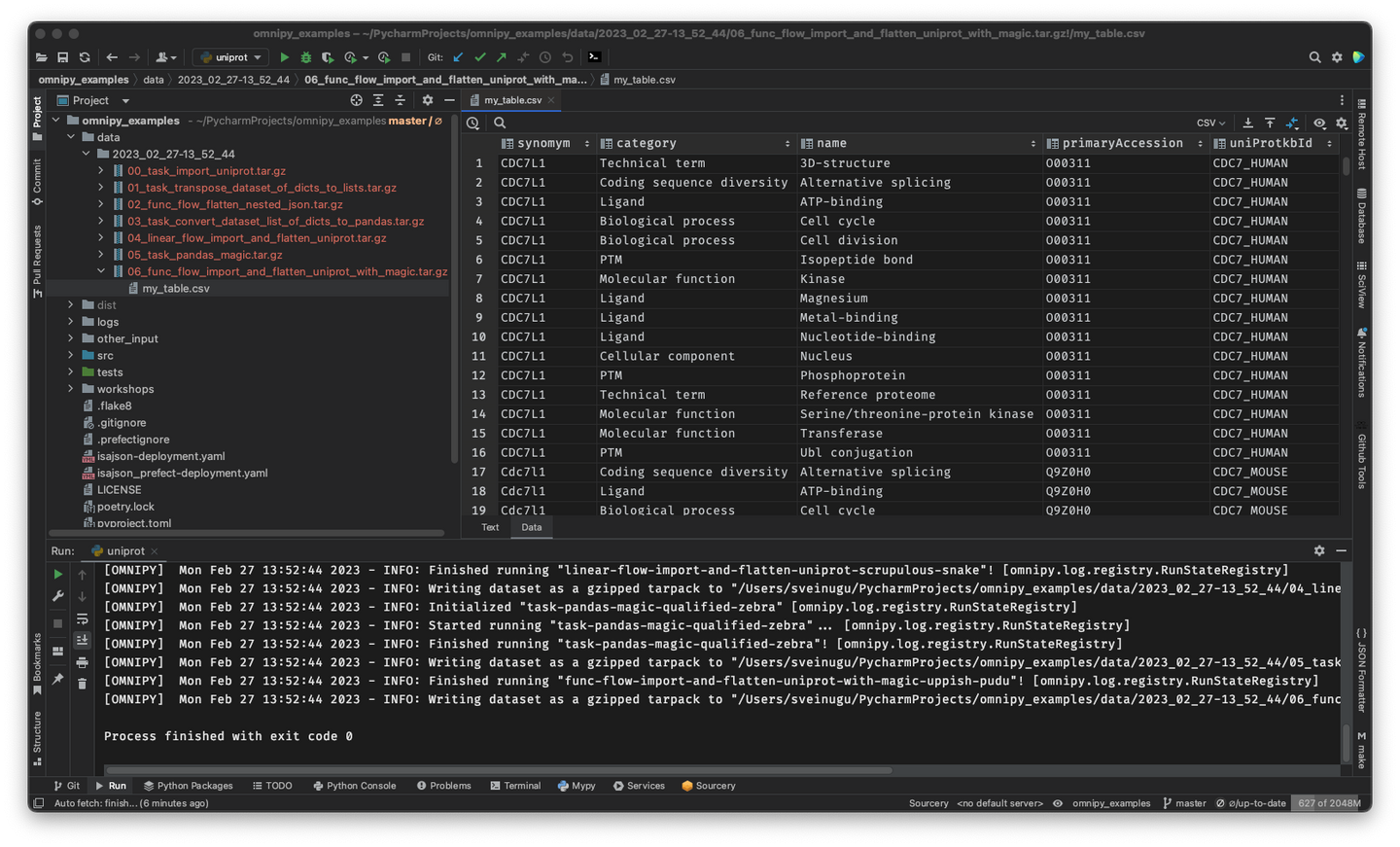
When piecing together a custom flow in Omnipy, the user has persistent access to the state of the data at every step of the process. Persistent intermediate data allows for caching of tasks based on the input data and parameters. Hence, if the input data and parameters of a task does not change between runs, the task is not rerun. This is particularly useful for importing from REST API endpoints, as a flow can be continuously rerun without taxing the remote server; data import will only carried out in the initial iteration or when the REST API signals that the data has changed.
Scale up with external compute resources
In the case of large datasets, the researcher can set up a flow based on a representative sample of the full dataset, in a size that is suited for running locally on, say, a laptop. Once the flow has produced the correct output on the sample data, the operation can be seamlessly scaled up to the full dataset and sent off in software containers to run on external compute resources, using e.g. Kubernetes. Such offloaded flows can be easily monitored using a web GUI.
Industry-standard ETL backbone
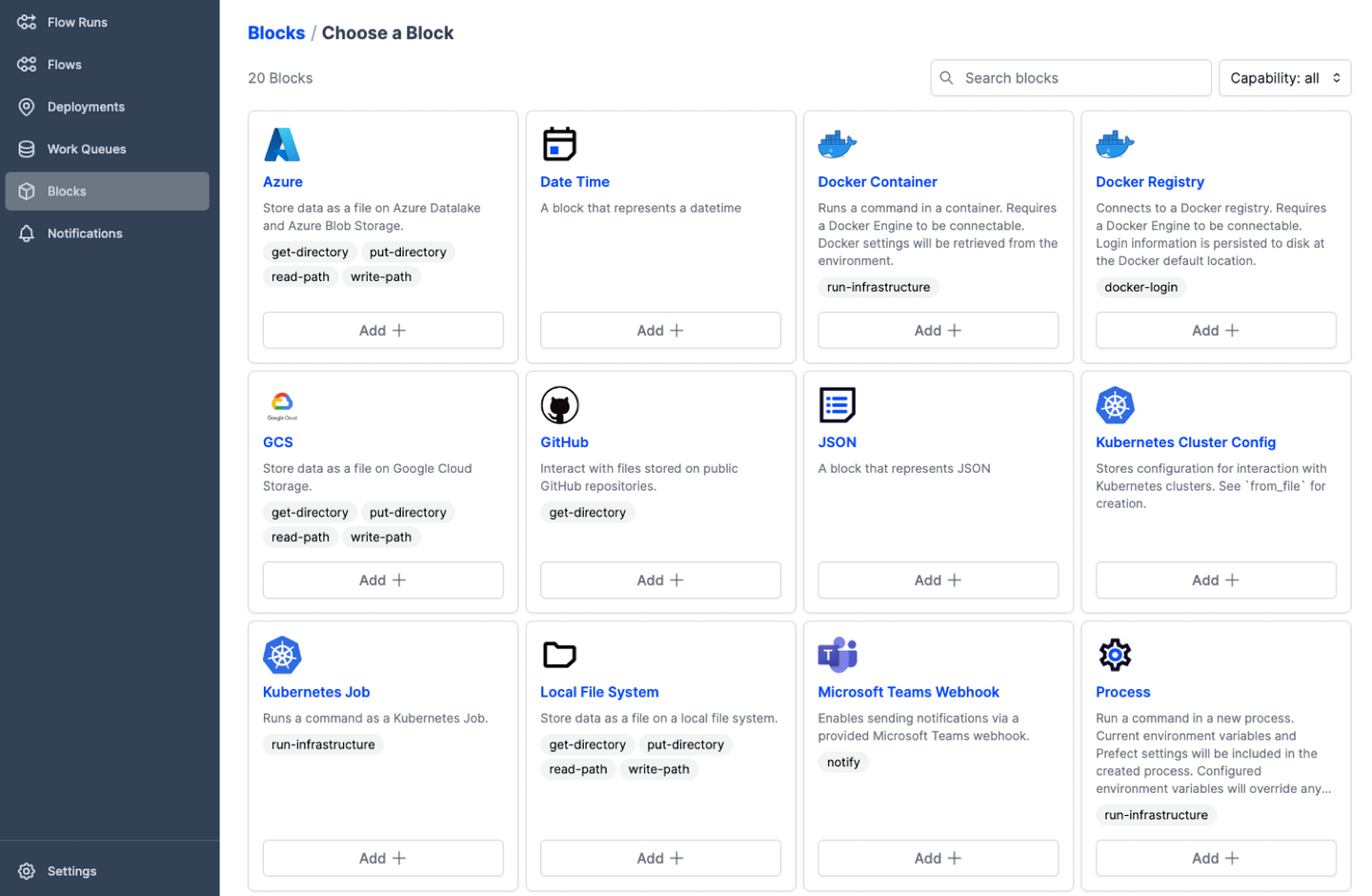
Offloading of flows to external compute resources is provided by the integration of Omnipy with a workflow engine based on the Prefect Python package. Prefect is an industry-leading platform for dataflow automation and orchestration that brings a series of powerful features to Omnipy:
- Predefined integrations with a range of compute infrastructure solutions
- Predefined integration with various services to support extraction, transformation, and loading (ETL) of data and metadata
- Code as workflow ("If Python can write it, Prefect can run it")
- Dynamic workflows: no predefined Direct Acyclic Graphs (DAGs) needed!
- Command line and web GUI-based visibility and control of jobs
- Trigger jobs from external events such as GitHub commits, file uploads, etc.
- Define continuously running workflows that still respond to external events
- Run tasks concurrently through support for asynchronous tasks
Pluggable workflow engines
It is also possible to integrate Omnipy with other workflow backends by implementing new workflow engine plugins. This is relatively easy to do, as the core architecture of Omnipy allows the user to easily switch the workflow engine at runtime. Omnipy supports both traditional DAG-based and the more avant garde code-based definition of flows. Two workflow engines are currently supported: local and prefect.
Release history Release notifications | RSS feed


Download files
Download the file for your platform. If you're not sure which to choose, learn more about installing packages.
Source Distribution
Built Distribution
Filter files by name, interpreter, ABI, and platform.
If you're not sure about the file name format, learn more about wheel file names.
Copy a direct link to the current filters
File details
Details for the file omnipy-0.11.0.tar.gz.
File metadata
- Download URL: omnipy-0.11.0.tar.gz
- Upload date:
- Size: 69.5 kB
- Tags: Source
- Uploaded using Trusted Publishing? No
- Uploaded via: poetry/1.7.1 CPython/3.10.8 Darwin/21.6.0
File hashes
| Algorithm | Hash digest | |
|---|---|---|
| SHA256 |
88c7307a9eadac17ad9f7db8b8d6a16554bdbdba506614a365eacb09525f6598
|
|
| MD5 |
3c9eb1e77f98c2bbfe534705ed4ec8f8
|
|
| BLAKE2b-256 |
ba277e02be4549877cf746ccb357365c9f4b00f8ad089a65fabfbca8004db2d6
|
File details
Details for the file omnipy-0.11.0-py3-none-any.whl.
File metadata
- Download URL: omnipy-0.11.0-py3-none-any.whl
- Upload date:
- Size: 92.1 kB
- Tags: Python 3
- Uploaded using Trusted Publishing? No
- Uploaded via: poetry/1.7.1 CPython/3.10.8 Darwin/21.6.0
File hashes
| Algorithm | Hash digest | |
|---|---|---|
| SHA256 |
aa45e1d02046ec53f812f4e90ce9bf01fb0b6888f0df69423113c45081e83fa0
|
|
| MD5 |
fc9e1780b396ba8ca254cb8a5f516864
|
|
| BLAKE2b-256 |
9f1492aaf21138ffa9fe4db5a5547e0b82ef5b657b78278b064ce9814c41f73c
|






