
OmniScout
Current release: 0.4.16
Local-first browser automation, search & research for AI agents.
No cloud APIs. No hosted sessions. No lock-in. Just a fast, local CLI in your terminal.








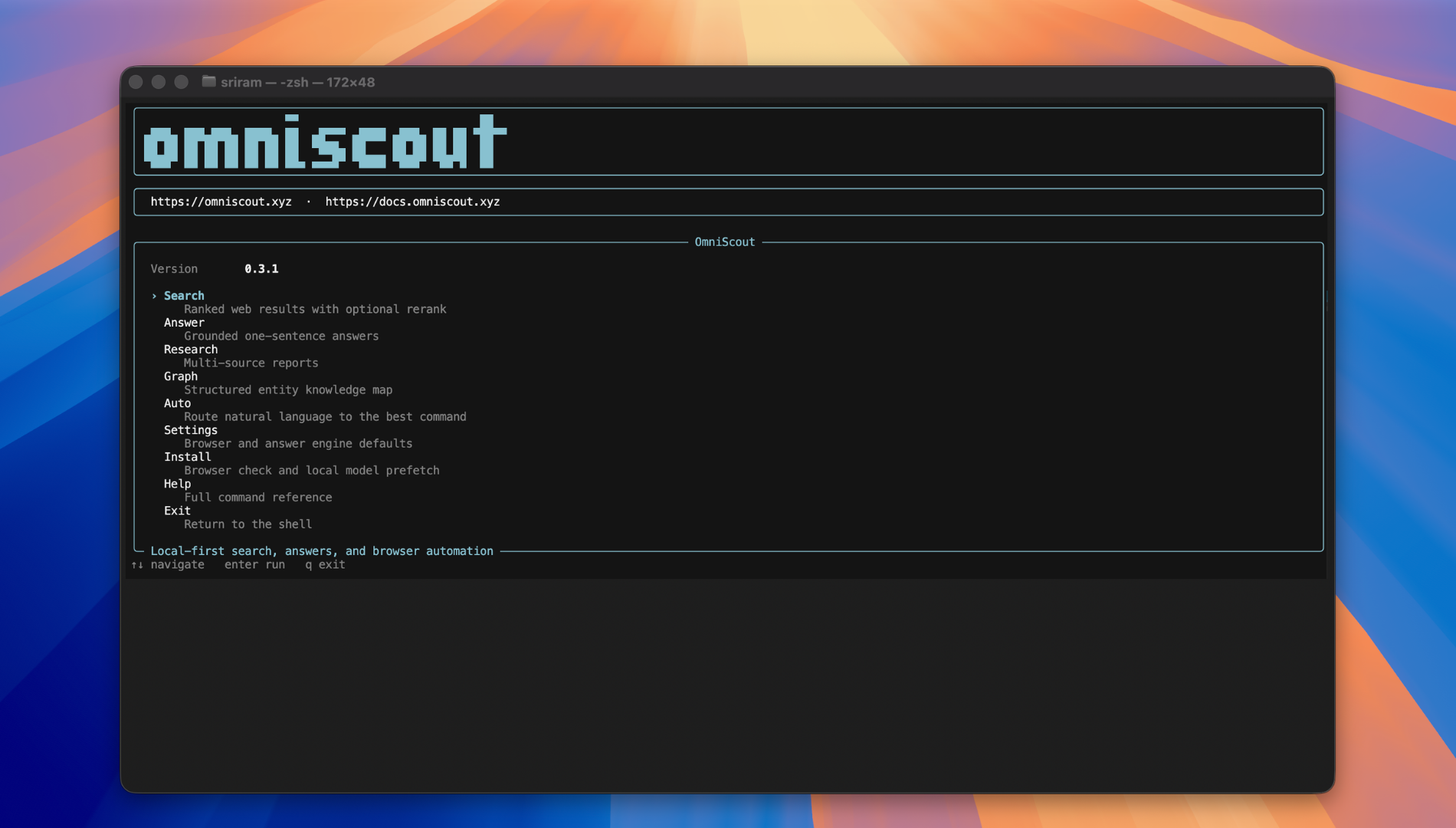
pip install omniscout
Requirements: Python 3.11 or newer and a Chromium-based browser such as Chrome, Brave, Edge, Vivaldi, Opera, Arc, or Chromium. Everything stays on your machine.
Verify the installation and inspect available commands:
omniscout --version
omniscout --help
omniscout computer doctor       # diagnose desktop automation (macOS)
Set up the default browser and download the existing-browser extension:
omniscout setup --browser dia
The command downloads the extension and opens the selected browser's
extensions page. Choose Load unpacked, select the printed folder once, and
confirm that its popup says connected.
Quick Start
Get ready, search, open a result in the browser, and inspect the page:
omniscout warmup
omniscout answer "latest AI news"
omniscout open
omniscout snapshot --refs-only
omniscout browser click '@e3'
For a direct URL, use the browser command group:
omniscout daemon start
omniscout browser navigate https://news.ycombinator.com
omniscout browser snapshot --refs-only
omniscout browser click '@e3'
omniscout browser close
Configure default browser:
omniscout settings set browser brave
Automation runs in a managed background window by default. To use your own browser instead:
omniscout settings set browser-automation headful
Install agent skill files so Claude Code, Cursor, and Codex auto-discover OmniScout:
omniscout install --skill
The installer currently writes skill files for Claude Code, Cursor, Codex CLI,
and Gemini CLI. Other agents can use the bundled SKILL.md manually.
For deterministic agent integration, use --json or set OMNISCOUT_JSON=1:
omniscout --json answer "What is local-first software?"
export OMNISCOUT_JSON=1
When you need to discover a command or option, use the built-in help:
omniscout --help
omniscout computer --help
omniscout computer ui --help
Documentation Overview
The full documentation lives at docs.omniscout.xyz and is organized as follows:
CLI
| Page | What it covers |
|---|---|
| Overview | What OmniScout is, what you get (search, browser, answers, research, graphs), installation, hello world, and configuration |
| Agents | Drop-in prompts and skill files for Claude Code, Cursor, Codex, and Kimi; multi-step agent loops; JSON output; error kinds; skill template |
| Examples | Copy-paste recipes: knowledge graphs, research, form fill, login, CAPTCHA, network capture, multi-step workflows, screenshots, PDFs, sessions, tabs, search → extract → answer, and Python/shell integration |
| Commands | Full CLI reference — every command, flag, and JSON shape: browser actions, tab/network/console management, search/extract/research/graph options, profiles, settings, workflow commands, and environment variables |
| What is OmniScout | What you get — search, browser control, answers, research — and how the pieces fit together |
| Roadmap | Planned features — search, extraction, page summaries, and MCP server |
| Troubleshooting | Every common failure mode and fix: login, CAPTCHA, installation, search, extraction, research, browser automation, profiles, performance, JSON output, and configuration issues |
| Probe Zero | OmniScout's answer mode — what it does, how to enable it, and when to use each mode |
SDK
| Page | What it covers |
|---|---|
| SDK Overview | What the SDK is, key features, installation, quick example, and common use cases |
| Python API Reference | Complete Python API docs — Search, Extraction, Research, Browser, Configuration, async support, testing, performance tips, and troubleshooting |
What It Is
OmniScout is a self-contained terminal-native interface for the web. Think of it as a local browser brain for AI agents — enabling them to search, browse, extract structured data, and remember everything without ever leaving your laptop.
It works with your existing Chromium browser (Chrome, Brave, Edge, Vivaldi, etc.). Everything stays on your machine, while search, extraction, and browser automation access the websites you request.
Why OmniScout?
| Feature | Status |
|---|---|
| Local First | No hosted browser sessions; everything stays on your machine by default |
| Search | Searches the web and puts the most relevant results first |
| Always Ready | Fast actions with persistent sessions |
| Real Browser | Drives your real Chrome/Brave; keeps cookies, logins, and extensions |
| Memory | Remember and search your browsing history |
| Rich Extraction | Pull structured data from any URL |
| Agent-Ready | Every command speaks JSON — hook it up to any AI framework |
Core Commands
The following is the complete beginner-oriented command map. Run any command with
--help for its flags and subcommands.
| Command | Purpose |
|---|---|
search |
Search the web, most relevant results first. |
answer |
Retrieve web results and synthesize an answer; preferred when you need an answer rather than a URL list. |
map |
List the pages on a site. |
warmup |
Get ready before a batch of calls. |
remember, memory |
Store and search remembered visits and notes. |
extract |
Return readable or structured data from a URL or query. |
open, snapshot, context, reset |
Open pages, inspect @eN refs, view workflow state, and reset continuity. |
auto |
Route a one-line request to the best command. |
research, graph |
Run full research or build entity knowledge graphs. |
settings, install |
Configure OmniScout and install agent skills or browser support. |
browser |
Direct Chromium automation for complex web workflows. |
computer |
Native desktop automation for apps, files, clipboard, and windows. |
daemon, session, profile |
Manage the service, persistent sessions, and browser profiles. |
mcp |
Serve OmniScout to MCP clients (Claude Desktop, Cursor, opencode). |
index, extract-jobs, crawl, monitor |
Manage indexes, background jobs, crawls, and URL change monitoring. |
record, macro, replay, workflow |
Record, reuse, replay, and export workflows. |
benchmark |
Benchmark answer modes. |
Search
1. Search & Research
# Web search
omniscout search "state of local AI agents 2026"

# Summarized one-sentence answer
omniscout answer "Who is the president?" --depth balanced

# Full research from many sources
omniscout research "emerging quantum computing startups 2026"

# Open the local OmniScout Search UI
omniscout search ui
Browser
2. Browser Automation
# Navigate and identify elements
omniscout browser navigate https://news.ycombinator.com
omniscout browser snapshot --refs-only
omniscout browser click '@e3'

# Screenshots: full page, scroll-stitched, element, or pixel region
omniscout browser screenshot --full-length --out state.png
omniscout browser screenshot --stitched --out state-stitched.png
omniscout browser screenshot --ref '#hero' --out hero.png
omniscout browser screenshot --region 0,200,1280,800 --out mid.png
omniscout browser screenshot --delay 2 --out after-load.png

# Capture network and console logs
omniscout browser network list
omniscout browser console tail
Computer
3. Desktop Automation
# Open apps/files/URLs and type into the focused window
omniscout computer navigate /Applications/Notes.app
omniscout computer wait 300
omniscout computer type "Meeting notes"
omniscout computer key cmd+s

# Clipboard, screenshots, and window management
omniscout computer clipboard set "Hello from Scout"
omniscout computer screenshot --out /tmp/desktop.png
omniscout computer screenshot --region 100,100,800,600 --out /tmp/crop.png
omniscout computer window list
Desktop automation currently supports macOS. Commands use the same JSON output
and --session model as browser automation.
Extract
4. Content Extraction
# Clean Markdown or structured JSON from any page
omniscout extract https://example.com
omniscout extract -q "SpaceX founder" --format structured --fields founder

# Schema-driven extraction
omniscout extract https://stripe.com/pricing \
  --schema-inline '{"type":"object","properties":{"pricing":{"type":"string"}}}'
5. Knowledge Graphs
# Map a company or person into a structured tree
omniscout graph "Cursor"              # search web and extract
omniscout graph "Cursor" -w cursor.com --data  # use a specific site
omniscout graph "Cursor" --llm        # optional AI overlay on results
6. Browser Memory
# Remember and search your browsing history
omniscout remember https://example.com/blog/post
omniscout memory "neural networks in production"
Desktop automation reference
computer supports navigate, type, key, screenshot, wait, doctor,
clipboard, window, ui, and backend. The computer ui group supports
snapshot, click, drag, and is; use its @eN references for element-level
actions. Desktop automation currently supports macOS.
Reusable workflow example
omniscout record start --name my_macro
omniscout browser navigate https://example.com
omniscout browser snapshot --refs-only
omniscout record stop my_macro
omniscout macro run my_macro
Development
cd cli
python -m venv .venv
source .venv/bin/activate
pip install -e ".[dev]"
pytest
ruff check .
Tests live in cli/tests/. Integration tests are marked with integration and
may start subprocesses or bind local ports. Keep browser profiles and generated
model/cache data outside the repository.
How it fits together
flowchart LR
    A["AI agent (Claude / Cursor / Codex / Kimi)"] --> B["OmniScout CLI"]
    B --> C["Browser"]
    B --> G["Search / Extract / Research / Graph"]
    C --> J["Chrome / Brave / Edge / Vivaldi"]
JSON & Agent Integration
Every command speaks JSON. Set OMNISCOUT_JSON=1 and stdout becomes a structured payload.
export OMNISCOUT_JSON=1
omniscout search "robotics simulators"
Configuration
Create a config.toml in your config directory (e.g. ~/.config/omniscout/config.toml on Linux, ~/Library/Application Support/omniscout/config.toml on macOS):
search_limit = 10
research_results = 8
request_throttle_seconds = 1.0
browser = "chrome"                    # chrome | edge | brave | vivaldi | opera | arc | chromium | custom
# browser_executable = "/path/to/browser"  # only needed for 'custom'
Or configure via CLI:
omniscout settings browsers
omniscout settings set browser brave
omniscout settings show
Environment Variables
| Variable | Purpose |
|---|---|
OMNISCOUT_JSON=1 |
Force JSON output on every command |
OMNISCOUT_DATA_DIR |
Override the default data directory |
OMNISCOUT_BROWSER |
Browser ID (overrides config) |
TWOCAPTCHA_API_KEY |
CAPTCHA solver API key |
Supported By
OmniScout works with any AI agent that can run shell commands. Skill files are auto-installed with omniscout install --skill wherever a well-known directory exists.
Agents with verified skill directories:
- Claude Code —
~/.claude/skills/ - OpenAI Codex CLI —
~/.codex/skills/ - Cursor —
~/.cursor/skills-cursor/ - Gemini CLI / Antigravity —
~/.gemini/config/skills/ - Pi — paste
SKILL.mdinto the system prompt - OpenCode — paste
SKILL.mdinto the system prompt - Windsurf — paste
SKILL.mdinto the system prompt - Cline — paste
SKILL.mdinto the system prompt - Roo Code — paste
SKILL.mdinto the system prompt - Amp — paste
SKILL.mdinto the system prompt - Replit Agent — paste
SKILL.mdinto the system prompt - AiderDesk — paste
SKILL.mdinto the system prompt - AstrBot — paste
SKILL.mdinto the system prompt - Droid (Factory) — paste
SKILL.mdinto the system prompt - Goose — paste
SKILL.mdinto the system prompt - Factory — paste
SKILL.mdinto the system prompt
Also works with: GitHub Copilot (Agent Mode), any custom agent with shell access, or any coding assistant that can invoke the omniscout / scout CLI binary.
The CLI is the interface. If your agent runs bash, it runs OmniScout.
License
Modified MIT — see LICENSE. Products built on OmniScout must prominently display Powered by OmniScout on the user interface.
1 maintainer

Metadata
1 maintainer
Release files for omniscout 0.4.16
For a detailed explanation of source distributions (sdists) and built distributions (wheels), please see the package formats documentation.
Source distribution (sdist)
| File | Size | Uploaded | |
|---|---|---|---|
| omniscout-0.4.16.tar.gz | 1.6 MB | Details |
Built distribution (wheel)
| File | Interpreter | ABI | Platform | Reset |
|---|---|---|---|---|
| omniscout-0.4.16-py3-none-any.whl | Python 3 | none | any | Details |
Total release size: 2.0 MB
Release files / omniscout-0.4.16.tar.gz
| Download URL | omniscout-0.4.16.tar.gz |
|---|---|
| Size | 1.6 MB |
| Tags | Source |
|
SHA-256 checksum How to use checksums |
2119830a7ca7924b449750e15e4887fce884901b6acfa2696a913ec22ee90469
|
|
BLAKE2b-256 checksum How to use checksums |
5b91cbaaa42d01908373ea7bb8a8b0924bb1753bd4f28a68f828ba96b2c8a3b3
|
| Upload date | |
|
Uploaded using Trusted Publishing? What is trusted publishing? |
Yes |
| Uploaded via |
twine/7.0.0 CPython/3.13.14
|
Provenance
Provenance describes where a file came from. On PyPI, provenance is shared via attestations, which provide a verifiable record of the build or publishing details. View details, limitations and caveats.


PyPI Publish Attestation
PyPI verified that this artifact, at this checksum, originated from the publisher listed below.
Signed by GitHub Actions, verified by PyPI on Oct 1, 2026.
Transparency logRelease files / omniscout-0.4.16-py3-none-any.whl
| Download URL | omniscout-0.4.16-py3-none-any.whl |
|---|---|
| Size | 463.3 kB |
| Tags | Python 3 |
|
SHA-256 checksum How to use checksums |
14cbf8a2f114323c277743e0c7b73ffffa3344dee80453fc04acf9fda0ce3bea
|
|
BLAKE2b-256 checksum How to use checksums |
7107a69a9b26e26535eb88ef5af814f14d784002ef2017b0f465c73d3e34c144
|
| Upload date | |
|
Uploaded using Trusted Publishing? What is trusted publishing? |
Yes |
| Uploaded via |
twine/7.0.0 CPython/3.13.14
|
Provenance
Provenance describes where a file came from. On PyPI, provenance is shared via attestations, which provide a verifiable record of the build or publishing details. View details, limitations and caveats.
PyPI Publish Attestation
PyPI verified that this artifact, at this checksum, originated from the publisher listed below.
Signed by GitHub Actions, verified by PyPI on Oct 1, 2026.
Transparency log













