
onetrace-console
A local web console for runs recorded with onetrace: every run in one place, each one checked by the verifier, and any two compared stage by stage.
The console never computes a verdict of its own. It keeps each run's files exactly as they were written, runs onetrace-verify and the SDK's own diff over them, and shows what those report. If the console and the run folder ever disagree, the folder is right.
Install
pip install onetrace-console
It needs Python 3.12 or later. It installs from PyPI alone: onetrace 0.5.0 and onetrace-verify 0.5.0, with the [crypto] extra so signatures and anchors are checked. The pages' viewer ships inside the package.
pip install onetrace-explain makes the Explain button on the local console's comparison page work: the console runs that command, which sends a packet of the comparison to the model you name, and its format is set out at explain-format.md.
See it with the demo's runs
onetrace-console demo
This records the demo's runs into onetrace-console-demo/ under the folder you start it from, starts the console, loads them, stores 15 comparisons, and prints the pages' addresses. The runs come from 11 small example pipelines that ship with the console: a question-and-answer pipeline over an example shop's refund policy, the reference demo's coding agent, a support-ticket triage, a support reply drafted by a stub whose wording varies from run to run, a supplier's invoice matched against its purchase order and goods receipt to paying or holding it, each payment or hold citing the decision that allowed it, an agent whose one step calls a sub-agent's run (the sub-agent's runs are a pipeline of their own), and four over physical readings: a pump's vibration to a maintenance work order, a camera frame of a bottle to a fill-level reject, a temperature logger to releasing or quarantining a shipment, and a tightening tool's wheel-bolt torques to passing a wheel or sending it to rework. The draft names the refund window in words; a later policy stage puts in the number of days. Every reading, ticket, invoice, decision and name in them is invented example data, and the demo records and compares; it controls no equipment and pays nothing. They make no network calls and use no hosted model: the embedder is a hashed bag of words, the answerer quotes the text it retrieved, and the times in the records are the times you ran it. 11 of its runs are broken on purpose when the demo is built; the read-only demo's Overview lists each one, with what was done to it and what its own page reads. The demo keeps its store and its trust file in that folder too. It runs in local mode, so it refuses to start while ONETRACE_CONSOLE_CONFIG is set.
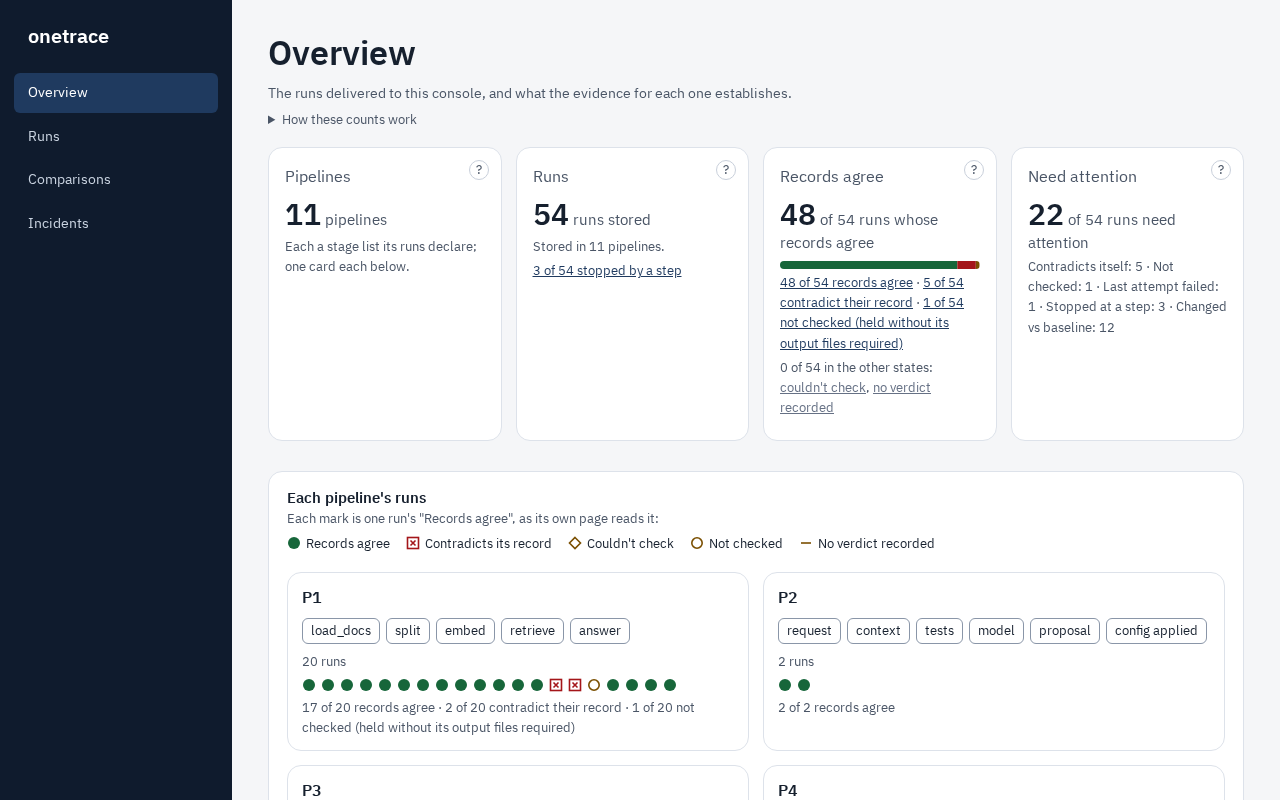
A read-only copy of the demo is hosted at https://demo.oneproof.dev. To try the read-only mode yourself, run onetrace-console demo --public.
Your own runs
onetrace-console <runs folder>
onetrace-console <runs folder> --compare <run A> <run B>
onetrace-console <runs folder> --open
onetrace-console <runs folder> --trust <file> --tsa-cert <file> --tsa-root <file>
onetrace-console <runs folder>loads every run folder in it: every folder holding aMANIFEST.json. It compares nothing unless you ask.- A run folder is skipped, with the reason, while the others load: a run still being recorded (it holds onetrace's
.lock), a folder that holds a link, or a folder whoseSHA256SUMSdoesn't match its files. --compare A Bcompares two of them, named by their folder names; A is the baseline.--openopens the console in your browser.--port Nlistens on port N, here and fordemo. The default is 8080.
Watching the folder
While the console runs, it reads the runs folder again every 2 seconds and takes in each new run once it has finished writing: once the run folder holds a MANIFEST.json, no .lock, and the same files at the same sizes on two reads in a row. A run still being recorded is not shown until then.
- The Overview and the list of every run say which folder is watched and when it was last read. When new runs have been taken in since the page was drawn, the page says so, with a link to show them; it doesn't reload by itself.
- A run is taken in once. If its folder changes afterwards, the stored copy stays as it was recorded and the page says the folder now differs; a run folder deleted afterwards stays in the store, with a note that it is no longer in the folder.
- Started on a folder with no finished run in it, the console waits for one.
--compare A Bnaming a run folder that isn't there yet waits too, and the comparison is made when both have arrived. - The folder is read by polling, the same way on Windows, macOS and Linux.
--watch-interval Nreads it every N seconds instead.--no-watchreads it once, at start, and not again; a folder with no run folder in it is then refused.
Signing and anchoring
--trust FILEnames the signing keys you trust, in anonetrace-trust/0.1file. A run signed with one of them reads "Signed by a known recorder: Yes", with that key's label from the file. Without--trust, a signed run reads "Signed, key not trusted".--tsa-cert FILEand--tsa-root FILEname the RFC 3161 time-stamp authority you trust and the root its certificate chains to. They go together;--tsa-rootmay be given more than once. With them, a run's anchor is checked, and "Committed by a known time" reads Yes when the check holds. Without them, an anchored run reads "Couldn't check", and the page names the two options to add.- Every check runs with these files, and a stored check records which ones it ran with. Started again with the same files, nothing is checked again; with different ones, every run is.
- A file that can't be read is refused at start, with how to fix it.
What it shows
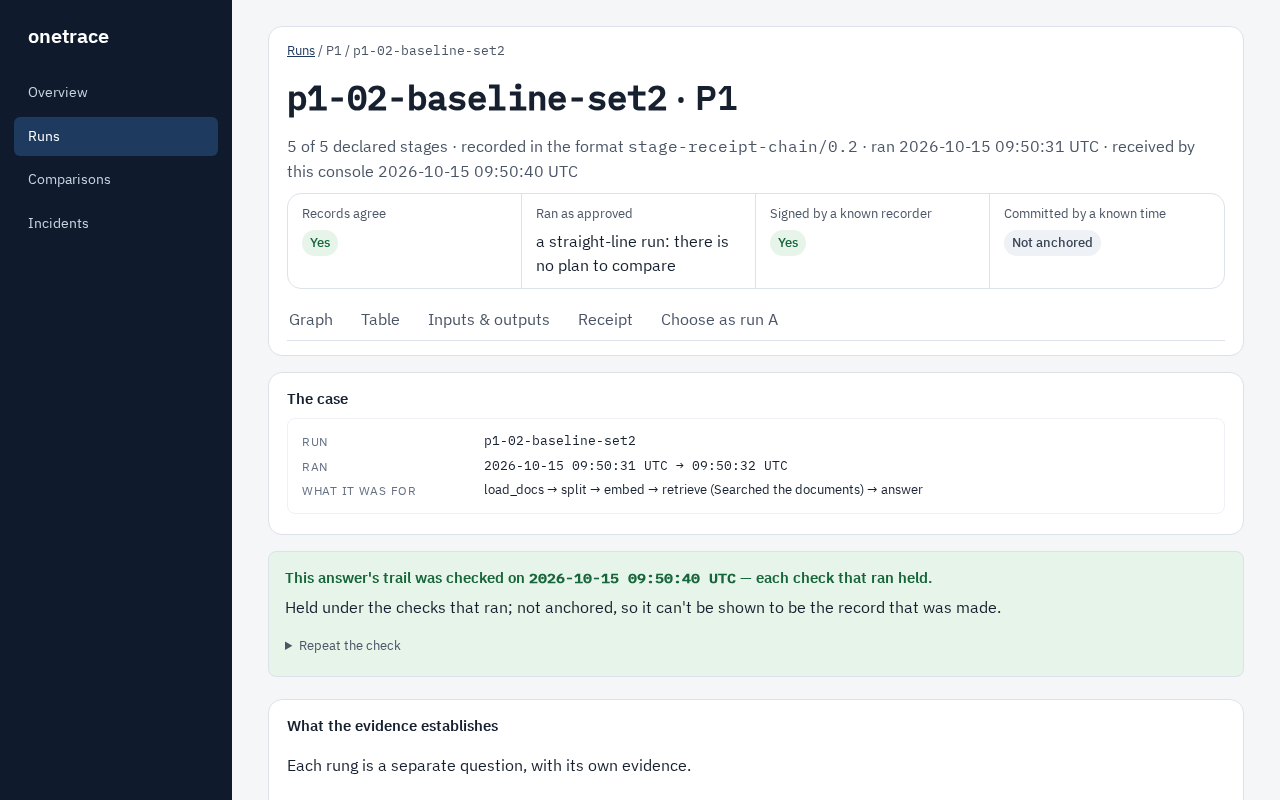
- Each run: the verifier's result and every row it reported, the run's stages, and its receipt, including whether it is signed and anchored.
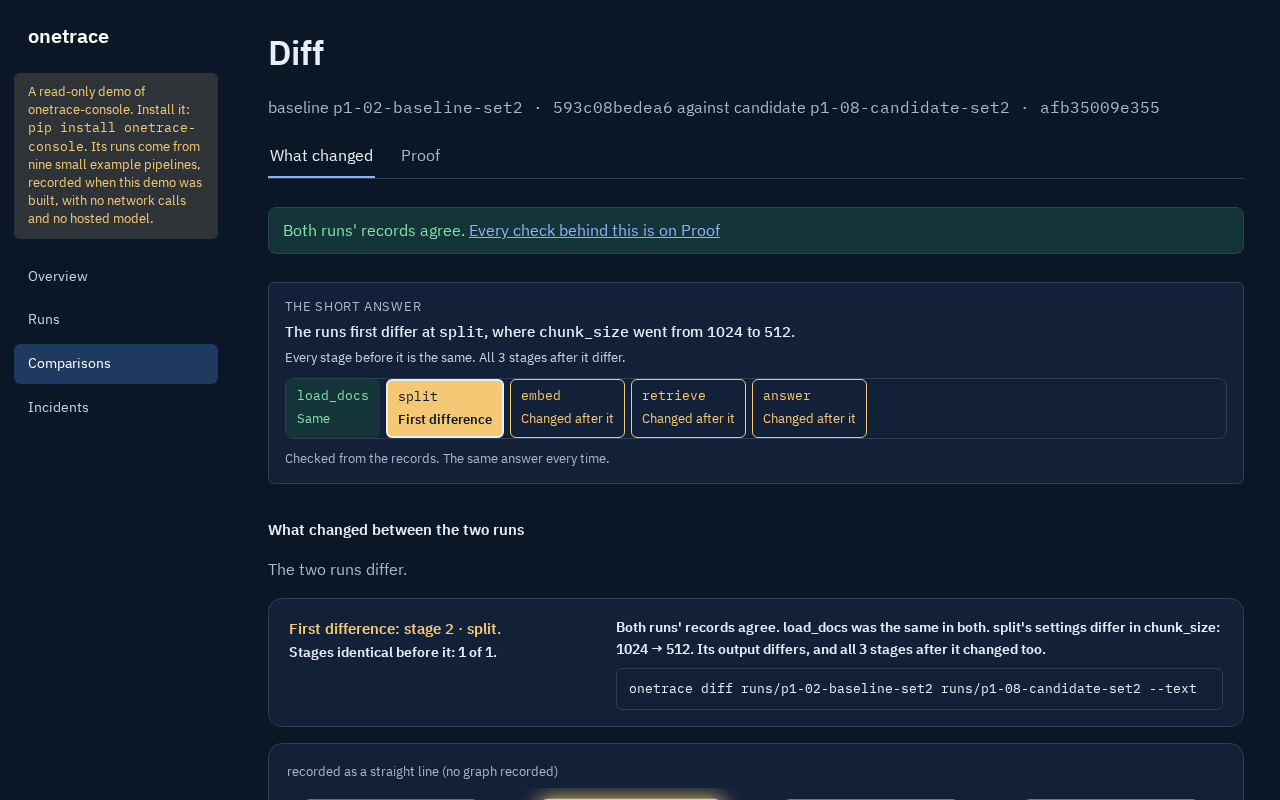
- Two runs compared: the stage-by-stage comparison
onetrace diffproduces, and the text that changed, as the SDK reports them. - Counts: every number with what it counts, and a link to the exact runs behind it.
What it does not show
Nothing here says which version is correct, who changed the source, or why.
A run's record does not show:
- that the output or the action was correct;
- why the model wrote what it wrote;
- that the signing key wasn't misused (your trust list is what ties a key to a name);
- that the run was correct at the anchored time (the anchor shows only that the record existed by then).
Where it runs
Started as above, it listens on 127.0.0.1 only; --open asks your browser to open the local page. The console makes no network calls. The Explain button runs onetrace-explain, if you install it, and that command sends an evidence packet to the model you configure. The first time it would send a kind of item it has never sent to that endpoint, it lists them and asks first. A folder load keeps what it stores in a store folder under the folder you start it from, and demo keeps it in onetrace-console-demo/.
To run it for a team, as a container with sign-in, see OPERATOR_README.md.
For contributors
On Windows, run the test suite from a short path (for example C:\src\oc), or turn on long paths: some of the files the suite writes have paths longer than Windows' 260-character limit.
Licence
Copyright 2026 Shamik Saha. Licensed under Apache-2.0; see LICENSE.
The bundled IBM Plex fonts are under the SIL Open Font License 1.1.
1 maintainer

Metadata
1 maintainer
Release files for onetrace-console 0.4.0
For a detailed explanation of source distributions (sdists) and built distributions (wheels), please see the package formats documentation.
Source distribution (sdist)
| File | Size | Uploaded | Provenance | Actions |
|---|---|---|---|---|
| onetrace_console-0.4.0.tar.gz | 1.3 MB | Without provenance | Details for onetrace_console-0.4.0.tar.gz |
Built distribution (wheel)
| File | Interpreter | ABI | Platform | Actions Reset |
|---|---|---|---|---|
| onetrace_console-0.4.0-py3-none-any.whl | Python 3 | none | any | Details for onetrace_console-0.4.0-py3-none-any.whl |
Total release size: 2.0 MB
Release files / onetrace_console-0.4.0.tar.gz
| Download URL | onetrace_console-0.4.0.tar.gz |
|---|---|
| Size | 1.3 MB |
| Tags | Source |
|
SHA-256 checksum How to use checksums |
f61d263fefc06b34abf1b3c08d539c5b289105331d76b0c09c0597ab10465e90
|
|
BLAKE2b-256 checksum How to use checksums |
320b8cad0e41f8ed6e1b590810cf7ddbc3a59048af2a2da3039c04b8d26c4398
|
| Upload date | |
|
Uploaded using Trusted Publishing? What is trusted publishing? |
No |
| Uploaded via |
twine/7.0.0 CPython/3.12.10
|
Release files / onetrace_console-0.4.0-py3-none-any.whl
| Download URL | onetrace_console-0.4.0-py3-none-any.whl |
|---|---|
| Size | 712.9 kB |
| Tags | Python 3 |
|
SHA-256 checksum How to use checksums |
f6fe19226cff16e965bcb80cab3999e2d00d190e0b8980e8fef2b03802462628
|
|
BLAKE2b-256 checksum How to use checksums |
c3cff8233651464987d7f3e114c15d0e9796dd80059d39780ae5235c16a573ab
|
| Upload date | |
|
Uploaded using Trusted Publishing? What is trusted publishing? |
No |
| Uploaded via |
twine/7.0.0 CPython/3.12.10
|
Security for onetrace-console 0.4.0
Provenance
Provenance describes where a file came from. On PyPI, provenance is shared via attestations, which provide a verifiable record of the build or publishing details. View details, limitations and caveats.
No provenance found
None of the files in this release were uploaded with provenance metadata.
A note on package security
PyPI is a repository for distributing packages, not a service for auditing them. While third-party security researchers and our staff do their best to detect and remove malicious packages, PyPI cannot guarantee the quality, security or suitability of any given package.
To learn more about protecting yourself from malicious actors, visit our package security documentation.














