
OpAstro Engine (Open Core)



Opastro is a deterministic horoscope engine built for two use cases:
- a developer-friendly Python library
- a high-UX terminal CLI (
opastro)
The open-core repo ships calculations + lightweight built-in meanings. Richer premium narrative packs are available via numerologyapi.com.
One-line promise: Open-source astrology engine for developers: CLI, API, Swiss Ephemeris, and explainable horoscope generation.
5-Minute Quickstart
python3 -m pip install -U opastro
opastro --version
opastro doctor
opastro horoscope --period daily --sign ARIES --target-date 2026-04-03
Terminal Demo
opastro horoscope --period daily --sign ARIES --target-date 2026-04-03 --format markdown
# OPASTRO REPORT
- **Type:** `horoscope`  - **Sign:** `ARIES`  - **Period:** `daily`

## General (...)
...
Interactive Home Deck
Launch the cosmic terminal home screen with no report arguments:
opastro ui
The home deck includes an animated ASCII atmosphere, a searchable command
palette (/) covering the available CLI actions, and useful website/docs/premium
links (@). The current ui launcher is intentionally omitted to avoid a
recursive command inside its own interface. Press h or ? for controls. Supply
--period when you want the keyboard-driven report browser instead:
opastro ui --period daily --sign ARIES
Inside the @ palette, press o to open the selected link in your browser.
Inside the / palette, press Enter to run the selected command example. The
JSON home payload includes command aliases and CTA targets for wrappers and
IDE integrations.
The report browser keeps those affordances close at hand: press @ to open a
links drawer without leaving the report, Enter to select a destination, and
o to open it. Press r to refresh the current period and receive a compact
status confirmation in the footer.
Command results launched from / stay inside the dark TUI atmosphere. Output
and diagnostics are captured into a scrollable result page, with Enter or
Esc returning to the home deck. Use / to find text in a long result, c to
clear the search, or r to rerun the command. Export commands show their
saved artifact paths there while binary files such as natal PDFs remain safely
on disk.
Report mode is responsive: wide terminals use the split section browser, while terminals from 42 columns upward switch to a compact single-column reader without losing filters, factor drill-down, refresh, or links.
Open Core vs Premium
| Product | Calculation Engine | Editorial Layer | Dataset Scale | Delivery Surface | Best For |
|---|---|---|---|---|---|
opastro (this repo) |
Deterministic open calculations (Swiss Ephemeris), explainable factor scoring | Lightweight built-in meanings (open-core) | Compact in-repo rule/content set | Python library, opastro CLI, local FastAPI |
Developers shipping local tools, prototypes, and transparent astrology workflows |
| numerologyapi.com | Same core precision + production-grade premium tuning | Rich premium editorial narrative packs | Editorial dataset: 716,398 entries (3.4G) |
Managed premium API + deeper reading outputs | Teams/apps needing high-depth user-facing readings and premium narrative quality at scale |
Open-core gives you transparent calculations and full developer control. Premium adds the large editorial intelligence layer for deeper storytelling and production content depth.
🏗️ High-Level Architecture
OpAstro (open-core) is built from the same architectural foundation used in the premium NumerologyAPI platform.
Premium access:
- API platform: numerologyapi.com
- Premium engine repo: dakidarts/the-numerology-api
Architecture graphic:
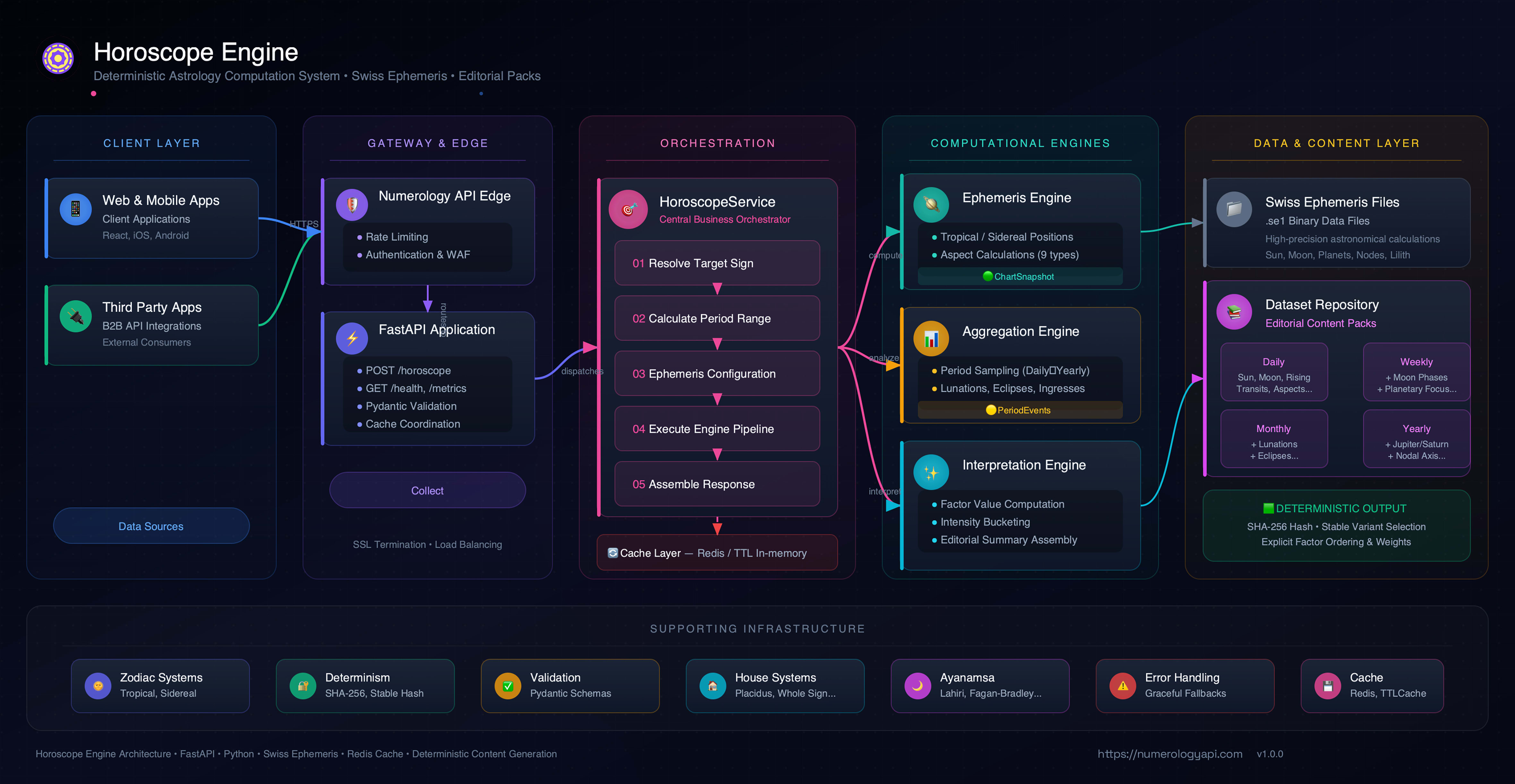
┌─────────────────────────────────────────────────────────────────────────┐
│                            Client Layer                                 │
│  (Web Apps, Mobile Apps, Third-party Integrations)                      │
└─────────────────────────────────────────────────────────────────────────┘
                                      │
                                      ▼
┌─────────────────────────────────────────────────────────────────────────┐
│                   API Gateway (NumerologyAPI.com)                       │
│  Rate Limiting | Authentication | Load Balancing | SSL Termination      │
└─────────────────────────────────────────────────────────────────────────┘
                                      │
                                      ▼
┌─────────────────────────────────────────────────────────────────────────┐
│                      FastAPI Application Layer                          │
│  ┌─────────────────────────────────────────────────────────────────┐    │
│  │  Endpoints: /health, /horoscope, /birthday-horoscope,           │    │
│  │             /planet-horoscope, /natal-birthchart,              │    │
│  │             /natal-birthchart/wheel.svg|wheel.png,             │    │
│  │             /natal-birthchart/report.pdf, /synastry,            │    │
│  │             /natal-birthchart/transits, /metrics,               │    │
│  │             /admin/pregenerate                                  │    │
│  │  • Request validation (Pydantic)                                │    │
│  │  • Error handling & mapping                                     │    │
│  │  • Cache lookup & storage                                       │    │
│  │  • Metrics collection                                           │    │
│  └─────────────────────────────────────────────────────────────────┘    │
└─────────────────────────────────────────────────────────────────────────┘
                                      │
                                      ▼
┌─────────────────────────────────────────────────────────────────────────┐
│                  HoroscopeService (Orchestrator)                        │
│  ┌─────────────────────────────────────────────────────────────────┐    │
│  │  • Request orchestration                                        │    │
│  │  • Sign resolution (provided vs. derived)                       │    │
│  │  • Period range calculation                                     │    │
│  │  • Ephemeris configuration                                      │    │
│  │  • House enablement policy                                      │    │
│  │  • Response assembly                                            │    │
│  └─────────────────────────────────────────────────────────────────┘    │
└─────────────────────────────────────────────────────────────────────────┘
           │                        │                        │
           ▼                        ▼                        ▼
┌──────────────────┐    ┌──────────────────┐    ┌──────────────────┐
│  EphemerisEngine │    │ AggregationEngine│    │ Interpretation   │
│                  │    │                  │    │ Engine           │
│ • Swiss Ephemeris│    │ • Period sampling│    │ • Factor calc    │
│ • Positions      │    │ • Event extraction│   │ • Content select │
│ • Aspects        │    │ • Metrics        │    │ • Section render │
│ • Houses         │    │ • Deduplication  │    │ • Scoring        │
└──────────────────┘    └──────────────────┘    └──────────────────┘
           │                        │                        │
           ▼                        ▼                        ▼
┌──────────────────┐    ┌──────────────────┐    ┌──────────────────┐
│  Swiss Ephemeris │    │  Period Events   │    │  V2 Content      │
│  Data Files      │    │  (Structured)    │    │  Repository      │
│  (.se1 files)    │    │                  │    │  (Editorials)    │
└──────────────────┘    └──────────────────┘    └──────────────────┘
Notes:
- OpAstro open-core intentionally ships a smaller public endpoint/content surface.
- Premium NumerologyAPI extends this foundation with larger endpoint coverage and deeper editorial systems.
What Is Open Here
- Swiss Ephemeris-based astrology calculations
- Deterministic factor derivation and section scoring
- Built-in lite renderer (no external dataset required)
- FastAPI service endpoints
- Python package + installable CLI
- Test suite covering API, CLI, rendering, caching, and health checks
What Is Not Included
- Private premium meaning dataset and editorial packs
- Premium content production pipeline assets
Requirements
- Python
3.11+
Install (PyPI)
python3 -m pip install opastro
Install (Editable, Contributors)
python3 -m venv .venv
source .venv/bin/activate
python3 -m pip install -e .
CLI
Running with no arguments opens the welcome UI:
opastro
Command Catalog
| Command | Description |
|---|---|
opastro |
Main welcome UI with OPASTRO ASCII banner + quick start |
opastro init |
Interactive onboarding to create/update a default profile (`--template api |
opastro profile ... |
Manage saved profiles (save, list, show, use) |
opastro welcome |
Show welcome UI explicitly |
opastro catalog |
List periods, sections, signs, and planets (--json for scripts/IDEs) |
opastro doctor |
Runtime diagnostics (python path, platform, ephemeris, terminal, config) |
opastro logger |
Runtime error log inspector (show, tail, path, clear) |
opastro horoscope |
Generate standard reports (daily/weekly/monthly/yearly) |
opastro birthday |
Generate birthday-cycle yearly report |
opastro planet |
Generate planet-focused report |
opastro events |
Generate a global celestial event calendar (text/JSON/iCalendar) |
opastro natal |
Generate natal report + wheel chart assets (SVG/PNG/map/PDF) |
opastro explain |
Show why each section line appeared (factor provenance) |
opastro completion --shell ... |
Generate shell completion scripts |
opastro ui |
Launch interactive TUI with section drill-down |
opastro batch |
Multi-sign / multi-date report generation |
opastro render |
Generate visual artifacts and premium planetary scenes |
opastro serve |
Run local FastAPI app |
Global flags:
opastro -v/opastro --versionprints installed/source version.opastro --force-update-check <command>bypasses the local release-check cache.opastro --no-update-check <command>disables the release check for one invocation.
Interactive terminal invocations perform a cached best-effort check against the
repository's latest GitHub release tag. New-version notices are shown in the
welcome/TUI surfaces and on stderr for regular CLI commands, keeping JSON and
other machine-readable stdout clean. Set OPASTRO_UPDATE_CHECK=0 to disable
checks globally.
Report Flags
--period {daily,weekly,monthly,yearly}(required forhoroscope,planet)--sign ARIES--target-date YYYY-MM-DD--sections general,career,money--birth-date YYYY-MM-DD--birth-time HH:MM--lat <float> --lon <float>--timezone <IANA timezone>--zodiac-system {sidereal,tropical}(default:tropical)--ayanamsa {lahiri,fagan_bradley,krishnamurti,raman,yukteswar}--house-system {placidus,whole_sign,equal,koch}--node-type {true,mean}--tenant-id <id>--wheel-theme {night,day}(for natal SVG/PNG/PDF wheel styling)--split(split natal wheel SVG into full/main/legends parts)--split-png(export split parts as PNG: main/legends/combined)--split-layout {stacked,side-by-side}(presentation layout for composed split output)--split-dir <path>(optional export dir for split wheel parts)--json--format {text,json,markdown,html}--export <path>
CLI Examples
# Interactive setup (creates active default profile)
opastro init
opastro init --template natal

# Save profile defaults without prompts
opastro profile save --name work --sign ARIES --format markdown --set-active

# Save natal-specific profile defaults (theme/branding)
opastro profile save --name natal --set-active --user-name "Dakidarts" --wheel-theme day --accent "#3ddd77"

# Switch active profile
opastro profile use work

# Explain why lines appeared
opastro explain --kind horoscope --period daily --sign ARIES --target-date 2026-04-03 --format markdown

# Interactive TUI
opastro ui --period daily --sign ARIES --target-date 2026-04-03
# keys: ↑↓/j,k section • 1-4 period • / filter • d density • enter factor mode • pgup/pgdn scroll • g/G jump • r refresh • @ links • h/? help • q quit
# static/export mode: opastro ui --period daily --sign ARIES --json
# limited terminals: opastro ui --period daily --sign ARIES --ascii
# alternate report modes:
opastro ui --kind birthday --sign ARIES --target-date 2026-04-03
opastro ui --kind planet --planet mars --period daily --sign ARIES --target-date 2026-04-03
opastro ui --kind events --period monthly --target-date 2026-04-03

# Runtime error logs with suggested fixes
opastro logger show --limit 5
opastro logger tail
opastro logger path

# Batch generation
opastro batch --kind horoscope --period daily --signs ARIES,TAURUS --date-from 2026-04-03 --date-to 2026-04-05 --format markdown --export-dir reports/batch

# Daily sign-mode
opastro horoscope --period daily --sign ARIES --target-date 2026-04-03

# Daily personalized (houses + daily_house_focus enabled if time+coords provided)
opastro horoscope \
  --period daily \
  --target-date 2026-04-03 \
  --birth-date 1997-08-17 \
  --birth-time 09:30 \
  --lat 4.0511 \
  --lon 9.7679 \
  --timezone Africa/Douala

# Birthday-cycle report
opastro birthday --sign TAURUS --target-date 2026-04-03

# Planet-focused monthly report
opastro planet --period monthly --planet mercury --sign TAURUS --target-date 2026-04-03

# Global celestial event calendar
opastro events --period monthly --target-date 2026-04-03
opastro events --period monthly --target-date 2026-04-03 --format ics --export reports/celestial-events.ics

# Natal report + premium artifact exports
opastro natal \
  --user-name "Dakidarts" \
  --birth-date 1997-08-14 \
  --birth-time 09:30 \
  --lat 4.0511 \
  --lon 9.7679 \
  --timezone Africa/Douala \
  --wheel-svg reports/natal-wheel.svg \
  --wheel-png reports/natal-wheel.png \
  --house-map reports/natal-house-map.json \
  --pdf reports/natal-report.pdf

# Split wheel into parts (full/main/legends)
opastro natal \
  --birth-date 1997-08-14 \
  --birth-time 09:30 \
  --lat 4.0511 \
  --lon 9.7679 \
  --timezone Africa/Douala \
  --split \
  --split-dir reports/natal-split

# Split wheel with modular PNG parts and stacked layout
opastro natal \
  --birth-date 1997-08-14 \
  --birth-time 09:30 \
  --lat 4.0511 \
  --lon 9.7679 \
  --timezone Africa/Douala \
  --split \
  --split-png \
  --split-layout stacked \
  --split-dir reports/natal-split-stacked

# Raw JSON output
opastro horoscope --period weekly --sign LEO --json

# Export markdown report
opastro horoscope --period daily --sign ARIES --format markdown --export reports/aries.md

# Render premium 2D/2.5D planetary scene
opastro render planetary-scene \
  --datetime "2026-04-19T12:00:00Z" \
  --theme dark \
  --format svg \
  --projection perspective \
  --include-aspects \
  --include-minor-bodies \
  --transparent
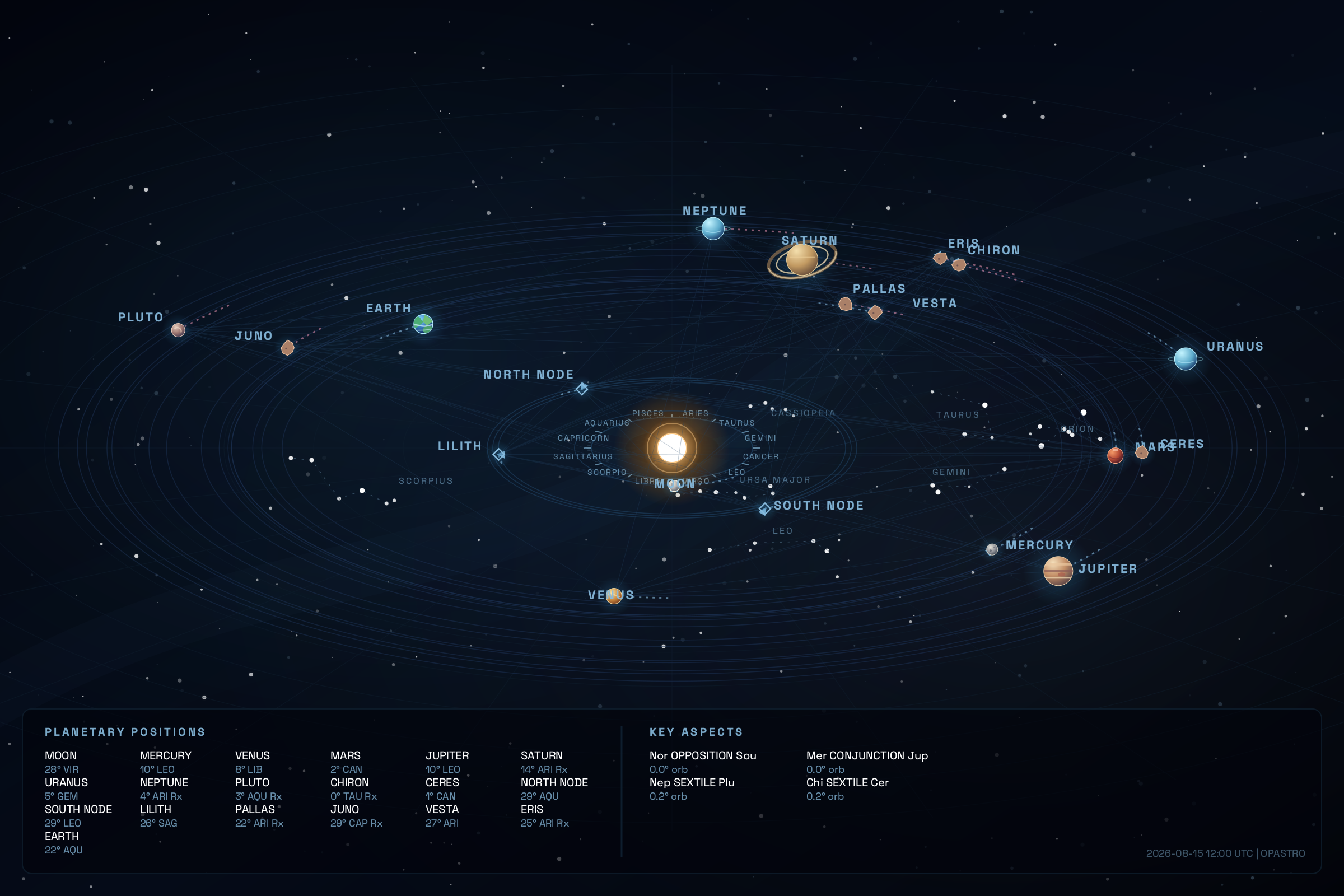
Rendered Scene Example (April 20, 2026)
Notes:
- Planetary scenes use Swiss Ephemeris longitude/latitude and geocentric distance, a bundled precessed constellation catalog, deterministic date-seeded stars, and graphical SVG body markers. Distance bands are logarithmic for readability and are not heliocentric orbital-scale claims.
- Earth is included as a scene-only inverse-Sun-vector body, and all planet icons are native SVG vectors for resolution-independent exports.
- Phase 2 adds a tropical zodiac reference band and instantaneous direct/retrograde motion trails; use
--no-zodiac-bandor--no-motionfor a quieter composition. - If
--user-nameis omitted, natal personalization falls back to active profile name; if none exists, it falls back toOPASTRO. - Wheel assets include a profile context block (name, birth timestamp, coordinates, timezone, house system, zodiac system, generation timestamp) and a responsive combined symbols legend.
Gallery: Modular Natal Wheel Outputs
Use this command to generate all modular parts:
opastro natal \
  --birth-date 1997-08-14 \
  --birth-time 09:30 \
  --lat 4.0511 \
  --lon 9.7679 \
  --timezone Africa/Douala \
  --split \
  --split-png \
  --split-layout side-by-side \
  --split-dir reports/natal-gallery
Generated files:
natal-wheel.full.svgnatal-wheel.main.svgnatal-wheel.legends.svgnatal-wheel.combined.svgnatal-wheel.main.pngnatal-wheel.legends.pngnatal-wheel.combined.png
API
Run local API:
opastro serve --host 127.0.0.1 --port 8000 --reload
Or directly:
uvicorn horoscope_engine.main:app --host 127.0.0.1 --port 8000 --reload
Endpoints
GET /healthPOST /horoscopePOST /birthday-horoscopePOST /planet-horoscopePOST /natal-birthchartPOST /natal-birthchart/wheel.svgPOST /natal-birthchart/wheel.pngPOST /natal-birthchart/wheel.parts.zipPOST /natal-birthchart/house-overlayPOST /natal-birthchart/report.pdfGET /metricsPOST /admin/pregenerate
Natal wheel/PDF assets support optional query parameter theme=night|day.
POST /natal-birthchart/wheel.svg also supports:
split=trueto return wheel parts JSON (full_svg,main_wheel_svg,legends_svg,combined_svg)split_layout=stacked|side-by-sideto control composed split presentation.POST /natal-birthchart/wheel.parts.zipreturns a one-click bundle with split SVG + PNG assets andmanifest.json.
Minimal API Call
curl -X POST http://127.0.0.1:8000/horoscope \
  -H "Content-Type: application/json" \
  -d '{"period":"daily","sign":"ARIES"}'
Natal Birthchart API Call
curl -X POST http://127.0.0.1:8000/natal-birthchart \
  -H "Content-Type: application/json" \
  -d '{"birth":{"date":"1997-08-14","time":"09:30","coordinates":{"latitude":4.0511,"longitude":9.7679},"timezone":"Africa/Douala"}}'
Environment Variables
| Variable | Default | Purpose |
|---|---|---|
SE_EPHE_PATH |
auto-detected | Swiss Ephemeris path override |
REDIS_URL |
unset | Enable Redis cache if set |
REDIS_KEY_PREFIX |
"" |
Redis key prefix |
CONTENT_HEALTHCHECK_DISABLE |
0 |
Skip startup content/schema check |
CONTENT_HEALTHCHECK_FAIL_FAST |
0 |
Raise startup error when health check issues are found |
PREGEN_TOKEN |
unset | Protect /admin/pregenerate with X-Admin-Token |
OPASTRO_ANALYTICS |
0 (disabled) |
Opt-in local anonymous CLI analytics (1 enables) |
Developer UX Extras
# Diagnose and preview auto-fixes
opastro doctor --fix --dry-run

# Machine-readable diagnostics for CI/tooling
opastro doctor --json

# Machine-readable engine catalog for scripts and IDE integrations
opastro catalog --json

# Apply auto-fixes (installs editable package + deps)
opastro doctor --fix

# Runtime error logs (captured from uncaught CLI errors)
opastro logger show --limit 20
opastro logger clear

# Opt-in anonymous local analytics
OPASTRO_ANALYTICS=1 opastro catalog --json

# Generate shell completions
opastro completion --shell bash
opastro completion --shell zsh
opastro completion --shell fish
Testing
python3 -m pip install -e ".[dev]"
PYTHONPATH=src python3 -m pytest -q
Docs
Start here: docs/README.md
Branded Python Namespace
OpAstro now ships a branded import namespace in:
src/opastro/__init__.py
You can import the SDK in any of these styles:
import opastro as oa

service = oa.HoroscopeService(oa.ServiceConfig())
print(oa.__version__)
from opastro import HoroscopeService, ServiceConfig, HoroscopeRequest, Period
from datetime import date

service = HoroscopeService(ServiceConfig())
response = service.generate(
    HoroscopeRequest(period=Period.DAILY, sign="ARIES", target_date=date(2026, 4, 3))
)
print(response.sign, response.period.value)
Module imports are also supported:
from opastro.config import ServiceConfig
from opastro.models import HoroscopeRequest, Period
from opastro.service import HoroscopeService
Python Library Examples
1) Basic Daily Report (Sign Mode)
from datetime import date

from opastro.config import ServiceConfig
from opastro.models import HoroscopeRequest, Period
from opastro.service import HoroscopeService

service = HoroscopeService(ServiceConfig())

response = service.generate(
    HoroscopeRequest(
        period=Period.DAILY,
        sign="ARIES",
        target_date=date(2026, 4, 3),
    )
)

print(response.report_type.value, response.sign, response.period.value)
for section in response.sections:
    print(f"[{section.section.value}] {section.summary}")
2) Personalized Report (Birth + Coordinates)
from datetime import date

from opastro.config import ServiceConfig
from opastro.models import BirthData, Coordinates, HoroscopeRequest, Period
from opastro.service import HoroscopeService

service = HoroscopeService(ServiceConfig())

response = service.generate(
    HoroscopeRequest(
        period=Period.WEEKLY,
        target_date=date(2026, 4, 3),
        birth=BirthData(
            date=date(1997, 8, 17),
            time="09:30",
            coordinates=Coordinates(latitude=4.0511, longitude=9.7679),
            timezone="Africa/Douala",
        ),
    )
)

print(response.sign)
print(response.data.snapshot.rising_sign)
print(response.data.snapshot.house_cusps)
3) Planet-Focused Report
from datetime import date

from opastro.config import ServiceConfig
from opastro.models import Period, PlanetHoroscopeRequest, PlanetName
from opastro.service import HoroscopeService

service = HoroscopeService(ServiceConfig())

response = service.generate_planet(
    PlanetHoroscopeRequest(
        period=Period.MONTHLY,
        planet=PlanetName.MERCURY,
        sign="TAURUS",
        target_date=date(2026, 4, 3),
    )
)

print(response.report_type.value)
print(response.sections[0].title)
4) JSON Serialization
from datetime import date

from opastro.config import ServiceConfig
from opastro.models import HoroscopeRequest, Period
from opastro.service import HoroscopeService

service = HoroscopeService(ServiceConfig())
payload = service.generate(
    HoroscopeRequest(period=Period.DAILY, sign="LEO", target_date=date(2026, 4, 3))
).model_dump(mode="json")

print(payload["report_type"], payload["period"], payload["sign"])
Want Premium Narrative Depth?
Unlock richer editorial readings and premium API access: numerologyapi.com
Explore OpAstro · Watch the TUI demo
⭐ If you find this project useful, give it a star on GitHub!



1 maintainer

Metadata
1 maintainer
Release files for opastro 0.1.9
For a detailed explanation of source distributions (sdists) and built distributions (wheels), please see the package formats documentation.
Source distribution (sdist)
| File | Size | Uploaded | |
|---|---|---|---|
| opastro-0.1.9.tar.gz | 394.0 kB | Details |
Built distribution (wheel)
| File | Interpreter | ABI | Platform | Reset |
|---|---|---|---|---|
| opastro-0.1.9-py3-none-any.whl | Python 3 | none | any | Details |
Total release size: 786.3 kB
Release files / opastro-0.1.9.tar.gz
| Download URL | opastro-0.1.9.tar.gz |
|---|---|
| Size | 394.0 kB |
| Tags | Source |
|
SHA-256 checksum How to use checksums |
2431bdfedb9d1998b80bfba69bb3169f0ffce7cfbdf76512b2d45c9064ee259a
|
|
BLAKE2b-256 checksum How to use checksums |
cc31daf5705127d2ff0507e872c72c2966528965f81b8bc0f64a43a9af6bb964
|
| Upload date | |
|
Uploaded using Trusted Publishing? What is trusted publishing? |
No |
| Uploaded via |
twine/6.2.0 CPython/3.11.14
|
Release files / opastro-0.1.9-py3-none-any.whl
| Download URL | opastro-0.1.9-py3-none-any.whl |
|---|---|
| Size | 392.3 kB |
| Tags | Python 3 |
|
SHA-256 checksum How to use checksums |
22e6d330958f6db126aede7595288aadf8014e4101645339958314ef124fd420
|
|
BLAKE2b-256 checksum How to use checksums |
6f98fe861950d8c5016b02aa9eee2771cc780c35b22b3aff27cc35acc460b97d
|
| Upload date | |
|
Uploaded using Trusted Publishing? What is trusted publishing? |
No |
| Uploaded via |
twine/6.2.0 CPython/3.11.14
|














