
Open-source astrology engine for developers: CLI, API, Swiss Ephemeris, and explainable horoscope generation.

Project description

OpAstro Engine (Open Core)



Opastro is a deterministic horoscope engine built for two use cases:
- a developer-friendly Python library
- a high-UX terminal CLI (
opastro)
The open-core repo ships calculations + lightweight built-in meanings. Richer premium narrative packs are available via numerologyapi.com.
One-line promise: Open-source astrology engine for developers: CLI, API, Swiss Ephemeris, and explainable horoscope generation.
5-Minute Quickstart
python3 -m pip install -U opastro
opastro --version
opastro doctor
opastro horoscope --period daily --sign ARIES --target-date 2026-04-03
Terminal Demo
opastro horoscope --period daily --sign ARIES --target-date 2026-04-03 --format markdown
# OPASTRO REPORT
- **Type:** `horoscope`  - **Sign:** `ARIES`  - **Period:** `daily`

## General (...)
...
Open Core vs Premium
| Product | Calculation Engine | Editorial Layer | Dataset Scale | Delivery Surface | Best For |
|---|---|---|---|---|---|
opastro (this repo) |
Deterministic open calculations (Swiss Ephemeris), explainable factor scoring | Lightweight built-in meanings (open-core) | Compact in-repo rule/content set | Python library, opastro CLI, local FastAPI |
Developers shipping local tools, prototypes, and transparent astrology workflows |
| numerologyapi.com | Same core precision + production-grade premium tuning | Rich premium editorial narrative packs | Editorial dataset: 716,398 entries (3.4G) |
Managed premium API + deeper reading outputs | Teams/apps needing high-depth user-facing readings and premium narrative quality at scale |
Open-core gives you transparent calculations and full developer control. Premium adds the large editorial intelligence layer for deeper storytelling and production content depth.
🏗️ High-Level Architecture
OpAstro (open-core) is built from the same architectural foundation used in the premium NumerologyAPI platform.
Premium access:
- API platform: numerologyapi.com
- Premium engine repo: dakidarts/the-numerology-api
Architecture graphic:
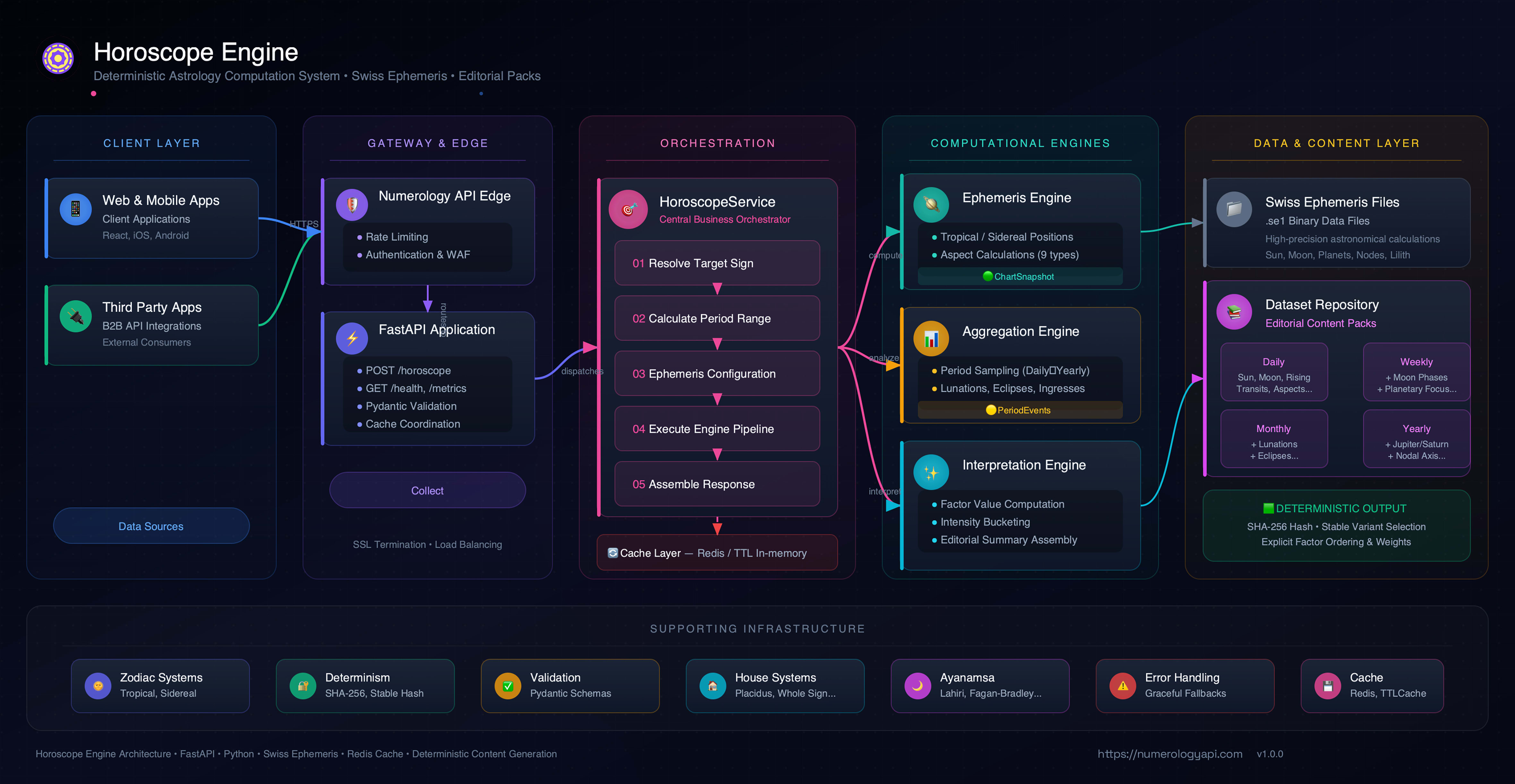
┌─────────────────────────────────────────────────────────────────────────┐
│                            Client Layer                                 │
│  (Web Apps, Mobile Apps, Third-party Integrations)                      │
└─────────────────────────────────────────────────────────────────────────┘
                                      │
                                      ▼
┌─────────────────────────────────────────────────────────────────────────┐
│                   API Gateway (NumerologyAPI.com)                       │
│  Rate Limiting | Authentication | Load Balancing | SSL Termination      │
└─────────────────────────────────────────────────────────────────────────┘
                                      │
                                      ▼
┌─────────────────────────────────────────────────────────────────────────┐
│                      FastAPI Application Layer                          │
│  ┌─────────────────────────────────────────────────────────────────┐    │
│  │  Endpoints: /health, /horoscope, /birthday-horoscope,           │    │
│  │             /planet-horoscope, /house-horoscope,                │    │
│  │             /planet-house-horoscope, /aspect-horoscope,         │    │
│  │             /transit-horoscope, /natal-birthchart,              │    │
│  │             /natal-birthchart/svg, /metrics, /admin/pregenerate │    │
│  │  • Request validation (Pydantic)                                │    │
│  │  • Error handling & mapping                                     │    │
│  │  • Cache lookup & storage                                       │    │
│  │  • Metrics collection                                           │    │
│  └─────────────────────────────────────────────────────────────────┘    │
└─────────────────────────────────────────────────────────────────────────┘
                                      │
                                      ▼
┌─────────────────────────────────────────────────────────────────────────┐
│                  HoroscopeService (Orchestrator)                        │
│  ┌─────────────────────────────────────────────────────────────────┐    │
│  │  • Request orchestration                                        │    │
│  │  • Sign resolution (provided vs. derived)                       │    │
│  │  • Period range calculation                                     │    │
│  │  • Ephemeris configuration                                      │    │
│  │  • House enablement policy                                      │    │
│  │  • Response assembly                                            │    │
│  └─────────────────────────────────────────────────────────────────┘    │
└─────────────────────────────────────────────────────────────────────────┘
           │                        │                        │
           ▼                        ▼                        ▼
┌──────────────────┐    ┌──────────────────┐    ┌──────────────────┐
│  EphemerisEngine │    │ AggregationEngine│    │ Interpretation   │
│                  │    │                  │    │ Engine           │
│ • Swiss Ephemeris│    │ • Period sampling│    │ • Factor calc    │
│ • Positions      │    │ • Event extraction│   │ • Content select │
│ • Aspects        │    │ • Metrics        │    │ • Section render │
│ • Houses         │    │ • Deduplication  │    │ • Scoring        │
└──────────────────┘    └──────────────────┘    └──────────────────┘
           │                        │                        │
           ▼                        ▼                        ▼
┌──────────────────┐    ┌──────────────────┐    ┌──────────────────┐
│  Swiss Ephemeris │    │  Period Events   │    │  V2 Content      │
│  Data Files      │    │  (Structured)    │    │  Repository      │
│  (.se1 files)    │    │                  │    │  (Editorials    )│
└──────────────────┘    └──────────────────┘    └──────────────────┘
Notes:
- OpAstro open-core intentionally ships a smaller public endpoint/content surface.
- Premium NumerologyAPI extends this foundation with larger endpoint coverage and deeper editorial systems.
What Is Open Here
- Swiss Ephemeris-based astrology calculations
- Deterministic factor derivation and section scoring
- Built-in lite renderer (no external dataset required)
- FastAPI service endpoints
- Python package + installable CLI
- Test suite covering API, CLI, rendering, caching, and health checks
What Is Not Included
- Private premium meaning dataset and editorial packs
- Premium content production pipeline assets
Requirements
- Python
3.11+
Install (PyPI)
python3 -m pip install opastro
Install (Editable, Contributors)
python3 -m venv .venv
source .venv/bin/activate
python3 -m pip install -e .
CLI
Running with no arguments opens the welcome UI:
opastro
Command Catalog
| Command | Description |
|---|---|
opastro |
Main welcome UI with OPASTRO ASCII banner + quick start |
opastro init |
Interactive onboarding to create/update a default profile (`--template api |
opastro profile ... |
Manage saved profiles (save, list, show, use) |
opastro welcome |
Show welcome UI explicitly |
opastro catalog |
List periods, sections, signs, and planets |
opastro doctor |
Runtime diagnostics (python path, platform, ephemeris mode) |
opastro logger |
Runtime error log inspector (show, tail, path, clear) |
opastro horoscope |
Generate standard reports (daily/weekly/monthly/yearly) |
opastro birthday |
Generate birthday-cycle yearly report |
opastro planet |
Generate planet-focused report |
opastro natal |
Generate natal report + wheel chart assets (SVG/PNG/map/PDF) |
opastro explain |
Show why each section line appeared (factor provenance) |
opastro completion --shell ... |
Generate shell completion scripts |
opastro ui |
Launch interactive TUI with section drill-down |
opastro batch |
Multi-sign / multi-date report generation |
opastro serve |
Run local FastAPI app |
Global flags:
opastro -v/opastro --versionprints installed/source version.
Report Flags
--period {daily,weekly,monthly,yearly}(required forhoroscope,planet)--sign ARIES--target-date YYYY-MM-DD--sections general,career,money--birth-date YYYY-MM-DD--birth-time HH:MM--lat <float> --lon <float>--timezone <IANA timezone>--zodiac-system {sidereal,tropical}(default:tropical)--ayanamsa {lahiri,fagan_bradley,krishnamurti,raman,yukteswar}--house-system {placidus,whole_sign,equal,koch}--node-type {true,mean}--tenant-id <id>--wheel-theme {night,day}(for natal SVG/PNG/PDF wheel styling)--split(split natal wheel SVG into full/main/legends parts)--split-png(export split parts as PNG: main/legends/combined)--split-layout {stacked,side-by-side}(presentation layout for composed split output)--split-dir <path>(optional export dir for split wheel parts)--json--format {text,json,markdown,html}--export <path>
CLI Examples
# Interactive setup (creates active default profile)
opastro init
opastro init --template natal

# Save profile defaults without prompts
opastro profile save --name work --sign ARIES --format markdown --set-active

# Save natal-specific profile defaults (theme/branding)
opastro profile save --name natal --set-active --user-name "Dakidarts" --wheel-theme day --accent "#3ddd77"

# Switch active profile
opastro profile use work

# Explain why lines appeared
opastro explain --kind horoscope --period daily --sign ARIES --target-date 2026-04-03 --format markdown

# Interactive TUI
opastro ui --period daily --sign ARIES --target-date 2026-04-03
# keys: ↑↓/j,k section • enter factor mode • pgup/pgdn scroll • g/G jump • q quit

# Runtime error logs with suggested fixes
opastro logger show --limit 5
opastro logger tail
opastro logger path

# Batch generation
opastro batch --kind horoscope --period daily --signs ARIES,TAURUS --date-from 2026-04-03 --date-to 2026-04-05 --format markdown --export-dir reports/batch

# Daily sign-mode
opastro horoscope --period daily --sign ARIES --target-date 2026-04-03

# Daily personalized (houses + daily_house_focus enabled if time+coords provided)
opastro horoscope \
  --period daily \
  --target-date 2026-04-03 \
  --birth-date 1997-08-17 \
  --birth-time 09:30 \
  --lat 4.0511 \
  --lon 9.7679 \
  --timezone Africa/Douala

# Birthday-cycle report
opastro birthday --sign TAURUS --target-date 2026-04-03

# Planet-focused monthly report
opastro planet --period monthly --planet mercury --sign TAURUS --target-date 2026-04-03

# Natal report + premium artifact exports
opastro natal \
  --user-name "Dakidarts" \
  --birth-date 1997-08-14 \
  --birth-time 09:30 \
  --lat 4.0511 \
  --lon 9.7679 \
  --timezone Africa/Douala \
  --wheel-svg reports/natal-wheel.svg \
  --wheel-png reports/natal-wheel.png \
  --house-map reports/natal-house-map.json \
  --pdf reports/natal-report.pdf

# Split wheel into parts (full/main/legends)
opastro natal \
  --birth-date 1997-08-14 \
  --birth-time 09:30 \
  --lat 4.0511 \
  --lon 9.7679 \
  --timezone Africa/Douala \
  --split \
  --split-dir reports/natal-split

# Split wheel with modular PNG parts and stacked layout
opastro natal \
  --birth-date 1997-08-14 \
  --birth-time 09:30 \
  --lat 4.0511 \
  --lon 9.7679 \
  --timezone Africa/Douala \
  --split \
  --split-png \
  --split-layout stacked \
  --split-dir reports/natal-split-stacked

# Raw JSON output
opastro horoscope --period weekly --sign LEO --json

# Export markdown report
opastro horoscope --period daily --sign ARIES --format markdown --export reports/aries.md
Notes:
- If
--user-nameis omitted, natal personalization falls back to active profile name; if none exists, it falls back toOPASTRO. - Wheel assets include a profile context block (name, birth timestamp, coordinates, timezone, house system, zodiac system, generation timestamp) and a responsive combined symbols legend.
Gallery: Modular Natal Wheel Outputs
Use this command to generate all modular parts:
opastro natal \
  --birth-date 1997-08-14 \
  --birth-time 09:30 \
  --lat 4.0511 \
  --lon 9.7679 \
  --timezone Africa/Douala \
  --split \
  --split-png \
  --split-layout side-by-side \
  --split-dir reports/natal-gallery
Generated files:
natal-wheel.full.svgnatal-wheel.main.svgnatal-wheel.legends.svgnatal-wheel.combined.svgnatal-wheel.main.pngnatal-wheel.legends.pngnatal-wheel.combined.png
API
Run local API:
opastro serve --host 127.0.0.1 --port 8000 --reload
Or directly:
uvicorn horoscope_engine.main:app --host 127.0.0.1 --port 8000 --reload
Endpoints
GET /healthPOST /horoscopePOST /birthday-horoscopePOST /planet-horoscopePOST /natal-birthchartPOST /natal-birthchart/wheel.svgPOST /natal-birthchart/wheel.pngPOST /natal-birthchart/wheel.parts.zipPOST /natal-birthchart/house-overlayPOST /natal-birthchart/report.pdfGET /metricsPOST /admin/pregenerate
Natal wheel/PDF assets support optional query parameter theme=night|day.
POST /natal-birthchart/wheel.svg also supports:
split=trueto return wheel parts JSON (full_svg,main_wheel_svg,legends_svg,combined_svg)split_layout=stacked|side-by-sideto control composed split presentation.POST /natal-birthchart/wheel.parts.zipreturns a one-click bundle with split SVG + PNG assets andmanifest.json.
Minimal API Call
curl -X POST http://127.0.0.1:8000/horoscope \
  -H "Content-Type: application/json" \
  -d '{"period":"daily","sign":"ARIES"}'
Natal Birthchart API Call
curl -X POST http://127.0.0.1:8000/natal-birthchart \
  -H "Content-Type: application/json" \
  -d '{"birth":{"date":"1997-08-14","time":"09:30","coordinates":{"latitude":4.0511,"longitude":9.7679},"timezone":"Africa/Douala"}}'
Environment Variables
| Variable | Default | Purpose |
|---|---|---|
SE_EPHE_PATH |
auto-detected | Swiss Ephemeris path override |
REDIS_URL |
unset | Enable Redis cache if set |
REDIS_KEY_PREFIX |
"" |
Redis key prefix |
CONTENT_HEALTHCHECK_DISABLE |
0 |
Skip startup content/schema check |
CONTENT_HEALTHCHECK_FAIL_FAST |
0 |
Raise startup error when health check issues are found |
PREGEN_TOKEN |
unset | Protect /admin/pregenerate with X-Admin-Token |
OPASTRO_ANALYTICS |
0 (disabled) |
Opt-in local anonymous CLI analytics (1 enables) |
Developer UX Extras
# Diagnose and preview auto-fixes
opastro doctor --fix --dry-run

# Machine-readable diagnostics for CI/tooling
opastro doctor --json

# Apply auto-fixes (installs editable package + deps)
opastro doctor --fix

# Runtime error logs (captured from uncaught CLI errors)
opastro logger show --limit 20
opastro logger clear

# Opt-in anonymous local analytics
OPASTRO_ANALYTICS=1 opastro catalog

# Generate shell completions
opastro completion --shell bash
opastro completion --shell zsh
opastro completion --shell fish
Testing
python3 -m pip install -e ".[dev]"
PYTHONPATH=src python3 -m pytest -q
Docs
Start here: docs/README.md
Branded Python Namespace
OpAstro now ships a branded import namespace in:
src/opastro/__init__.py
You can import the SDK in any of these styles:
import opastro as oa

service = oa.HoroscopeService(oa.ServiceConfig())
print(oa.__version__)
from opastro import HoroscopeService, ServiceConfig, HoroscopeRequest, Period
from datetime import date

service = HoroscopeService(ServiceConfig())
response = service.generate(
    HoroscopeRequest(period=Period.DAILY, sign="ARIES", target_date=date(2026, 4, 3))
)
print(response.sign, response.period.value)
Module imports are also supported:
from opastro.config import ServiceConfig
from opastro.models import HoroscopeRequest, Period
from opastro.service import HoroscopeService
Python Library Examples
1) Basic Daily Report (Sign Mode)
from datetime import date

from opastro.config import ServiceConfig
from opastro.models import HoroscopeRequest, Period
from opastro.service import HoroscopeService

service = HoroscopeService(ServiceConfig())

response = service.generate(
    HoroscopeRequest(
        period=Period.DAILY,
        sign="ARIES",
        target_date=date(2026, 4, 3),
    )
)

print(response.report_type.value, response.sign, response.period.value)
for section in response.sections:
    print(f"[{section.section.value}] {section.summary}")
2) Personalized Report (Birth + Coordinates)
from datetime import date

from opastro.config import ServiceConfig
from opastro.models import BirthData, Coordinates, HoroscopeRequest, Period
from opastro.service import HoroscopeService

service = HoroscopeService(ServiceConfig())

response = service.generate(
    HoroscopeRequest(
        period=Period.WEEKLY,
        target_date=date(2026, 4, 3),
        birth=BirthData(
            date=date(1997, 8, 17),
            time="09:30",
            coordinates=Coordinates(latitude=4.0511, longitude=9.7679),
            timezone="Africa/Douala",
        ),
    )
)

print(response.sign)
print(response.data.snapshot.rising_sign)
print(response.data.snapshot.house_cusps)
3) Planet-Focused Report
from datetime import date

from opastro.config import ServiceConfig
from opastro.models import Period, PlanetHoroscopeRequest, PlanetName
from opastro.service import HoroscopeService

service = HoroscopeService(ServiceConfig())

response = service.generate_planet(
    PlanetHoroscopeRequest(
        period=Period.MONTHLY,
        planet=PlanetName.MERCURY,
        sign="TAURUS",
        target_date=date(2026, 4, 3),
    )
)

print(response.report_type.value)
print(response.sections[0].title)
4) JSON Serialization
from datetime import date

from opastro.config import ServiceConfig
from opastro.models import HoroscopeRequest, Period
from opastro.service import HoroscopeService

service = HoroscopeService(ServiceConfig())
payload = service.generate(
    HoroscopeRequest(period=Period.DAILY, sign="LEO", target_date=date(2026, 4, 3))
).model_dump(mode="json")

print(payload["report_type"], payload["period"], payload["sign"])
Want Premium Narrative Depth?
Unlock richer editorial readings and premium API access: numerologyapi.com
⭐ If you find this project useful, give it a star on GitHub!





Download files
Download the file for your platform. If you're not sure which to choose, learn more about installing packages.
Source Distribution
Built Distribution
Filter files by name, interpreter, ABI, and platform.
If you're not sure about the file name format, learn more about wheel file names.
Copy a direct link to the current filters
File details
Details for the file opastro-0.1.5.tar.gz.
File metadata
- Download URL: opastro-0.1.5.tar.gz
- Upload date:
- Size: 120.5 kB
- Tags: Source
- Uploaded using Trusted Publishing? No
- Uploaded via: twine/6.2.0 CPython/3.11.14
File hashes
| Algorithm | Hash digest | |
|---|---|---|
| SHA256 |
c95e8008fb0d62b23a8049dab4b65c08dca1ffff6d95389972e13bbcdecab026
|
|
| MD5 |
71a3f0a7247291f26fafe8f9869d1eae
|
|
| BLAKE2b-256 |
15e449bf7d67cc1fe19849af489ff41306aa6947ea9656f488306e6888289e65
|
File details
Details for the file opastro-0.1.5-py3-none-any.whl.
File metadata
- Download URL: opastro-0.1.5-py3-none-any.whl
- Upload date:
- Size: 120.9 kB
- Tags: Python 3
- Uploaded using Trusted Publishing? No
- Uploaded via: twine/6.2.0 CPython/3.11.14
File hashes
| Algorithm | Hash digest | |
|---|---|---|
| SHA256 |
f1e29c3e4dae0cf193bb16d2175180d68db9db7ef2955d3c6460cf91cdd39f81
|
|
| MD5 |
18b2c940c900811fa5e0c1c48abe4447
|
|
| BLAKE2b-256 |
d93312256de12a114d9c27dc510f70a50fb154860f12d555500984b6238c5e95
|






