
OpenAdapt: Launcher for the OpenAdapt Flow Compiler







Lifecycle: Beta launcher/meta-package. The active compiler and governed runtime are developed in
openadapt-flow. This repository preserves the high-visibilityopenadaptinstall and unified CLI; it is not a second implementation of the engine. The pre-1.0 monolith is historical and frozen underlegacy/.
Compile repeated GUI work into deterministic, governed workflows.
OpenAdapt compiles a demonstrated workflow into a locally executable program. Healthy runs make no model calls. When an interface drifts, the runtime first tries deterministic re-resolution, can optionally propose a reviewable repair, and halts when configured identity, postcondition, effect, or certification checks fail. The same governed contract spans browser structure, Windows UI Automation, native macOS and Linux accessibility, and remote-display (RDP/Citrix) sessions. Each deployed workflow qualifies its exact application, environment, target identity, and independent effect oracle before writes are enabled.
pip install openadapt installs the launcher and the compiler, exposed as
openadapt flow .... Native capture, privacy scrubbing, and the separate ML
research toolkits remain optional extras.
Join us on Discord | Documentation | OpenAdapt.ai
Why a compiler
Every automation tool assumes an API. The systems that actually run regulated work often don't: legacy EMRs, Citrix desktops, and internal apps a team still drives by hand. General computer-use agents can operate those GUIs, but re-reasoning through every step with a large model is slow, expensive, and non-deterministic, and a wrong click writes to the wrong record.
OpenAdapt takes the opposite path for workflows you run over and over. You
demonstrate the task once. openadapt-flow compiles that demonstration into
a script that replays deterministically and locally, with no model calls on
a healthy run. When the UI changes, the resolution ladder may re-resolve the
target and persist a reviewable repair. When configured checks cannot establish
identity or success, the run halts with a report instead of continuing.
flowchart LR
  D["Demonstrate once"] --> C["Compile to a local program"]
  C --> R{"Replay deterministically<br/>no model calls on a healthy run"}
  R -->|UI matches| V["Verified write"]
  R -->|UI drifted| L{"Resolution ladder<br/>re-resolves the target?"}
  L -->|resolved| V
  L -->|no confident match| H["Halt with a report"]
  V --> P["Illustrated run report"]
  H --> P
  classDef halt stroke:#b21f2d,stroke-width:2px;
  classDef ok stroke:#3e6b4f,stroke-width:2px;
  class H halt;
  class V ok;
Text summary (PyPI does not render Mermaid): demonstrate once, compile to a local program, then replay it deterministically with no model calls. If the UI matches, the write is verified; if it drifted, the resolution ladder re-resolves the target, and if it cannot establish a confident match the run halts with a report instead of guessing. Either way, every run writes an illustrated report.
Installation
pip install openadapt              # CLI + demonstration compiler (openadapt flow …)
pip install "openadapt[capture]"   # + local human desktop recording
pip install "openadapt[privacy]"   # + Presidio-backed PII/PHI scrubbing
pip install "openadapt[all]"       # Platform substrate + research extras
The flagship compiler ships in the base install, so openadapt flow … works
right after pip install openadapt. The base install includes OS-keychain
credential storage for secure Cloud pairing; environment-based token
configuration remains available on headless systems. This launcher requires
openadapt-flow>=1.20.1,<2
so clean installs cannot resolve an older engine that lacks the governed hosted
artifact commands or the complete replay backend/config flag surface documented
below.
Desktop recording and replay dependencies are deliberately separate. Capture observes a human demonstration on the machine running the command; the selected replay backend may later drive a native app, a Windows agent, or a remote framebuffer:
pip install "openadapt[capture,windows]"  # local capture + WAA client replay
pip install "openadapt[capture,macos]"    # local capture + native macOS replay
pip install "openadapt[capture,linux]"    # local capture + native Linux AT-SPI replay
pip install "openadapt[capture,rdp]"      # local capture + network RDP replay
The macos extra installs native bindings only on macOS. The linux extra
installs only on Linux and still needs the host's AT-SPI typelib/runtime and an
interactive X11 session. The windows extra is the cross-platform HTTP client
for a separately running in-guest WAA agent. The rdp extra adds the network
RDP transport; it does not install or configure an RDP server.
Citrix local-window replay does not expose a cross-platform citrix extra: on
Windows its Win32 client is in Flow's base install, while macOS uses the macos
extra. Flow has no built-in Citrix window client on Linux. Citrix Workspace
itself is external software and is never installed by this package. Add
openadapt[capture] on Windows or install openadapt[capture,macos] on macOS
when the same machine will also record the human demonstration. The Python
capture extra does not bundle FFmpeg: video recording requires a separately
provisioned ffmpeg/ffprobe pair, or the managed runtime provisioned by the
Desktop app.
Requirements: Python 3.10–3.12
Quick Start
OpenAdapt runs two ways:
- Local (recommended). Record, compile, and replay entirely on your own machine. No account, no upload, no cloud: the recording, the compiled bundle, and every replay stay local. The browser reference path works end to end today; native and remote targets additionally require the matching host, dependency extra, permissions, and workflow qualification described below.
- Cloud (optional, managed). A hosted service that adds managed execution, a dashboard, approvals, policy, audit, scheduling, and billing for teams. It is not required for the local loop.
Start local.
Path 1: Local (recommended)
Everything in this path runs on your own machine and nothing leaves it. First
try the bundled MockMed workflow. It needs no account and no target application,
and it is the same reproducible path openadapt-flow exercises in CI:
pip install openadapt

openadapt flow demo-record --out rec
openadapt flow compile rec --out bundle --name mockmed-triage
openadapt flow certify bundle --policy permissive
openadapt flow replay bundle --run-dir run-baseline
openadapt flow replay bundle --drift theme --run-dir run-drift \
  --save-healed-to bundle-healed
Each replay writes an illustrated REPORT.md in its run directory: an ordered
step table, the resolution rung and confidence per step, before/after
screenshots, and totals. See real rendered examples committed in the engine
repo: the
baseline MockMed run report
and the
theme-drift run report.
The drift run demonstrates bounded deterministic re-resolution; it is not a
claim that arbitrary UI changes can be repaired.
Now record your own workflow. For --backend web, Flow drives a headed browser
and records its page directly. For
--backend windows|macos|linux|rdp|citrix, record observes the real mouse,
keyboard, and screen while a human performs the demonstration on the current
interactive desktop. The backend flag records the intended replay substrate; it
does not connect to or automate a remote target during capture.
# Browser (default backend; --url is the app to record)
openadapt flow record --backend web --url https://your.app --out rec
openadapt flow compile rec --out bundle --name my-workflow
openadapt flow replay bundle --url https://your.app
Native desktop and remote-display demonstrations use the same compile-ready recording command. For RDP/Citrix, scope capture to the visible client window so the recorded coordinates use the same pixel space as replay:
openadapt flow record --backend windows --out rec --task "triage note"
openadapt flow record --backend macos --out rec --task "edit a note"
openadapt flow record --backend rdp --window "Windows App" \
  --rdp-window "Windows App" --out rec
openadapt flow record --backend citrix --window "Citrix Viewer" \
  --rdp-window "Citrix Viewer" --rdp-window-title "Ward A" \
  --rdp-readiness-text "Appointments" --out rec
After compilation, replay accepts Flow's complete target and deployment
surface. Pass target flags directly for a local qualification run, or use
--config deployment.yaml; run uses the same backend surface and adds the
stricter deployment admission gates:
openadapt flow compile rec --out bundle --name my-workflow

openadapt flow replay bundle --backend windows \
  --agent-url http://localhost:5001
openadapt flow replay bundle --backend macos --macos-app TextEdit
openadapt flow replay bundle --backend linux \
  --linux-app gedit --linux-window-title notes.txt
openadapt flow replay bundle --backend rdp --rdp-host 10.0.0.5
openadapt flow replay bundle --backend citrix \
  --rdp-window "Citrix Viewer" --rdp-window-title "Ward A" \
  --rdp-readiness-text "Appointments"

openadapt flow run bundle --config deployment.yaml
The Windows agent, native applications, RDP service, and Citrix Workspace
session must already exist and be explicitly configured. Neither the launcher
nor replay silently provisions or connects those external systems.
Browser, Windows, macOS, Linux, RDP, and Citrix/VDI are available execution
substrates in the same compiler and governed runtime. Each deployment still
binds the exact application, environment, identity contract, and independent
effect oracle; Citrix's retained qualification covers the shipped
Workspace-window contract and records ica_hdx_accepted=false rather than
mislabeling stand-in or RDP evidence as a counted ICA/HDX run. See
Substrate maturity.
Before you deploy, apply the stricter gates:
openadapt flow lint bundle
openadapt flow certify bundle --policy clinical-write
These two commands currently exit nonzero on the bundled workflow. That is intentional: it is runnable under the permissive demo policy, but it has unarmed clicks, a vacuous postcondition, and no configured system-of-record effect for its write, so the strict policy refuses to call it safe. A policy pass means only that the bundle satisfies that named policy.
The same halt-don't-guess principle holds at replay time. When a step cannot be verified, the run stops and reports why rather than writing to the wrong record. Below, the optional desktop app (Beta) halts a run because the typed value could not be verified on the target field:
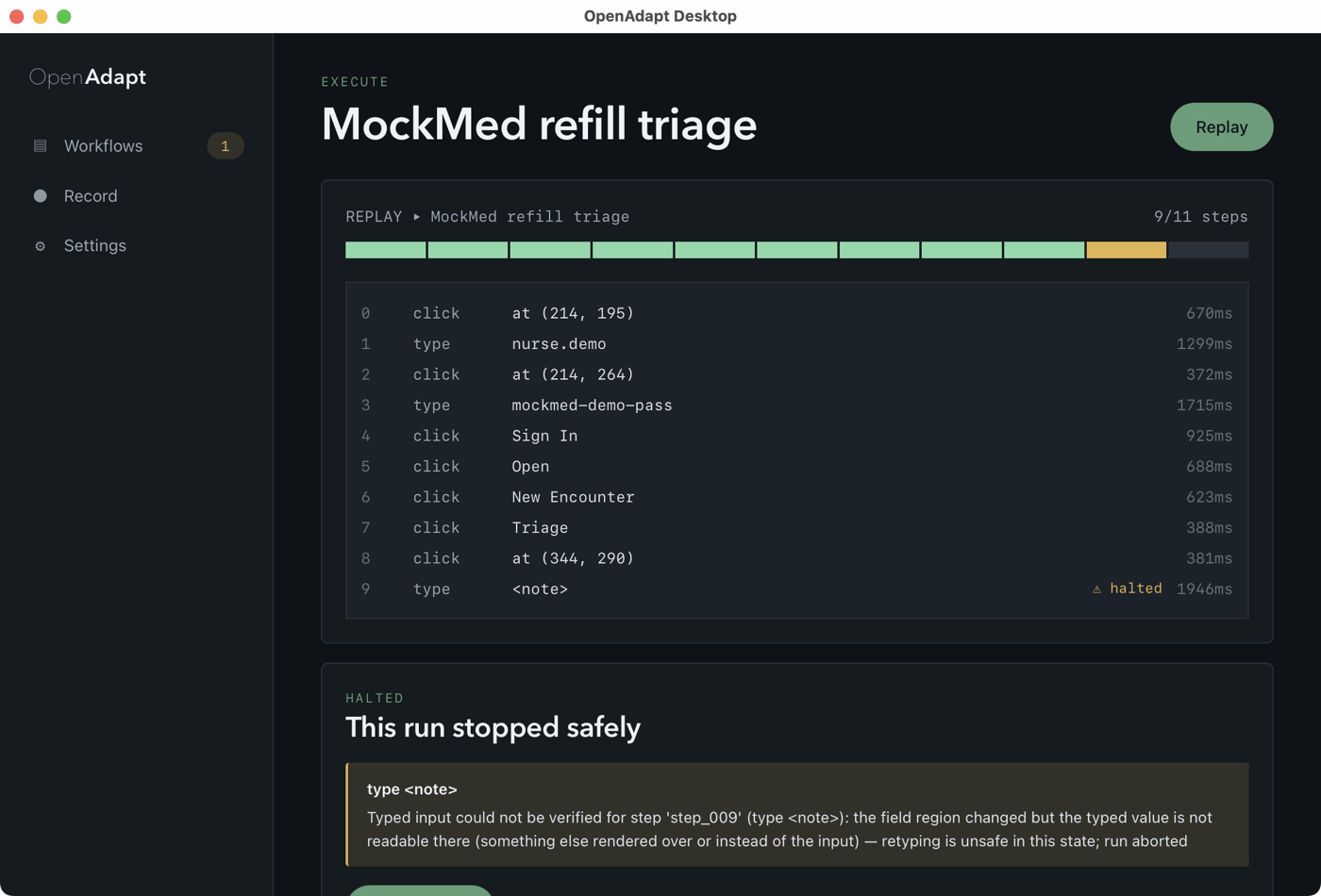
One recording does more than replay a single path. openadapt flow for-each
wraps a compiled bundle's body in a governed loop that runs once per record of
a worklist (CSV or JSON), bounded, identity-checked and effect-verified per
record, and halting on ambiguity instead of skipping a record. And before a
bundle ever runs, openadapt flow visualize renders its program graph: the
ordered steps, the resolution ladder, the armed identity gates, the effect
checks, and every point the run can halt, as offline HTML, Mermaid, or JSON.
openadapt flow for-each bundle --records worklist.csv --out queue-bundle
openadapt flow visualize bundle -o graph.html
Here is the actual program graph for the bundled MockMed workflow, generated by
openadapt flow visualize bundle --format mermaid (not drawn by hand). Eleven
ordered steps, an armed identity gate on the record it opens, and the final
Save Encounter write marked irreversible and as the run's halt point:
flowchart TD
  n0("click at (214, 195)")
  n1("type 'nurse.demo'")
  n2("click at (214, 264)")
  n3("type 'mockmed-demo-pass'")
  n4("click 'Sign In'")
  n5("click 'Open'<br/><small>identity</small>")
  n6("click 'New Encounter'")
  n7("click 'Triage'")
  n8("click at (344, 290)")
  n9("type <note>")
  n10("click 'Save Encounter'<br/><small>irreversible</small>")
  n11{{"Success"}}
  n0 --> n1
  n1 --> n2
  n2 --> n3
  n3 --> n4
  n4 --> n5
  n5 --> n6
  n6 --> n7
  n7 --> n8
  n8 --> n9
  n9 --> n10
  n10 --> n11
  classDef irreversible stroke:#b4530a,stroke-width:2px;
  classDef halt stroke:#b21f2d,stroke-width:2px;
  class n10 irreversible;
  class n10 halt;
Text summary (PyPI does not render Mermaid): the graph is a linear program of 11
steps (sign in with nurse.demo, open the record, start a new encounter, go to
triage, type the note, and save), with an armed identity gate on click 'Open'
and the Save Encounter write marked irreversible and as the single halt point,
ending in a Success terminal. The --format html render is a self-contained,
offline page with the full per-step resolution ladder, identity, and effect
annotations; --format json emits the shared graph spec.
A compiled program is not limited to a straight line. Wrapping a demonstrated
body in openadapt flow for-each compiles a data-driven loop, and
visualize renders that richer structure honestly. Here is a compact
save-encounter body wrapped in a governed loop over a worklist, generated by
openadapt flow visualize bundle --format mermaid (again, not drawn by hand):
flowchart TD
  n0{"Loop over worklist"}
  n1("type <patient_id>")
  n2("type <note>")
  n3("save encounter<br/><small>effect · irreversible</small>")
  n4{{"Success"}}
  n0 -->|per row of worklist| n1
  n1 --> n2
  n2 --> n3
  n3 -->|next record| n0
  n0 -->|worklist exhausted| n4
  classDef irreversible stroke:#b4530a,stroke-width:2px;
  classDef halt stroke:#b21f2d,stroke-width:2px;
  class n3 irreversible;
  class n3 halt;
Text summary (PyPI does not render Mermaid): a governed loop over a worklist.
The Loop over worklist node runs the demonstrated body once per record (per row of worklist): type the patient_id, type the note, then the save encounter write, which is marked irreversible, effect-verified against
the system of record, and the per-record halt point. Control returns to the loop
(next record) after each record and leaves to Success only when the worklist
is exhausted; a record whose write cannot be verified halts the run instead of
being skipped. Every per-record gate the linear replay applies -- identity
where armed, effect verification, and postconditions -- fires again on each
iteration, bounded so an over-long worklist halts rather than running unbounded.
The body shown is a compact MockMed fixture whose loop is replay-tested in
openadapt-flow; a loop authored over a full recording is in that repo's
docs/showcase-loop.
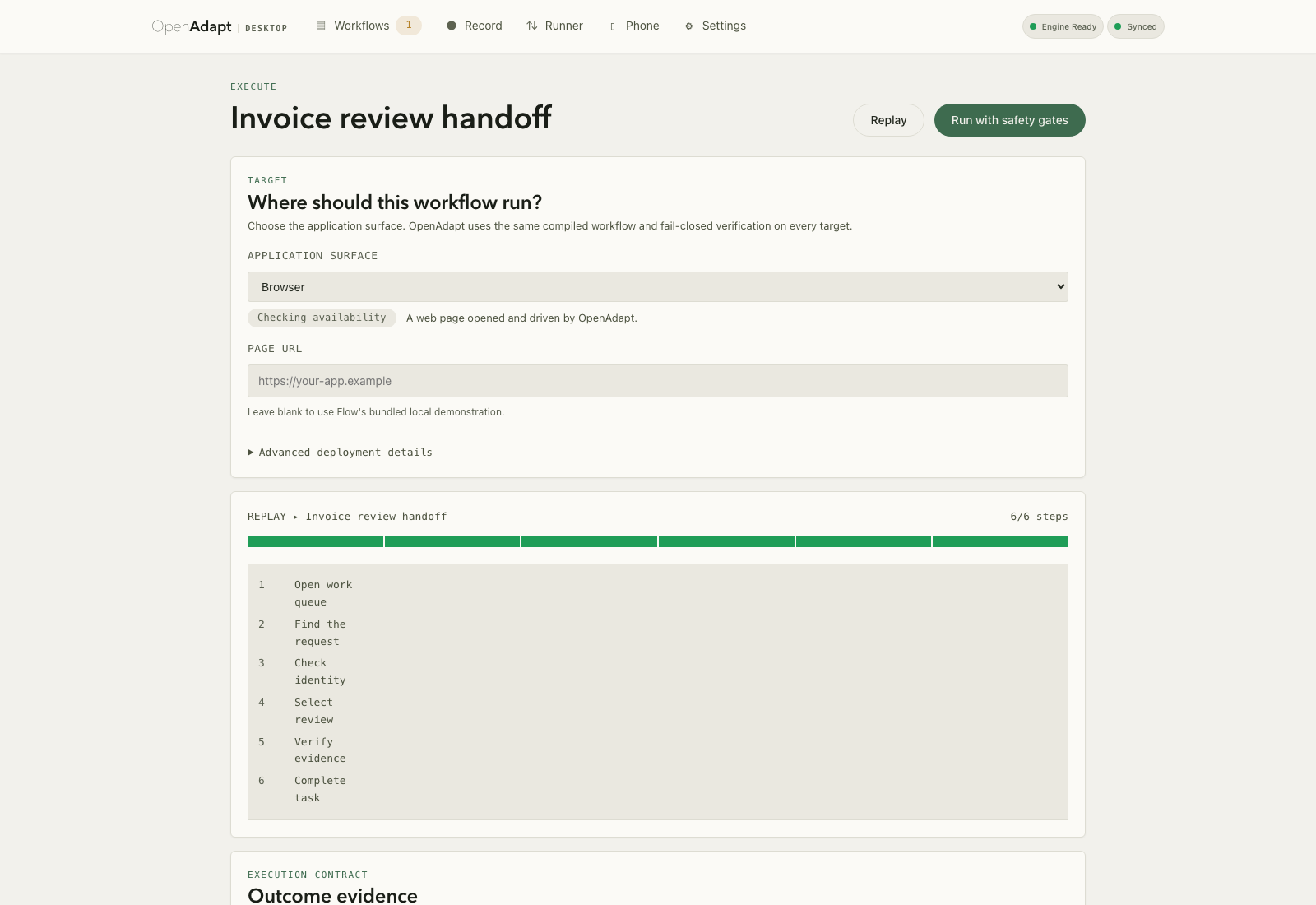
Replayed locally, that same compiled workflow runs deterministically with no
model calls. The optional desktop app (Beta) shows a completed run:
11/11 steps verified, and $0.000 because a healthy run makes no model calls:
openadapt flow <verb>is the recommended path. The standaloneopenadapt-flow <verb>command keeps working and behaves identically.
Path 2: Cloud (optional, managed)
OpenAdapt Cloud is the optional hosted path for teams that want managed execution, a dashboard, approvals, policy, audit, scheduling, and billing. It is not required for the local loop above. The public managed subscription runs browser workflows today; Windows, macOS, Linux, RDP, and Citrix substrates run locally, self-hosted, or on-prem under the same governed contract and can connect to the control plane without moving live application data into the managed browser runner.
First connect this computer to the workspace you already opened in Cloud. Click Connect local OpenAdapt there. The desktop app opens when its protocol handler is installed; otherwise Cloud gives you one command:
openadapt connect --pairing oap_... --host https://app.openadapt.ai
The one-time pairing expires after five minutes. The resulting workspace credential is saved in the operating system keychain and can be revoked in Cloud settings. Pairing grants the existing governed ingest capability; it does not let a web page run terminal commands or browse local files.
Cloud never ingests a raw recording. Create and review a sanitized derivative locally, approve its exact bytes, then upload that immutable derivative with an ingest token created in the Cloud dashboard:
openadapt flow sanitize rec --kind recording --out rec-sanitized
openadapt flow review-sanitized rec-sanitized --original rec
openadapt flow approve-sanitized rec-sanitized --original rec --reviewer "$USER"
openadapt flow login --token oai_ingest_...
openadapt flow push rec-sanitized --kind recording

openadapt flow compile rec-sanitized --out bundle --name workflow
openadapt flow lint bundle --strict
openadapt flow certify bundle --policy permissive
openadapt flow replay bundle --url https://app.example/login --run-dir run
openadapt flow sanitize bundle --kind bundle --out bundle-sanitized
openadapt flow review-sanitized bundle-sanitized --original bundle
openadapt flow approve-sanitized bundle-sanitized --original bundle \
  --reviewer "$USER"
openadapt flow validate-hosted --recording rec-sanitized \
  --bundle bundle-sanitized --run-dir run --policy permissive \
  --risk-class low --environment staging-v1 \
  --target-url https://app.example/login --out validation.json
openadapt flow push bundle-sanitized --kind bundle \
  --validation-attestation validation.json
The original recording remains local. Sanitization accounts for every file and refuses unsupported content rather than copying it. Review is local and approval is bound to the exact archive hash; live observations can contain PHI again and therefore remain inside the workflow's declared execution boundary.
How the compiler works
Each compiled step carries a template crop, an OCR label, geometry landmarks, and postconditions derived from what the demo changed on screen. At replay time a resolution ladder tries them in order (local match, global match, OCR, landmark geometry, then optionally a grounding model), so healthy runs cost milliseconds and make no model calls.
- Deterministic replay. No large model on the hot path, so a compiled run is repeatable and has no model API charge on a healthy run. It still consumes local or hosted compute, storage, monitoring, and exception-handling effort.
- Bounded re-resolution and repair. Deterministic fallback rungs can recover from supported drift. Optional model- or human-assisted repairs are governed changes to the bundle, not unconstrained reasoning on every run.
- Explicit verification. Compiled steps can carry postconditions. For consequential writes, effect verification must also be configured against a system of record; screen evidence alone cannot prove a transaction committed.
- Refusal where armed. Identity-verified or policy-gated steps can refuse a low-confidence match and halt with a report. Coverage is not automatic for every click, so lint and certification are part of deployment.
The canonical CI path uses a headless browser, so the complete compiler
lifecycle can run without OS permissions. Execution adapters provide browser
structure, Windows UI Automation, native macOS/Linux accessibility, and
remote-display (RDP/Citrix) observation and actuation. Every adapter returns
candidate evidence to the same uniqueness, identity, policy, postcondition,
effect-verification, and halt semantics; native operations are preferred when
available and visual evidence supplies the remote-display fallback.
Compiled workflows can also be emitted as Agent Skills or MCP servers so other
agents can invoke them. The
openadapt-agent v2 bridge
serves governed Flow bundles over MCP and emits Agent Skills without becoming
a second execution runtime.
In one field test against a computer-use agent on a real third-party EMR (OpenEMR's public demo), compiled replay matched the agent's success (20/20 compiled vs 10/10 agent) at roughly half the median latency and with zero model calls in the measured runs; the agent's measured model charge was about $0.55 per run. This comparison does not include authoring, maintenance, compute, storage, review, or exception-handling cost. It is a small-sample result on a shared, daily-resetting public demo, so it is not CI-reproducible; a CI-reproducible control and the adversarial safety measurements are published alongside it.
See openadapt-flow for the compiler, validation methodology, and known limits.
Repository Role and Lifecycle
This repository is the stable URL and install route; openadapt-flow is the
canonical implementation. Lifecycle labels describe support intent, not a
blanket production-readiness claim.
| Package | Role | Maturity | Repository |
|---|---|---|---|
openadapt |
Installer + unified CLI (openadapt flow ...) |
Beta | This repo |
openadapt-flow |
Compiler + governed runtime across browser, native accessibility, and remote-display adapters | Beta; deployment qualification is workflow- and environment-specific | openadapt-flow |
openadapt-agent |
MCP + Agent Skills bridge over governed Flow bundles | Active v2 integration surface | openadapt-agent |
openadapt-capture |
Optional native recorder | Experimental | openadapt-capture |
openadapt-privacy |
Optional PII/PHI scrubbing | Experimental | openadapt-privacy |
openadapt-flow also ships standalone on PyPI (pip install openadapt-flow);
the standalone openadapt-flow <verb> command behaves identically to
openadapt flow <verb>.
Substrate maturity
Package maturity above is separate from how far each execution surface is qualified. These labels come from one canonical, machine-readable status manifest that the website, docs, and this README all reconcile to, so no surface can drift ahead of the evidence.
The label describes product availability separately from the bounded evidence record for a particular application or environment:
- Available: implemented in the released compiler and governed runtime.
- Beta: a public product or service with an explicit delivery and evidence boundary.
| Surface | Public label | What it means |
|---|---|---|
| Browser | Available | Reference record → compile → replay path; runs in CI with no OS permissions and backs the public managed subscription. |
| Windows / macOS / Linux | Available | Native UIA, AX/AppKit, and AT-SPI backends execute through the governed runtime. Retained counted tasks cover exact independently verified effects and ambiguity/stale-target refusal; each application retains its own qualification. |
| RDP | Available | Real-network Aardwolf/Windows input and a separate real-FreeRDP full lifecycle have counted retained evidence. Remote applications, display policy, identity, and effect rules remain deployment-bound. |
| Citrix / VDI | Available | The dedicated exact-Workspace-window backend, readiness gate, governed replay, durable resume, and refusal contract are released. The retained stand-in record has ica_hdx_accepted=false, so a consequential ICA/HDX deployment receives its own counted acceptance record rather than inheriting RDP evidence. |
| Hosted Cloud | Beta | Live $500/month managed browser-workflow subscription. Maturity is Beta — not a certification, SLA, or completed paid-customer lifecycle. Desktop, RDP, and Citrix run self-hosted or in a customer-controlled deployment, not in the managed subscription. |
Current launcher, Flow, and Desktop versions are maintained only in the canonical machine-readable status manifest. This README intentionally does not copy that release ledger because each component releases independently.
CLI reference
openadapt flow record --backend web|windows|macos|linux|rdp|citrix --out <dir>
                                                  Record a human demonstration
openadapt flow compile <rec> --out <bundle>       Compile a recording into a bundle
openadapt flow replay <bundle> [--backend ...]    Replay against a configured target
openadapt flow replay <bundle> --config <yaml>    Replay with deployment wiring
openadapt flow run <bundle> --config <yaml>       Add deployment admission gates
openadapt flow lint <bundle>                       Report a bundle's coverage gaps
openadapt flow certify <bundle> --policy <name>    Enforce a safety policy on a bundle
openadapt flow sanitize <path> --kind <kind> --out <dir>
openadapt flow review-sanitized <dir> --original <path>
openadapt flow approve-sanitized <dir> --original <path> --reviewer <identity>
openadapt flow login --token <oai_ingest_token>
openadapt flow validate-hosted --recording <dir> --bundle <dir> --run-dir <dir> ...
openadapt flow push <sanitized-recording-dir> --kind recording
openadapt flow push <sanitized-bundle-dir> --kind bundle \
  --validation-attestation <attestation.json> [--workflow-id <uuid>] \
  [--resolves-run-id <halted-run-uuid>]
openadapt flow report-break <run-dir> --workflow-id <id>

openadapt capture start --name <name>    Standalone local capture utility ([capture])
openadapt capture stop                    Stop standalone capture
openadapt capture list                    List standalone captures
openadapt capture view <name>             Open standalone capture viewer

# Prefer `openadapt flow record --backend ...` for compiler-ready recordings.

openadapt version                         Show installed versions
openadapt doctor                          Check system requirements
Research (not the product)
These packages are research, not part of the supported product. They explore whether human demonstrations can improve the accuracy of general computer-use models. They are not required to record, compile, or replay a workflow, and the compiler above makes no model calls on its hot path.
| Package | Research focus | Repository |
|---|---|---|
openadapt-ml |
Training and inference for multimodal GUI-action models | openadapt-ml |
openadapt-evals |
Benchmark evaluation for GUI agents | openadapt-evals |
openadapt-retrieval |
Multimodal demonstration retrieval | openadapt-retrieval |
openadapt-grounding |
UI element localization / grounding models | openadapt-grounding |
Install with pip install openadapt[ml,evals]. The openadapt train and
openadapt eval commands become available once those extras are installed.
Research thesis: demonstration-conditioned agents
The research line asks a different question from the compiler: instead of compiling one demonstration into a deterministic script, can a model use demonstrations at inference time to disambiguate unfamiliar GUIs?
- Demonstrate — record user actions and screenshots, scrub PII/PHI, build a searchable demonstration library.
- Learn — embed and index demonstrations for retrieval, and/or fine-tune Vision-Language Models on them.
- Execute — condition a policy on retrieved demonstrations, ground intent to coordinates, act behind safety gates, and evaluate to feed results back.
Validated result (research, not product): on a controlled macOS benchmark (45 System Settings tasks sharing a common navigation entry point), demonstration-conditioned prompting improved first-action accuracy from 46.7% to 100%, with a length-matched control (+11.1 pp) confirming the benefit is semantic, not token-length. Phase 2 (retrieval-only prompting) is validated; Phase 3 (demo-conditioned fine-tuning) is in progress. See the research thesis for methodology and limits.
Industry note: OpenCUA (NeurIPS 2025 Spotlight, XLANG Lab) reused OpenAdapt's macOS accessibility capture code in their AgentNetTool, but uses demonstrations only for model training, not runtime conditioning.
Migration and Deprecated Paths
- New automation work: install
openadaptand useopenadapt flow ...; make engine changes inopenadapt-flow. openadapt-agentv2: Active bridge. Build agent-facing integrations on its MCP and Agent Skills surface. Governed execution remains inopenadapt-flow; the pre-v2 model-driven execution wrapper is the deprecated component.- Pre-1.0 monolith: Historical. Version 0.46.0 and its source remain available for existing users, but receive no feature development.
Legacy Version
The monolithic OpenAdapt codebase (v0.46.0) is preserved in the legacy/
directory.
pip install openadapt==0.46.0
See docs/LEGACY_FREEZE.md for the migration guide.
Early demonstrations of the legacy version: Twitter demo · Loom walkthrough. For the current architecture, see the documentation.
Permissions
The default headless-browser path needs no OS permissions. Native desktop capture does:
macOS: Grant Accessibility, Screen Recording, and Input Monitoring permissions to your terminal. See permissions guide.
Windows: Run as Administrator if needed for input capture.
Contributing
- Join Discord
- Pick an issue from the relevant repository
- Submit a PR
For sub-package development:
git clone https://github.com/OpenAdaptAI/openadapt-flow  # or another package
cd openadapt-flow
pip install -e ".[dev]"
Related Projects
- OpenAdaptAI/SoM — Set-of-Mark prompting
- OpenAdaptAI/pynput — input monitoring fork
- OpenAdaptAI/atomacos — macOS accessibility
Product surfaces: OpenAdapt Cloud provides approvals, policy, audit, scheduling, billing, and results. Managed browser execution, local native execution, and customer-controlled remote-display execution use the same compiler/runtime contract, with the execution and data boundary bound before a workflow is activated. Internal tooling:
openadapt-wright,openadapt-herald,openadapt-crier,openadapt-consilium,openadapt-telemetry, andopenadapt-viewersupport development and operations; they are not required by the compiler runtime.
Support
- Discord: https://discord.gg/yF527cQbDG
- Documentation: https://docs.openadapt.ai
- Issues: use the relevant repository
License
MIT License — see LICENSE for details.
1 maintainer

Download files
Download the file for your platform. If you're not sure which to choose, learn more about installing packages.
Source Distribution
Built Distribution
Filter files by name, interpreter, ABI, and platform.
If you're not sure about the file name format, learn more about wheel file names.
Copy a direct link to the current filters
File details
Details for the file openadapt-1.7.2.tar.gz.
File metadata
- Download URL: openadapt-1.7.2.tar.gz
- Upload date:
- Size: 55.4 kB
- Tags: Source
- Uploaded using Trusted Publishing? No
- Uploaded via: twine/6.1.0 CPython/3.13.14
File hashes
| Algorithm | Hash digest | |
|---|---|---|
| SHA256 |
c9eb5912f99f84353f436345dfad239df2cd1d2a730586cce19339adef2341eb
|
|
| MD5 |
70ff42ea4e63f63a792d67738011fe51
|
|
| BLAKE2b-256 |
b34fc3069181ad4cc900a7fe1eabc5b5965653387f9c811e04b747ca48fb4602
|
File details
Details for the file openadapt-1.7.2-py3-none-any.whl.
File metadata
- Download URL: openadapt-1.7.2-py3-none-any.whl
- Upload date:
- Size: 24.7 kB
- Tags: Python 3
- Uploaded using Trusted Publishing? No
- Uploaded via: twine/6.1.0 CPython/3.13.14
File hashes
| Algorithm | Hash digest | |
|---|---|---|
| SHA256 |
861d98866abae56fc62ea2b03122751732c70c61185255b6ae24c4eb151ba212
|
|
| MD5 |
c4cdf65b351c308267e67c400c1a07e1
|
|
| BLAKE2b-256 |
1e67a9eb6b0c475800c82a2cba8ad8b2574b46e2ef1b3f56c2618d798934a7df
|







