
OpenAgentd




A coding-first workspace for a local coding agent.
Run an agent on your machine, see every tool call and diff, and keep your models, coding sessions, workspaces, and telemetry under your control.
Get started · Features · Discord · Facebook Group · Issues · Contribute
Why OpenAgentd
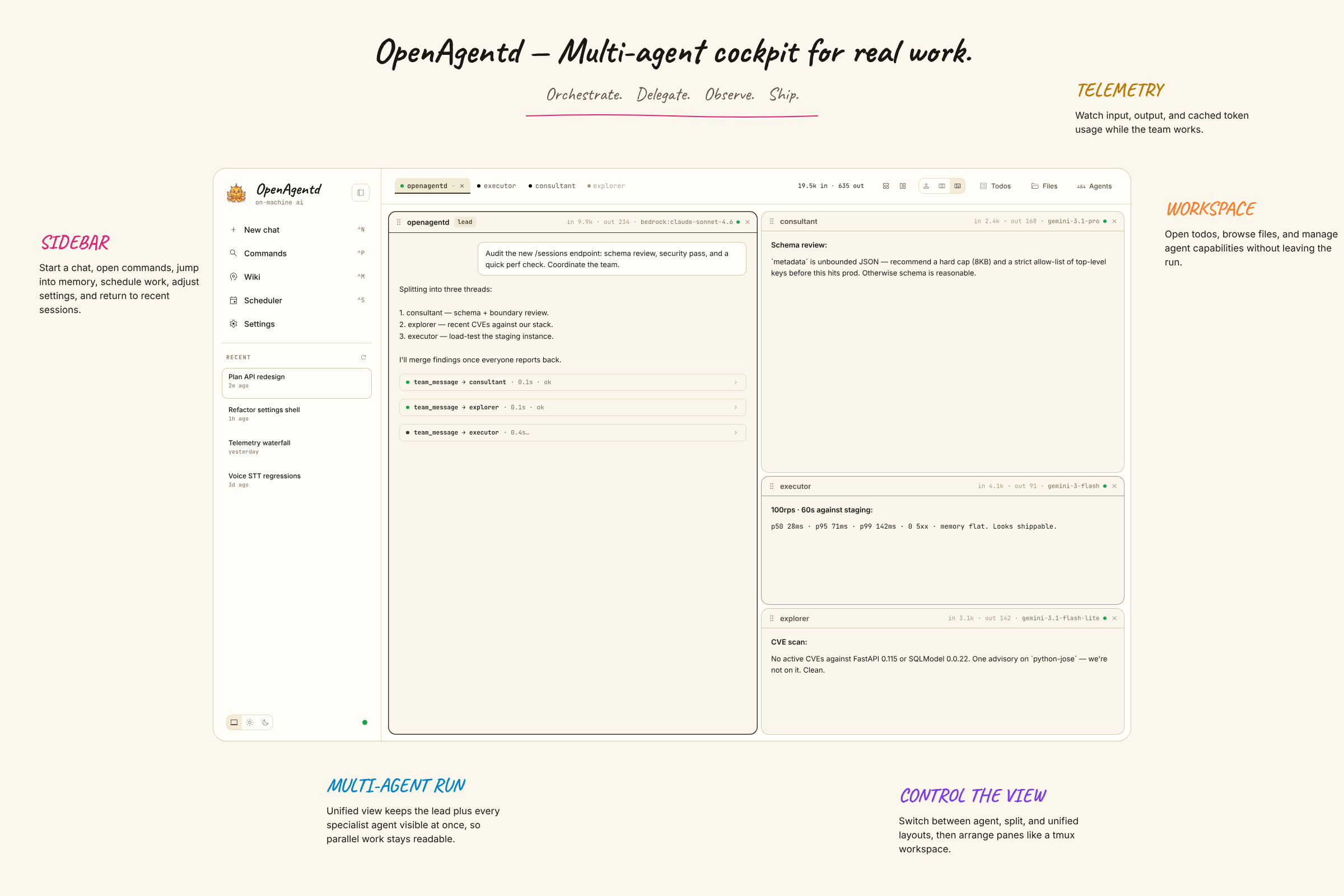
Most coding agents live in a terminal or an editor. OpenAgentd is a coding-first native desktop app and mobile companion where you can run an agent, follow work in real time, inspect what changed, and keep moving without losing context.
- See the work. Streamed replies, tool calls, arguments, results, timings, files, diffs, terminal output, and agent status are visible in one interface.
- Track tasks. A clean, user-readable taskboard checklist keeps current work and progress visible at a glance.
- Work in real repositories. Coding sessions open local folders, support isolated git worktrees, show changes and history, and return language-server diagnostics after edits.
- Choose your models. Use your own keys with major cloud and local providers, including Anthropic, OpenAI, Gemini, OpenRouter, Bedrock, Copilot, Codex, Ollama, and more.
- Stay local-first. Sessions, telemetry, configuration, and the API server run on your machine. Connect a mobile client or another desktop securely when you need to.
The versioned feature catalogue is the canonical record of shipped capabilities.
Get started
Desktop app
Install the current desktop release:
# macOS / Linux
curl -fsSL https://raw.githubusercontent.com/lthoangg/openagentd/main/install.sh | sh
# Windows PowerShell
irm https://raw.githubusercontent.com/lthoangg/openagentd/main/install.ps1 | iex
Open OpenAgentd from your applications folder or Start menu. The desktop app runs its bundled backend automatically, and new installations can start a conversation immediately with the keyless OpenCode Zen default. Add another provider in Settings whenever you want to switch models.
Release artifacts are available for macOS, Windows, and Linux on the latest release page. Unsigned desktop builds may require an explicit operating-system confirmation before first launch.
CLI server
Install the backend when you want to run it from a terminal, use a browser client, or connect another device:
uv tool install openagentd
openagentd
The server creates its default agents and configuration on first start. Open the printed local address and add a provider in Settings. For a phone or another computer on your network:
openagentd server start --host 0.0.0.0 --key
openagentd server status
openagentd server health
--key protects non-loopback access. Use openagentd --help and <command> --help for the current command reference.
Run one agent turn directly against the current project directory when you need a pipe-friendly terminal response:
openagentd run --model openai:gpt-5.5 --thinking high --prompt "Summarize this project"
The command validates the current directory as a coding workspace, persists a new session for the turn, and streams the agent's response text to standard output. Tool-permission events follow the runtime's existing auto-allow policy; interactive agent questions stop the non-interactive command. It does not support workspace selection or session resume.
From source
git clone https://github.com/lthoangg/openagentd.git
cd openagentd
uv sync
bun install --cwd web
make run
For frontend development in a second terminal:
cd web && bun dev
What it feels like
| A conversation that can act | A workspace that stays in view |
|---|---|
 |
 |
| Inspect changes | Keep an eye on local usage |
|---|---|
 |
 |
Built for the whole loop
Plan and code. Toggle between Plan mode for read-only exploration and decision-complete plans, and Code mode for surgical implementation—switch mid-session right from the composer or with Tab.
Build and inspect. Attach files, browse a coding workspace, use @ mentions, review real-time diffs, and inspect structured tool output without leaving the conversation. Delegate independent sub-tasks across specialists with a unified timeline.
Operate with confidence. Manage providers, MCP servers, skills, path denylist permissions, scheduled tasks, todos, and local telemetry from the coding workspace. OpenAgentd supports desktop, browser, and touch-first mobile clients against the same API.
For users and contributors
- Features — shipped, version-cited capabilities.
- Releases — download builds and read release notes.
- Discord — join the community server to chat and ask questions.
- Facebook Group — join the community group to connect and share.
- Issues — feature requests, bugs, roadmap discussion, and known issues.
- Security policy — report vulnerabilities privately.
- Contributing — set up a development checkout and submit changes.
OpenAgentd is licensed under Apache 2.0.
1 maintainer

Metadata
1 maintainer
Release files for openagentd 2.27.0
For a detailed explanation of source distributions (sdists) and built distributions (wheels), please see the package formats documentation.
Source distribution (sdist)
| File | Size | Uploaded | |
|---|---|---|---|
| openagentd-2.27.0.tar.gz | 17.9 MB | Details |
Built distribution (wheel)
| File | Interpreter | ABI | Platform | Reset |
|---|---|---|---|---|
| openagentd-2.27.0-py3-none-any.whl | Python 3 | none | any | Details |
Total release size: 18.7 MB
Release files / openagentd-2.27.0.tar.gz
| Download URL | openagentd-2.27.0.tar.gz |
|---|---|
| Size | 17.9 MB |
| Tags | Source |
|
SHA-256 checksum How to use checksums |
e2cb224c0ab39c4e437cc2ff6b5f97e9bcb052d65c7861a6c043c40f051c8943
|
|
BLAKE2b-256 checksum How to use checksums |
0a502e56d399fe3b36178a70ee6767a2218a6da5ae2792ff9f038712077ce894
|
| Upload date | |
|
Uploaded using Trusted Publishing? What is trusted publishing? |
Yes |
| Uploaded via |
uv/0.12.19 {"installer":{"name":"uv","version":"0.12.19","subcommand":["publish"]},"python":null,"implementation":{"name":null,"version":null},"distro":{"name":"Ubuntu","version":"24.04","id":"noble","libc":null},"system":{"name":null,"release":null},"cpu":null,"openssl_version":null,"setuptools_version":null,"rustc_version":null,"ci":true}
|
Release files / openagentd-2.27.0-py3-none-any.whl
| Download URL | openagentd-2.27.0-py3-none-any.whl |
|---|---|
| Size | 816.0 kB |
| Tags | Python 3 |
|
SHA-256 checksum How to use checksums |
62b7d7853efb43f6eace44bf6e3dc1b94f02755a6891d98f42442d2fcb0320f5
|
|
BLAKE2b-256 checksum How to use checksums |
cf0b2d424c1eaafc58507cefb346ed4811df46541a87ad204a7f7f370bad803c
|
| Upload date | |
|
Uploaded using Trusted Publishing? What is trusted publishing? |
Yes |
| Uploaded via |
uv/0.12.19 {"installer":{"name":"uv","version":"0.12.19","subcommand":["publish"]},"python":null,"implementation":{"name":null,"version":null},"distro":{"name":"Ubuntu","version":"24.04","id":"noble","libc":null},"system":{"name":null,"release":null},"cpu":null,"openssl_version":null,"setuptools_version":null,"rustc_version":null,"ci":true}
|














